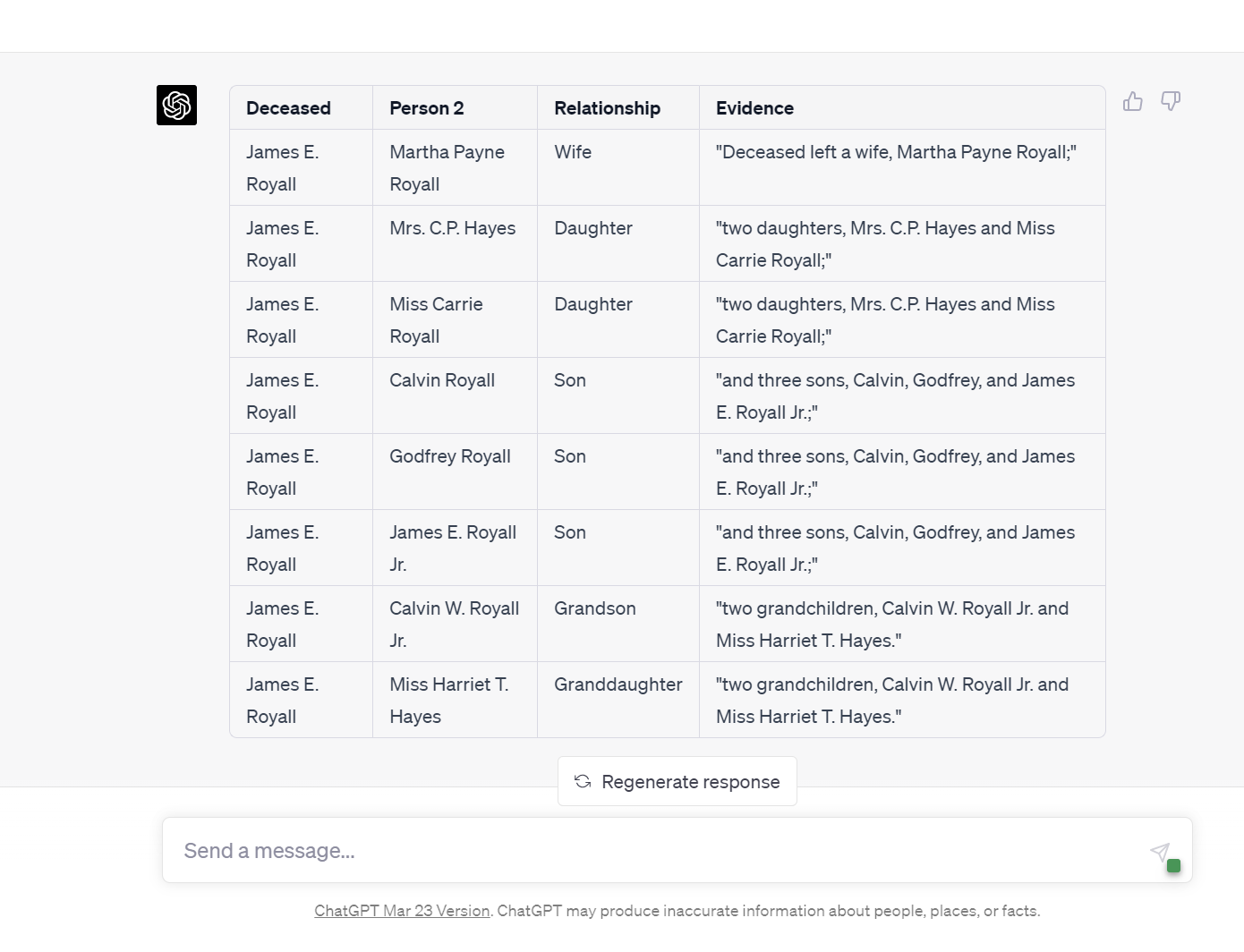
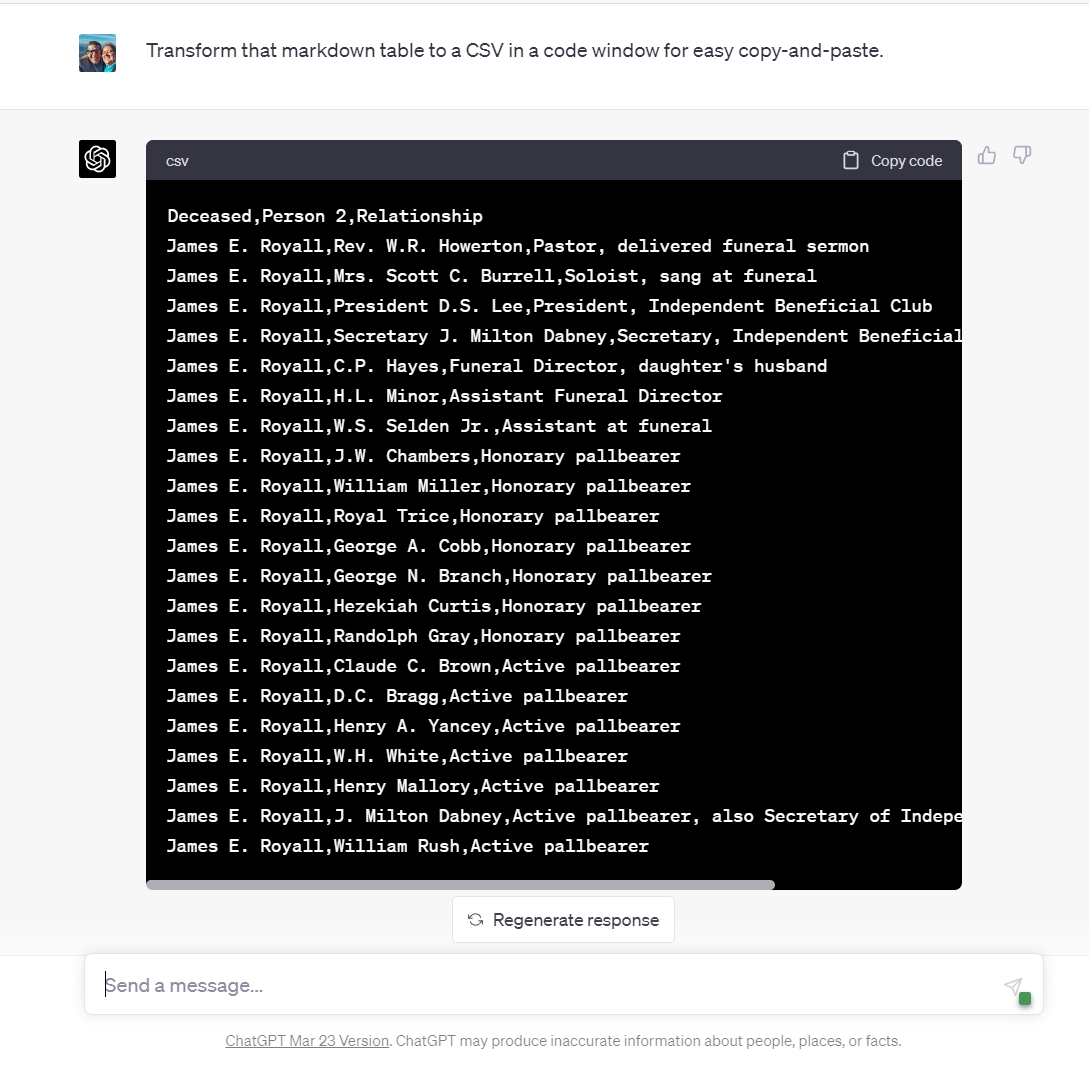
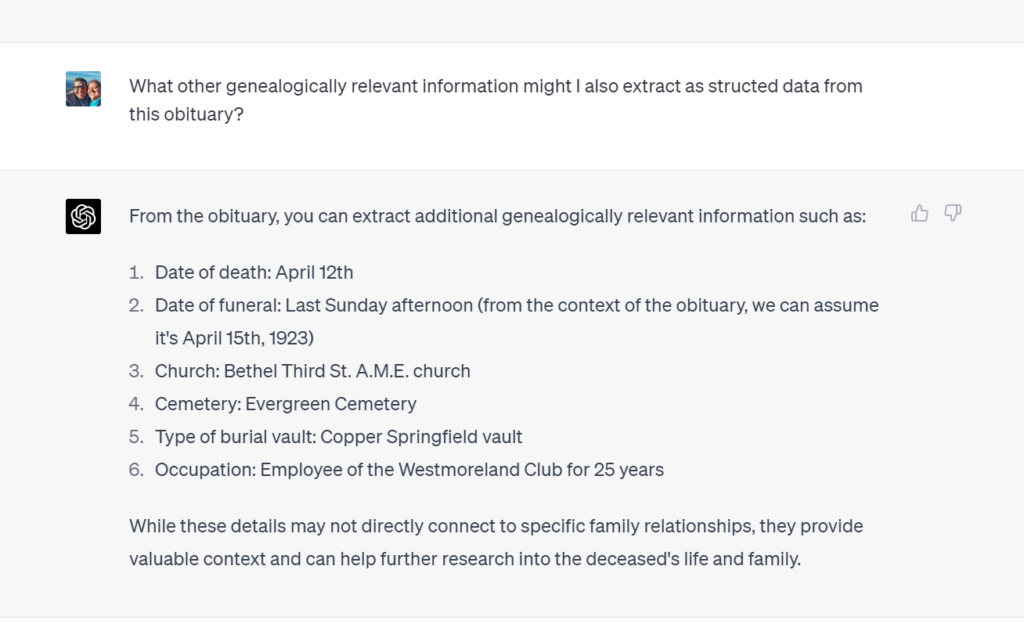
The post was prepared as part of my upcoming talk: The National Genealogical Society is hosting a MemberConnects! event on Empowering Genealogists with Artificial Intelligence. Join us Wed. 6 Sept 2023, at 8 p.m. ET. Register here: https://bit.ly/NGSMemberConnects6Sept2023
As we venture deeper into the digital age, the intersection of genealogy and artificial intelligence (AI) is becoming increasingly more exciting. Today, I’m diving into a key skill that will empower your genealogical research with AI: how to craft effective prompts for large language models (LLMs) like ChatGPT.
If you’ve been following the ongoing conversation about genealogy and AI, you’ll recall that while LLMs have an arsenal of abilities, they also come with some quirks. To guide them effectively, we need to be thoughtful in our approach.
So, without further ado, let’s discuss the five components that make for a great genealogy prompt!
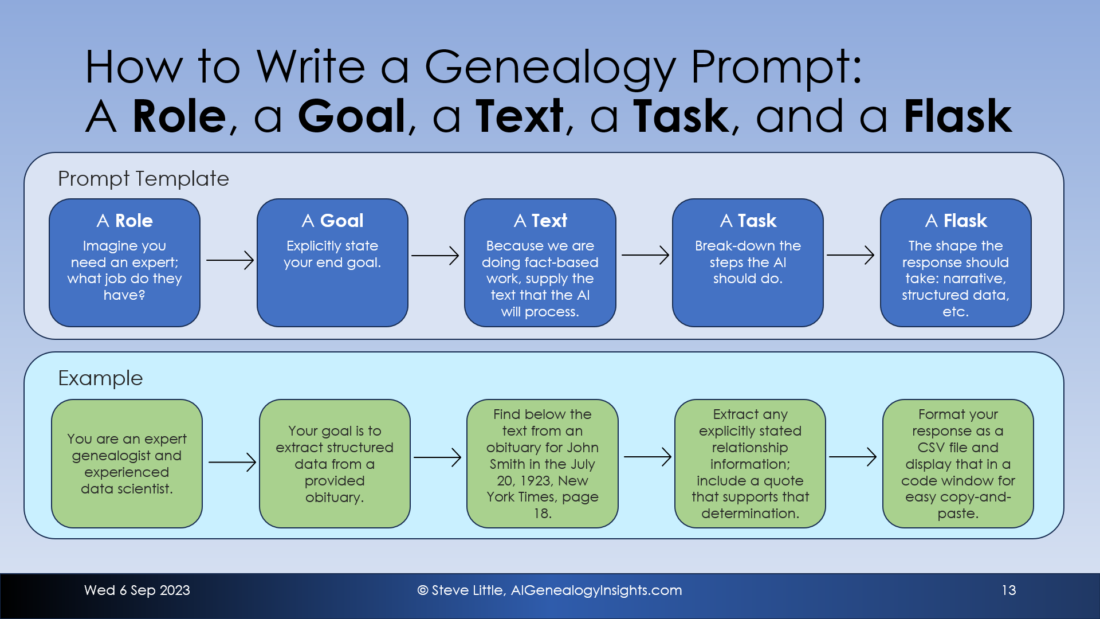
1. A Role: Begin by imagining you’re recruiting an expert for a specific task. What’s their profession? What expertise should they possess? By defining a role, you’re setting the stage and giving the LLM a context to operate within.
2. A Goal: What do you want to achieve? This is your endgame. Being explicit here ensures that the AI has a clear understanding of your expectations.
3. A Text: Since genealogy is grounded in factual research, provide the text you’d like the AI to process. By supplying the exact text, you mitigate the risk of the AI generating fictitious information (a phenomenon known as “hallucinating”).
4. A Task: Simplify your request. Break it down into manageable steps, just as you’d explain a process to a bright but inexperienced intern. This ensures the LLM knows the sequence of operations it should perform.
5. A Flask: While the term “flask” is playfully chosen for the rhyme, it represents the container or format you’d like your response in. This could range from a narrative report to a structured database table.
For instance, consider this prompt:
PROMPT: You are an expert genealogist and a seasoned data scientist. Your goal is to extract structured relationship data from a provided obituary. Find below an obituary for John Smith from the July 20, 1923, New York Times, page 18. Extract any explicitly stated relationship information; include a quote that supports that determination. Format your response as a CSV file and display that in a code window for easy copy-and-paste.
By following this structure, you provide the LLM with a roadmap to navigate your request. The result? You get precisely the information you’re looking for, formatted just the way you want it.
In conclusion, the digital world of genealogy is at our fingertips, and with tools like ChatGPT, the possibilities are endless. But remember, like any tool, its effectiveness lies in how we use it. With a role, goal, text, task, and flask in hand, you’re all set to harness the full power of LLMs for your genealogical pursuits. Happy researching! 🌳🔍🖥️
New model eliminates hallucinations, shatters input limits, and much more
Key Points:
OpenAI’s Code Interpreter is an advanced AI model for ChatGPT, offering the ability to execute code, analyze data, generate charts, and handle files. It can also interact with genealogical data and databases, serving as a potential tool for genealogists.
The Code Interpreter helps address two significant challenges of earlier AI models: hallucinations and input limits. It operates solely on user-provided data, reducing chances of generating false information, and can handle large input files up to 100MB.
The tool demonstrates proficiency in analyzing and visualizing genealogical data, as demonstrated through the GEDCOM file analysis and creation of a timeline for family migration.
Code Interpreter can interact with personal genealogical databases such as RootsMagic, directly engaging with raw data and creating visual representations like network graphs to reveal community interconnectedness.
Despite promising results, the Code Interpreter is in its early days of assessment, and user data security remains paramount. The feature is currently available only for paid ChatGPT Plus subscribers, with further refinements and exploration of its capabilities anticipated.
Introduction
Imagine stumbling upon a powerful tool that has the potential to revolutionize your genealogical exploration, a tool that could seamlessly dive into the intricate knots of your lineage, swim through the waves of complex data, and emerge with valuable insights. Your quest to understand your roots just became a lot more intriguing with OpenAI’s introduction of the “Code Interpreter” for ChatGPT on July 6, 2023.
Designed to elevate the prowess of the already sophisticated ChatGPT, the Code Interpreter is an advanced AI model imbued with capabilities beyond mere text generation and understanding. It facilitates an interactive workspace, allowing the execution of code, analysis of data, generation of charts, editing of files, and even complex calculations. But what sets it apart, especially for genealogists and heritage enthusiasts, is its potential to help decipher genealogical data like GEDCOM files and mine through genealogical databases.
With Code Interpreter, OpenAI offers an elegant solution to two primary challenges that earlier AI models faced – hallucinations and input limits. By ensuring that the AI operates solely on the data you provide, it significantly reduces the chances of ‘hallucination,’ where the AI might generate inauthentic information. Additionally, it can handle input files as large as 100MB, if not more, far exceeding its predecessors.
In this blog post, we take a first glimpse of Code Interpreter, as we begin unpacking the features of this powerful tool, provide a preliminary evaluation of its capabilities, and discuss potential precautions to keep in mind. We’ll also present a couple of genealogical tasks it can perform, shedding light on the immediate and exciting implications of this innovative technology. It will take weeks and months to chart the limits and benefits of this new ChatGPT model, so let’s get started.
More About Code Interpreter
OpenAI’s Code Interpreter is an innovative addition to its AI tool, ChatGPT. Imagine having a smart assistant that can not only understand your requests, but can also run complex analyses, manage files, and even generate charts. All of this is done within a safe and secure environment, providing peace of mind regarding your data’s integrity. The real charm of Code Interpreter lies in its ease of use – you don’t need any programming knowledge. It seamlessly writes and executes Python code based on your needs, working like an intelligent companion in a dynamic workspace. So, whether you want to crunch numbers or organize your files, Code Interpreter empowers ChatGPT to make your interactions more fruitful, efficient, and engaging, all without you having to write a single line of code.
Use Case 1: GEDCOM Analysis
Let’s start with GEDCOM files, a common data format for genealogy enthusiasts. Before Code Interpreter, handling these files with ChatGPT required a rather tedious process of copying and pasting data – a method only feasible for smaller files encompassing a few generations. Now, though, with the ability to upload files directly to Code Interpreter, we can analyze GEDCOM data on a much larger scale. As a test, I uploaded a GEDCOM file, weighing in at 1,741 KB, with information on roughly 3,500 individuals spanning more than ten generations. A diverse family tree of this size would have been a challenge previously, but Code Interpreter took it in stride.
In saying this, I should note that it wasn’t all smooth sailing. Engaging Code Interpreter with the GEDCOM file required persistence and some workarounds. GEDCOM is a unique format, needing to be read line-by-line as opposed to being treated as a structured data container. But once I got Code Interpreter on track, it proved capable of accurately answering various queries about the data.
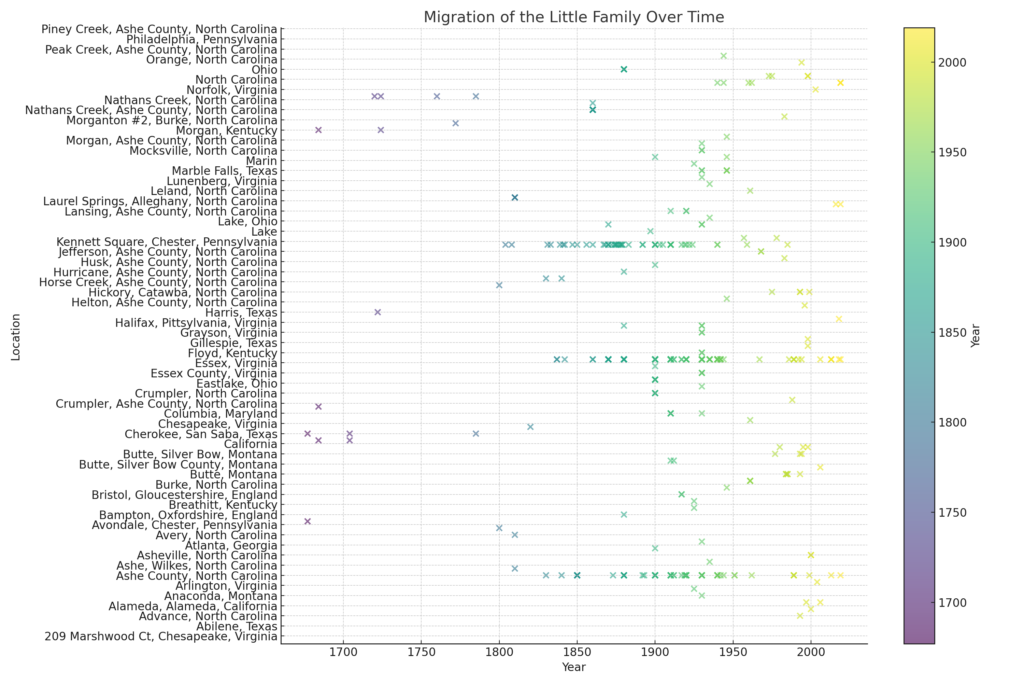
Fascinated by Code Interpreter’s noted proficiency in data visualization, I attempted to coax it into charting the migration of my ‘Little’ ancestors. While I didn’t manage to extract a geographical map, Code Interpreter surprised me by producing a timeline of the places where the ‘Little’ family resided over centuries. Although this initial draft may not win any design awards, the potential it holds is thrilling. With a bit of tweaking and fine-tuning, this process could transform into a powerful tool for visualizing our ancestors’ journey through time. And, even if we cannot get Code Interpreter to create a map directly, the extracted place-date data can be exported to more sophisticated mapping tools.
Figure 1: Not a failure, yet no great success, but showing great potential, ChatGPT’s Code Interpreter generated a timeline of LITTLE family locations over 300 years by extracting information from a GEDCOM file. This proof of concept took less than a half-hour with the user having no previous experience with Code Interpreter. Next step would be to refine and have Code Interpreter generate migration trail on a map.
This engagement with GEDCOM data left me curious: could Code Interpreter directly engage with a genealogical database such as RootsMagic, Family Tree Maker, or GRAMPS? Exploring this question opened a whole new can of possibilities, as we’ll see in the next section.
Use Case 2: Personal Genealogical Databases
After the mixed success of navigating GEDCOM files, I decided to engage Code Interpreter with my genealogical database software, RootsMagic. Instead of treating genealogical data as a mere transportation medium between systems, I aimed to access the source – the MySQL database where information is stored. The idea was to bypass the constraints of the GEDCOM format and see how Code Interpreter would handle the raw data.
I must admit, the initial success was exhilarating. Unlike the multiple attempts required with GEDCOM, Code Interpreter connected to the MySQL database quickly and began parsing the structure with ease. The interaction felt natural, intuitive, and even conversational – an unexpected, pleasant surprise.
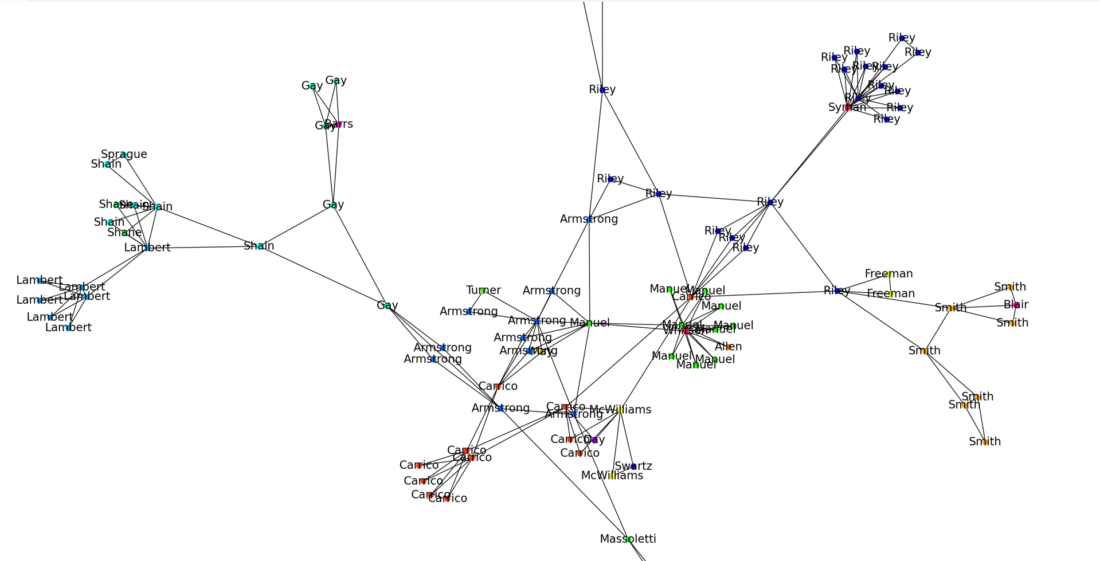
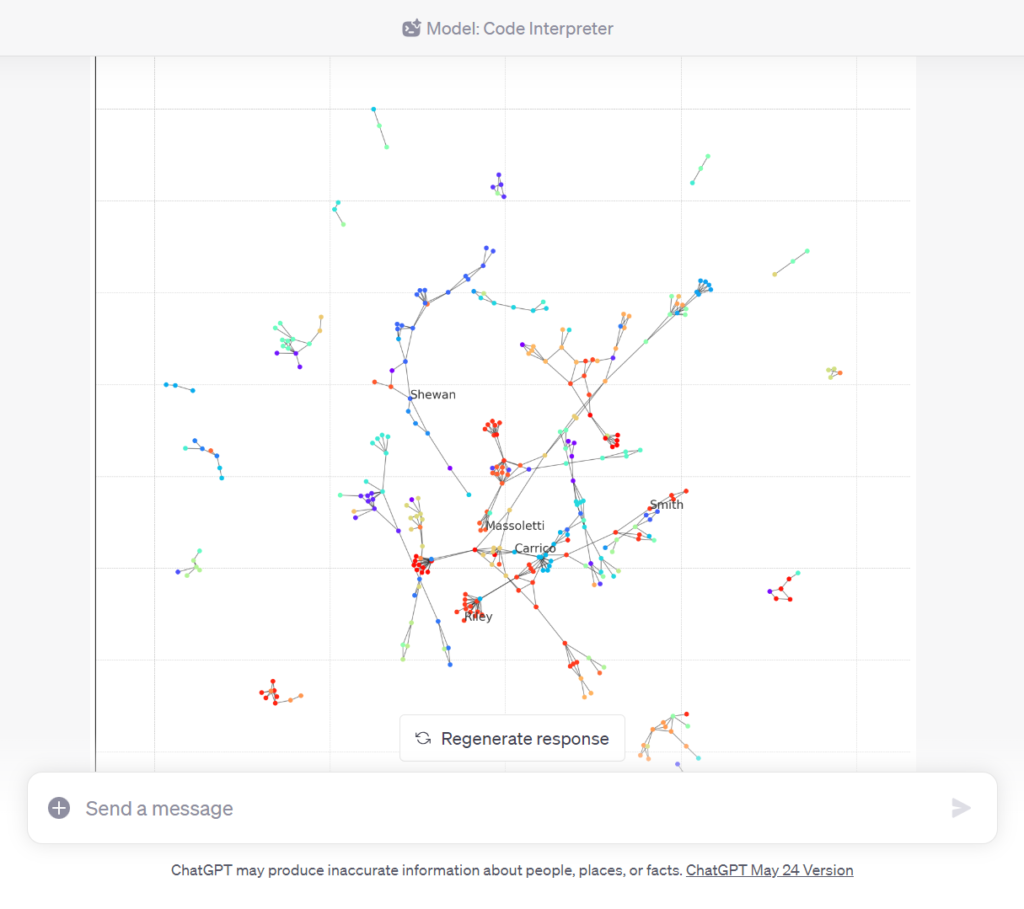
To maintain privacy, I didn’t upload my primary database. Instead, I utilized a smaller database I maintain, documenting the 500-odd residents of a local village cemetery, many of whom were interrelated through two centuries of intermarriage. I wanted to visualize these connections, and so I tasked Code Interpreter with creating a network graph of the graveyard’s community interrelations.
My initial request returned a promising yet somewhat chaotic result. It required some refinement to achieve a clear and meaningful visual representation. However, after a few iterations, Code Interpreter was able to produce an insightful graph. It divided the deceased into 16 distinct clusters, with one particularly large, sprawling group standing out.
Figure 2: Accessing the underlying MySQL database of a RootsMagic file, Code Interpreter generated a network graph of people buried in a cemetery.
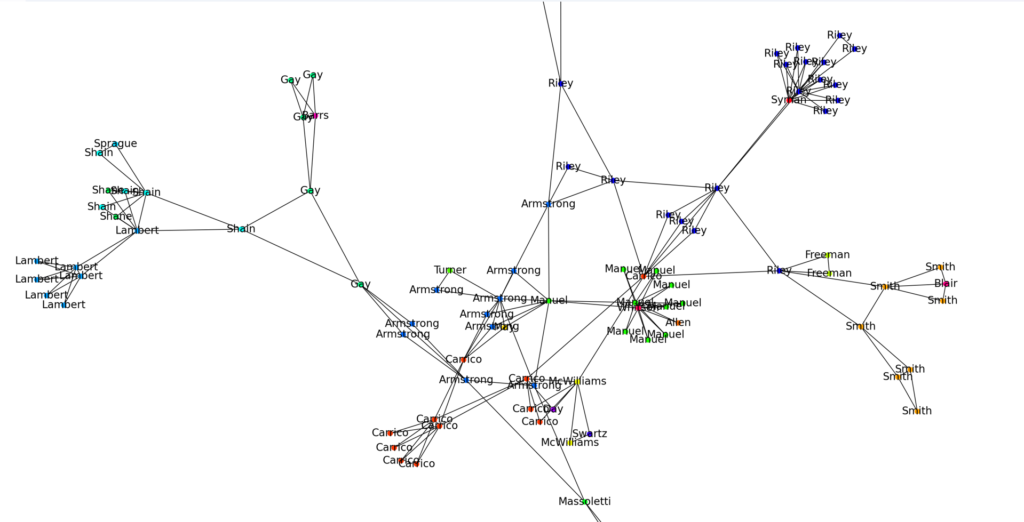
To describe our back-and-forth, I first asked Code Interpreter to construct a network graph. We hit a couple of roadblocks early on due to overlooking some data structure intricacies and labeling issues, but Code Interpreter handled these issues remarkably well. Each misstep was met with patient re-evaluation, followed by refined attempts. As we iterated, my companion made changes according to my feedback: focusing on the largest family group, providing unique colors for each surname, ensuring that the complete data could be re-created if needed.
Despite the initial hiccup with labeling, we finally got a striking visualization. The final network graph, color-coded and clean, revealed the interconnectedness of the community in a way that tables or lists of names could never accomplish.
Figure 3: If you’ve ever wondered how people buried together in a cemetery were related to one another, ChatGPT’s Code Interpreter can quickly generate a network graph of their relationships by searching for patterns in your genealogical database, here RootsMagic.
To sum up, Code Interpreter turned a potentially tedious task into a conversational and interactive learning journey. It had its share of stumbles, but I found it surprisingly adaptable and willing to learn from its mistakes. Even though the network graph needed some fine-tuning, the process’s simplicity and potential were promising.
This successful experience with a personal genealogical database invigorated me. I am ready to push the boundaries further and explore Code Interpreter’s capability with other formats – specifically, scanned historical documents. The results, as we will see in my next post, are fascinating.
Conclusion
In our exploratory journey, we’ve found that OpenAI’s Code Interpreter for ChatGPT offers exciting new possibilities for genealogical work. We’ve witnessed it tackle GEDCOM files, interact with personal genealogical databases, and handle complex tasks such as generating visualizations, all while preserving user data security. A significant observation was that the AI did not hallucinate or make things up when only user data was provided, marking a crucial development. In addition, the input limit has been drastically increased, accommodating files as large as 100MB.
Nonetheless, these are still early days of assessment, and this evaluation is not meant to serve as a comprehensive guide. These proof-of-concept applications merely scratch the surface of what this tool can do. It’s also important to note that, at this stage, the Code Interpreter feature is only available for paid subscribers to ChatGPT Plus.
We should also remember that while ChatGPT Plus provides privacy controls, ensuring data security ultimately rests with us. We recommend turning off chat history and chat training to safeguard your genealogical data.
The future is bright, and the possibilities seem endless. We expect a flurry of new use-cases to emerge as genealogists and enthusiasts experiment with this technology. This early assessment merely hints at what’s to come. Code Interpreter is a powerful new ally in our quest to unravel the mysteries of our past, and we look forward to refining our techniques to unlock its full potential.
UPDATE: Shortly after sharing this post, Bob Coret, the creator of the “Open Archives” plugin (and a founder of the site), got in touch. The “Open Source” plugin in more impressive than my cursory exploration revealed. The plugin is more thoroughly documented at his blog post, which is linked at bottom along with further observations.
For those engaged in A.I. genealogy and digital explorations, this piece investigates a modest recent progression in A.I.-assisted genealogical research. You may already be familiar with this if you’re a seasoned researcher, but for those who haven’t encountered it yet, this post will introduce a compelling new tool. It’s particularly relevant for those interested in Dutch and Belgian archives, but the implications could extend far beyond these boundaries.
Encountering Open Archives
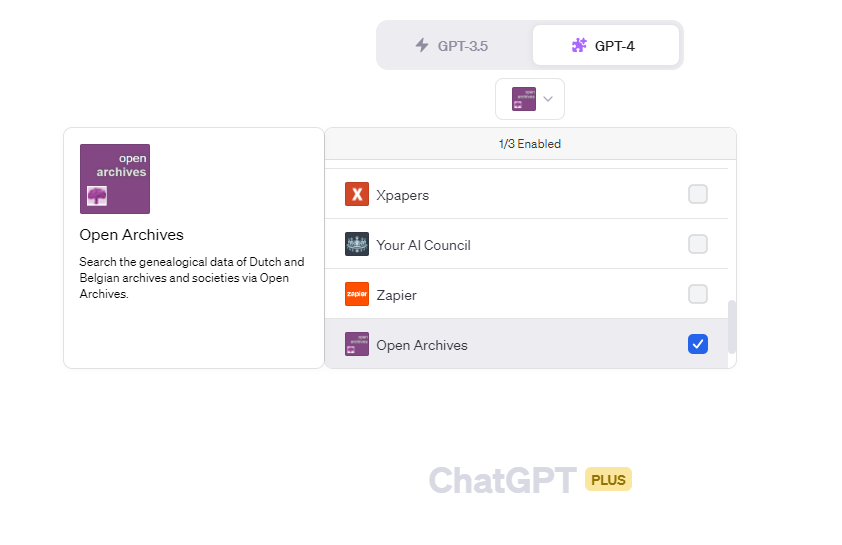
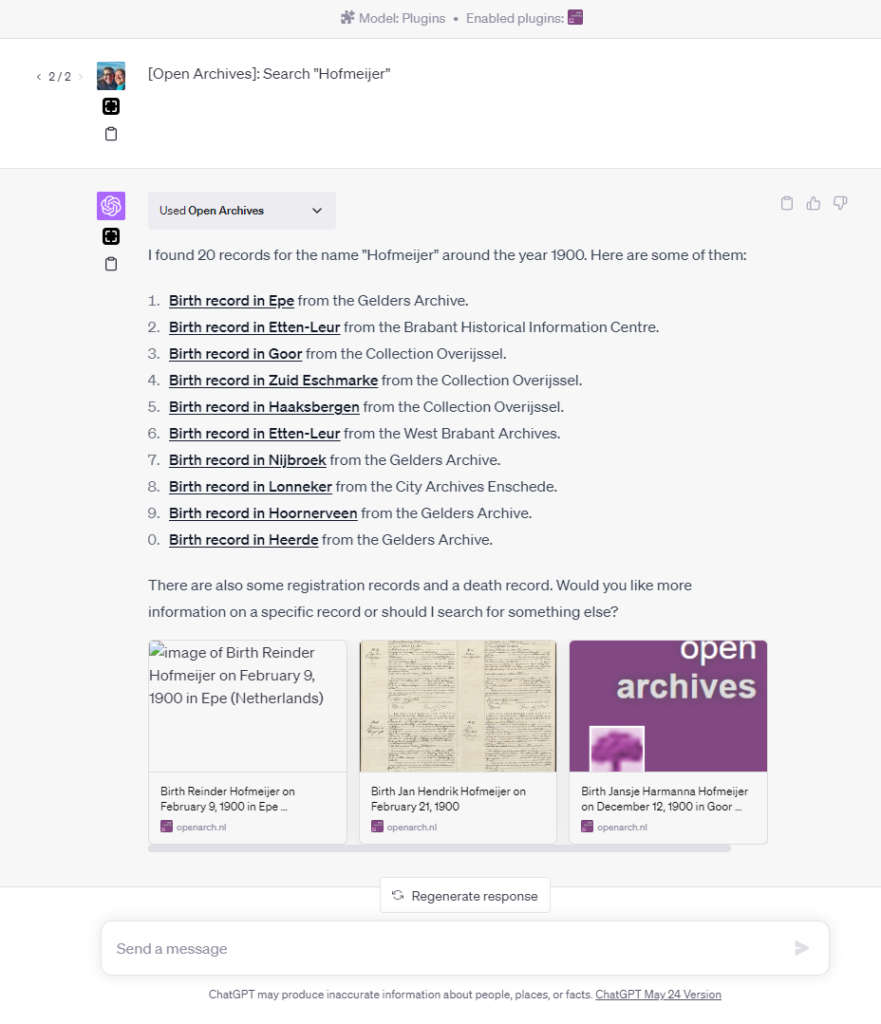
While exploring the digital landscape for genealogy-related plugins, I made an intriguing discovery: the “Open Archives” plugin. This tool offers a novel approach to accessing genealogical data from Dutch and Belgian archives and societies. Here’s how the plugin describes itself: “Search the genealogical data of Dutch and Belgian archives and societies via Open Archives.”
[Image 1 Caption: A glimpse of the Open Archives plugin interface.]
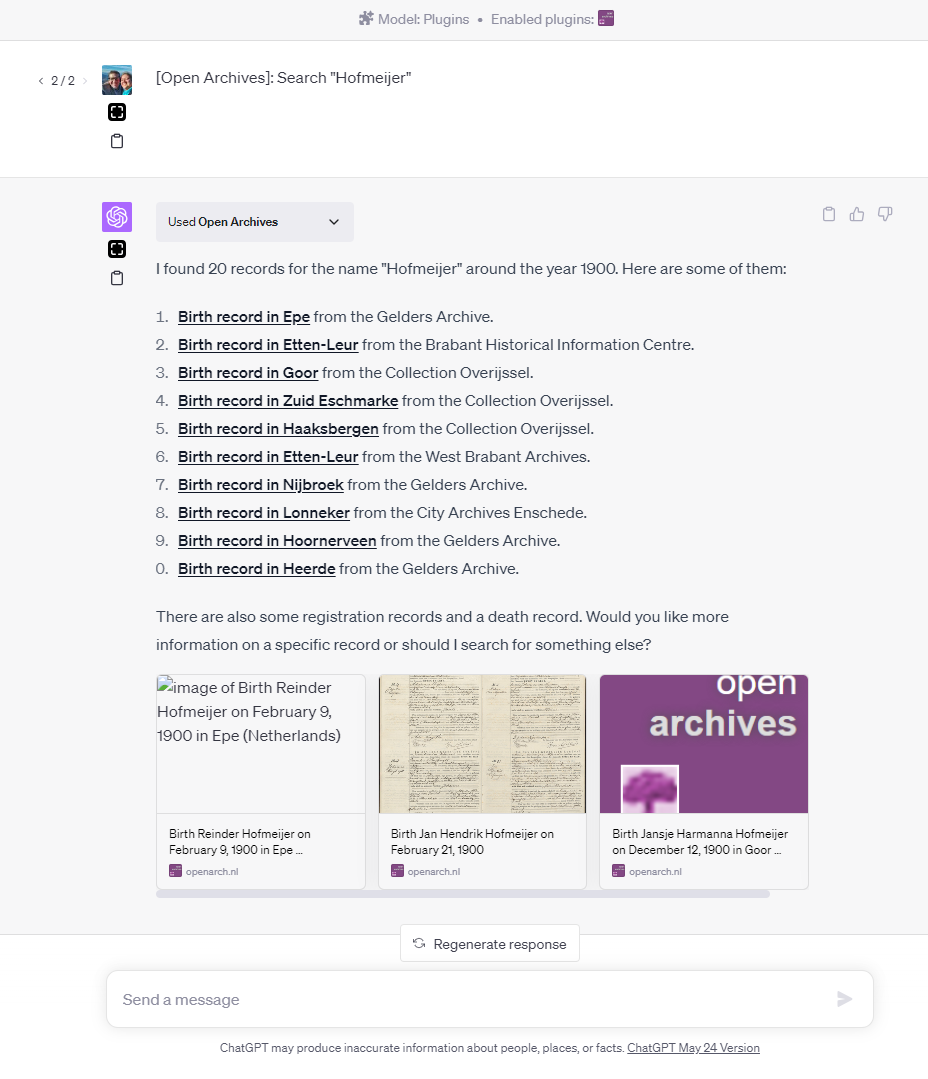
A preliminary test shows promising results. The plugin appears to effectively search records across these archives, providing links to found records on the original archive websites.
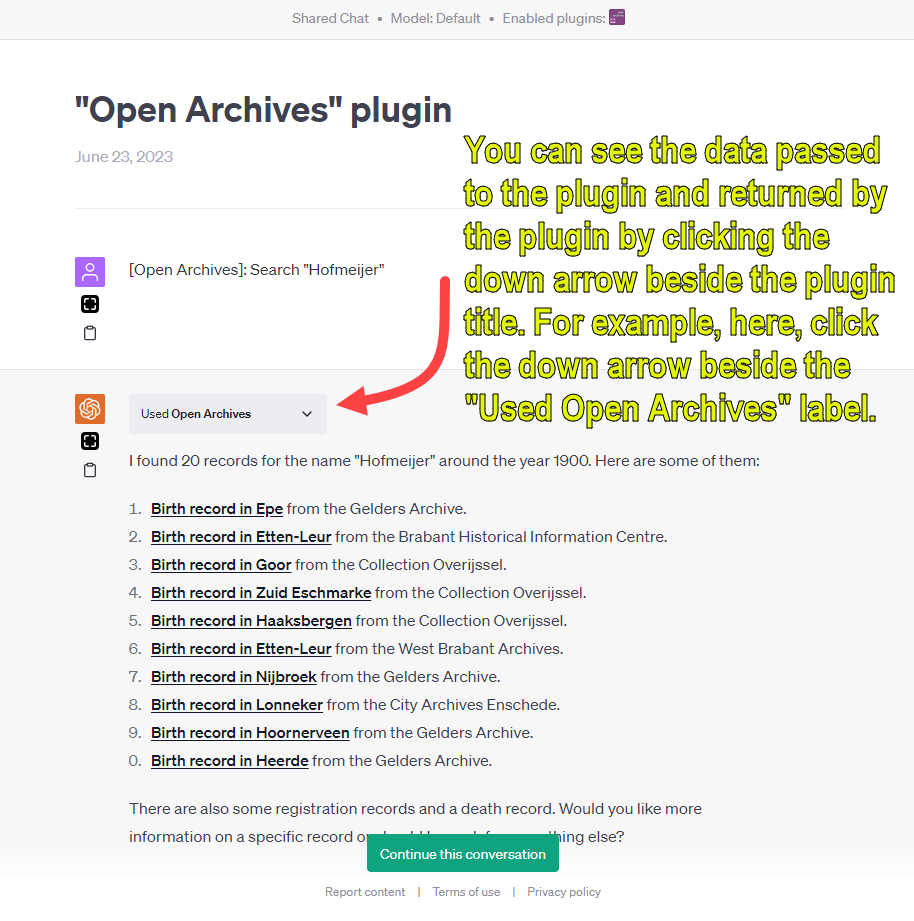
[Image 2 Caption: A sample prompt and response demonstrating the plugin’s capabilities.]
However, it’s worth noting that the plugin currently does not offer additional AI processing of the records within ChatGPT directly. That is, the plugin doesn’t import the record data into the chat session, a feature that could potentially add another layer of convenience and efficiency to our research.
Exploring the ChatGPT Session
To fully understand the potential of this tool, consider this: anyone can access the ChatGPT session via this link, and the returned links are live. Registered ChatGPT users can continue the chat and ChatGPT Plus subscribers can also carry on the conversation with the plugin enabled.
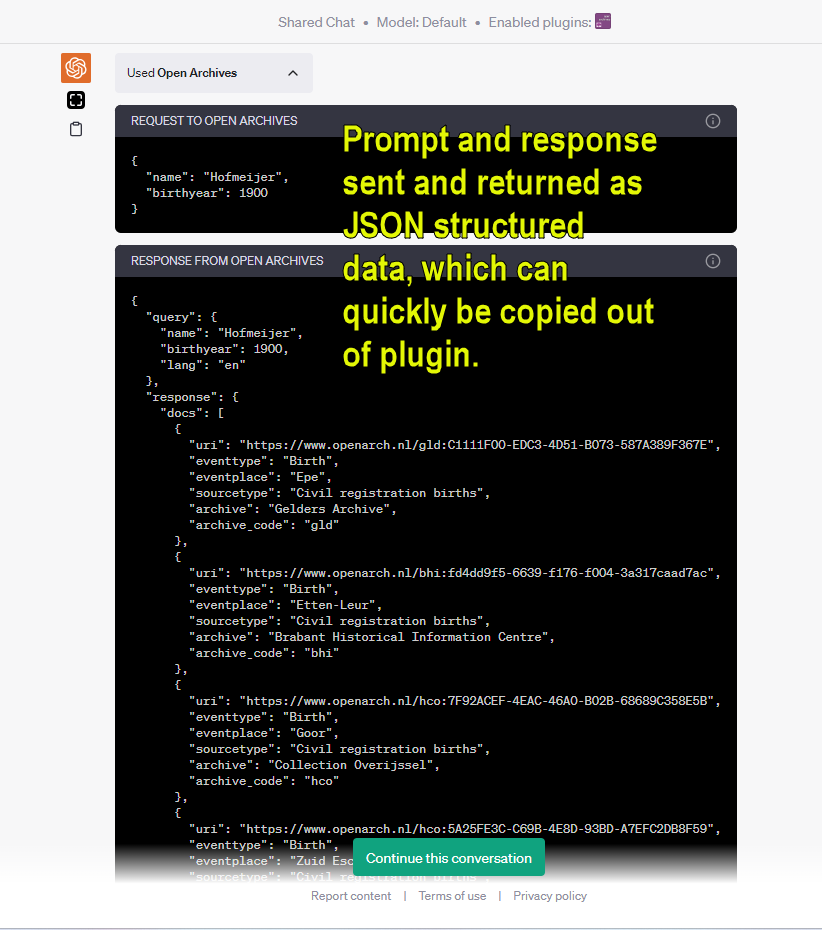
Beyond simply using the plugin, it’s also possible to examine the data passed to the plugin and returned by it. All you have to do is click the down arrow beside the plugin title. In this case, for example, click the down arrow next to the “Used Open Archives” label.
[Image 3 Caption: The Open Archives plugin’s ‘More Information’ button.]
The Nitty-Gritty: Structured Data
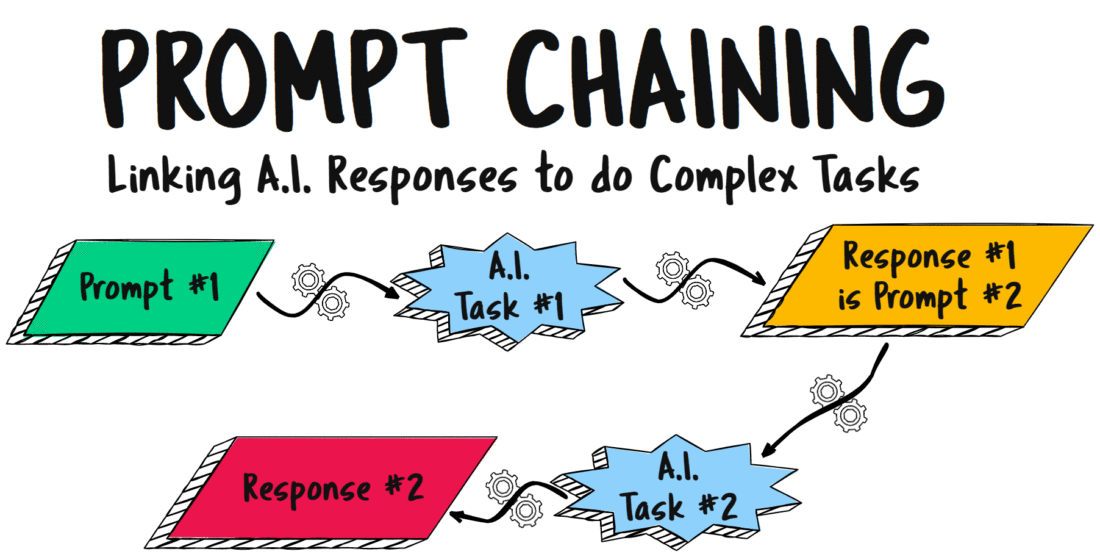
The data exchange between the user and the plugin happens in the form of JSON structured data, a widely used format that allows for easy copying out of the plugin.
[Image 4 Caption: A snapshot of the JSON prompt and response.]
The Road Ahead
While the Open Archives plugin doesn’t yet import the record data into the chat session, this pioneering tool provides a glimpse of what might be possible in the future of digital genealogical research. It paves the way for a more interactive, AI-enhanced exploration of historical records, opening up new avenues for discovery and understanding. As researchers and enthusiasts, let’s keep our eyes on the horizon for what’s coming next!
UPDATE: Shortly after sharing this post, Bob Coret, the creator of the "Open Archives" plugin (and a founder of the site), got in touch. The "Open Source" plugin in more impressive than my cursory exploration revealed. The plugin is more thoroughly documented at his blog post, which is linked below.

* Contrary to a comment in the linked article, the plugin does import record data into the chat session. In simple cases, you can ask the system for birth information (date/place) for a specific person, and then continue in a chat style by asking when the person died.
* A more complex query that can be made is "did they have children". For this, ChatGPT needs to call a specific function using a unique identification (GUID) of a marriage certificate.
* Another impressive query is "how old was {name}". For this, ChatGPT makes two requests to Open Archives (for birth and death records) and calculates the person's age.
* Bob Coret has documented his experiences with the plugin in more detail in a blog post, which is written in Dutch but easily translated to your first language.

https://blogbob.coret.org/2023/06/open-archieven-als-plugin-voor-chatgpt.html
I. Introduction: The Power of A.I. Genealogical Prompt Chaining
Welcome to the fascinating world of AI applications, where the dynamic use of language models continually expands our capabilities and insights. Today, we venture further into this realm to explore an exciting concept: prompt chaining.
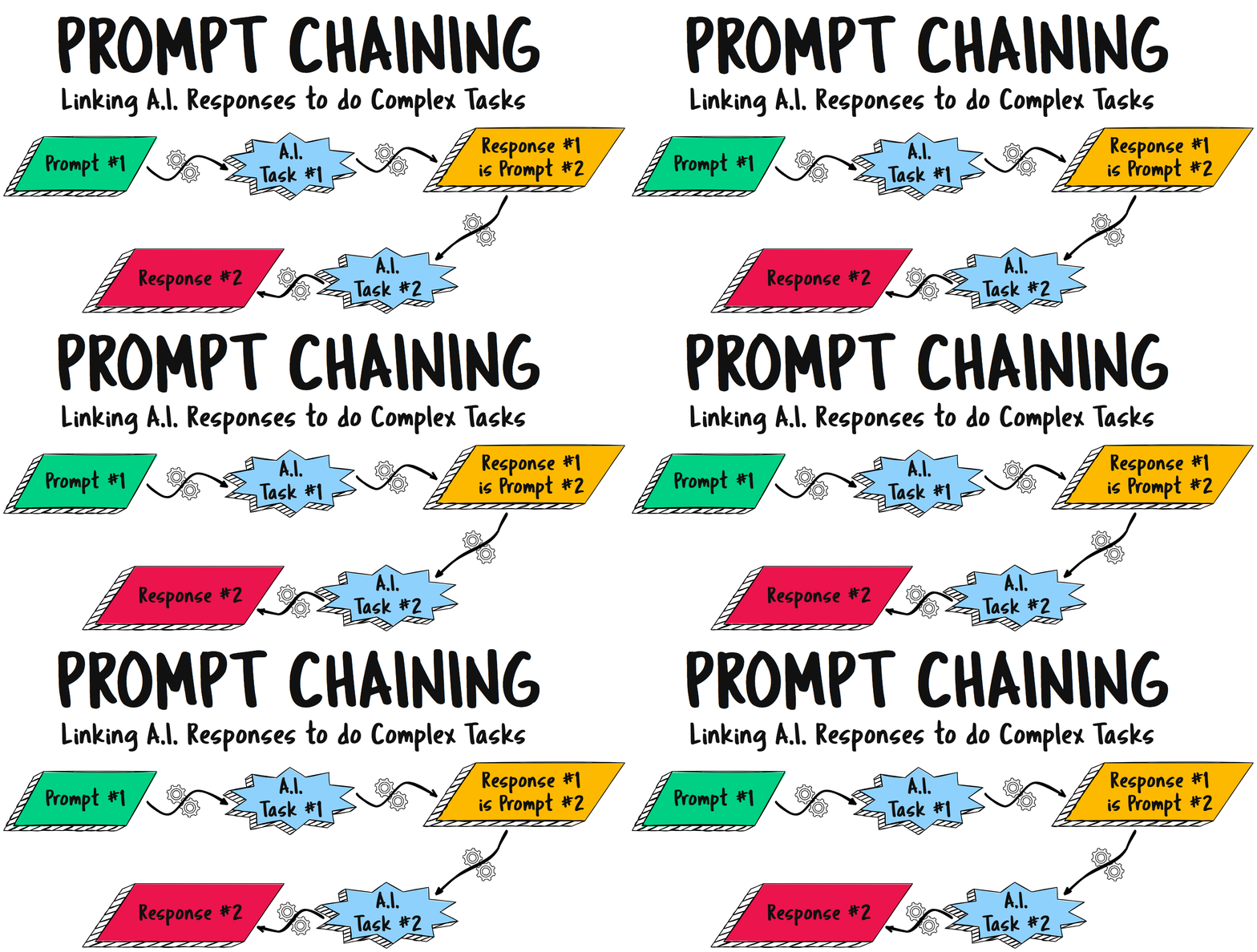
Prompt chaining is a powerful tool that taps into the versatility of AI, enabling us to extend the utility of a single interaction by linking it to subsequent prompts. In essence, it is a relay race of information processing where the output of one AI operation serves as the input to another. This chain of operations harnesses the potential of AI to process, generate, and analyze data in a seamless flow, creating opportunities for multi-faceted inquiries and sophisticated data manipulation. Most simply, prompt chaining is using the response from one A.I. interaction as the prompt for a following interaction.
Our exploration of prompt chaining builds upon the foundations we established in previous blog posts. We delved into structured data extraction from narrative sources, shedding light on how we can extract valuable insights from complex texts. In another post, we introduced ChatGPT plugins, an innovative extension of OpenAI’s powerful language model, GPT-4, which further enhances its capabilities.
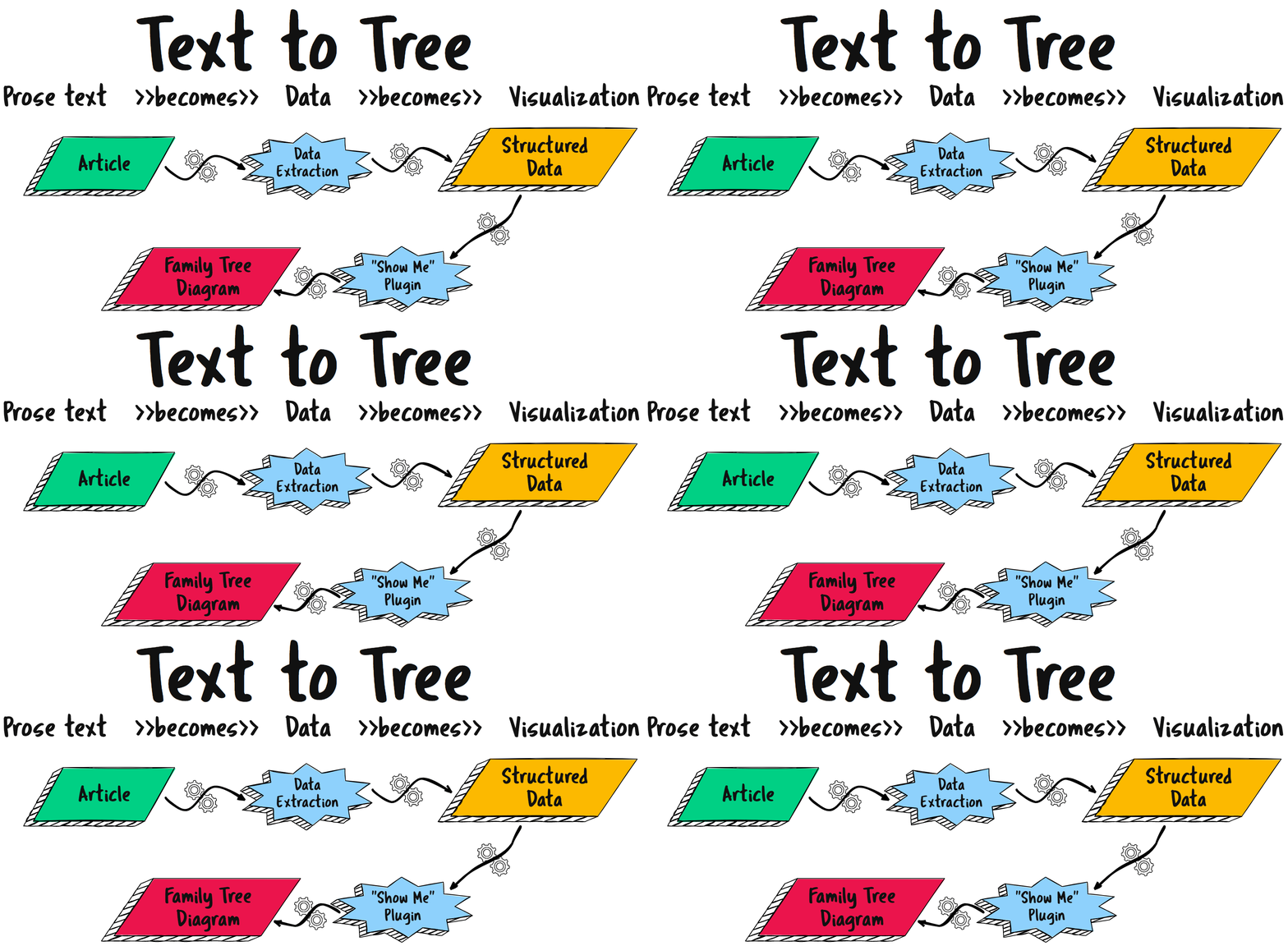
Today, our journey takes us to a fascinating intersection of these concepts. We aim to illustrate how prompt chaining can be effectively combined with the “Show Me” diagramming plugin for ChatGPT. This plugin translates textual relationships into illustrative diagrams, providing a visual representation of the relationships extracted from narrative sources.
However, a quick but important caveat before we proceed: the advanced features we’ll be discussing, including the “Show Me” plugin, require a subscription to ChatGPT Plus. While the primary value of this subscription lies in gaining access to the latest and most powerful iteration of the language model—GPT-4—the plugins definitely add a delightful layer of functionality, the proverbial icing on the cake.
This post will introduce and develop an understanding of prompt chaining. Building on a general definition and description of prompt chaining, four cases studies will be considered to sharpen our imagination of how prompt chaining will evolve as the number of A.I.-assisted genealogical use cases (tasks) grows.
Most simply, prompt chaining is using the response from one A.I. interaction as the prompt for a following interaction.
A.I. Genealogy Insights
II. Background Information
The “Show Me” diagramming plugin is an innovative tool integrated with OpenAI’s language model, ChatGPT. It’s designed to help generate visual diagrams based on user inputs. With this plugin, users can request ChatGPT to draw diagrams, flowcharts, or even family trees. Its applications are broad, making it a versatile and practical tool for visual learners, project managers, educators, and in our case, genealogists.
To fully appreciate the potential of the “Show Me” diagramming plugin and how it can be utilized in genealogical research, it’s essential to familiarize oneself with some of our previous posts. These articles delve into the practical applications of AI in genealogy, and specifically, how ChatGPT can be utilized to extract and organize valuable information.
The article “AI and Genealogy: Using ChatGPT to Glean Info from Obits, Articles, and Announcements” provides a comprehensive exploration of how ChatGPT can extract genealogical information from text sources like obituaries, wedding announcements, and newspaper articles. The post demonstrates how the AI can be prompted to identify relationships between individuals, create markdown tables of this information, and even generate GEDCOM files, which can be used to create family trees.
Another key post to review is “Using ChatGPT Plugins for Genealogy“. Leveraging ChatGPT Plus plugins can substantially enhance artificial intelligence-assisted genealogy. These software add-ons customize ChatGPT for genealogical research, with the AskYourPDF plugin as a key example. This tool allows for interaction with PDF files, extracting crucial data from scanned records or historical articles. These plugins automate tasks and interact with digital resources, increasing efficiency and insight in genealogical research, symbolizing the promising future of AI in genealogy. The plugin used extensively in this post, the “Show Me” diagramming plugin, is also introduced in that earlier blog post.
Those two previous posts provide a solid foundation for understanding how AI, and more specifically, ChatGPT with its plugins, can revolutionize genealogical research. As we move forward today, we will explore how the “Show Me” diagramming plugin, in particular, can provide a visual dimension to relationships.
You know the saying, “A picture is worth a thousand words.” That saying is never more true than in genealogy–relationships are hard for others to understand when presented only as a stream of names. Seeing a diagram of the relationships among people–a family tree or a pedigree chart–is a tremendous aid to understanding. Visually presenting relationships helps us communicate our research and findings in a way that others are more easily able to understand. The “Show Me” plugin empowers genealogists to use A.I. to generate charts, diagrams, and family trees from textual, natural language descriptions.
The advent of A.I. plugins, however, in early summer 2023 is just developing from infancy to early childhood. My research and experience during this season is that many plugins have great potential, but currently exhibit significant shortcomings. Specifically, the “Show Me” plugin demonstrated extensively in this post would currently received a grade of “C-” but with the expectation that this will, for reasons I will explain below, improve soon to a useful “B+”.
Finally, before we jump into the case studies, a brief preview and explanation. The last two case studies involve research as genealogists might typically conduct: the consideration of an earlier researcher’s work and the examination of an obituary. The first two case studies, however, use as their subject matter fictional places and people. This was done for several reasons. First, readers are likely to be familiar with one or both of the peoples and places in these first two case studies. Second, the people and relationships offered by these fictional examples are extensive, allowing for a better presentation of the principles being demonstrated. And finally, third, well, it was fun. I pray these first two fictional examples won’t distract any readers so much as to inhibit their ability to see the underlaying processes at work. That said, let’s jump into the case studies.
III. Case Study 1: Complex Family in “One Hundred Years of Solitude”
“One Hundred Years of Solitude,” a widely acclaimed novel by Gabriel García Márquez, offers a fascinating exploration of the Buendía family over seven generations in the fictional town of Macondo. The intricate relationships and complex family dynamics in this novel make it an ideal case study for demonstrating the capabilities of ChatGPT and the “Show Me” diagramming plugin in handling complex genealogical data.
To begin, we would need to extract the relationship information from the text. This process involves identifying and understanding the connections between the various characters in the novel. With the assistance of ChatGPT, this is made significantly easier. By providing the AI with a well-crafted prompt, we can instruct it to sift through the text and identify the relationships between characters, as well as the events that bind them together.
For example, a prompt may be constructed as follows:
PROMPT: Assume the role of an expert, professional genealogist. Consider the genealogically relevant information that might appear in the novel "One Hundred Years of Solitude". I would like to know about the stated relationships between characters in the text. When you can with certainty, state the relationship between two characters in the book. Extract names and relationships from "One Hundred Years of Solitude" and present that information in a way that the next AI, a diagram-generating AI, can use your information, in turn, to create a family relationship visualization.
ChatGPT, with its impressive language processing capabilities, then extracts the relationship information and organize it. [NOTE: In this example, I did not feed the entire novel to ChatGPT to process. In all the following examples and case studies, however, the A.I. is restricted to using only information that I provide to it.]
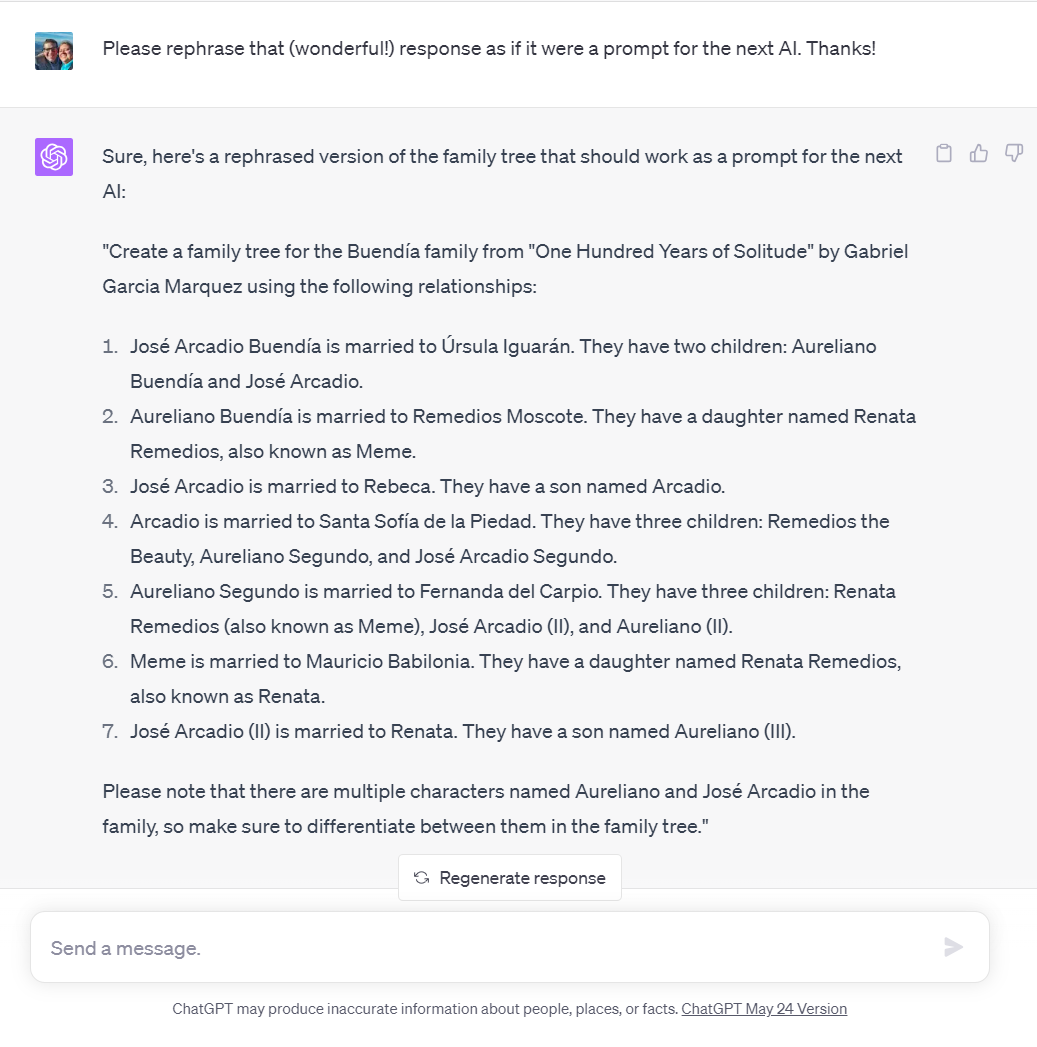
The response did not look enough like a prompt for the next AI, so I prompted ChatGPT to refine its response. As we have noted before, just as “writing means re-writing,” so working with A.I. is often an iterative, refining process; that is, we don’t often get things perfect on the first attempt, so try, try again, until you get what you need.
The refinement looked like a great prompt for the “Show Me” plugin. So, once we have this relational data, we can use it to create a prompt for the “Show Me” plugin to generate a visual representation of the Buendía family tree. The next prompt, then, could look something like this, which is just an exact copy-and-paste from the last response:
"SHOW ME" PROMPT: Show me a family tree for the Buendía family from "One Hundred Years of Solitude" by Gabriel Garcia Marquez using the following relationships:
1.	José Arcadio Buendía is married to Úrsula Iguarán. They have two children: Aureliano Buendía and José Arcadio.
2.	Aureliano Buendía is married to Remedios Moscote. They have a daughter named Renata Remedios, also known as Meme.
3.	José Arcadio is married to Rebeca. They have a son named Arcadio.
4.	Arcadio is married to Santa Sofía de la Piedad. They have three children: Remedios the Beauty, Aureliano Segundo, and José Arcadio Segundo.
5.	Aureliano Segundo is married to Fernanda del Carpio. They have three children: Renata Remedios (also known as Meme), José Arcadio (II), and Aureliano (II).
6.	Meme is married to Mauricio Babilonia. They have a daughter named Renata Remedios, also known as Renata.
7.	José Arcadio (II) is married to Renata. They have a son named Aureliano (III).
Please note that there are multiple characters named Aureliano and José Arcadio in the family, so make sure to differentiate between them in the family tree.
The result would be a detailed diagram illustrating the family relationships of the Buendía family. This visual representation, built on the foundation of meticulous data extraction and AI processing, allows us to easily understand and analyze the complex familial dynamics present in “One Hundred Years of Solitude”.
Sharp-eyed readers will here observe why I currently graded the “Show Me” plugin as a “C-“. Notice that spouses are not placed on the same row or level as their partners, but instead are one level below with the children. There are work-arounds and solutions to this problem (some easy, as noted below), but users should be aware of this issue in the spring/summer of 2023. Both the “Show Me” plugin and the other diagramming plugins available in the ChatGPT plugin store rely on a graphic tool called “Mermaid“; Mermaid is great for many, many uses, but it is, obviously, not created primarily to generate family trees. The developers of Mermaid, though, are working to explicitly add family tree diagrams to the tool’s repertoire. As I mentioned, though, there are work-arounds currently available, and every diagram that is generated is easily editable with a link that is included with every chart.
So, that shortcoming acknowledged, do not let the perfect be the enemy of the good. What ChatGPT and the “Show Me” plugin did, even though not perfect, is still fairly amazing. In about three-and-a-half minutes, the genealogically relevant information was extracted from a 440 page novel and transformed into a family tree. The implications of this process are significant. Not only does it provide a visual aid for understanding complex relationships in literature, but it also has the potential to be a valuable tool in fields such as education, history, and of course, genealogy. By making it easier to visualize and comprehend complex familial relationships, the “Show Me” plugin enhances our ability to extract deeper meanings and insights from texts. Moreover, it demonstrates the potential for AI to transform how we approach, engage, and understand large bodies of text.
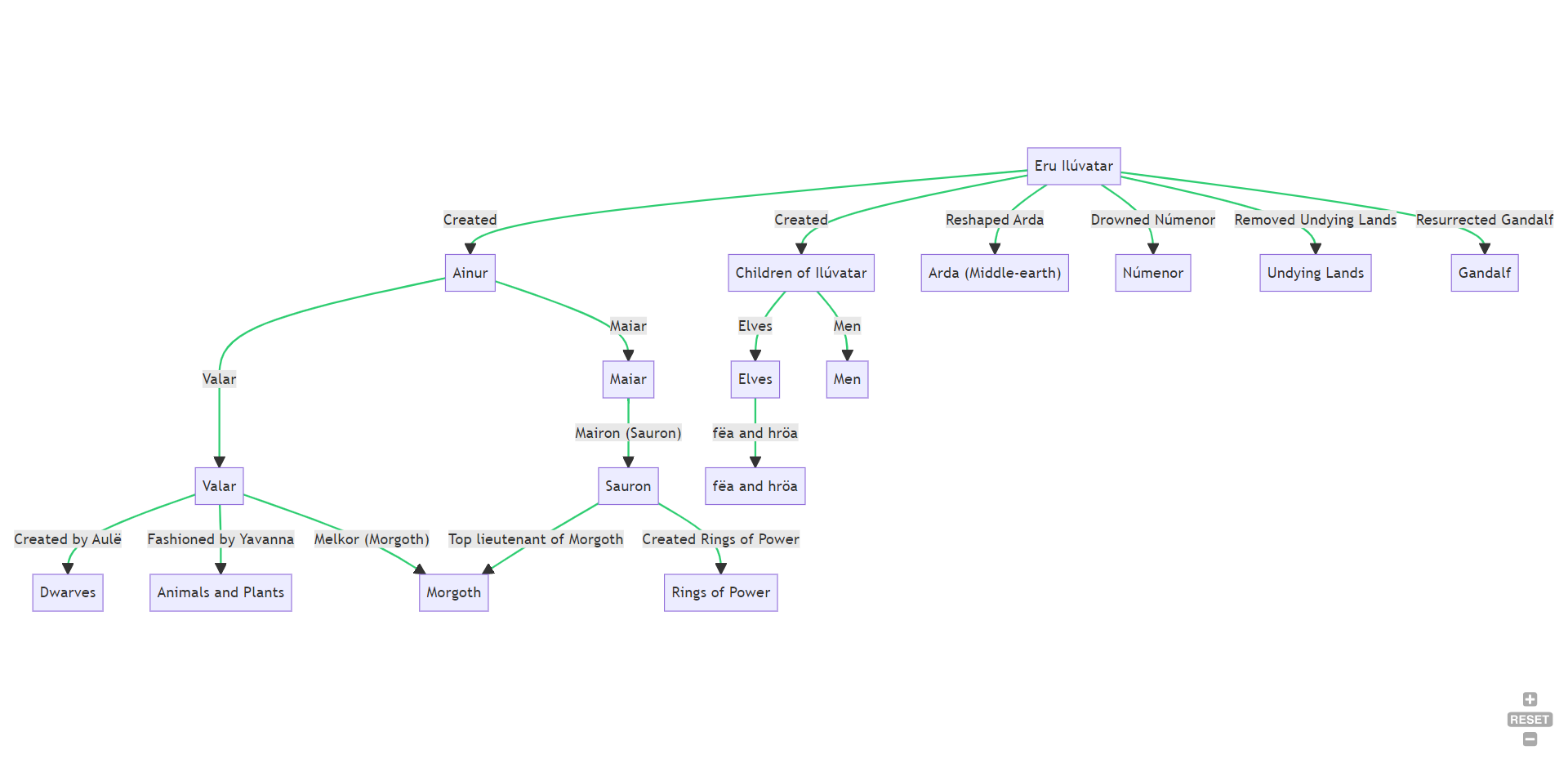
IV. Case Study 2: Tolkien’s Universe
The second case study, as I mentioned, also draws from the world of relationships in literature. I’m no Tolkien-head, so it was a bit unusual for a “Lord of the Rings” post to appear in my social feed. I’ve enjoyed the movies and read a couple of the books, and I know just enough to have heard that Tolkien is often credited with developing a literary universe. So when glanced at the article in my feed, I quickly noticed that it would lend itself nicely to this demonstration of chain prompting data extraction and data visualization. Tolkien’s universe offers a compelling backdrop against which we can further demonstrate the potential of prompt chaining with ChatGPT and the “Show Me” diagramming plugin.
The article I stumbled across was rich in relationships between people and, well, something else. So, whether you’re navigating the familial ties of the House of Elrond or tracing the lineage of the Dwarven clans, Tolkien’s works are filled with complex genealogical data that could be readily extracted by an AI. To begin this process, we would again need to construct a suitable prompt that instructs ChatGPT to identify and delineate the relationships between the various characters within Tolkien’s universe.
A sample prompt might look like this:
PROMPT: You are a professor of literature with deep expertise in science fiction and fantasy. Find below an article about Tolkien's "Lord of the Rings" universe. As if you were a genealogist, I want to map, chart, diagram, or in some way visualize the relationships between creatures and characters in the article. Please suggest how that might BEST be done, then attempt to do whatever you can do to visualize the relationships, even if it's not the best possible way imaginable.

ARTICLE:
Lord of the Rings: What Does Sauron Look Like Under His Armor? It's Complicated
https://www.cbr.com/lord-of-rings-what-sauron-really-looks-like/
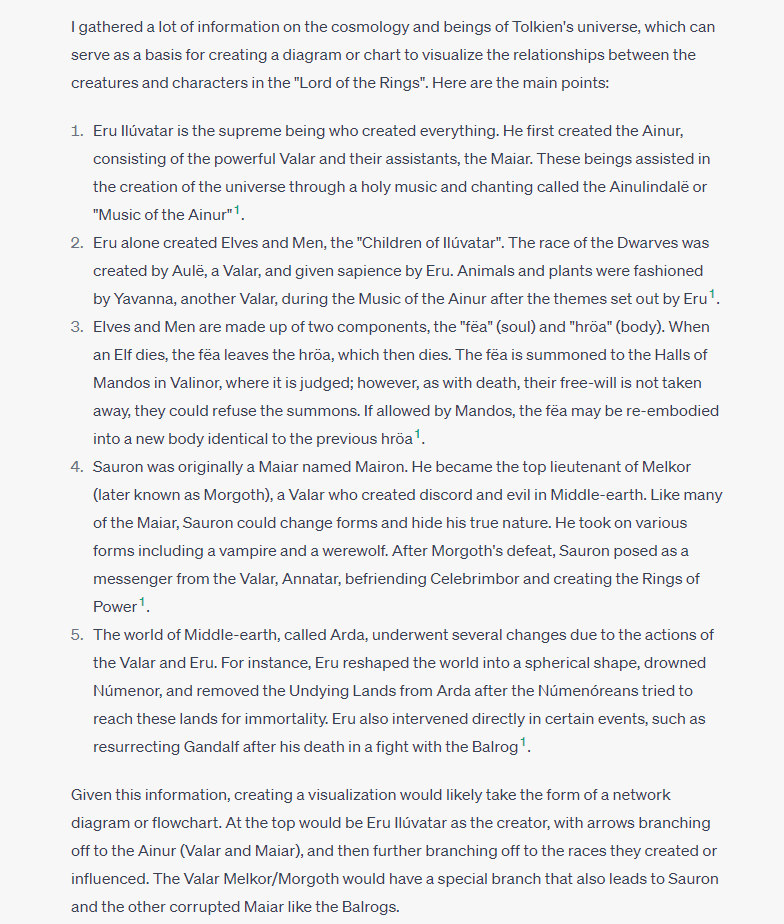
Guided by this prompt, ChatGPT would then delve into the texts and extract the necessary relationship data, organizing it into a structured format for easy interpretation and analysis.
With the relationship data in hand, we can then feed this information into the “Show Me” plugin to generate a diagram that visualizes these connections. This might involve creating a new prompt such as:
"SHOW ME" PROMPT: Show me a diagram of the lineages and relationships in Tolkien's universe using the following relationship data.

TEXT:
I gathered a lot of information on the cosmology and beings of Tolkien's universe, which can serve as a basis for creating a diagram or chart to visualize the relationships between the creatures and characters in the "Lord of the Rings". Here are the main points:
[COMPLETE DESCRIPTION FOLLOWED]...
The result? A comprehensive and easily digestible diagram that visually represents the complex relationships in Tolkien’s universe. This visual aid can be a powerful tool for understanding and exploring the intricacies of Tolkien’s rich lore, making it accessible and engaging for both seasoned fans and newcomers alike. It should not take too much imagination to see how this process is analogous and applicable to genealogy.
Furthermore, this case study underscores the potential of prompt chaining with AI in enhancing our understanding of literature. By enabling us to visualize complex relationships and lineages, the “Show Me” plugin can bring to life the rich tapestry of connections that form the backbone of our favorite family history stories. In this way, we can unlock deeper insights and appreciation for the families that we love, showcasing the immense potential of AI as a tool for genealogical analysis and exploration.
V. Case Study 3: Family Biographical Sketch
As we transition from literature to a genealogical context, let’s move into the realm of family biographical sketches. These sketches are rich sources of family history, often containing detailed information about relationships, life events, and personal narratives that can be invaluable in genealogical research.
In this case study, we’ll explore how a family biographical sketch can provide the data needed for prompt chaining and how this approach can bring the intricate web of familial relationships to life. In this example, it took me about six minutes to take a photo of a book page with my phone, extract the text from the phone, then use ChatGPT 4 to extract the relationship information from the text, and finally have the “Show Me” plugin generate a family tree diagram.
Family biographical sketches typically provide in-depth information about a family, including relationships, dates and locations of important events, occupations, and sometimes even anecdotes that give unique insights into the lives of our ancestors. These sketches, while rich in information, can sometimes be challenging to navigate due to their narrative format and the sheer volume of information they contain.
Here’s where prompt chaining with ChatGPT and the “Show Me” plugin can prove invaluable. By directing ChatGPT to extract the genealogical data from the biographical sketch, we can transform the narrative data into a structured format, ready for visualization.
The initial prompt could be framed like this:
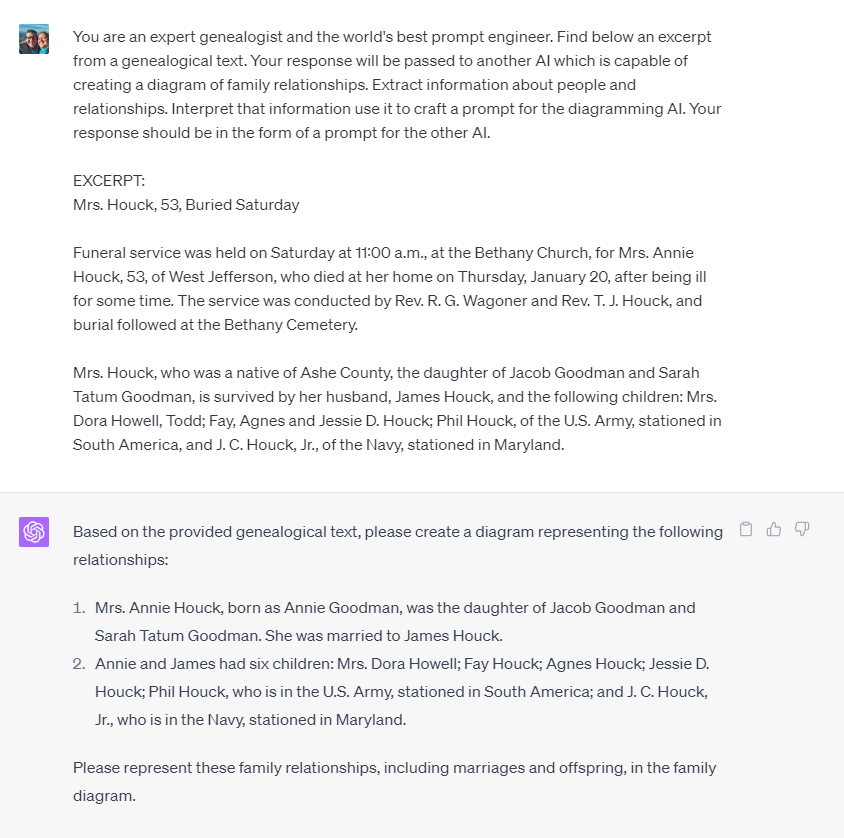
PROMPT: You are an expert genealogist and the world's best prompt engineer. Find below an excerpt from a genealogical text. Your response will be passed to another AI which is capable of creating a diagram of family relationships. Extract information about people and relationships. Interpret that information and use it to craft a prompt for the diagramming AI. Your response should be in the form of a prompt for the other AI.

EXCERPT:
THE AMBROSE PARKS LITTLE FAMILY
The earliest known ancestor of the numerous Littles in Ashe County is Isaac (ca. 1800-1892).
[BIOGRAPHICAL SKETCH CONTINUES...]
The results…
Once the relationships are extracted, the data can be fed into the “Show Me” plugin with a prompt like this:
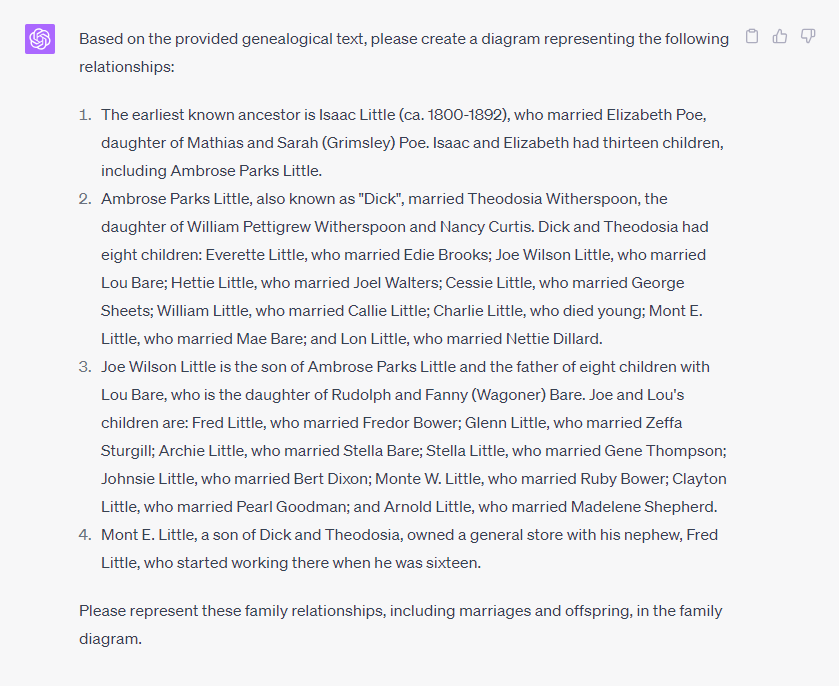
"SHOW ME" PROMPT: Based on the provided genealogical text below, show me a diagram representing the reported  relationships. Combine Husbands/Wives into one node; for example "Isaac Little married Elizabeth Poe" is one node, and the parents together of their children.

GENEALOGY:
1.	The earliest known ancestor is Isaac Little (ca. 1800-1892), who married Elizabeth Poe, daughter of Mathias and Sarah (Grimsley) Poe. Isaac and Elizabeth had thirteen children, including Ambrose Parks Little.
[GENEALOGY CONTINUES AS SHOWN ABOVE...]
The resulting diagram brings clarity to the complex relationships described in the biographical sketch. This visual representation of family connections can be an invaluable tool for genealogists, making it easier to understand and trace familial relationships across generations. Note the instruction in bold in the prompt; this is the work-around to get the “Show Me” plugin to place mothers and fathers on the same row, line, or level in a family tree diagram; for now, they need to be treated as one unit, that is, as the parents together. Again, this deficiency will be addressed and remedied in time. Advanced users may want to note that the Mermaid scripting language is easily accessible and configurable for every diagram that the “Show Me” diagram generates.
Furthermore, it highlights the power of prompt chaining in a genealogical context. By transforming narrative data into structured, visual representations, we can unlock a new dimension of understanding in our family history research. This case study serves to showcase how the combined power of AI and genealogy can enrich our understanding of our past, bringing our ancestors’ stories to life in a compelling and accessible way.
VI. Case Study 4: Obituaries
Continuing in our genealogical context, let’s turn our attention to obituaries, a commonly used but often underappreciated resource in genealogical research. Obituaries are a treasure trove of information, offering insights into the lives of our ancestors, their relationships, and their place in the community.
In this case study, we’ll explore how obituaries can provide valuable data for prompt chaining and how this method can bring new insights to genealogical research.
Obituaries are unique in their ability to encapsulate the essence of a person’s life, including their family ties, accomplishments, and legacies. However, the narrative format and sometimes cryptic language used in obituaries can make extracting this information a challenge. This is where AI, particularly ChatGPT, can step in.
To initiate the process, we would provide ChatGPT with a prompt to extract relevant information from an obituary. The prompt could be framed as:
PROMPT: You are an expert genealogist and the world's best prompt engineer. Find below an excerpt from a genealogical text. Your response will be passed to another AI which is capable of creating a diagram of family relationships. Extract information about people and relationships. Interpret that information use it to craft a prompt for the diagramming AI. Your response should be in the form of a prompt for the other AI.

OBITUARY:
Mrs. Houck, 53, Buried Saturday

Funeral service was held on Saturday at 11:00 a.m., at the Bethany Church, for Mrs. Annie Houck, 53, of West Jefferson, who died at her home on Thursday, January 20, after being ill for some time. The service was conducted by Rev. R. G. Wagoner and Rev. T. J. Houck, and burial followed at the Bethany Cemetery.

Mrs. Houck, who was a native of Ashe County, the daughter of Jacob Goodman and Sarah Tatum Goodman, is survived by her husband, James Houck, and the following children: Mrs. Dora Howell, Todd; Fay, Agnes and Jessie D. Houck; Phil Houck, of the U.S. Army, stationed in South America, and J. C. Houck, Jr., of the Navy, stationed in Maryland.
The data extracted by ChatGPT can then be used to create a prompt for the “Show Me” plugin to visualize these relationships:
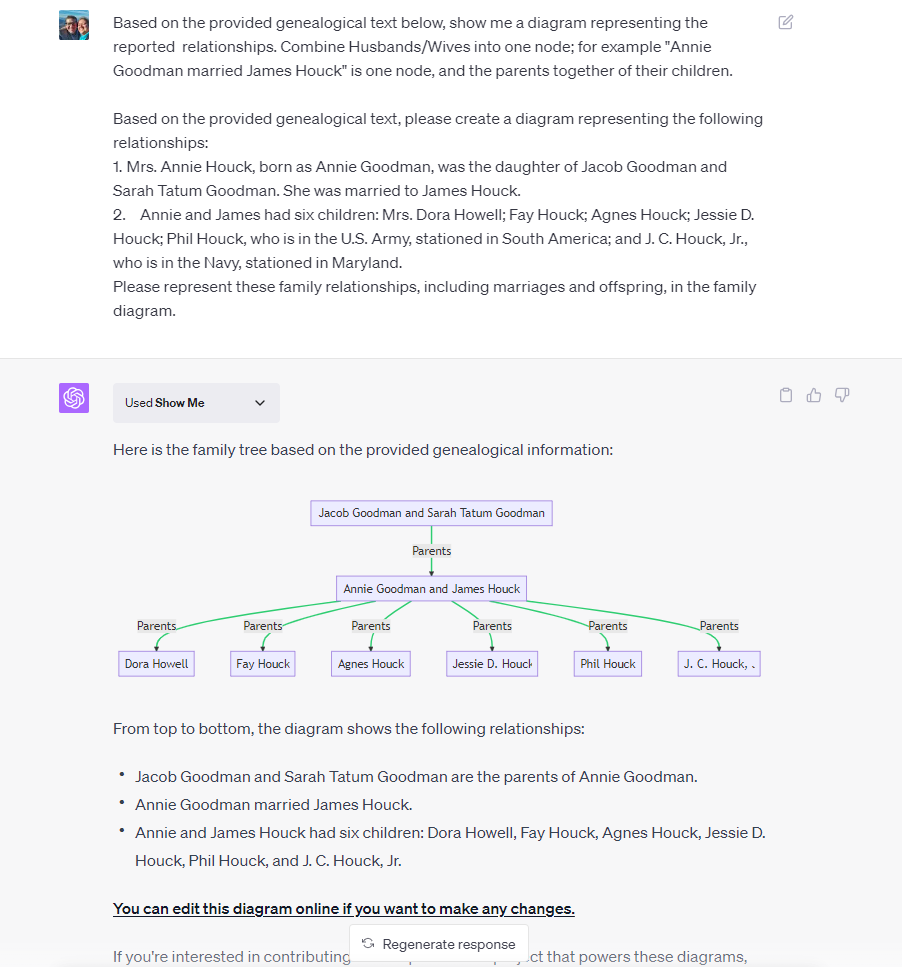
"SHOW ME" PROMPT: Based on the provided genealogical text below, show me a diagram representing the reported  relationships. Combine Husbands/Wives into one node; for example "Annie Goodman married James Houck" is one node, and the parents together of their children.

Based on the provided genealogical text, please create a diagram representing the following relationships:
1.	Mrs. Annie Houck, born as Annie Goodman, was the daughter of Jacob Goodman and Sarah Tatum Goodman. She was married to James Houck.
2.	Annie and James had six children: Mrs. Dora Howell; Fay Houck; Agnes Houck; Jessie D. Houck; Phil Houck, who is in the U.S. Army, stationed in South America; and J. C. Houck, Jr., who is in the Navy, stationed in Maryland.
Please represent these family relationships, including marriages and offspring, in the family diagram.
The resulting diagram provides a visual representation of the relationships gleaned from the obituary, offering a unique perspective on the family structure and relationships of the deceased.
The value of this approach in genealogical research is manifold. Not only does it allow for the efficient extraction of valuable information from obituaries, but it also presents this information in a clear, visual format that can aid in understanding complex family relationships and in tracing lineages. It demonstrates the power of prompt chaining in unlocking the potential of obituaries as a source of genealogical data, bringing us one step closer to the stories of our ancestors.
VII. Conclusion
Looking forward, the potential of prompt chaining is immense. As the capabilities of AI tools like ChatGPT continue to expand, the possibilities for prompt chaining grow exponentially. The fine-tuning of the diagrams provided by the “Show Me” plugin, for instance, could lead to more nuanced and detailed visualizations of data, further enhancing our understanding of complex information.
Every week, we witness the introduction of new use cases – data extraction, translation, optical character recognition (OCR), narration, and diagramming, among others. With each new task that AI can handle, the potential combinations of prompt chaining multiply dramatically, broadening the horizons of AI-assisted endeavors, such as genealogy. This continuous growth in AI capabilities underscores the increasing relevance and power of prompt chaining.
In the present, we manually chain or link prompts, carefully curating the sequence to accomplish our specific goals. Yet, we can envision a future, perhaps not too distant, where AI agents will not only suggest optimal task combinations but also carry out complex workflows seamlessly, further reducing the manual effort and increasing the efficiency of achieving more intricate goals.
I invite all readers to dive into this fascinating world of AI-assisted research. Try out the “Show Me” plugin and experiment with prompt chaining. The journey may challenge your understanding of what AI can do and inspire you to imagine new ways to harness its power.
We would love to hear about your experiences, discoveries, and insights in this area. Please share your results in the Comments section below. Remember, every experiment, every question, every insight adds to our collective understanding of this powerful tool.
Here’s to the continued exploration of AI’s potential, and to the remarkable power of prompt chaining!
What they are, where to get them, why use them, and how to use them: Using the AskYourPDF plugin as an in-depth example
I. Introduction: Plugins: What, why, where, & how
[NOTE: For clarification: the plugin features discussed in this post require a ChatGPT Plus subscription. At $20/month, you gain access not just to GPT-4 with its advanced functionalities – of which plugins are merely an additional advantage – but to an AI model that vastly outperforms GPT-3.5 and others like Bard, Claud, etc. Trying GPT-4 offers an incredible opportunity to unlock the vast capabilities of AI that you might not be fully utilizing yet. While plugins are a welcome bonus, GPT-4 is truly the star of the show. In other words, no one is paying $20 for plugins–it’s GPT-4 that’s worth the cost.]
Welcome to a fascinating exploration at the intersection of artificial intelligence and genealogy. If you’re a genealogist or a family history enthusiast, you are likely always on the lookout for tools that can aid in your research, streamline your workflow, and unlock new insights. Today, we’re going to delve into a resource that may be new territory for many: ChatGPT and its versatile plugins.
ChatGPT, developed by OpenAI, is a highly advanced language model trained on a diverse range of internet text. But what does that mean for you? Well, in simple terms, it’s like having a tireless research assistant that can generate human-like text based on the prompts you provide. It can answer questions, write essays, summarize text, and even generate creative ideas — all in the blink of an eye. It’s a tool that has been making waves in many fields, from education to business to creative writing, and it is beginning to assist the world of genealogy.
In this blog post, we’re going to introduce you to the world of plugins designed for ChatGPT Plus. We’ll explore what a plugin is, why it’s beneficial for genealogists, and how to enable, install, select, and use a plugin. We’ll also showcase some plugins that will be of particular interest to genealogists, and provide a more in-depth introduction to the AskYourPDF plugin, a tool that could prove invaluable in your research. So, whether you’re a seasoned genealogist or a beginner just starting your journey into your family’s past, join us as we explore the new frontier of AI-assisted genealogical research. The future of genealogy is here, and it’s incredibly exciting. Let’s dive in!
Essentially, a plugin is a piece of software that adds new features or functionality to another program.
II. What is a Plugin for ChatGPT Plus
In our digital age, the term “plugin” is quite common, but let’s pause a moment to ensure we all understand what it means in the context of ChatGPT Plus. Essentially, a plugin is a piece of software that adds new features or functionality to another program. Think of it as an accessory or an add-on that enhances the base product. In this case, the base product is ChatGPT Plus, and plugins are designed to augment its abilities, tailoring it to better fit your specific needs.
Now, you may be wondering: “What kind of enhancements are we talking about?” The beauty of plugins lies in their diversity. Some plugins are designed to give ChatGPT Plus new abilities, like parsing specific data formats or interacting with certain databases. Others are designed to improve the quality of the AI’s output in specific contexts, like technical writing or poetry composition. And some plugins, like the AskYourPDF plugin we’ll discuss later, can provide a seamless interface between ChatGPT Plus and other software or data sources.
For genealogists, plugins for ChatGPT Plus offer an opportunity to tailor the AI to better suit the unique needs of genealogical research. They allow you to push the boundaries of what’s possible with AI assistance, and help you leverage the vast capabilities of ChatGPT Plus in new and exciting ways. With the right plugins, you can transform ChatGPT Plus into a specialized tool for genealogical research, a tool that can save you time, streamline your research process, and help you unearth insights that might otherwise have been missed. In the following sections, we’ll explore this in more detail, providing a clear guide on how to use these plugins and highlighting some of the most valuable ones for genealogists. Stay with us as we journey further into the world of ChatGPT Plus plugins. It’s a world full of potential, and we’re excited to help you discover it.
PRO TIP: The AskYourPDF plugin not only allows you to search in, extract from, and chat with(!) a PDF document, but it can also access PowerPoint (.ppt and .pptx files), Excel and Google Sheets spreadsheets (.csv files), ebooks (.epub files), and Word and Google Docs documents (.rtf files).
A.I. Genealogy Insights
III. Why? The Value of Plugins for Genealogists
In the world of genealogy, every piece of information, no matter how small, can potentially be the key that unlocks a new understanding of your family history. The search for these pieces often involves sifting through vast amounts of data, from online records to old letters to scanned documents. This is where plugins for ChatGPT Plus can bring significant value.
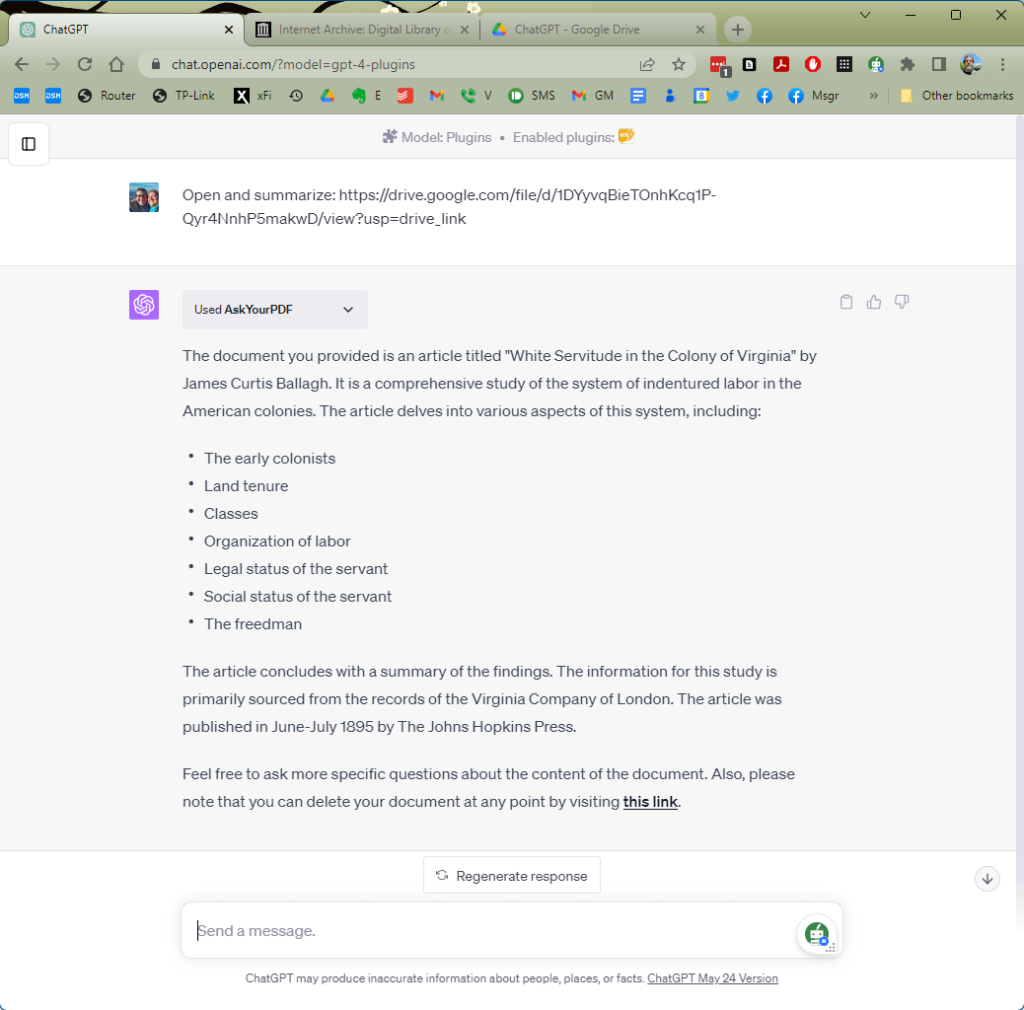
Plugins can enhance the capabilities of ChatGPT Plus in ways that are particularly beneficial for genealogical research. For instance, some plugins are designed to improve the AI’s ability to understand and generate text in specific contexts. These can be incredibly helpful when you’re trying to interpret old documents written in outdated or specialized language. With the right plugin, you could ask ChatGPT Plus to explain what a certain phrase means or to provide a modern language paraphrase of an old letter.
Other plugins can help ChatGPT Plus interact with specific databases or digital resources. This can save you considerable time by automating some of your research tasks. Instead of manually searching through an online database for records of a certain individual, you could ask ChatGPT Plus, with the right plugin, to do it for you. You could even ask it to summarize the findings or highlight the most relevant details.
Let’s consider a specific example: the AskYourPDF plugin. This plugin allows ChatGPT Plus to interact with PDF files, a common format for many digital resources used in genealogical research. With this plugin, you can ask ChatGPT Plus to extract information from a PDF, such as the names and dates mentioned in a scanned census record or the key points from a lengthy historical article. This can be a huge time-saver, allowing you to focus more on interpreting the information and less on finding it. As we delve deeper into the realm of ChatGPT Plus plugins, it becomes clear that these tools hold great potential for genealogists. By automating tasks, interpreting complex language, and interacting with a range of digital resources, plugins can make your genealogical research more efficient and insightful. They are valuable tools in the modern genealogist’s toolbox, and we’re excited to help you explore them further.
In a moment, we will explore how to use the AskYourPDF plugin, but first we’ll talk about who can use this plugin, where to find it, how to install it, and how to activate it for use.
All ChatGPT Plus users now have access to plugins but they may not know that because plugins are considered a “beta” feature that are not enabled by default; that is, all ChatGPT Plus users can access plugins by enabling that beta feature.
A.I. Genealogy Insights
IV. How to Enable plugins, Install, Select, and Use a ChatGPT Plugin
Ready to dive into the world of plugins? This section will guide you through the process of enabling, installing, selecting, and using a plugin with ChatGPT Plus. Before we get started, it’s important to note that plugins are currently a beta feature. This means you’ll need to enable beta features in your OpenAI account settings.
Here is a step-by-step guide to get you started:
1. Enable Beta Features: Log into your OpenAI account and navigate to your account settings. Look for a section titled “Beta Features” and check the box to enable them.
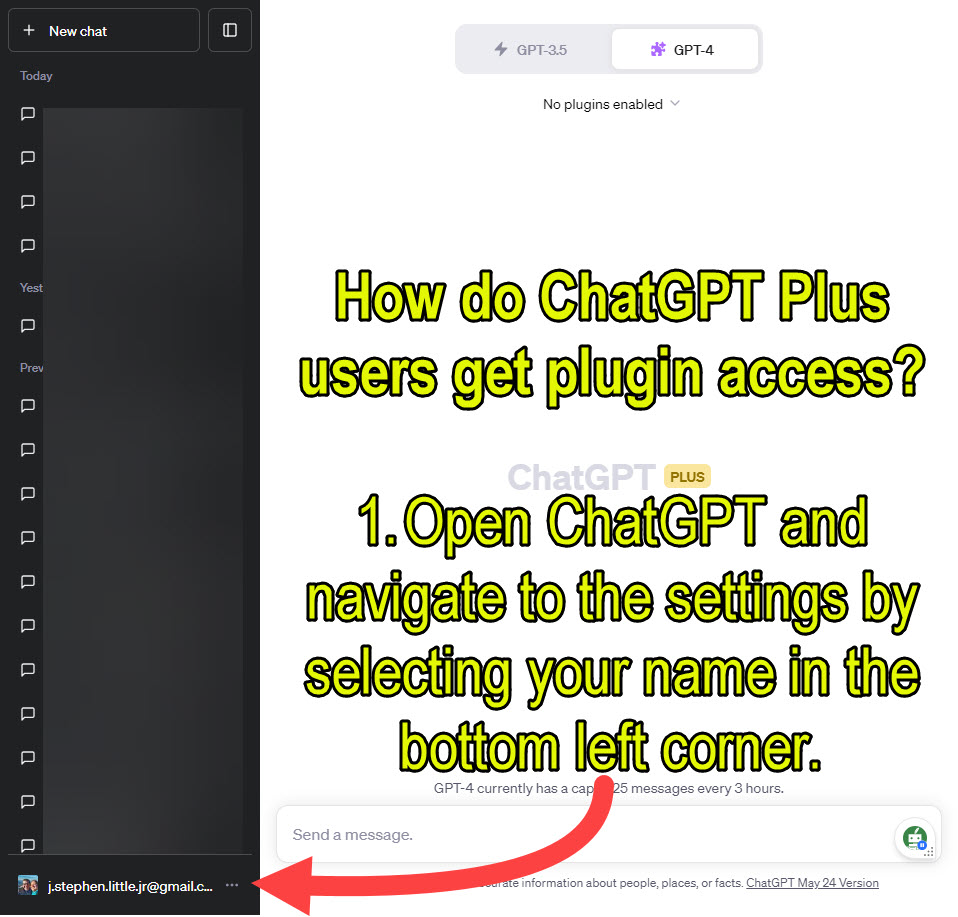
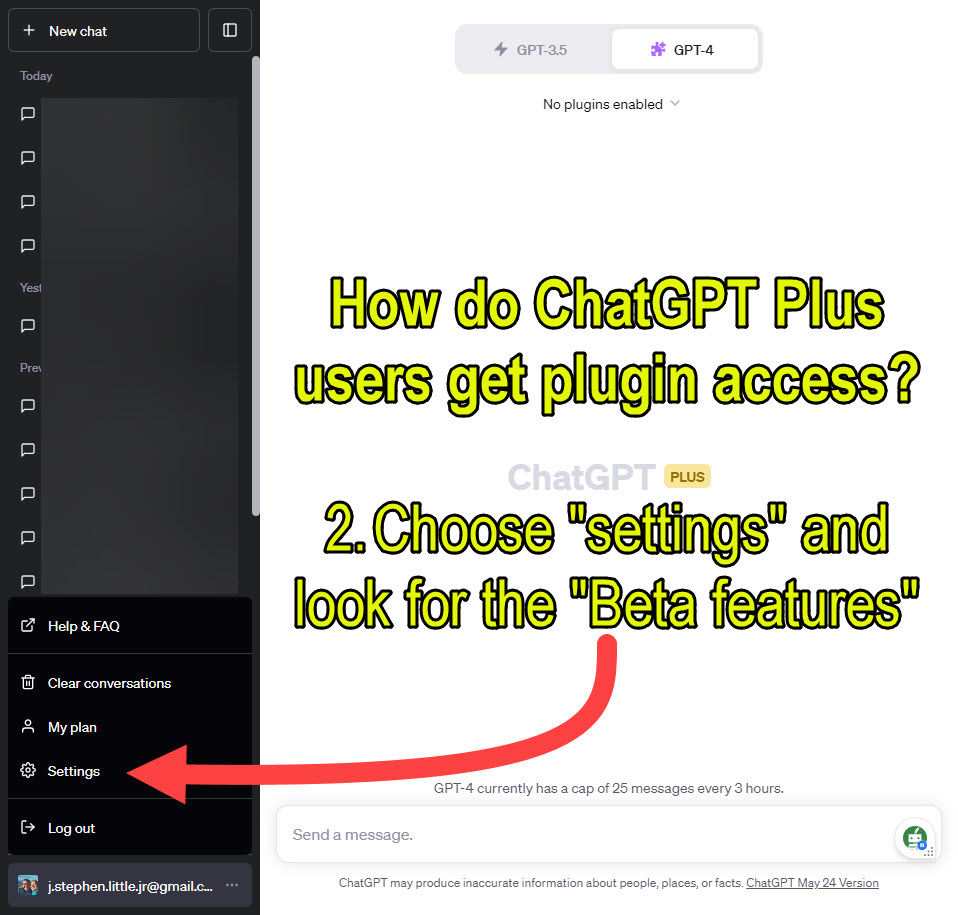
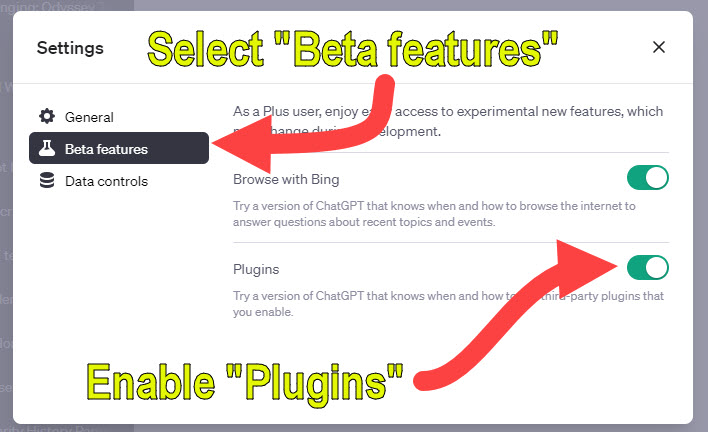
Open ChatGPT and navigate to the settings by selecting your name in the bottom left corner.After opening the menu by clicking the dots next to your username, click “Settings” and look for the radio buttons to enable “Beta features.”After clicking “Settings,” use the radio buttons to enable “Plugins.” While you are here, go ahead and enable “Browse with Bing,” which will empower you to use ChatGPT to browse the internet and answer questions about recent topics and events.
2. Access the Plugin Marketplace: Once you’ve enabled beta features, you can access the plugin marketplace. This is where you can browse available plugins, read descriptions, and see user reviews.
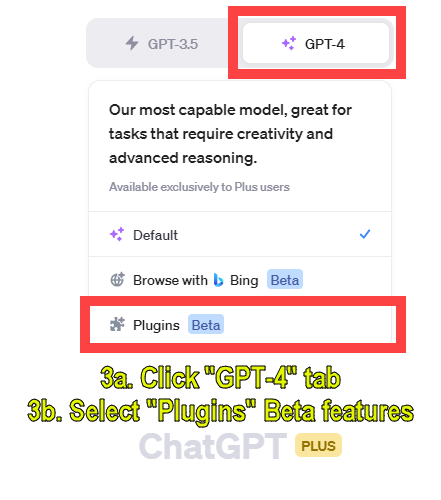
To access the Plugin store or “Marketplace,” ChatGPT Plus users can click the “GPT-4” tab, opening the drop-down menu, and selecting the “Plugins Beta” model (the version or flavor of ChatGPT you wish to use).
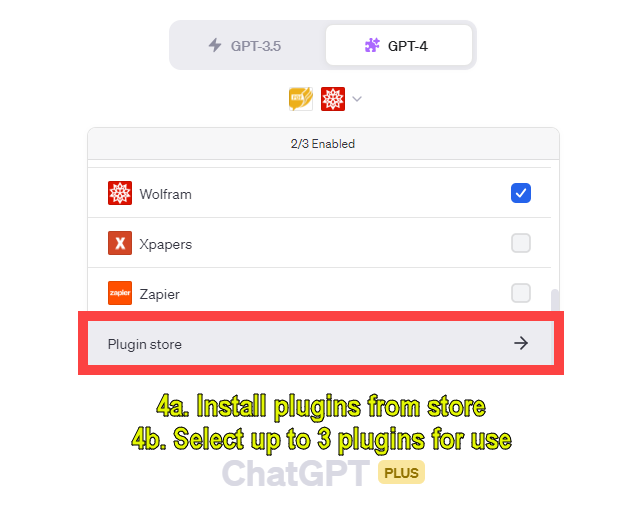
After selecting the Plugins Beta model, select “Plugin store” from the drop-down menu.
3. Install a Plugin: When you’ve found a plugin you’d like to try, select it to see more information. You’ll see an “Install” button on the plugin’s page. Click this button to add the plugin to your ChatGPT Plus. Currently plugins are free, but only three plugins can be “active” at any one time.
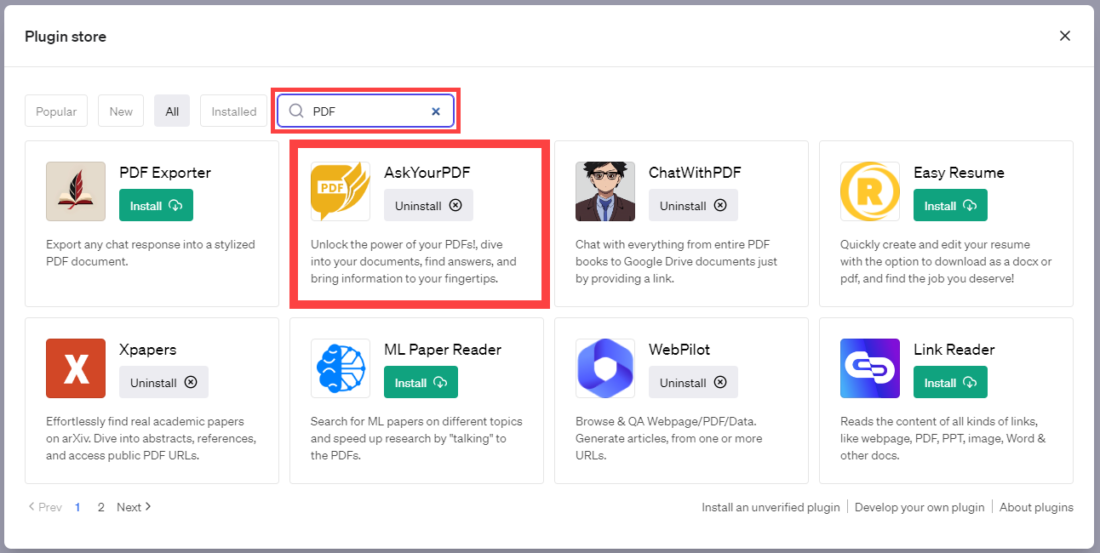
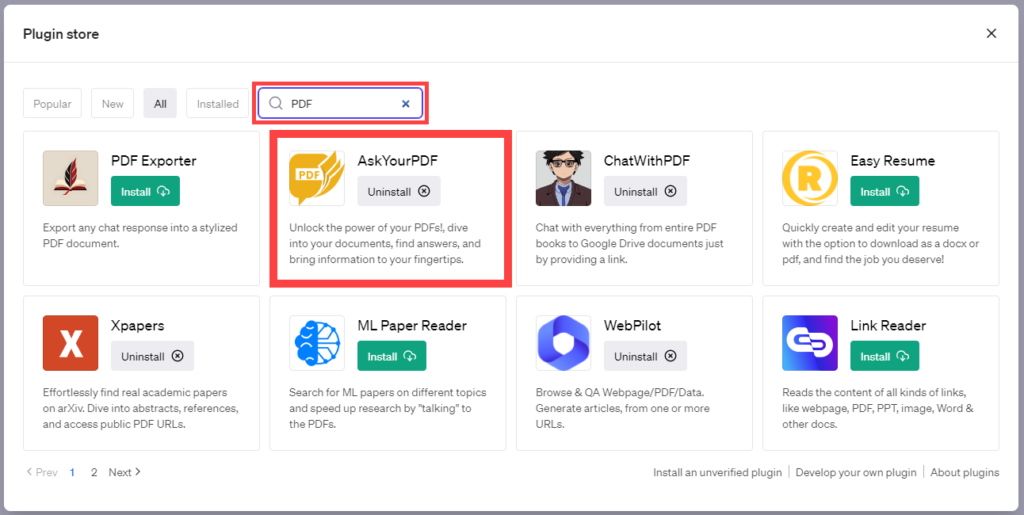
In the Plugin Store, you can search names and descriptions of plugins. Search for “pdf,” and several plugins with PDF capabilities will surface in the results. Currently, our tests indicate that “AskYourPDF” is the strongest plugin for working with PDFs. Click the “Install” button to add the plugin to your list of accessible plugins. Currently plugins are free, but only three plugins can be “active” at any one time.
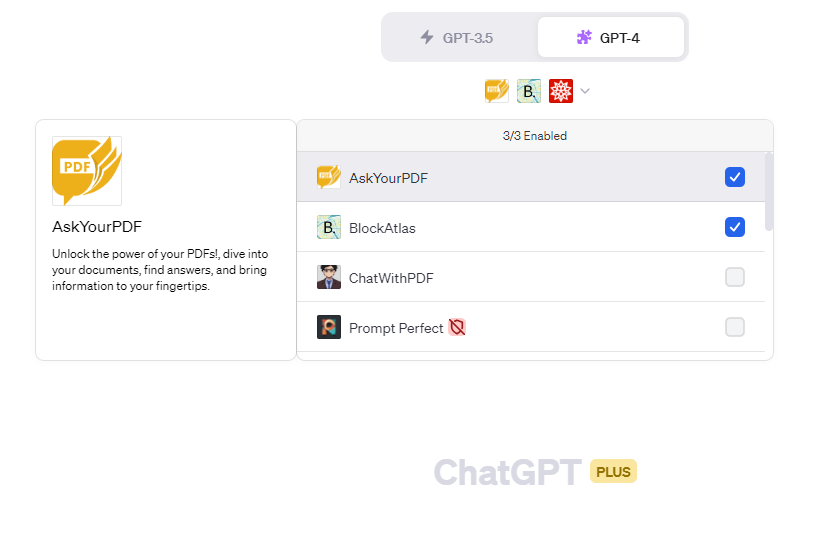
4. Select a Plugin: Once you’ve installed a plugin, you can select it for use. Although you can install any number of plugins, only three can be “active” at any one time. Of the active plugins, ChatGPT will select the most appropriate plugin as ChatGPT determines. PRO TIP: Because ChatGPT determines which active plugin to use, we often keep only one plugin active, forcing ChatGPT to use that plugin. Go to your ChatGPT Plus interface, and look for a dropdown menu labeled “Plugins.” This menu will list all the plugins you’ve installed. Select the plugin you want to use from this list.
Select a Plugin: Once you’ve installed a plugin, you can select it for use. Although you can install any number of plugins, only three can be “active” at any one time. Of the active plugins, ChatGPT will select the most appropriate plugin as ChatGPT determines. PRO TIP: Because ChatGPT determines which active plugin to use, we often keep only one plugin active, forcing ChatGPT to use that plugin.
5. Use a Plugin: With a plugin selected, you can now use it in your interactions with ChatGPT Plus. The exact way you use a plugin will depend on its specific features and capabilities, so it’s a good idea to read the user guide or documentation that comes with each plugin.
Remember, each plugin will have its own unique features and methods of interaction. Some plugins may provide additional tools or options within the ChatGPT Plus interface, while others might enhance the AI’s responses to your prompts. PRO TIP: Don’t be afraid to experiment and explore the functionality of each plugin. In the next section, we’ll take a closer look at some plugins that are particularly useful for genealogists. Whether you’re looking for assistance with document interpretation, database queries, or another aspect of your research, there’s likely a plugin that can help. Let’s continue our exploration!
V. Suggested Plugins for Genealogists: AskYourPDF, Wolfram, Show Me, BlockAtlas
As a genealogist, the intricate task of tracing lineage and family history can sometimes feel like solving a complex puzzle. Fortunately, there are some innovative ChatGPT plugins designed to make your research more efficient, more accurate, and ultimately more fruitful. In this section, we’ll introduce you to three such plugins: Wolfram, Show Me, and BlockAtlas. We’ll explore their features, advantages, drawbacks, and specific applications for genealogical research. Please note, information about the AskYourPDF plugin will be discussed in detail in the next section.
1. Wolfram Plugin
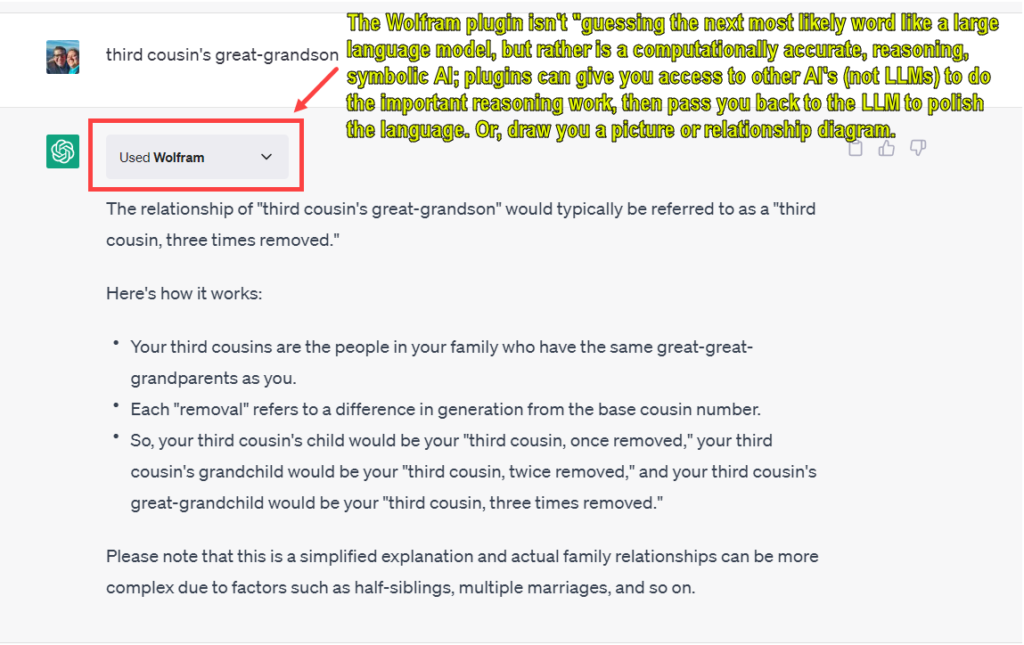
The Wolfram plugin is a powerful computational tool that enhances ChatGPT’s capabilities in several fields. Originally designed for use in disciplines such as mathematics, astronomy, chemistry, and geography, this plugin can also be a valuable tool in genealogical research.
Features and Uses: The Wolfram plugin can answer complex queries and provide visualizations and real-time data. In genealogy, this could be leveraged to analyze demographic data, calculate generational intervals, and provide visual representations of complex family trees. Additionally, the plugin’s strength in geography can assist in understanding the geographical distribution and migration patterns of your ancestors.
The Wolfram plugin doesn’t merely guess the next most likely word like a large language model, but rather enhances ChatGPT’s abilities with accurate computational reasoning and symbolic AI. Plugins can augment the capabilities of ChatGPT, allowing it to perform computations, deliver curated knowledge and data, and even create visual diagrams. However, they work in conjunction with, rather than replacing, the core language generation functionality of ChatGPT.
Pros: The Wolfram plugin offers improved accuracy and focus in responses compared to the standard ChatGPT model. It can handle complicated questions, providing a more streamlined response without overwhelming you with excess information.
Cons: The Wolfram plugin’s core strength lies in computational tasks and scientific fields. Although it can be significantly beneficial for genealogical research, this is not its primary function.
The Wolfram plugin doesn’t merely guess the next most likely word like a large language model, but rather enhances ChatGPT’s abilities with accurate computational reasoning and symbolic AI. Plugins can augment the capabilities of ChatGPT, allowing it to perform computations, deliver curated knowledge and data, and even create visual diagrams. However, they work in conjunction with, rather than replacing, the core language generation functionality of ChatGPT.
2. Show Me Plugin
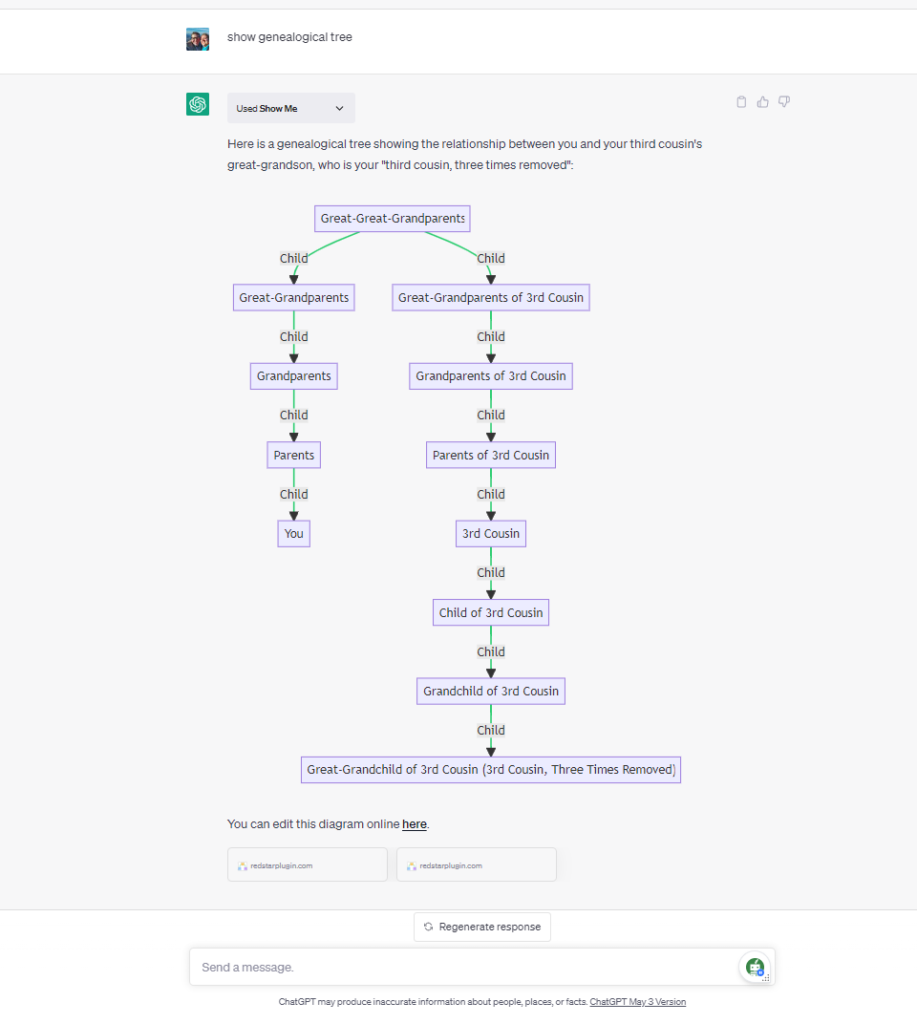
The “Show Me” plugin for ChatGPT Plus users allows the model to create diagrams using Mermaid JS, a JavaScript-based diagram and flowchart generating tool. This plugin is used to visualize data in a variety of graph formats.
Given the plugin’s ability to create diagrams, genealogists might use it to:
Visualize family relationships in the form of pedigree charts or family trees. These could outline ancestry and descent, helping to clearly see familial connections.
Create descendant charts to map out the offspring of a particular individual or couple.
Generate family group sheets that summarize vital information about a specific family, including the parents and their children, along with dates and places of birth, marriage, and death.
Develop family outline reports, which could be used to sequentially list each child in a family and their respective families.
Produce other types of diagrams that might be useful for genealogical research, like timelines or geographical maps.
Please note that these are potential uses inferred from the general capabilities of the “Show Me” plugin and the typical needs of genealogists. The actual possibilities would depend on the specific features and limitations of the plugin, and how well it integrates with genealogical research methods and tools. We were able to confirm the “Show Me” plugin’s ability to use the definition provided by Wolfram to create the diagram of between a person and their third cousin’s great-grandchild (or third cousin, three times removed).
3. BlockAtlas Plugin
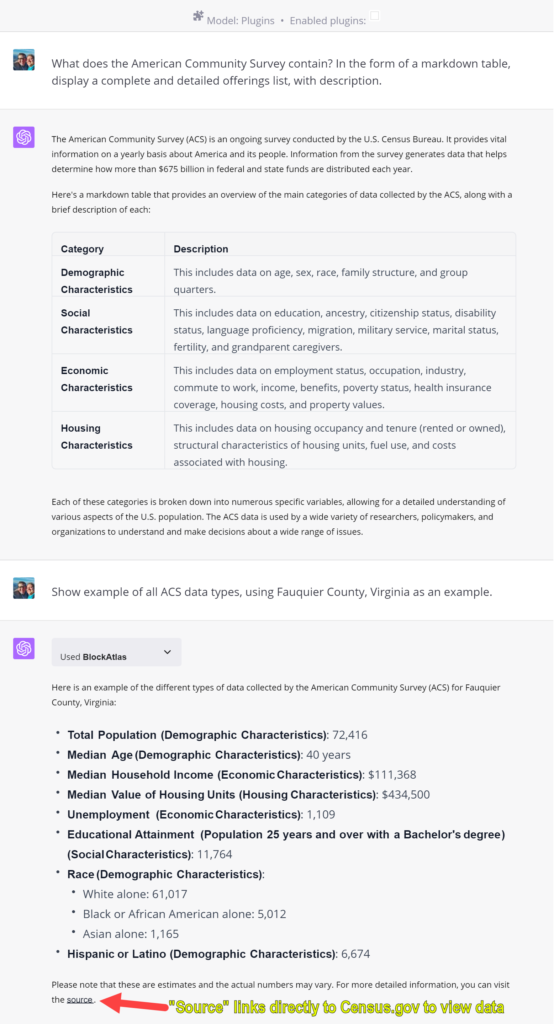
ChatGPT now includes a plugin called “BlockAtlas” which lets you use the AI to question US Census data, or, at least for now, a limited set of US Census data, the American Community Survey since 2005.
ChatGPT now includes a plugin called “BlockAtlas” which lets you use the AI to question US Census data, or, at least for now, a limited set of US Census data, the American Community Survey since 2005.
VI. A Deep Dive into the AskYourPDF Plugin
Navigating the expansive landscape of genealogical research often requires the ability to extract and process information from an array of sources, including PDF documents, text files, spreadsheets, presentation slides, and other documents. The AskYourPDF plugin, designed to work seamlessly with ChatGPT, is a powerful tool that can significantly enhance your ability to work with PDF files, and many other file types, including TXT, CSV, PPT, PPTX, EPUB, and RTF files.
1. Detailed Overview of the AskYourPDF Plugin
The AskYourPDF plugin is an ingenious tool that enables ChatGPT to analyze PDF documents with enhanced capabilities. But what does this mean in practice? This plugin can examine a PDF document, suggest changes, extract pertinent information, and even provide a summary of the document’s content. What’s more, it can be used to search through a lengthy PDF document to find specific pieces of information, saving you precious time and effort.
Security Note: It’s important to exercise caution when using online tools for analyzing sensitive documents. There are websites claiming to offer AI PDF analysis for free, but they may have ulterior motives. For this reason, it’s recommended to only use the AskYourPDF plugin via the ChatGPT prompt window on the official OpenAI website to ensure the privacy and integrity of your documents.
2. How the AskYourPDF Plugin Can Be Used in Genealogical Research
In genealogical research, the AskYourPDF plugin can prove to be a game changer. With the ability to analyze, summarize, and search through PDF documents, it can streamline the process of data extraction and interpretation. For example, if you have a lengthy historical document or a family record in PDF format, this plugin can swiftly sift through it to find relevant names, dates, and events.
Furthermore, if you’re dealing with a large collection of archival documents, the AskYourPDF plugin can help you extract and organize key information, making it easier to trace familial connections and build comprehensive family trees. The ability to quickly locate specific information in voluminous documents also means you can spend less time on manual search efforts and more time on interpreting and connecting the dots in your genealogical research.
3. Tips and Tricks for Getting the Most Out of the AskYourPDF Plugin
Be Specific in Your Queries: When asking ChatGPT to find information in a PDF using the AskYourPDF plugin, be as specific as possible. For instance, if you’re looking for a particular name or event, specify it clearly in your query. This will make the search more effective and yield more accurate results.
Leverage the Summary Feature: If you’re dealing with a long document and want a quick overview, ask ChatGPT to summarize the PDF for you. This can help you grasp the main points and decide whether you need to delve deeper into the document.
Because of the vast potential of this plugin for genealogists, additional research and posts are coming.
VII. Conclusion
As we draw to a close on our exploration of ChatGPT and its plugins, let’s take a moment to revisit the key points we’ve covered.
We started by introducing ChatGPT Plus, an advanced artificial intelligence model capable of engaging in intelligent and meaningful conversations. We learned that plugins are added tools that can enhance the functionality of ChatGPT Plus, providing additional features and expanding the range of tasks it can perform.
The value of these plugins in genealogical research came into focus, illustrating how they can streamline the research process, simplify data analysis, and allow for more efficient exploration of family histories. We also provided a step-by-step guide on how to enable, install, select, and use these plugins, thereby equipping you with the knowledge needed to integrate these tools into your research practices.
The OpenAI ChatGPT “Plugin Store” is not the only place to find plugins. There is a third-party site that offers a superior way to find ChatGPT plugins: WhatPlugin.ai.
Special thanks to a Facebook group “Genealogy and Artificial Intelligence” member for this tip.
We dove into the world of plugins that are particularly useful for genealogists, offering a brief overview of several notable ones. We then took a closer look at three top recommendations: Wolfram, Show Me, and BlockAtlas, explaining their specific features, pros, cons, and uses. This was followed by an in-depth exploration of the AskYourPDF plugin, illustrating its utility in analyzing, summarizing, and searching through PDF documents, a common requirement in genealogical research.
The journey through the capabilities and potentials of ChatGPT plugins hopefully has shed light on how these tools can become valuable allies in your genealogical quest. However, this exploration is far from exhaustive, and the full potential of these plugins can only be realized when they are put to use.
We encourage you to take these insights and explore the plugins further, integrating them into your research methods and tailoring their use to your specific needs. Each plugin brings its own unique set of capabilities, and the right combination of plugins can significantly enhance the scope and efficiency of your genealogical research. Remember, the journey of discovery does not end here. As you continue to work with ChatGPT and its plugins, you’ll undoubtedly find more ways they can aid your genealogical pursuits. Let your curiosity guide you, and let these tools empower your quest for deeper understanding of your family’s history.
Humans vs. Machines with Gary Marcus 🤖: “And the winner is…Watson!” 🏆
Last Week in AI 🧠 (segment at 44:00): “Auto-GPT and BabyAGI: How ‘autonomous agents’ are bringing generative AI to the masses” 🤖
Video: Interview: Adam Conover: A.I. and Stochastic Parrots | FACTUALLY with Emily Bender and Timnit Gebru
Prompt: A Useful, Flexible Format
My most frequent initial prompt is fairly similar to this helpful graphic I saw on Twitter this week. My most-used prompts for various topics usually take the general form:
PROMPT: Assume the role of a professor of [field] with a specialty in [sub-field]. Find below a [text of some sort]. Create a [task] in the form of a [format].
My most commonly used response formats are markdown tables (which copy-and-paste nicely into word processors) and bullet lists (which are often a next set of prompts); lesser used are hierarchical outlines and code windows.
ChatGPT Cheat Sheet:
This is one of the easiest and most effective ways to use ChatGPT.
Great use case from Denys Allen, PA Ancestors. Love the emphasis on having ChatGPT *process* information rather than gathering information (which WILL burn you), and generating text based on *given* (NOT gathered) information.
Understanding the difference between instructing chatbots to PROCESS information rather than GATHER information is vital in spring 2023 to their successful use. Too frequently we inadvertently ask ChatGPT to gather, find, or search for information without realizing that doing so is inviting the large language model to inject fiction and hallucinations into the response, because that is their nature. The antidote is to constrain and restrict the chatbot by instructing it to work ONLY on the information you provide it.
I've used ChatGPT to write family history narratives in less than five minutes. Here's the steps I used.
— Denys Allen, PA Ancestors (@denys_allen) April 24, 2023
Use Case: Historical Document Analysis and Simplification
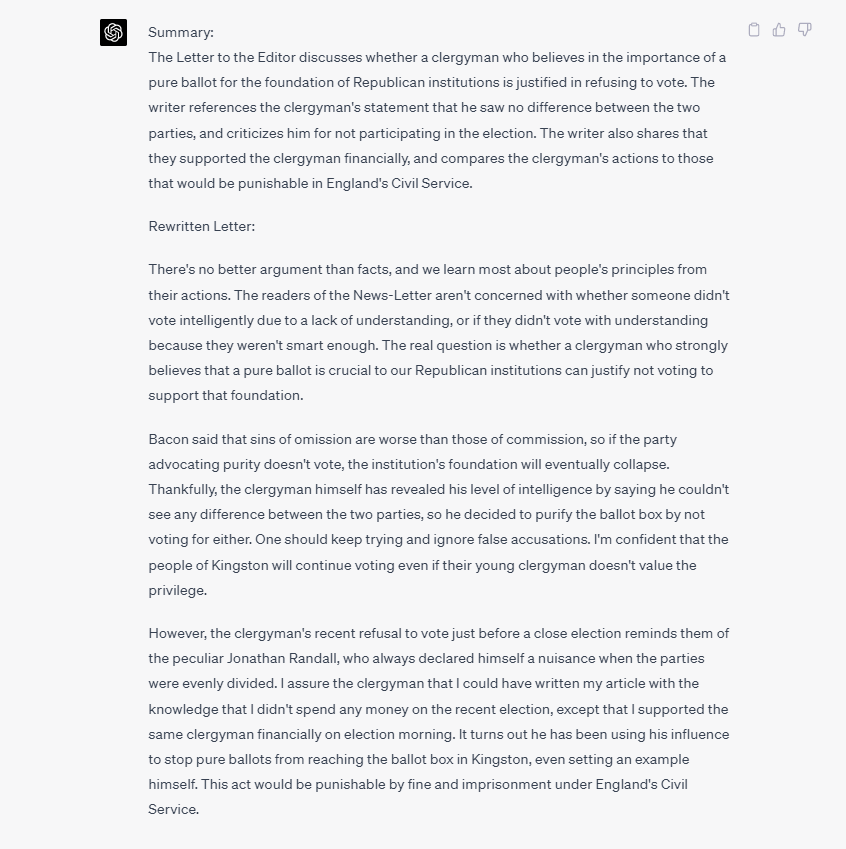
In the Genealogy and Artificial Intelligence group at Facebook, Rand Hall shared an interesting use case: Historical Document Analysis and Simplification. In this use case, the AI system is tasked with analyzing and summarizing a historical document, converting it into contemporary standard English, and comparing different summaries by extracting salient points. This involves understanding historical language and context, as well as transforming the text while maintaining its original meaning. The AI system’s capabilities can assist genealogists and researchers in interpreting, comparing, and understanding historical texts more effectively and efficiently.
PROMPT: Assume the role of a historian, linguist, and editor. Find below an 1882 Letter to the Editor. First, summarize the Letter. Then, rewrite the Letter in simple contemporary standard English, while prioritizing fidelity to the meaning of the original Letter.
Podcasts: Two Recommendations from This Week
While mowing the lawn this week, I listened to several great podcasts; these are the best two. The first, an episode of a new show from a familiar host, and the second, the best segment this week, a short introduction to “autonomous agents.”
Steve’s Note: Polished and produced, this podcast is beginner and novice-friendly, and serves an antidote to the hype and hustle surrounding AI today; this is the first episode of a limited series. Summary: The first episode of the fourth season of Humans vs Machines podcast is titled “And the winner is…Watson!” hosted by Gary Marcus. The episode talks about IBM’s Watson’s defeat of Ken Jennings on Jeopardy! and how it became one of artificial intelligence’s most dramatic triumphs. The podcast also discusses AI’s impact on humanity and its potential to change the world. The episode features interviews with David Ferrucci, an AI researcher who led the Watson project, and Ken Jennings of Jeopardy!
2️⃣ Podcast: Last Week in AI 🤖🧠 Episode: #119: Open Source GPTs, X.AI, Auto-GPT, China’s Censorship of AI Segment (timestamp: 44:00 to 53:00): Auto-GPT and BabyAGI: How ‘autonomous agents’ are bringing generative AI to the masses URL:👉 https://lastweekin.ai/p/lwiai-podcast-119-open-source-gpts
Steve’s Note: This podcast is closer to the classic two techies talking format; I found the hosts very smart and informative; this 9-minute segment is the most interesting I heard this week, introducing a topic that is likely to become more important in the weeks and months to come; you can try one of these autonomous agents at https://agentgpt.reworkd.ai/. Summary: Autonomous agents are software programs that utilize large language models like GPT-4 to automate and simplify tasks such as research, code writing, and business management. Notable examples include BabyAGI and Auto-GPT, which offer various features and functionalities. Despite their potential, these agents face challenges in maintaining focus, predictability, safety, and reliability. They also raise ethical and social concerns regarding AI operating without human supervision. Nevertheless, autonomous agents represent progress towards artificial general intelligence (AGI), where AI systems can think and act like humans.
Video: Interview: Adam Conover: A.I. and Stochastic Parrots | FACTUALLY with Emily Bender and Timnit Gebru
Large language models are unmoored from reality, so I appreciate experts who can offer a grounding perspective.
Adam Conover, host of “Adam Ruins Everything,” may not be everyone’s cup of tea, but I personally enjoy his work. In this excellent hour-long podcast/YouTube video, he interviews two important AI experts: Emily Bender and Timnit Gebru. The conversation doesn’t present a balanced, centrist perspective, but it offers a valuable skeptical viewpoint. This is a great listen while doing other things, like driving or folding laundry, but it also deserves your full attention if you are deeply interested in the topic.
Any time a linguist such as Emily Bender gets a spotlight, I cheer, and ten-fold for computational linguists. Timnit Gebru was famously fired from Google for too loudly calling attention to bias in their training data and systems. I hope these voices are more widely heard.
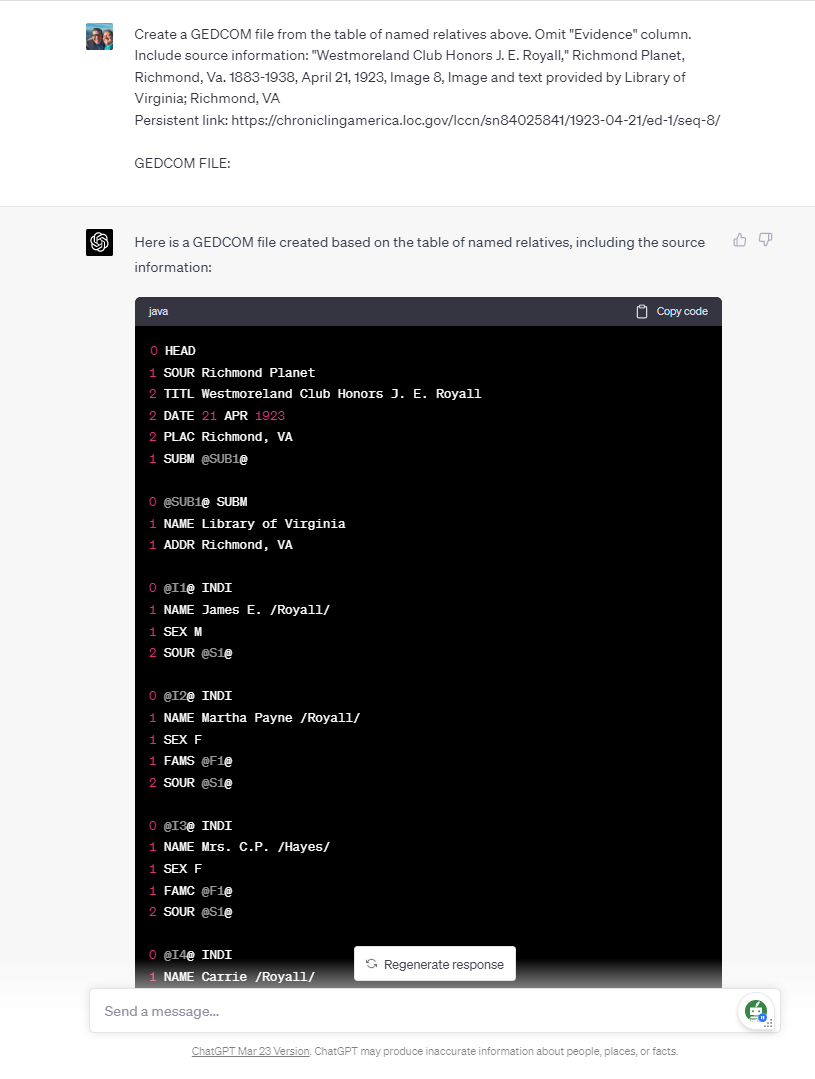
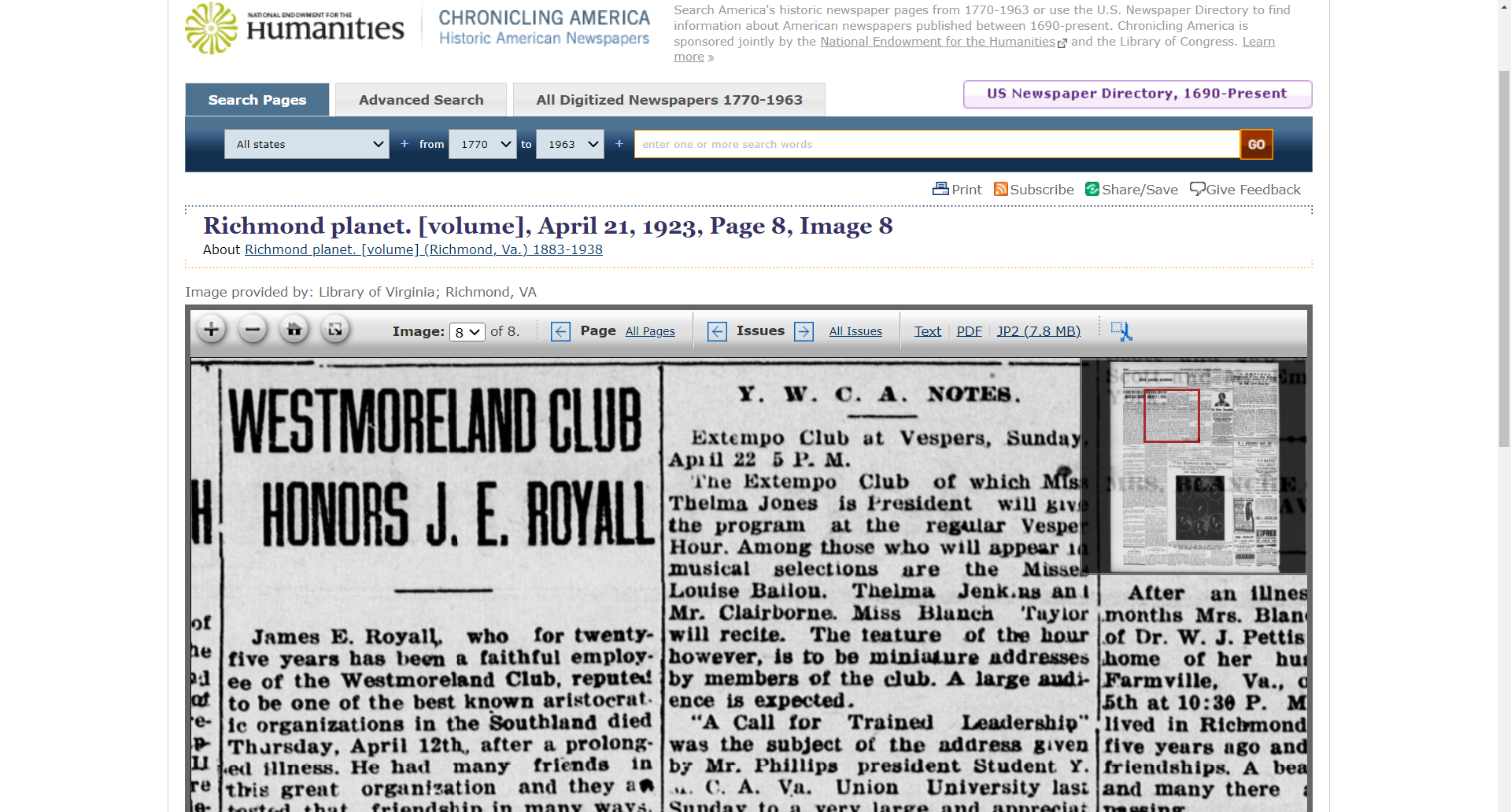
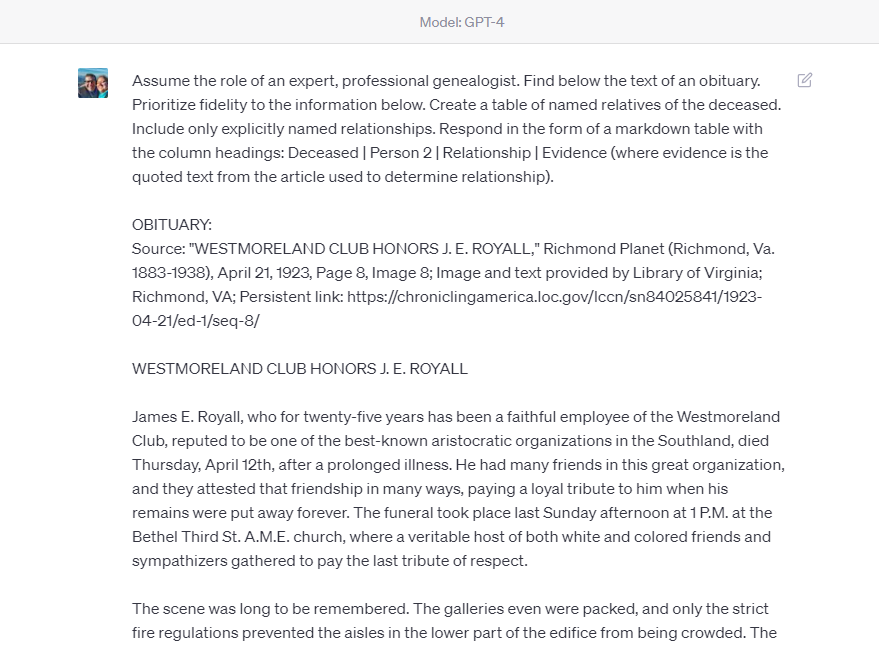
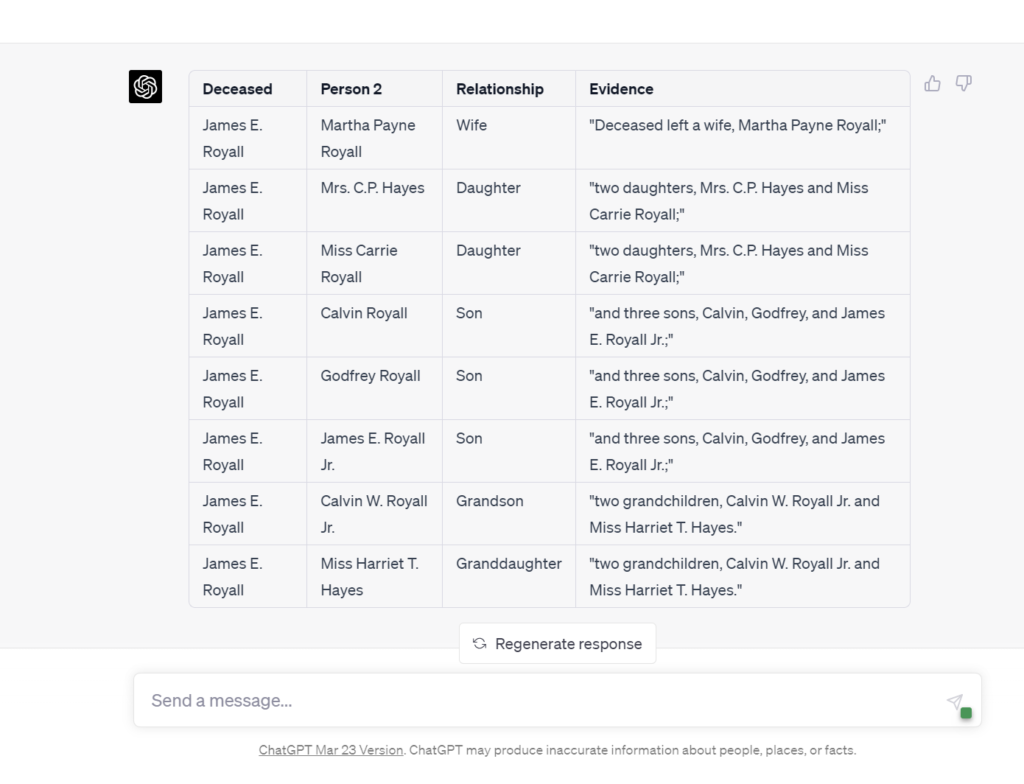
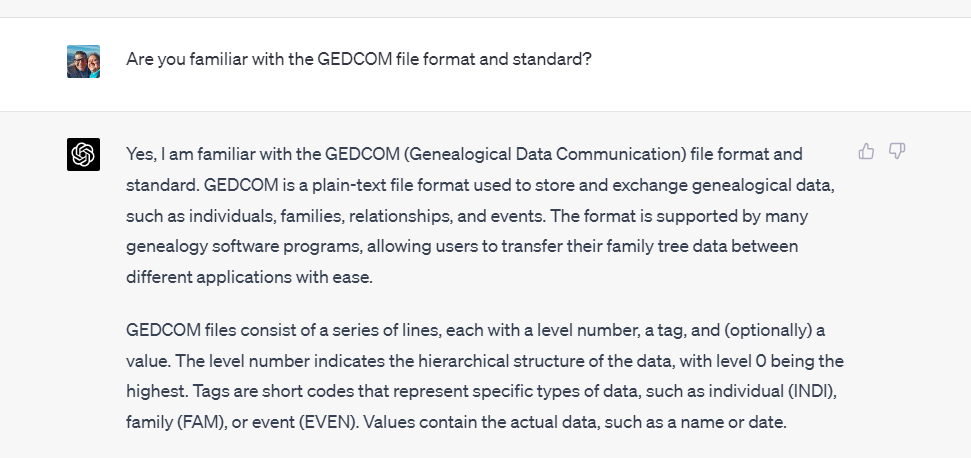
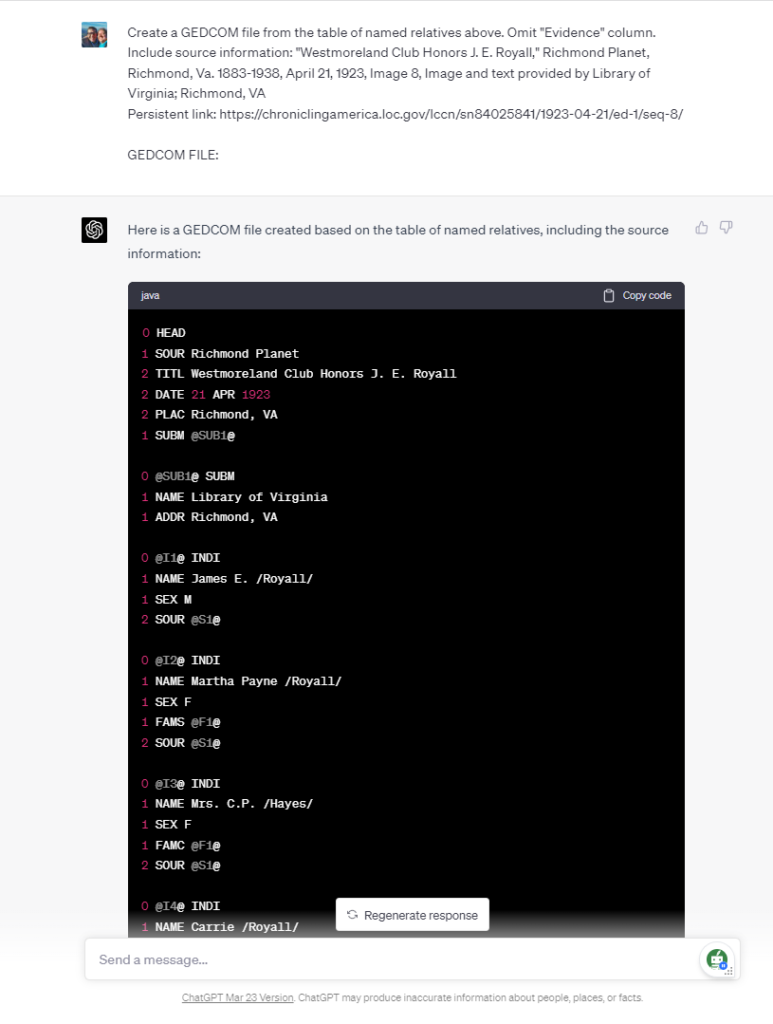
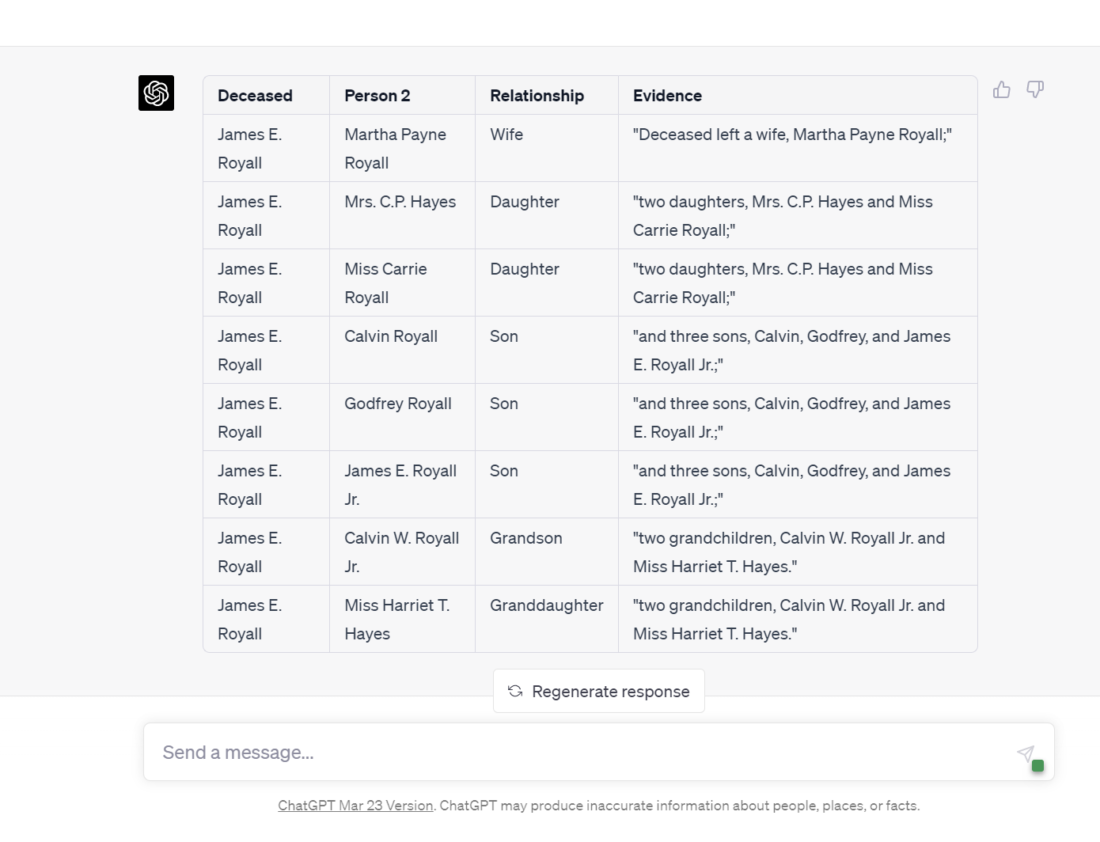
This Use Case Guide explains how to utilize artificial intelligence to extract GEDCOM (family tree) files from narrative genealogically-rich sources such as birth and wedding announcements, obituaries, and newspaper articles and the like.
This Use Case Guide begins the same as Use Case Guide #2, but deviates after Step 5 to create the GEDCOM file.
Introduction:
In the world of genealogy research, information is scattered across various sources, including narrative texts such as birth and wedding announcements, obituaries, and newspaper articles. These unstructured narratives can be challenging to manage and analyze. In this blog post, we will explore the specific task of quickly extracting valuable data such as names, relationships, dates, and places from these texts and converting them into structured data formats such as GEDCOM files, the format used to build and exchange family trees and to share genealogical data. This data extraction and storage process is tremendously beneficial for for streamlining genealogical research and making connections between family members, ancestors, and historical events.
To accomplish this task, we will be utilizing ChatGPT, an advanced AI language model developed by OpenAI. ChatGPT is capable of processing and extracting information from large volumes of text, making it an ideal tool for genealogy enthusiasts seeking to organize and analyze their research data efficiently.
Objectives:
Automate the extraction process: Utilize ChatGPT to efficiently extract names, relationships, dates, and places from various sources, such as announcements, obituaries, and newspaper articles, minimizing manual effort and speeding up the research process.
Improve data organization: Convert the extracted information into structured data formats such as GEDCOM files to facilitate better organization, storage, and retrieval of genealogical data.
Enhance data analysis: Enable genealogy researchers to analyze structured data more effectively, identify patterns, and uncover hidden connections between family members and historical events.
Save time and resources: Streamline the research process by reducing the time spent on manually extracting and organizing data, freeing up more time for analysis and interpretation.
Increase research accuracy: Minimize human errors and inconsistencies in data extraction and organization by leveraging ChatGPT’s advanced language processing capabilities.
Requirements:
Access to AI: Obtain a free or paid subscription to an artificial intelligence service such as OpenAI’s ChatGPT. Other AI options include Google’s Bard, Anthropic’s Claude, or Microsoft’s Bing Chat, but in April 2023, OpenAI’s GPT-4 based ChatGPT is strongest.
Input data: Provide ChatGPT with text from sources such as birth or wedding announcements, obituaries, and newspaper articles, containing information about names, relationships, dates, and places relevant to genealogical research.
Family tree software to read and use the GEDCOM file created here. Most genealogy applications and website and utilize GEDCOM files to share family trees and genealogical data; these include desktop applications such as RootsMagic, Family Tree Maker, Gramps, and online resources such as Ancestry, DNA Painter, MyHeritage, and FindMyPast.
Optional: Formatting requirements: Ensure that the input text is free of major errors or inconsistencies. Although ChatGPT can handle some level of noise in the data, better-formatted input will yield more accurate and reliable results. Our earlier Use Case Guide on Cleaning OCR Text quickly steps you through this process.
Helpful: Genealogy research resources: Familiarize yourself with various genealogical research methods, repositories, and databases to: (1) know where to find the texts to data mine, and (2) effectively contextualize and validate the information extracted by ChatGPT.
Caveats for the Careful on Large Language Models in Genealogy (April 2023):
No live internet access, with data current only up to September 2021
Unreliable for fact-based research, relying on statistical language patterns
Official ChatGPT warning: may produce inaccurate information
Mainly used for information processing, not discovering new data
Limited to 1500 words input/output (approx. 4k tokens)
Chatbots lack traditional memory, necessitating careful management of conversation
See Use Case Guide #1: Cleaning OCR Text for detailed information on each caveat above.
How To: Methodology:
Step 1: Get a free or paid AI account. In April 2023, OpenAI’s GPT-4 based ChatGPT is strongest, but the free version based on GPT-3.5 will also work; you can get a free account at https://chat.openai.com/auth/login.
Step 2: Find and prepare your input text. In spring 2023, most publicly-accessibly AI systems are based on large language models that are untethered to reality or knowledge systems; they work by selecting the next statistically most likely word based on your prompt and previous utterances in your chat. For this reason, fact-based researchers such as genealogists restrict the AI to working only on the data you input. In this series of Use Case Guides, we have been using texts from publicly available sources such as the Chronicling America newspaper archive from The Library of Congress and the National Endowment for the Humanities. Our Use Case Guide #1: How to Clean Raw and Poor OCR Text breaks-down this step down in a detailed walk-through; refer to that guide if you would like help with this step. This Guide uses an obituary first published 100 years ago this week in one of my state’s capital newspapers: “Westmoreland Club Honors J. E. Royall,” Richmond Planet (Richmond, VA) 1883-1938, April 21, 1923, Page 8, Image 8; Image and text provided by Library of Virginia; Richmond, VA; < https://chroniclingamerica.loc.gov/lccn/sn84025841/1923-04-21/ed-1/seq-8/ > [accessed: 17 April 2023]. I processed and cleaned the raw (nightmarish) Chronicling American text using the steps in Usage Guide #1.
Step 3: Start a new ChatGPT session. It is important to start a new ChatGPT session when beginning a new genealogical task because (lacking both short-term and long-term memory) the chatbot re-ingests up to the previous 400 lines of your “dialogue” in order to simulate a conversation; this can have the unintended effect of contaminating your chat with information from pervious utterances in the current session. See “Don’t Get Burned by Spicy Autocomplete” for more information about this concern.
Step 4: Write your prompt. Your prompt will include two parts: (a) your instructions to the AI, and (b) the input text from which you want to extract structured genealogical data. We’ll discuss both parts in turn.
Step 4(a): Write your instructions to the AI. The instructional component of a prompt itself has subcomponents. Here you can see that the first part of the instructions are directing the AI to assume a role, in this case, of a genealogist; this has the effect of providing a context for the AI’s response. Next, action verbs to direct the AI; in this case “Find,” “Prioritize,” “Create,” “Include,” and “Respond.” These will change depending on your task; if you have troubling crafting this part, ChatGPT can help: write the instructions as best you can, then use ChatGPT to “convert these statements to the imperative mood“; this has the effect of changing your statements to the desired form “[you, the AI] do (verb) this.” Finally, you will see that here we are directing the AI to create a table of data; this is the most simple form of structured data, and perhaps the most meaningful and accessible to the human genealogist! Later, I’ll show you how to transform this table data into forms more suited for genealogical tools such as tree making applications, spreadsheets, and databases. To assist in the verification of our work, the AI is instructed to show its work, that is, to include the evidence it used to make a relationship determination by quoting the passage it relied upon to state a relationship. So far, thus prompted, contained, restrained, and instructed, I have not witnessed a fabrication or hallucination of a relationship. If you do, capture and save your whole session; I’d love to see it.
PROMPT: Assume the role of an expert, professional genealogist. Find below the text of an obituary. Prioritize fidelity to the information below. Create a table of named relatives of the deceased. Include only explicitly named relationships. Respond in the form of a markdown table with the column headings: Deceased | Person 2 | Relationship | Evidence (where evidence is the quoted text from the article used to determine relationship).
Step 4(b): Paste your input text below the instructions. Below your instruction, paste the text from which you would like to AI to process. Remember, as of April 2023, we are limited to about 1500 words input. Folks may tell you that you can upload more, perhaps by asking the AI to accept your input in parts, and it will agree to do that, but if you upload more than about 400 lines or about 1500 words, the AI will drop and ignore parts of your input. (In OpenAI’s technical jargon, we are limited to 4096 “tokens,” more akin to syllables than words, but for simplicities sake, about 1500 words input and 1500 words output.) [NOTE: If you need to enter a newline or line break in the ChatGPT edit box, Shift-Enter will give you a new line without submitting the request.]
Step 5: Examine your results; adjust as needed. Just as writing means re-writing, so prompt engineering means prompting and re-prompting. I never get the best results on a first attempt, so I expect to refine a prompt until the AI is producing the data in the form I want.
The results here are exactly as expected. This use case is a greater accomplishment than may be apparent to some. The imagination or understanding of how this use case will soon scale (become more powerful) is sometimes the missing piece. Here, eight relationships were extracted from a 700-word obituary; that is admittedly weak tea. But in time we will be able to process book chapters (50-pages announced already), whole books (this year or 2024), and entire archives after that. That’s the big deal that’s coming.
Step 6: Set the context for your GEDCOM request prompt. Set the context of the GEDCOM request by asking the AI about its familiarity with GEDCOM files.
PROMPT: Are you familiar with the GEDCOM file format and standard?
Step 7: Prompt for the creation of the GEDCOM file. There are several items to note about this prompt. First, we are directing to AI to transform the table of named relationship created earlier; that table included direct quotations from the source article for ease of validation and verification, but since that is not desired in the GEDCOM file, we instruct the artificial intelligence to omit that column of information. We do want the source of this information included with the GEDCOM file, so we supply that here to ChatGPT.
PROMPT: Create a GEDCOM file from the table of named relatives above. Omit "Evidence" column. Include source information: "Westmoreland Club Honors J. E. Royall," Richmond Planet, Richmond, Va. 1883-1938, April 21, 1923, Image 8, Image and text provided by Library of Virginia; Richmond, VA
Persistent link: https://chroniclingamerica.loc.gov/lccn/sn84025841/1923-04-21/ed-1/seq-8/

GEDCOM FILE:
Step 8: Examine your results. I have found that ChatGPT very reliably creates accurate and functional GEDCOM files using this complete method. Other artificial intelligences may not be as reliable: Anthropic’s Claude will create an accurate GEDCOM file, but fail to add the newlines (carriage returns or hard line breaks) needed to create a functional GEDCOM; asking again for those newline characters usually works; I have not been able to successfully create an accurate and functional GEDCOM with Google’s Bard, Perplexity AI, nor Microsoft’s Bing Chat.
Step 9: Save your results. You need to save your GEDCOM file as a text file. This means finding and using your computer’s text file editor. The basic Windows text editor is Notepad, so Windows users will open Notepad with a new, blank file. Then, in the ChatGPT code window, click the “Copy code” link at the upper right corner of the code window. Switch to the blank text file, paste the GEDCOM data into the text file, and save the file with a name such as “Royall.ged”; the “.ged” extension (last characters of the file name) is important. Remembering to include this file name extension will enable your genealogical apps and sites to recognize this text file as a family tree file.
Step 10: Open, test, verify, and confirm your work. At this point, you can open your genealogy application such as RootsMagic, Gramps, or Family Tree Maker and open or import the GEDCOM file (you will need to check that application’s instructions for opening and/or importing a GEDCOM file). You will usually want to open the GEDCOM file as a new tree, as opposed to merging it into an existing tree. Compare the information now in your new family tree to the information stated in the birth or wedding announcement, obituary, or newspaper article.
Results and Analysis:
Expected Outcomes: By using AI for this genealogy task, you can expect the extraction of key information such as names, relationships, dates, and places from various text sources, subsequently saving the data in a structured format such as GEDCOM files. This will facilitate easier sharing of family trees and the exchange of genealogical information.
Accuracy and Reliability: While ChatGPT is a powerful AI model, the accuracy and reliability of the results will depend on the quality of the input data and the clarity of the information present. In most cases, ChatGPT can accurately extract relevant data points, but manual review and validation is required to ensure the information is consistent with your research goals.
Conclusion:
In conclusion, using ChatGPT for extracting structured data from narrative sources like birth and wedding announcements, obituaries, and newspaper articles offers significant benefits and some limitations. The technology has the potential to greatly enhance genealogy research by automating the extraction of names, relationships, dates, and places, saving time and effort for researchers. The ability to convert this information into a structured data format such GEDCOM files further streamlines the research process and facilitates data organization, the sharing of family trees and the exchange of genealogical information.
However, limitations need to be considered. ChatGPT’s accuracy may vary depending on the quality of the input text, especially if dealing with raw OCR text or handwritten documents. Additionally, ChatGPT might struggle with complex relationships and ambiguous information present in the narratives. To overcome these challenges, AI Genealogists need to manually review and verify the extracted data.
For further improvement and exploration of AI in genealogy, researchers should consider integrating ChatGPT with other natural language processing tools or specialized genealogy software to enhance its capabilities. Collaborating with AI developers to create tailored models for genealogy research could further optimize the extraction process and improve overall accuracy. Encouraging users to share their experiences and provide feedback will contribute to the ongoing refinement of AI solutions for genealogy.
Ultimately, employing AI tools like ChatGPT for genealogy research has the potential to revolutionize the field, making it more accessible, efficient, and accurate. As AI technology continues to evolve, the possibilities for its application in genealogy will only expand, benefiting researchers and family historians alike.
Call to Action:
Try ChatGPT for your genealogy tasks: We encourage you to harness the power of ChatGPT for your genealogy research. Experience firsthand the benefits of using AI to extract structured data from narrative sources like birth and wedding announcements, obituaries, and newspaper articles.
Share your experiences: We would love to hear about your experiences using ChatGPT for genealogy tasks. Share your successes, challenges, or any interesting insights you’ve gained through utilizing AI in your research. Your feedback can help improve the technology and benefit the entire genealogy community.
Ask questions and seek advice: If you have any questions or need assistance with using ChatGPT for genealogy tasks, feel free to post them in the comments section below or reach out to us on social media. Our community of experts and fellow genealogy enthusiasts will be more than happy to help.
Connect with others and expand your knowledge: Join genealogy forums, social media groups, and other online communities where you can connect with others who are using AI for genealogy research. These platforms are excellent resources for sharing tips, tricks, and best practices, as well as staying up-to-date with the latest advancements in AI technology.
Explore additional resources: To further enhance your understanding of AI in genealogy and to make the most out of ChatGPT, check out the provided links to tutorials, support forums, and related articles. Continuously learning and staying informed will help you maximize the potential of AI in your genealogy research.
This Use Case Guide explains how to utilize AI to extract structured data such as tables and CSV files from narrative genealogically-rich sources such as birth and wedding announcements, obituaries, and newspaper articles and the like.
Introduction:
In the world of genealogy research, information is scattered across various sources, including narrative texts such as birth and wedding announcements, obituaries, and newspaper articles. These unstructured narratives can be challenging to manage and analyze. In this blog post, we will explore the specific task of quickly extracting valuable data such as names, relationships, dates, and places from these texts and converting them into structured data formats such as tables, JSON files, and near-universally usable CSV files (great for importing into spreadsheets such as Excel and Google Sheets and into databases such as MySQL and AirTable). This data extraction and storage process is tremendously beneficial for for streamlining genealogical research and making connections between family members, ancestors, and historical events.
To accomplish this task, we will be utilizing ChatGPT, an advanced AI language model developed by OpenAI. ChatGPT is capable of processing and extracting information from large volumes of text, making it an ideal tool for genealogy enthusiasts seeking to organize and analyze their research data efficiently. Stay tuned as we dive into the objectives, requirements, and methodology of using ChatGPT for genealogy data extraction and organization.
Objectives:
Automate the extraction process: Utilize ChatGPT to efficiently extract names, relationships, dates, and places from various sources, such as announcements, obituaries, and newspaper articles, minimizing manual effort and speeding up the research process.
Improve data organization: Convert the extracted information into structured data formats (e.g., tables, JSON, and CSV files) to facilitate better organization, storage, and retrieval of genealogical data.
Enhance data analysis: Enable genealogy researchers to analyze structured data more effectively, identify patterns, and uncover hidden connections between family members and historical events.
Save time and resources: Streamline the research process by reducing the time spent on manually extracting and organizing data, freeing up more time for analysis and interpretation.
Increase research accuracy: Minimize human errors and inconsistencies in data extraction and organization by leveraging ChatGPT’s advanced language processing capabilities.
Requirements:
Access to AI: Obtain a free or paid subscription to an artificial intelligence service such as OpenAI’s ChatGPT. Other AI options include Google’s Bard, Anthropic’s Claude, or Microsoft’s Bing Chat, but in April 2023, OpenAI’s GPT-4 based ChatGPT is strongest.
Input data: Provide ChatGPT with text from sources such as birth or wedding announcements, obituaries, and newspaper articles, containing information about names, relationships, dates, and places relevant to genealogical research.
Optional: Formatting requirements: Ensure that the input text is free of major errors or inconsistencies. Although ChatGPT can handle some level of noise in the data, better-formatted input will yield more accurate and reliable results. Our earlier Use Case Guide on Cleaning OCR Text quickly steps you through this process.
Optional: Data storage and processing tools: Utilize software and tools like Microsoft Excel, a CSV editor, or a MySQL client to store, manage, and analyze the structured data extracted by ChatGPT.
Helpful: Genealogy research resources: Familiarize yourself with various genealogical research methods, repositories, and databases to: (1) know where to find the texts to data mine, and (2) effectively contextualize and validate the information extracted by ChatGPT.
Caveats for the Careful on Large Language Models in Genealogy (April 2023):
No live internet access, with data current only up to September 2021
Unreliable for fact-based research, relying on statistical language patterns
Official ChatGPT warning: may produce inaccurate information
Mainly used for information processing, not discovering new data
Limited to 1500 words input/output (approx. 4k tokens)
Chatbots lack traditional memory, necessitating careful management of conversation
See Use Case Guide #1: Cleaning OCR Text for detailed information on each caveat above.
Caveats for the Bold
These initial Use Cases are admittedly weak tea: limited and narrow in function and capacity; these constraints reflect the abilities and token limits of AI systems for fact-based research in April 2023.
For now, think “Lego pieces” not “Post-Doc Assistant”; that is, in spring 2023, don’t imagine AI is a magic genie that can do all your work for you, like a post-doc assistant; instead, AI-assisted genealogical tasks are now more like a growing Swiss army knife or set of Lego blocks with which you can build tools to solve larger problems. It doesn’t take too much creativity to imagine how even these modest use cases can today be linked/chained and combined with each other to accomplish larger genealogical goals; soon enough, I imagine, the larger goals will be one-step AI-assisted tasks. But, for now, enjoy playing with the fundamental building blocks of more powerful systems to come.
How To: Methodology:
Step 1: Get a free or paid AI account. In April 2023, OpenAI’s GPT-4 based ChatGPT is strongest, but the free version based on GPT-3.5 will also work; you can get a free account at https://chat.openai.com/auth/login.
Step 2: Find and prepare your input text. In spring 2023, most publicly-accessibly AI systems are based on large language models that are untethered to reality or knowledge systems; they work by selecting the next statistically most likely word based on your prompt and previous utterances in your chat. For this reason, fact-based researchers such as genealogists restrict the AI to working only on the data you input. In this series of Use Case Guides, we have been using texts from publicly available sources such as the Chronicling America newspaper archive from The Library of Congress and the National Endowment for the Humanities. Our Use Case Guide #1: How to Clean Raw and Poor OCR Text breaks-down this step down in a detailed walk-through; refer to that guide if you would like help with this step. This Guide uses an obituary first published 100 years ago this week in one of my state’s capital newspapers: “Westmoreland Club Honors J. E. Royall,” Richmond Planet (Richmond, VA) 1883-1938, April 21, 1923, Page 8, Image 8; Image and text provided by Library of Virginia; Richmond, VA; < https://chroniclingamerica.loc.gov/lccn/sn84025841/1923-04-21/ed-1/seq-8/ > [accessed: 17 April 2023]. I processed and cleaned the raw (nightmarish) Chronicling American text using the steps in Usage Guide #1.
Step 3: Start a new ChatGPT session. It is important to start a new ChatGPT session when beginning a new genealogical task because (lacking both short-term and long-term memory) the chatbot re-ingests up to the previous 400 lines of your “dialogue” in order to simulate a conversation; this can have the unintended effect of contaminating your chat with information from pervious utterances in the current session. See “Don’t Get Burned by Spicy Autocomplete” for more information about this concern.
Step 4: Write your prompt. Your prompt will include two parts: (a) your instructions to the AI, and (b) the input text from which you want to extract structured genealogical data. We’ll discuss both parts in turn.
Step 4(a): Write your instructions to the AI. The instructional component of a prompt itself has subcomponents. Here you can see that the first part of the instructions are directing the AI to assume a role, in this case, of a genealogist; this has the effect of providing a context for the AI’s response. Next, action verbs to direct the AI; in this case “Find,” “Prioritize,” “Create,” “Include,” and “Respond.” These will change depending on your task; if you have troubling crafting this part, ChatGPT can help: write the instructions as best you can, then use ChatGPT to “convert these statements to the imperative mood“; this has the effect of changing your statements to the desired form “[you, the AI] do (verb) this.” Finally, you will see that here we are directing the AI to create a table of data; this is the most simple form of structured data, and perhaps the most meaningful and accessible to the human genealogist! Later, I’ll show you how to transform this table data into forms more suited for genealogical tools such as tree making applications, spreadsheets, and databases. To assist in the verification of our work, the AI is instructed to show its work, that is, to include the evidence it used to make a relationship determination by quoting the passage it relied upon to state a relationship. So far, thus prompted, contained, restrained, and instructed, I have not witnessed a fabrication or hallucination of a relationship. If you do, capture and save your whole session; I’d love to see it.
PROMPT: Assume the role of an expert, professional genealogist. Find below the text of an obituary. Prioritize fidelity to the information below. Create a table of named relatives of the deceased. Include only explicitly named relationships. Respond in the form of a markdown table with the column headings: Deceased | Person 2 | Relationship | Evidence (where evidence is the quoted text from the article used to determine relationship).
Step 4(b): Paste your input text below the instructions. Below your instruction, paste the text from which you would like to AI to process. Remember, as of April 2023, we are limited to about 1500 words input. Folks may tell you that you can upload more, perhaps by asking the AI to accept your input in parts, and it will agree to do that, but if you upload more than about 400 lines or about 1500 words, the AI will drop and ignore parts of your input. (In OpenAI’s technical jargon, we are limited to 4096 “tokens,” more akin to syllables than words, but for simplicities sake, about 1500 words input and 1500 words output.) [NOTE: If you need to enter a newline or line break in the ChatGPT edit box, Shift-Enter will give you a new line without submitting the request.]
Step 5: Examine your results; adjust as needed. Just as writing means re-writing, so prompt engineering means prompting and re-prompting. I never get the best results on a first attempt, so I expect to refine a prompt until the AI is producing the data in the form I want.
The results here are exactly as expected. This use case is a greater accomplishment than may be apparent to some. The imagination or understanding of how this use case will soon scale (become more powerful) is sometimes the missing piece. Here, eight relationships were extracted from a 700-word obituary; that is admittedly weak tea. But in time we will be able to process book chapters (50-page capacity announced already by OpenAI), whole books (this year or 2024), and entire archives after that. That’s the big deal that’s coming.
Step 6: Save your work. Save both your ChatGPT session and save your response to a text file. You can now easily download your entire ChatGPT history. You may also want to copy-and-paste the table data to a local file; some of the formatting will be lost if you paste into a plain text file, but pasting into a Word or Google Docs file will preserve the markdown formatting, if that is important to you.
Step 7: Wring further data from the text. Named relationships are not the only data that ChatGPT can extract from a text. ChatGPT excels at FAN processing of a text (finding friends, associates, and neighbors that are mentioned in a text). People (“entities” in AI jargon) are not the only data that can be extracted. ChatGPT will also extract places, events, and dates from a text. For example, after extracting the explicit relationships from the obituary, I instructed ChatGPT to extract all named associates from the text:
PROMPT: Create a table of named associates of the deceased; broaden the meaning of associates as wide as possible to include ALL named people in the obituary if their relationship or function at funeral is stated. Respond in the form of a markdown table with the column headings: Deceased | Person 2 | Relationship.
Step 8: Create derivative data structures and formats. You can now instruct ChatGPT to create alternate file types such as CSV (common separated values) files which are nearly universally usable by spreadsheets (Excel, Google Sheets), databases (MySQL, MS Access, AirTable), and word processors (Word, Google Sheets). For the technically inclined, GPT-4 is able to convert the table data to JSON files for processing by web applications and custom programming scripts such as Python. In the next Usage Guide, I’ll show you step-by-step how to create a GEDCOM file, used widely to create family trees and exchange genealogical data. Here you can see all how the named associates of the deceased may quickly be downloaded as a CSV file:
Step 9: As a last step, ask the AI what you forgot. This is always fun, and reveals that while I may be focused on one type or piece of information, the AI may help me uncover the missing piece to solve a brick wall that was under my nose but which I’d overlooked.
PROMPT: What other genealogically relevant information might I also extract as structed data from this obituary?
Results and Analysis:
Expected Outcomes: By using AI for this genealogy task, you can expect the extraction of key information such as names, relationships, dates, and places from various text sources, subsequently saving the data in structured formats like table data, JSON, and CSV files. This will facilitate easier data analysis and integration into your genealogical research.
Accuracy and Reliability: While ChatGPT is a powerful AI model, the accuracy and reliability of the results will depend on the quality of the input data and the clarity of the information present. In most cases, ChatGPT can accurately extract relevant data points, but manual review and validation is required to ensure the information is consistent with your research goals.
Conclusions:
In conclusion, using ChatGPT for extracting structured data from narrative sources like birth and wedding announcements, obituaries, and newspaper articles offers significant benefits and some limitations. The technology has the potential to greatly enhance genealogy research by automating the extraction of names, relationships, dates, and places, saving time and effort for researchers. The ability to convert this information into structured data formats such as table data, JSON, and CSV files further streamlines the research process and facilitates data organization.
However, limitations need to be considered. ChatGPT’s accuracy may vary depending on the quality of the input text, especially if dealing with raw OCR text or handwritten documents. Additionally, ChatGPT might struggle with complex relationships and ambiguous information present in the narratives. To overcome these challenges, AI Genealogists need to manually review and verify the extracted data.
For further improvement and exploration of AI in genealogy, researchers should consider integrating ChatGPT with other natural language processing tools or specialized genealogy software to enhance its capabilities. Collaborating with AI developers to create tailored models for genealogy research could further optimize the extraction process and improve overall accuracy. Encouraging users to share their experiences and provide feedback will contribute to the ongoing refinement of AI solutions for genealogy.
Ultimately, employing AI tools like ChatGPT for genealogy research has the potential to revolutionize the field, making it more accessible, efficient, and accurate. As AI technology continues to evolve, the possibilities for its application in genealogy will only expand, benefiting researchers and family historians alike.
Calls to Action:
Try ChatGPT for your genealogy tasks: We encourage you to harness the power of ChatGPT for your genealogy research. Experience firsthand the benefits of using AI to extract structured data from narrative sources like birth and wedding announcements, obituaries, and newspaper articles.
Share your experiences: We would love to hear about your experiences using ChatGPT for genealogy tasks. Share your successes, challenges, or any interesting insights you’ve gained through utilizing AI in your research. Your feedback can help improve the technology and benefit the entire genealogy community.
Ask questions and seek advice: If you have any questions or need assistance with using ChatGPT for genealogy tasks, feel free to post them in the comments section below or reach out to us on social media. Our community of experts and fellow genealogy enthusiasts will be more than happy to help.
Connect with others and expand your knowledge: Join genealogy forums, social media groups, and other online communities where you can connect with others who are using AI for genealogy research. These platforms are excellent resources for sharing tips, tricks, and best practices, as well as staying up-to-date with the latest advancements in AI technology.
Explore additional resources: To further enhance your understanding of AI in genealogy and to make the most out of ChatGPT, check out the provided links to tutorials, support forums, and related articles. Continuously learning and staying informed will help you maximize the potential of AI in your genealogy research.