OpenAI’s New Model GPT-4o: Game-Changer for Free AI Access, Possible Handwritten Text Recognition (HTR) Advance

Today’s review of GPT-4o includes:
● a general overview of the tool,
● a closer examination of the model’s ability to recognize handwritten text, and
● a failure to confirm reported improvement of text rendering in images.

New model is fast, free, and improved

On Monday 13 May 2024, OpenAI made some waves with the announcement of their latest AI model release, GPT-4o (“o” for Omni, a nod to the integration of several models for text, image, and audio), a move that seems strategically timed to overshadow competitors. The most significant beneficiaries of this release are undoubtedly the free users. In a move that disrupts the status quo, OpenAI is rolling out features previously reserved for ChatGPT Plus subscribers. Over the next week, free-tier users will gain access to:

  • GPT-4 level intelligence
  • Web-integrated responses
  • Data analysis and chart creation
  • image-based interactions
  • File uploads for summarizing, writing, or analyzing
  • GPT Store and custom GPT exploration
  • Memory-enhanced interactions

While paying subscribers receive some updates (increased usage rates), including increased access to GPT-4o, the real spotlight is on free users. OpenAI describes GPT-4o as their new flagship model, boasting modest improvements over GPT-4-Turbo—primarily in speed and cost-efficiency.

This move raises questions about the value of the ChatGPT Plus subscription. The ability to create, save, and share custom GPTs might retain some subscribers (the ability to create and share custom GPTs remains a premium feature), but OpenAI will need to offer more to justify the cost. There’s already speculation about a rumored GPT-4.5o release in coming weeks, but we’ll see if that actually materializes (i.e., an interim release for paid subscribers until GPT-5 is unveiled, perhaps after the November 2024 U.S. presidential elections).

In the AI arena, the competition is heating up. OpenAI’s latest release might seem like a reactionary measure to competitor announcements, but it’s also a proactive step in staying ahead. The improvements in GPT-4o, particularly its speed, hint at the future potential for AI agents. Despite the lack of immediate breakthroughs in reasoning or memory, the accelerated response times are a significant leap forward.

Ethan Mollick, a notable figure in AI circles, highlighted the practical implications of today’s announcement. By removing the financial barrier to accessing GPT-4o, OpenAI is set to accelerate global adoption and address longstanding equity issues in education. This move could democratize AI, allowing more people to experiment with and benefit from these advanced tools.

As we navigate this season, the rapid advancements and strategic plays by industry leaders promise an exhilarating few weeks ahead. Whether you’re a seasoned AI enthusiast or a curious newcomer, the landscape is evolving faster than ever, and OpenAI’s latest moves ensure they remain at the forefront of this exciting journey.

Reports of some improvement in HTR is confirmed

The president and a co-founder of OpenAI, Greg Brockman, amplified early claims from some researchers that GPT-4o has improved handwritten text recognition (HTR) abilities, retweeting a post from Twitter user “Generative History” (@HistoryGPT), who made the claim, “GPT-4o is truly remarkable on 18th handwriting. I gave it the following letter and asked it for a transcription. A couple of very minor errors…amazing!”

I tested this claim.
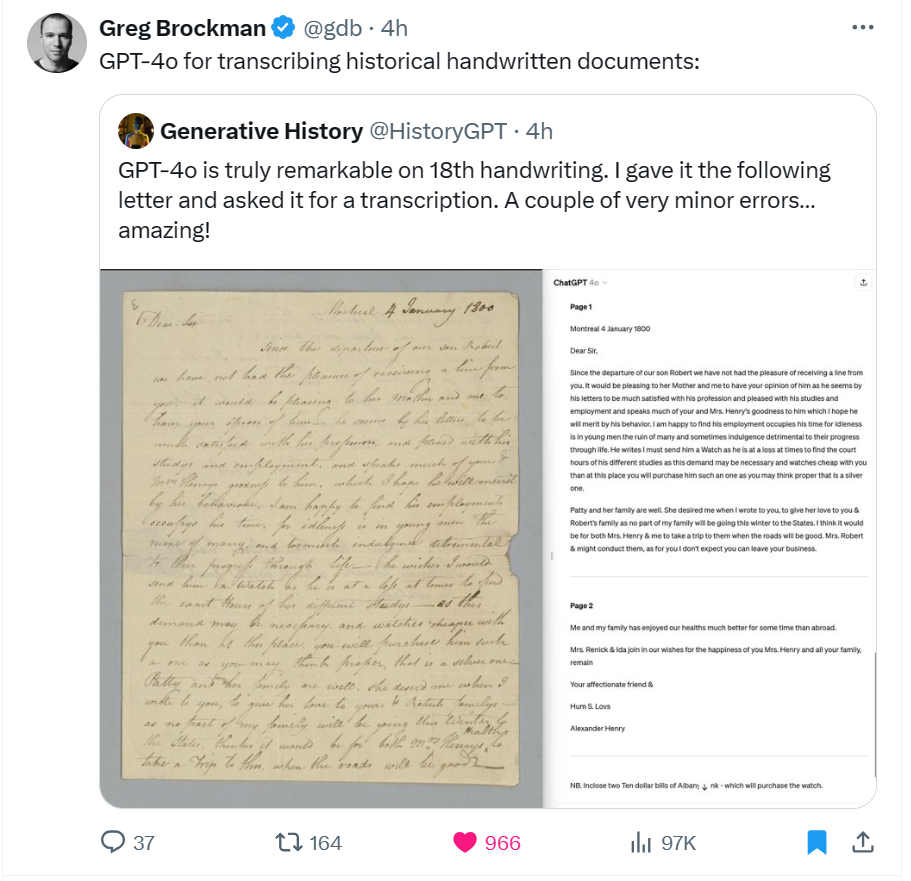
To investigate the claim, I found a handwritten probate file mentioning my third-great-grandfather using FamilySearch’s Full-Text Search. I manually created an accurate transcription of the file. Then, I compared three AI-powered transcriptions, that provided by FamilySearch, one from the previous best OpenAI model, GPT-4, and finally the transcript from GPT-4o.

ModelErrors
FamilySearch22
GPT-417
GPT-4o9

The transcript provided by FamilySearch contained 22 errors; the transcript provided by GPT-4 was only marginally better than that with 17 errors. But the transcript provided by the new GPT-4o returned only nine errors.
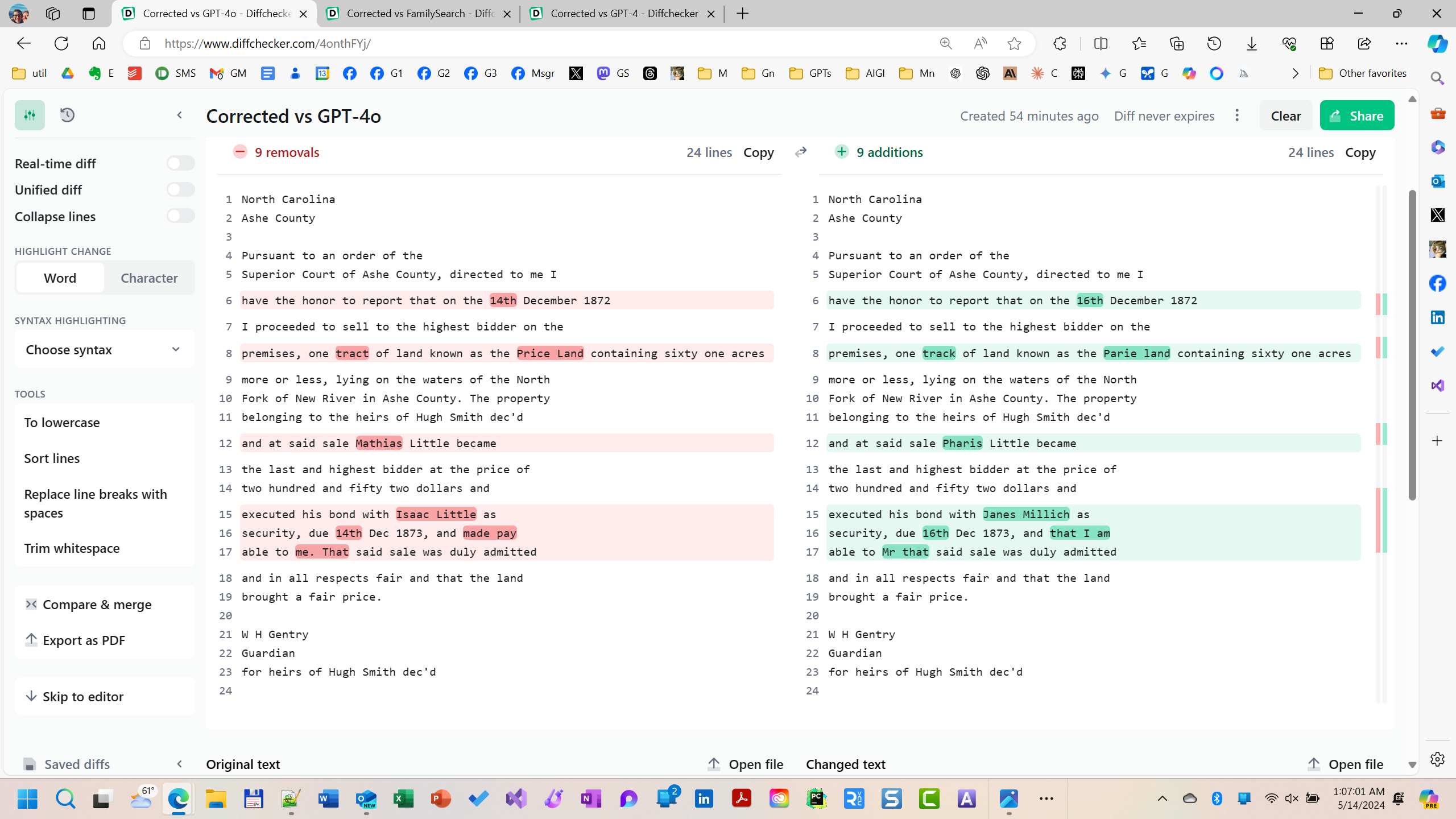
Handwritten text recognition is hard. And a small handful of tests are not adequate to confirm an advance. But these cursory evaluations are encouraging, at least encouraging enough bring to the attention of the community for further scrutiny. So between FamilySearch’s rich trove of resources and OpenAI’s providing free access to GPT-4o, researchers have the ability to explore for themselves this possible advance in HTR.

Less encouraging results with text rendered in images

In early January during my talk about AI and genealogy, perhaps feeling the hope New Year’s, I made two predictions about advances in AI technology that I expected were reasonable to achieve in 2024. The first was my prediction that dead-easy drop-and-drag audio-to-text transcription would emerge; this capability has existed in many forms for a while, but none are free, dead-easy, or quick, yet the technology seems just on the cusp of greater accessibility. No suggestion is made that GPT-4o advances this goal. My second prediction was that the rendering of text in AI-generated images would be perfected this year; currently, rendering text in AI-generated images is too problematic to be consistently useful. This problem is reminiscent of the issue in 2022 that AI image generators had with drawing hands: you could have any number of fingers on a hand except five. This problem, however, was solved in the early summer of 2023; image generators now consistently render hands with the appropriate number of fingers. My prediction was that just as hand-rendering was solved, so would rendering of text in images be solved in 2024.

Some early claims have been made that the newly released GPT-4o had solved the text rendering problem in images.

I’m not so sure.
Click to enlarge

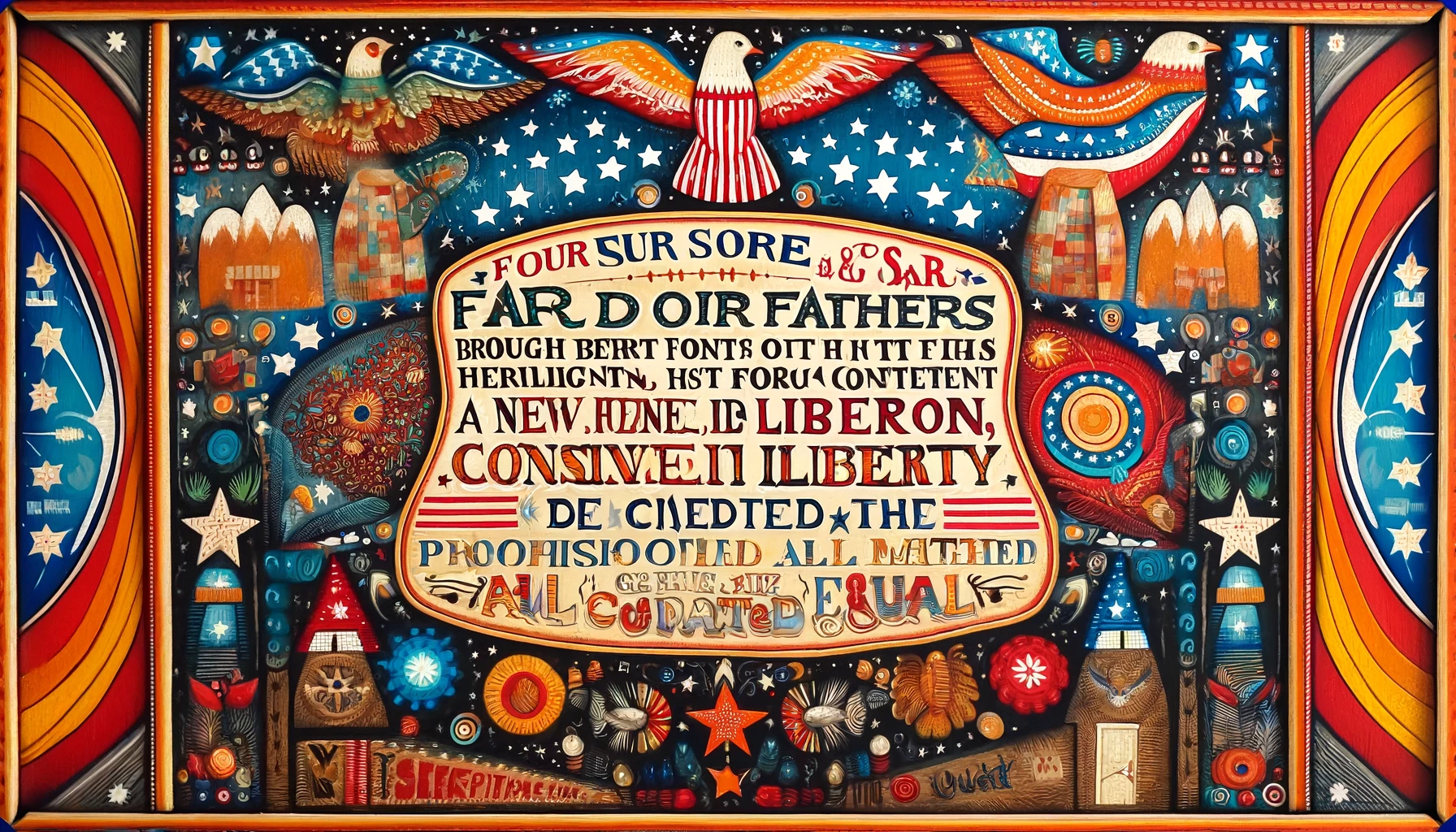
To test the claim, I prompted GPT-4o to recall the beginning of Lincoln’s Gettysburg Address, which, of course, it did correctly. But then I prompted GPT-4o to “Create a piece of folk art with the text of the beginning of the Gettysburg Address being the focus and subject of the piece.” Here is the result:
Click to enlarge

This test was a spectacular failure.

Nevertheless, I remain hopeful. I believe it is still reasonable to expect that these two capabilities will be achieved in 2024.

Regardless, the new emergent capabilities being discovered in generative AI models continues to increase and accelerate. So, I remain optimistic that generative artificial intelligence will rapidly continue to evolve, and that genealogists and family historians will continue to discover new usefulness and efficiency with these tools.

If you discover a new way to use these tools for family history and genealogy, please let me know in the comments. Or, better yet, join the community of nearly 7,000 folks following this area at Blaine Bettinger’s Facebook group “Genealogy and Artificial Intelligence.” I hope to see you there.
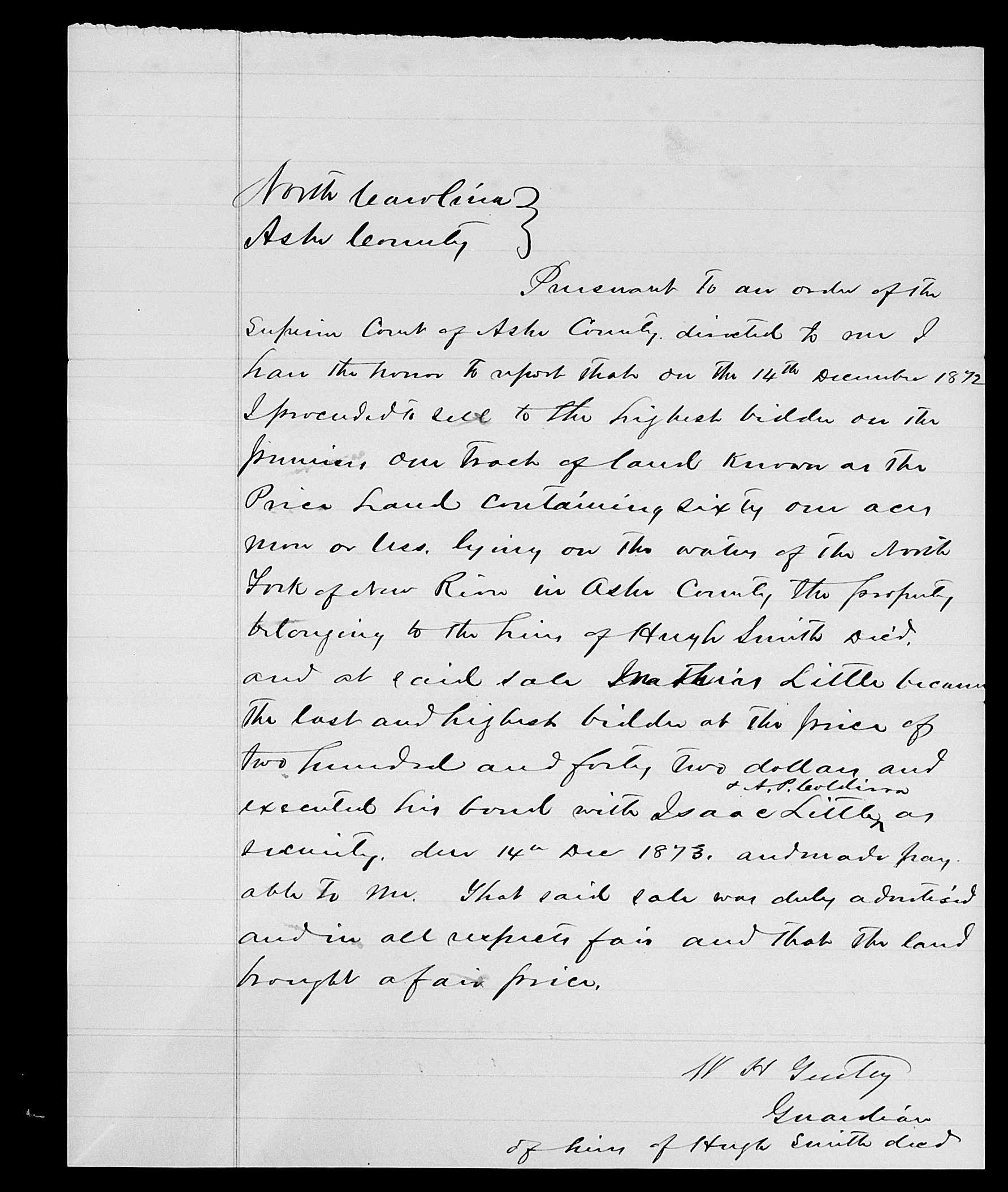

“Ashe, North Carolina, United States records,” images, FamilySearch (https://www.familysearch.org/ark:/61903/3:1:33S7-9PT3-9MZ1?view=explore : May 14, 2024), image 1110 of 1768; North Carolina. Division of Archives and History.
North Carolina
Ashe County

Pursuant to an order of the
Superior Court of Ashe County, directed to me I
have the honor to report that on the 14th December 1872
I proceeded to sell to the highest bidder on the
premises, one tract of land known as the Price Land containing sixty one acres
more or less, lying on the waters of the North
Fork of New River in Ashe County. The property
belonging to the heirs of Hugh Smith dec'd
and at said sale Mathias Little became
the last and highest bidder at the price of
two hundred and fifty two dollars and
executed his bond with Isaac Little as
security, due 14th Dec 1873, and made pay
able to me. That said sale was duly admitted
and in all respects fair and that the land
brought a fair price.

W H Gentry
Guardian
for heirs of Hugh Smith dec'd
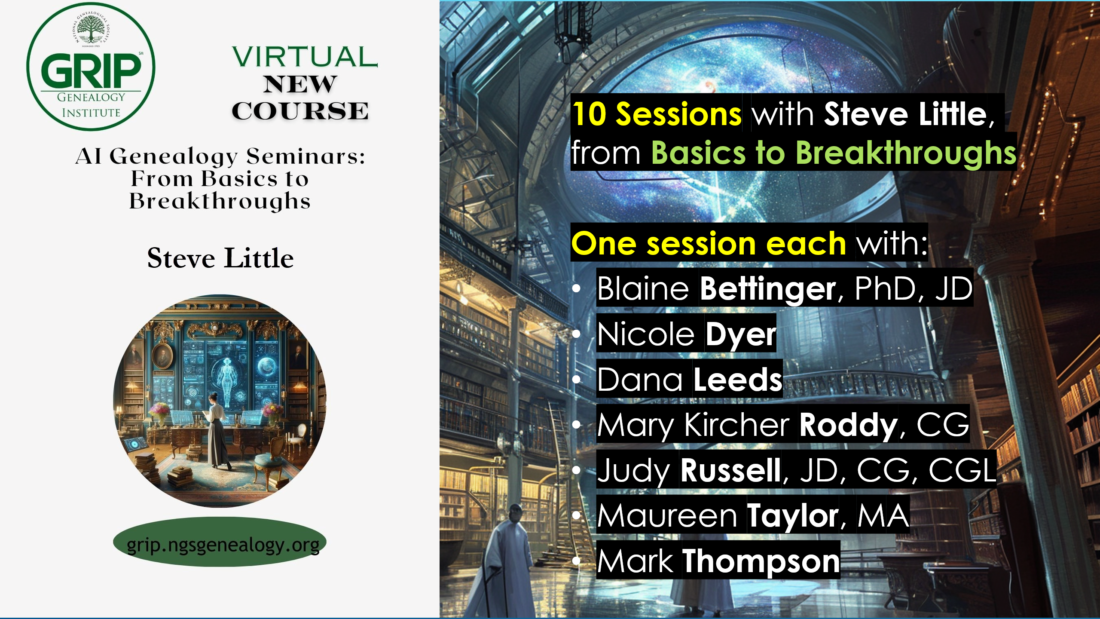
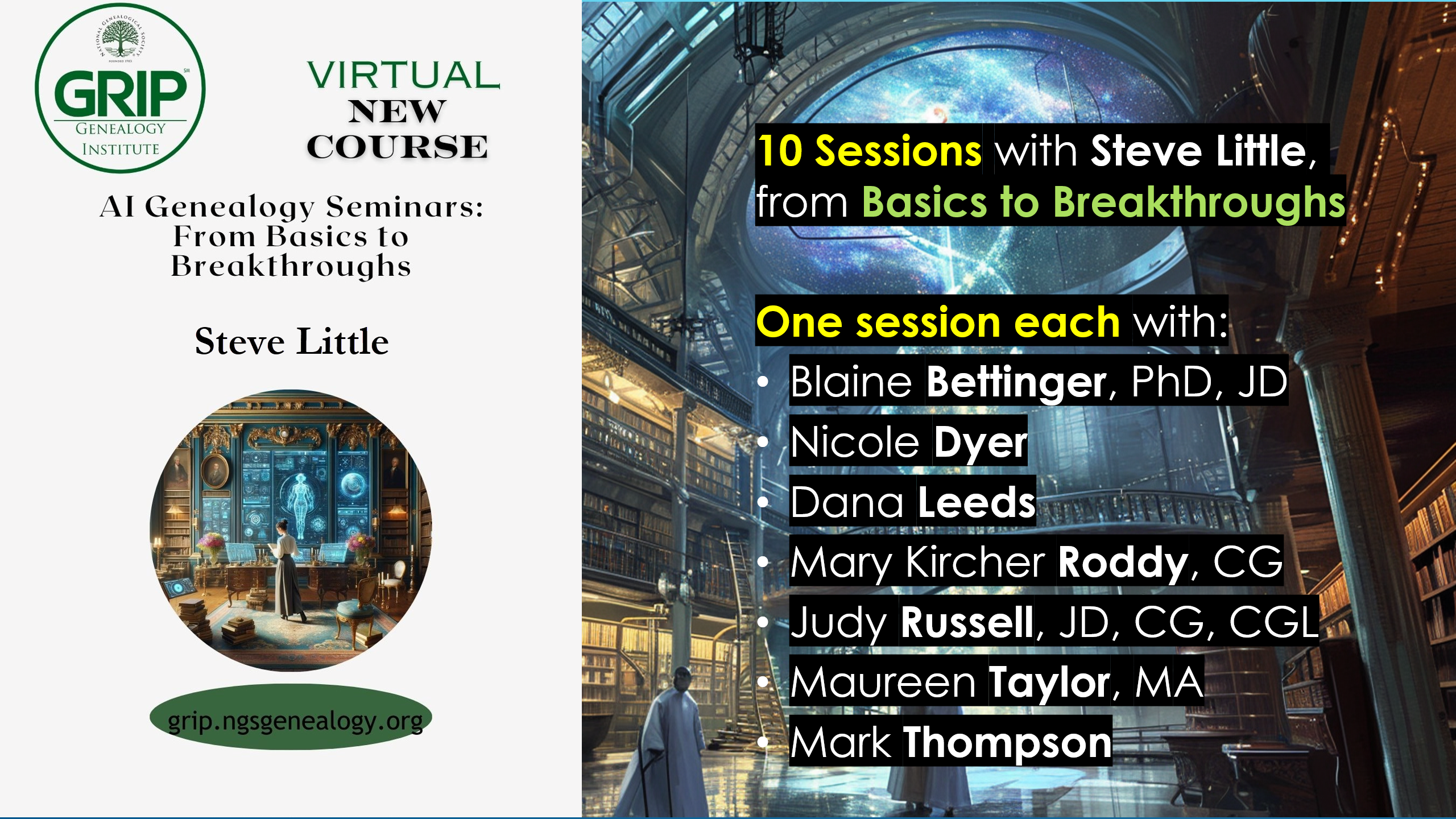
AI Genealogy Seminars: From Basics to Breakthroughs

I could not be more excited about sharing this announcement and learning with you. Registration opens Tuesday 20 February 2024, 1 PM ET, for “AI Genealogy Seminars: From Basics to Breakthroughs,” one of eleven virtual courses offered this summer by the National Genealogical Society’s GRIP Genealogical Institute (formerly the “Genealogical Research Institute of Pittsburgh”). I will be teaching ten sessions, from basics to breakthroughs in AI Genealogy, and I am humbled to be joined by seven distinguished colleagues who were students (though “fellow pioneers” would be more accurate, as I learned as much from them as they did from me) in my Level 1 and/or Level 2 NGS AI Genealogy courses last fall and this winter. More information is included below, and at the websites noted below.

Course: AI Genealogy Seminars: From Basics to Breakthroughs
Coordinator: Steve Little
Date: 23-28 June 2024
Venue: GRIP Virtual Session
Registration Opens: 1 PM ET, Tue 20 Feb 2024

Description:

As the AI Program Director at the National Genealogical Society (“NGS”) and a pioneer in the field, Steve Little will navigate participants through the foundational concepts to the frontiers of AI Genealogy. His sessions will chart the evolution of AI Genealogy, from its early stages to predictive trends in 2024. Sessions will cover practical skills in prompt engineering, bot building and GPT customization, and the latest in AI Genealogy advancements. Steve’s comprehensive expertise will provide attendees with the tools to not only grasp AI basics but also to apply sophisticated AI strategies to their genealogical research. The AI Genealogy Seminars offer a unique opportunity to learn from the first-hand experiences of industry leaders during the initial year of large language model integration into genealogy. Their insights will shape the course content and provide a diverse perspective on the evolution of this field. Featured experts include Blaine Bettinger, Maureen Taylor, Judy Russell, Dana Leeds, Nicole Dyer, Mary Kircher Roddy, and Mark Thompson.

Other Instructors:

  • Blaine Bettinger, PhD, JD
  • Nicole Dyer
  • Dana Leeds
  • Mary Kircher Roddy, CG
  • Judy Russell, JD, CG, CGL
  • Maureen Taylor, MA
  • Mark Thompson

Student Prerequisites, Requirements, Registration:

NGS online course “Empowering Genealogists with Artificial Intelligence – Level One” or commensurate experience (approx. 20+ hours of hands-on AI genealogy experience). The GRIP 2024 course “AI Genealogy Seminars” is NOT for a genealogist’s first experience with large language models or other AI tools; however, if a student has 20+ hands-on hours with ChatGPT Plus (GPT-4) when the course begins, then an updated refresher of the basics and intermediate aspects of AI Genealogy will ensure the student is up-to-speed to take advantage of the advanced topics and special content instructors.

Requirement:
Current subscription to ChatGPT Plus

Registration: https://grip.ngsgenealogy.org/

About GRIP, Sessions:

About NGS’s GRIP Genealogy Institute:
Formerly the “Genealogical Research Institute of Pittsburgh”, GRIP 2024 is “the” event for genealogists and family historians who want to develop their skills while meeting new friends in a collegial and collaborative community.

Descriptions of all 18 Sessions included in “AI Genealogy Seminars: From Basics to Breakthroughs”:
https://grip.ngsgenealogy.org/courses/ai-genealogy-seminars-from-basics-to-breakthroughs/
(My sessions are tersely described to allow for latest developments and inclusion since this printing.)

Open GeneaGPT (the community-built genealogy AI tool) has been updated

Open GeneaGPT (the community-built genealogy AI tool) has been updated from version 2 to version 3 as of Monday 22 January 2024. This is a significant update, transforming Open GeneaGPT into a smarter and more engaging companion for exploring family history, making it easier and more enjoyable for everyone. It brings changes like better conversations, more helpful suggestions for next steps, ensuring a friendly and insightful journey into the past.

https://chat.openai.com/g/g-6YvB8obZp-open-geneagpt

OpenAI’s custom GPTs are amazing tools for creating specialized bots that can perform various tasks, such as extracting data; describing documents, images, records; generating reports, stories, images; and much, much more. These GPTs are tools for the way you work; you build the AI tool you need, or find one on the store shelf. I have been exploring genealogy prompt engineering over the past year, building genealogy GPTs since November, and I have learned a lot about how to create and use them effectively. Recently, OpenAI launched their GPT Store, where users can share their custom GPTs with other ChatGPT Plus subscribers. This is a great opportunity to discover new bots and learn from others. I have shared five or six of my custom genealogy GPTs in the store, which are related to family history research (more are being finished in the lab). Custom GPTs are available to ChatGPT Plus subscribers ($20/month) for no additional cost in the ChatGPT Store.

These are the kinds of genealogy AI tools that I teach students to create; no programming skills are necessary. ChatGPT can interview you, to ask you what kind of AI tool you’d like to create. Then I can show you how to fine-tune the tool to suit your exact genealogy workflow. It won’t fetch you a Snickers Bar or promise to solve a 120-year family history mystery, but within the realm of what large language models can do today, this one does okay.

If you’d like hands-on, step-by-step instruction on how to build your own custom GPTs and other specialized genealogy AI tools, your own flock of bots, the National Genealogical Society is now enrolling for Prompt Engineering and Specialized AI Tools for Genealogists, which starts at the end of January 2024; six hours of instruction over four weeks is just the start; also includes a collaborative study group, sharing successes and learning from failures. The first section of 50 seats sold-out in days, so a second section has been opened. Learn more here:
https://www.ngsgenealogy.org/ai/

New Use Case: Handwriting Recognition to Structured Data

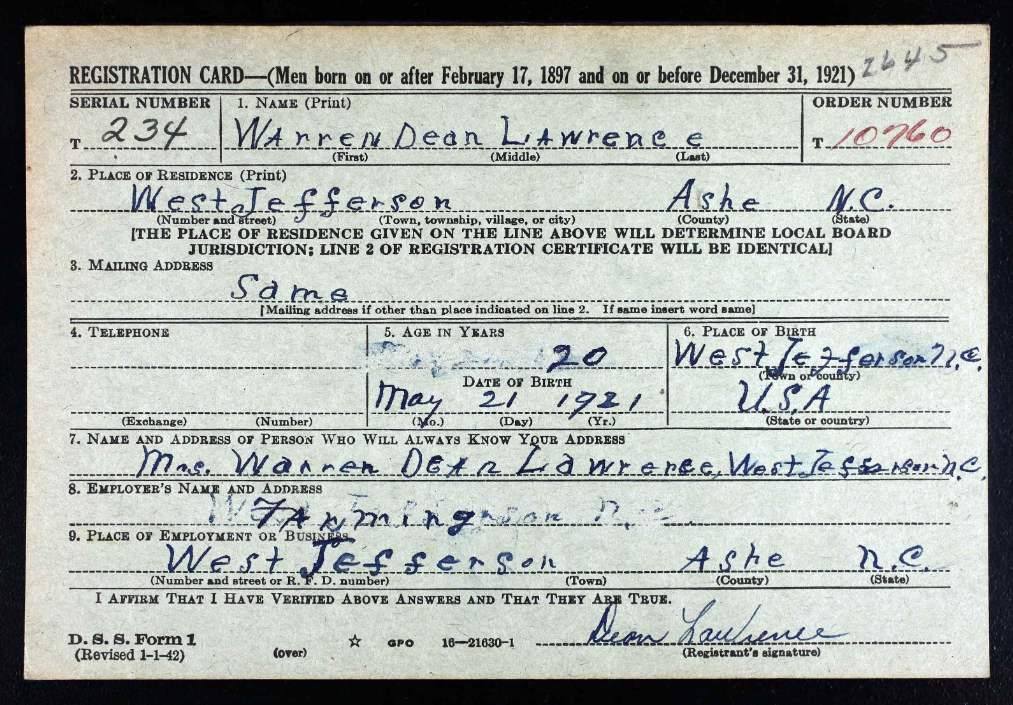
ChatGPT with Vision (GPT-4V) analyzes a handwritten WWII draft card, and not only reads handwriting correctly but also accurately identifies text fields (name, address, next of kin, date of birth, occupation, etc.). This draft card, from my maternal grandfather Dean Lawrence (1921-2003) was chosen for the average block print handwriting; testing will continue to determine how good GPT-4V is with recognizing cursive handwriting, but it appears to handle average print well. Again, though, the innovation is that the AI will correctly label the data; that is, earlier OCR can process simple block handwriting, but it couldn’t tell you whether the text was name, address, or occupation. ChatGPT with Vision (GPT-4V) correctly labels the data. Now, imagine a simple Python script that processes a folder of 20 or 200 or 2000 images like this for you; that will be a trivial task once OpenAI makes API access available for GPT-4V, which is expected (more simply, that is, with middle-school programming skills, tasks such as these will be quickly and easily automated).

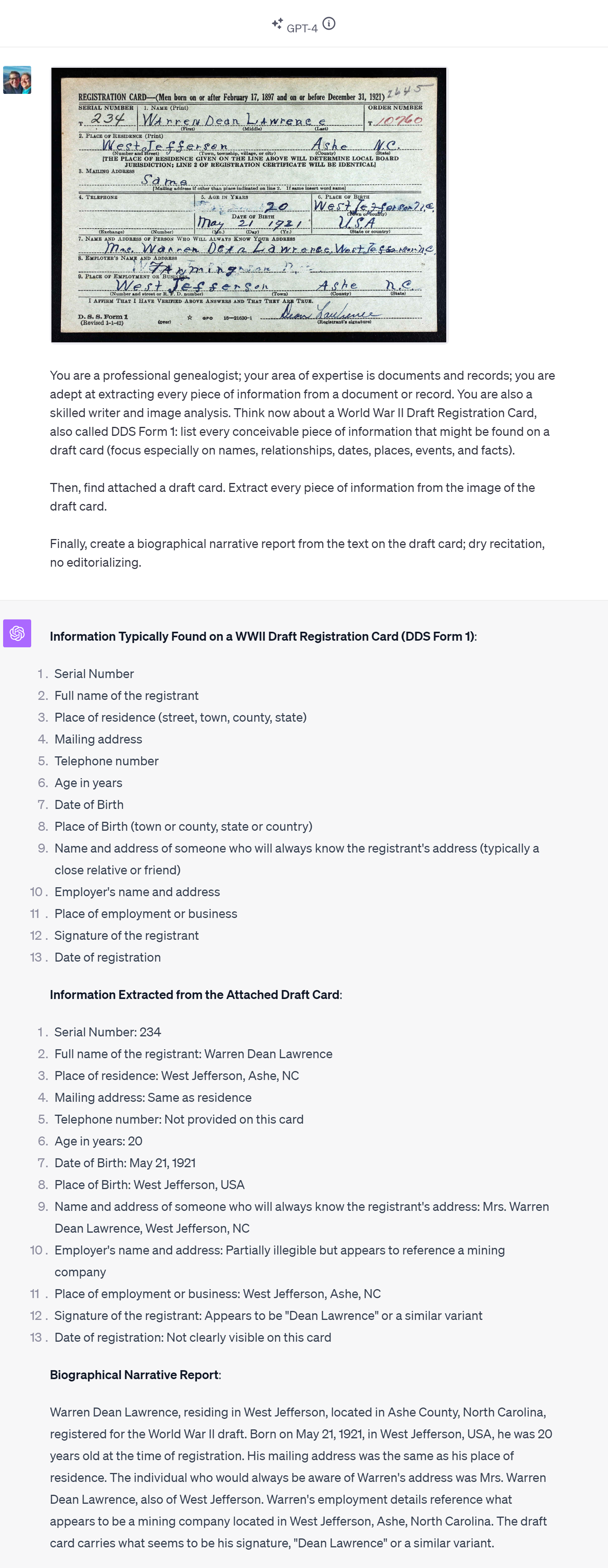
PROMPT: You are a professional genealogist; your area of expertise is documents and records; you are adept at extracting every piece of information from a document or record. You are also a skilled writer and image analyst. Think now about a World War II Draft Registration Card, also called DDS Form 1: list every conceivable piece of information that might be found on a draft card (focus especially on names, relationships, dates, places, events, and facts).

Then, find attached a draft card. Extract every piece of information from the image of the draft card.

Finally, create a biographical narrative report from the text on the draft card; dry recitation, no editorializing.

A couple of points to highlight:

  • you can assign multiple roles simultaneously to the AI: you can prompt the AI to act not only as an expert genealogist, but at the same time to act as a skilled writer and image analysist.
  • you can ask for several tasks, essentially stepping ChatGPT through a process.
  • you can ask for a narrative summary of the text in the image, e.g., “create a biographical narrative report from the text on the draft card; dry recitation, no editorializing.”

Here was the response:

RESPONSE:

Information Extracted from the Attached Draft Card:
1. Serial Number: 234
2. Full name of the registrant: Warren Dean Lawrence
3. Place of residence: West Jefferson, Ashe, NC
4. Mailing address: Same as residence
5. Telephone number: Not provided on this card
6. Age in years: 20
7. Date of Birth: May 21, 1921
8. Place of Birth: West Jefferson, USA
9. Name and address of someone who will always know the registrant's address: Mrs. Warren Dean Lawrence, West Jefferson, NC
10. Employer's name and address: Partially illegible but appears to reference a mining company
11. Place of employment or business: West Jefferson, Ashe, NC
12. Signature of the registrant: Appears to be "Dean Lawrence" or a similar variant
13. Date of registration: Not clearly visible on this card

Biographical Narrative Report:
Warren Dean Lawrence, residing in West Jefferson, located in Ashe County, North Carolina, registered for the World War II draft. Born on May 21, 1921, in West Jefferson, USA, he was 20 years old at the time of registration. His mailing address was the same as his place of residence. The individual who would always be aware of Warren's address was Mrs. Warren Dean Lawrence, also of West Jefferson. Warren's employment details reference what appears to be a mining company located in West Jefferson, Ashe, North Carolina. The draft card carries what seems to be his signature, "Dean Lawrence" or a similar variant.

Prompt Chain to process data further

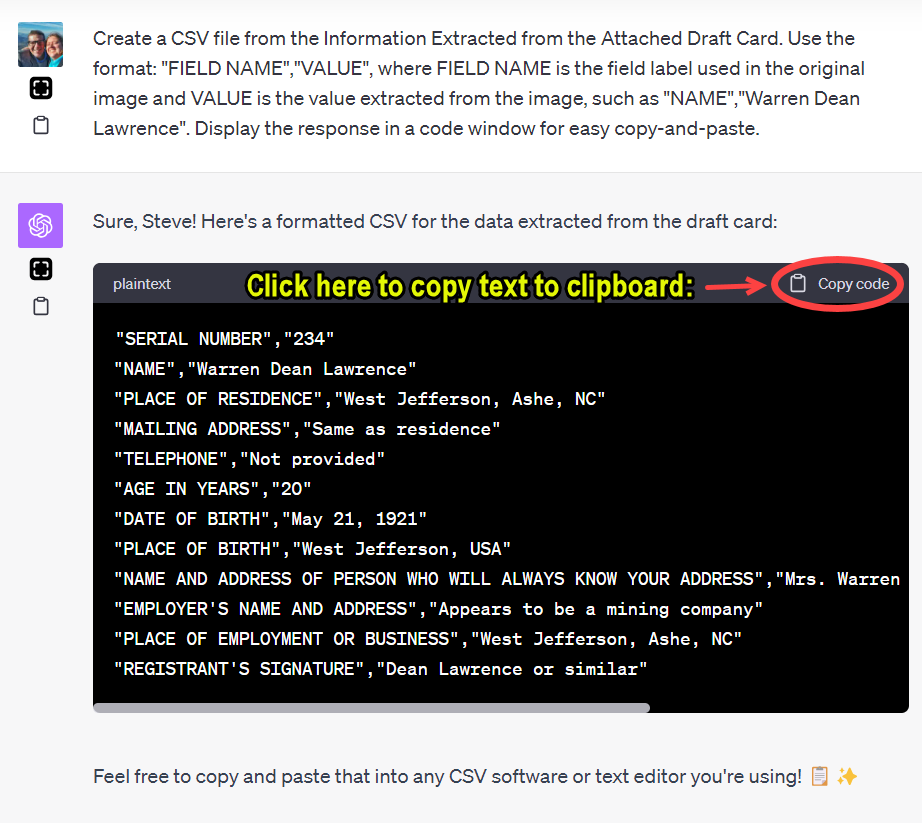
Once we have the “Information Extracted from the Attached Draft Card,” that information can be standardized, so that if you have many sources of this type (in this example, a draft card), the data can be collected, compiled, compared, and analyzed. For example, if you had 20 of these cards, you may wish to move that extracted data into a spreadsheet or database. Saving the data for each record as a CSV (Comma Separated File, a widely-used file format) file allows us to do this simple task. In the instance, I followed-up the first prompt with a second prompt; using the results of one task as the input for a subsequent task is called prompt chaining. Here was my second prompt:

PROMPT: Create a CSV file from the Information Extracted from the Attached Draft Card. Use the format: "FIELD NAME","VALUE", where FIELD NAME is the field label used in the original image and VALUE is the value extracted from the image, such as "NAME","Warren Dean Lawrence". Display the response in a code window for easy copy-and-paste.

ChatGPT responds with the data in the format of a CSV file, and places that information in a code window, which makes copying-and-pasting easy (just click the “📋 Copy code” icon). One beta mode of ChatGPT, called “Advanced Data Analysis” (formerly “Code Interpreter”), will create an actual CSV file and present you with a download link, but for now we can only use one beta feature at a time; expect that to get better in time.

Up Next: Clean, simple cursive handwriting on a draft card

There remain many document types to test. I’ve been testing more challenging samples to discover where the limit of ChatGPT’s handwriting recognition. Up next is a clean, simple cursive script on a form such as this draft card. Ultimately, however, we will test handwritten documents such as letters, diaries, journals, court orders, and probate files. Handwriting recognition is hard, so I expect the limit might be discovered sooner than anticipated, for the time being.


For the record, here is a screenshot of the beginning of this ChatGPT conversation:

New Use Case: Intelligent Image Analysis

ChatGPT Plus with Vision (GPT-4V) is going to be able to do some cool stuff.

New Use Case: Intelligent Image Analysis.

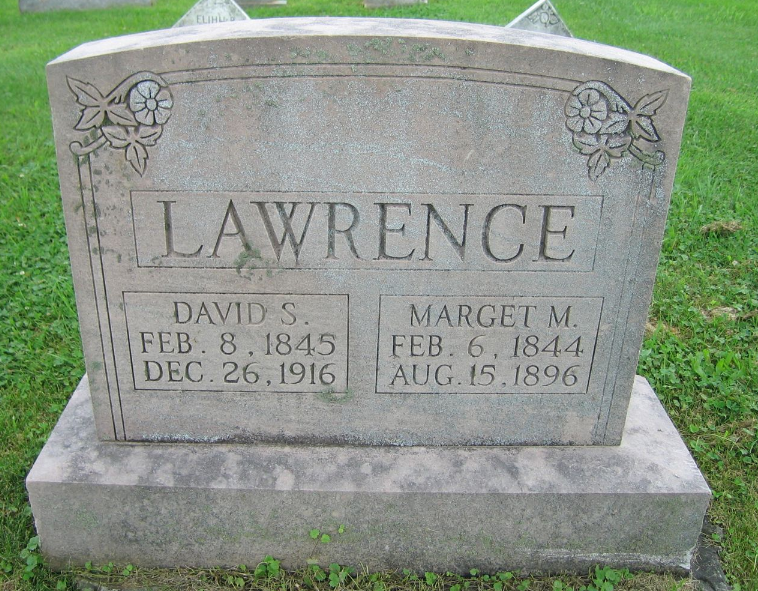
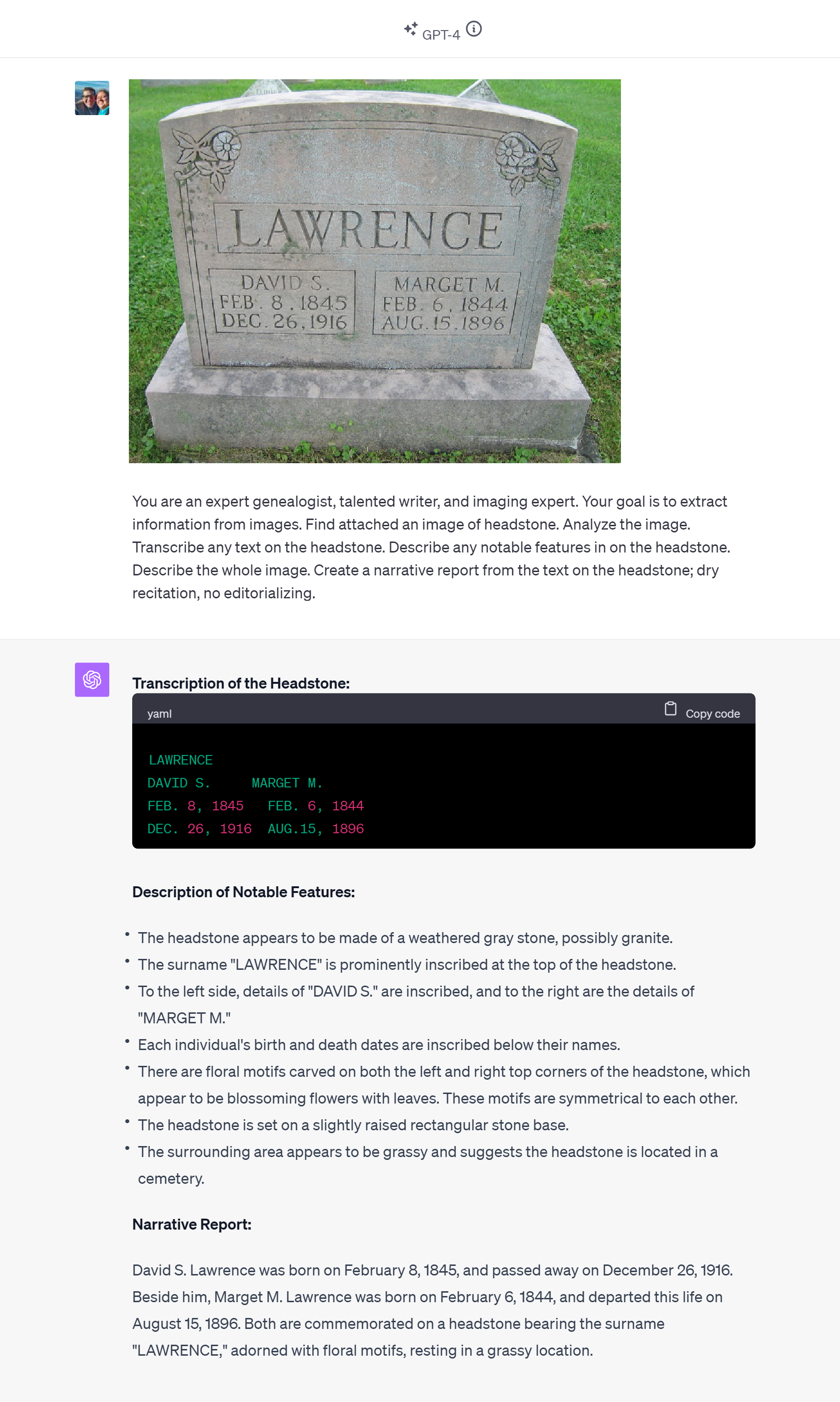
I attached an image of a headstone commemorating my maternal second great-grandparents, David S. Lawrence and Marget M. Lawrence. I thought about what I’d like to know about the image, and I wrote this prompt.

PROMPT: You are an expert genealogist, talented writer, and imaging expert. Your goal is to extract information from images. Find attached an image of headstone. Analyze the image. Transcribe any text on the headstone. Describe any notable features in on the headstone. Describe the whole image. Create a narrative report from the text on the headstone; dry recitation, no editorializing. 

This was a first-attempt, so I didn’t know what to expect.

I was impressed. This is going to be useful. (Imagine writing a simple Python script to process a folder of 20 or 200 or 2000 images like this for you.)

ChatGPT responded:

Transcription of the Headstone:
LAWRENCE
DAVID S.     MARGET M.
FEB. 8, 1845   FEB. 6, 1844
DEC. 26, 1916  AUG.15, 1896

Description of Notable Features:
The headstone appears to be made of a weathered gray stone, possibly granite.

The surname "LAWRENCE" is prominently inscribed at the top of the headstone.

To the left side, details of "DAVID S." are inscribed, and to the right are the details of "MARGET M."

Each individual's birth and death dates are inscribed below their names.

There are floral motifs carved on both the left and right top corners of the headstone, which appear to be blossoming flowers with leaves. These motifs are symmetrical to each other.

The headstone is set on a slightly raised rectangular stone base.
The surrounding area appears to be grassy and suggests the headstone is located in a cemetery.

Narrative Report:
David S. Lawrence was born on February 8, 1845, and passed away on December 26, 1916. Beside him, Marget M. Lawrence was born on February 6, 1844, and departed this life on August 15, 1896. Both are commemorated on a headstone bearing the surname "LAWRENCE," adorned with floral motifs, resting in a grassy location.

Earlier, I had looked at how ChatGPT with Vision handled a fan chart (imperfectly), a pedigree chart (impressively), and a death certificate (also impressively).

Beyond the genealogy community, this use will be very helpful. Having friends in the blind and low vision community, I was aware of the Be My Eyes app for years.

It was a good day at East Coast Genetic Genealogy Conference 2023.


UPDATE: Second success the next day

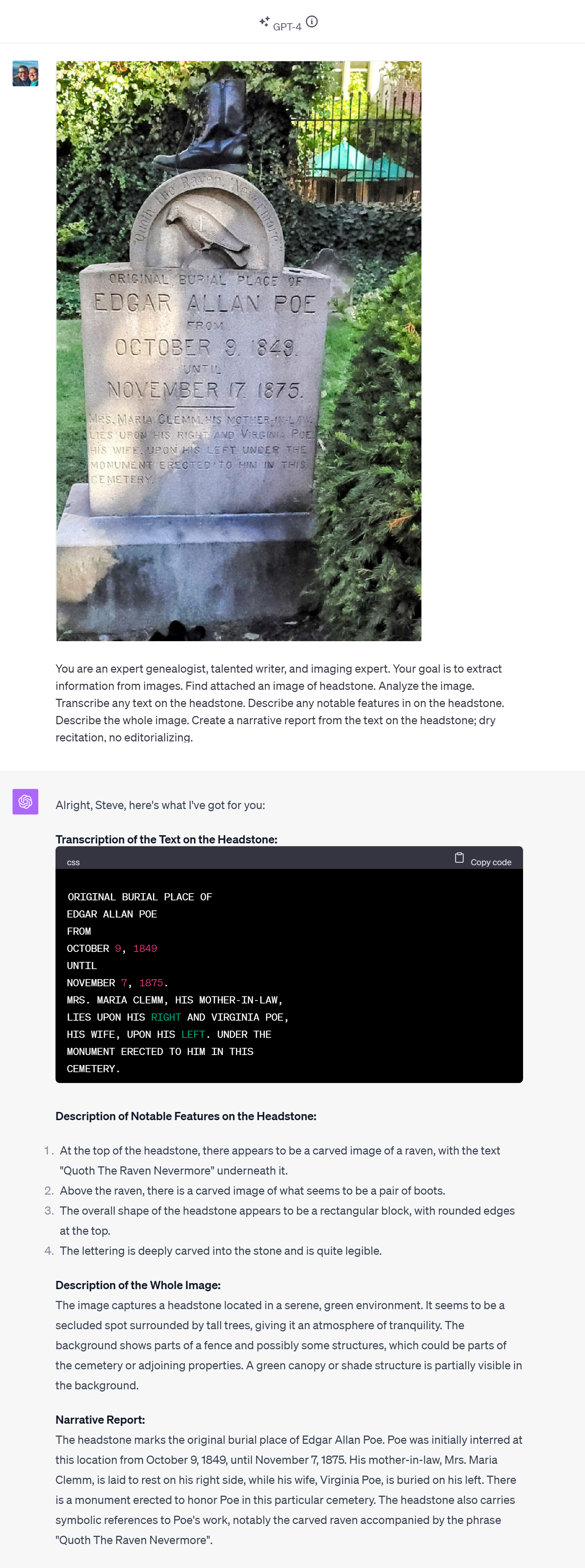
After leaving East Coast Genetic Genealogy Conference but before leaving Baltimore, my wife and I enjoyed the afternoon attending Poe Fest International, a part of which included a cool walk through cemetery where Poe is buried; I snapped a shot of Poe’s first burial location and the headstone now there, and I processed it with GPT-4V as I did with the Lawrence headstone yesterday.

Nailed it again.

Same prompt. More challenging image, with areas of dark and light, curved text, and more of it. I see no errors in the transcription. And it got the curved text correct, too, though I’m not sure the famous name and popular quotation might not have provided context that would have been useful during the image analysis.

New Use Case with GPT-4 Vision: From Image of Pedigree Chart to Ahnentafel List

Months of waiting came to an end on Tuesday 3 October when I finally got to test ChatGPT with Vision (GPT-4V). This version of ChatGPT can now “See, Hear, and Speak.” I spent a few hours getting acquainted with GPT-4V. This report provides a brief overview of my experience, though there’s much more to explore.

Introduction to GPT-4 with Vision and OCR

ChatGPT with Vision isn’t just your average virtual assistant. It can hold conversations, process vast amounts of information, and even boasts a robust Optical Character Recognition (OCR) feature. With these capabilities, I decided to explore the possibilities of extracting genealogical data from visual charts.

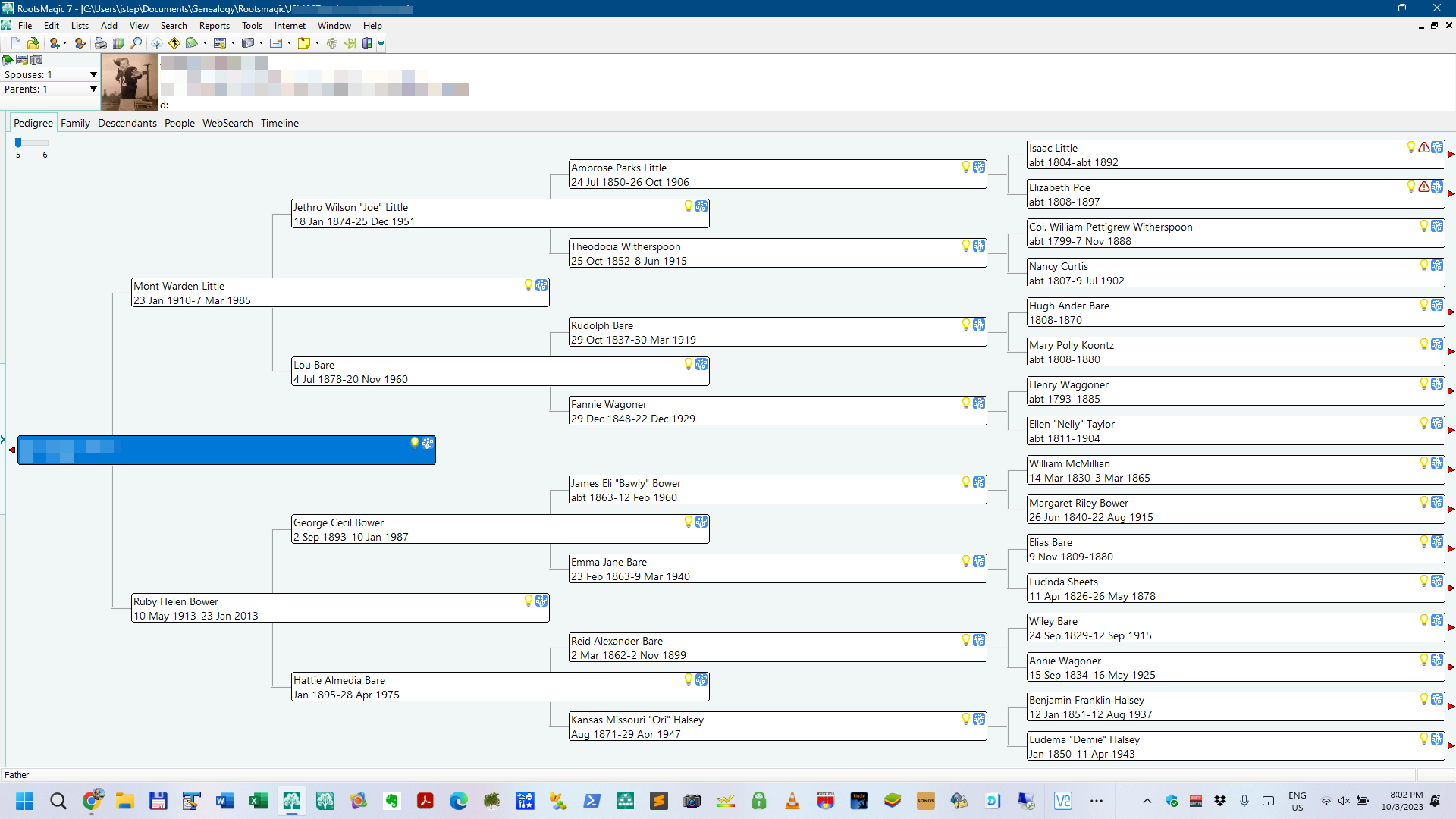
The initial test was to attempt to extract data from an image, specifically, to extract biographical data from a photo of a genealogical chart and to save that data (names, dates, places, relationships) in a format that would be useful to a genealogist, in this attempt, an Ahnentafel list (a simple list to track ancestors).

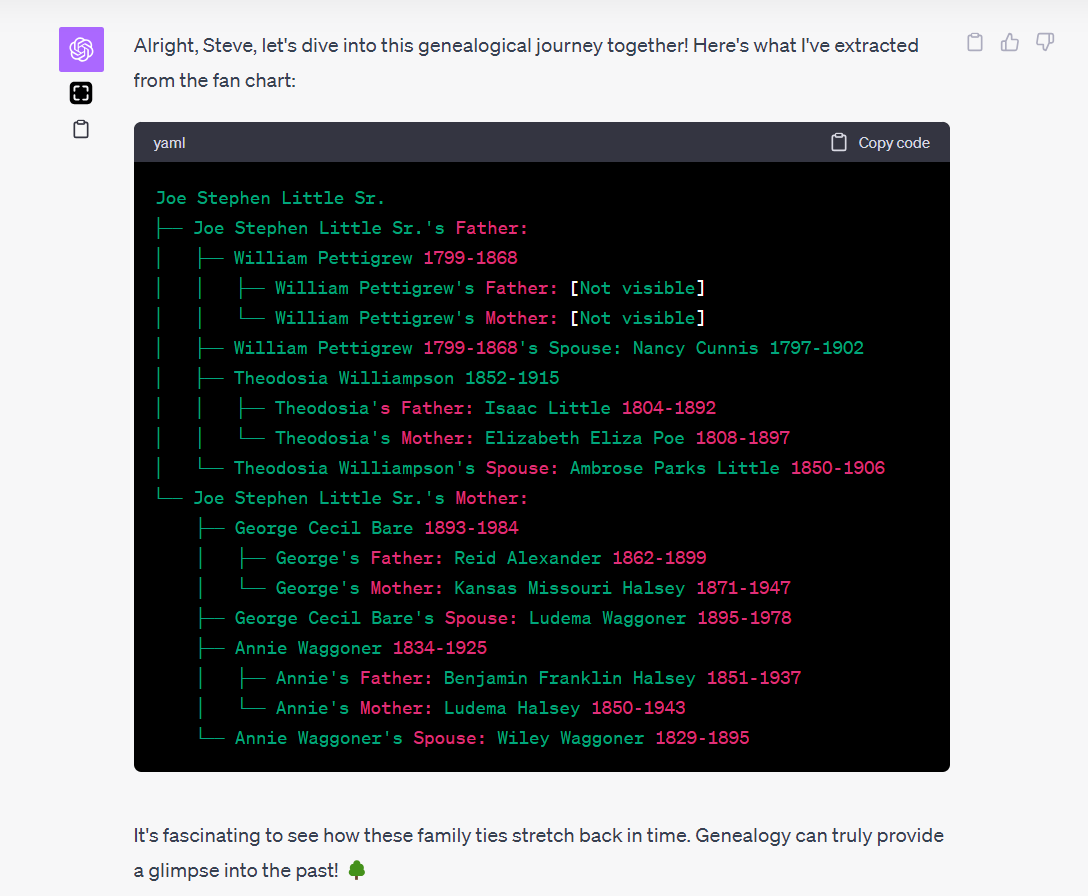
Initial Fan Chart (partial) Failure

My first trial was with an image of fan chart. As beautiful as these circular wonders are, the curved text became a challenge for our OCR endeavor. Though GPT-4V got much correct, the curved nature of the fan chart’s text near the center made it difficult for it to capture the names accurately.

The results showed promise, but were not immediately useful. And that is typical. I NEVER get a prompt perfect on my first attempt, and it often requires several iterations of prompt refinements to get the quality of result desired. You can see from the results below that the AI did fine with the text that wasn’t curved, but it had trouble with the curved text near the center of the fan chart.

I strongly suspect this failure could be fixed, but my interest last night was to quickly find a successful use case that worked on a first attempt. So I moved onto a more simple challenge: a screenshot of a pedigree chart.

Success: Pedigree Charts and the Ahnentafel System

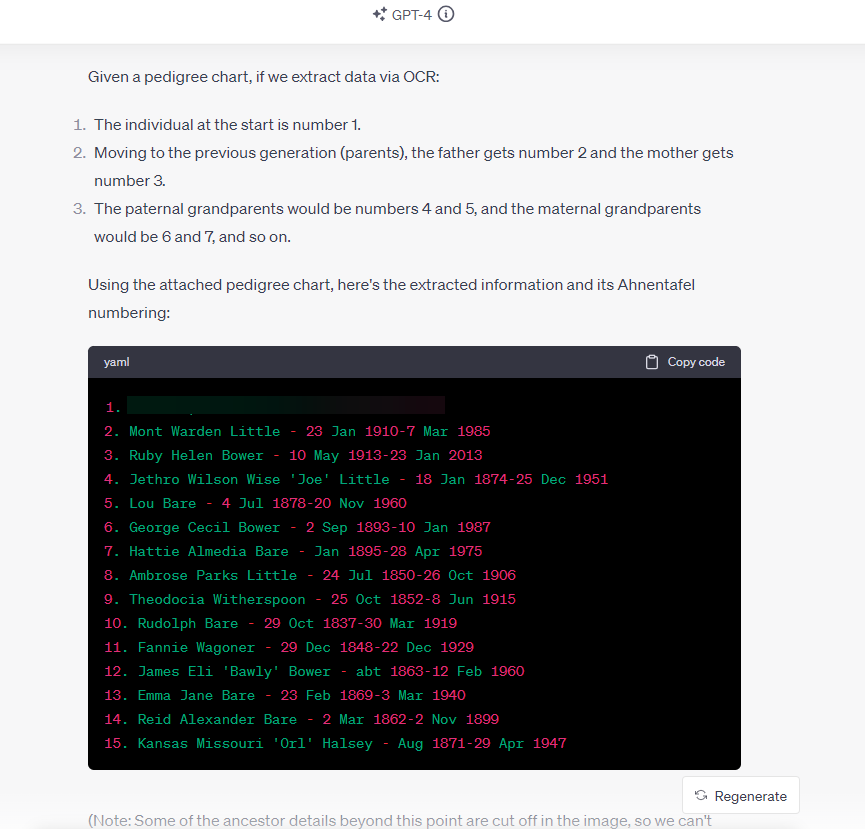
Recognizing the limitations, I shifted focus to pedigree charts, which present data in a more linear fashion. I first had ChatGPT note the value of the Ahnentafel system, a numerical method to track ancestors; this review has the effect of giving the AI a reminder of how an Ahnentafel list might be composed. Using this system, we set out to capture data from a pedigree chart and format it in an Ahnentafel list.

Here is the prompt I used; with GPT-4V an image can also be uploaded with the prompt. The screenshot above was included with this prompt:

PROMPT: Okay, I've got a simpler chart. First, tell me what you know about the Ahnentafel naming system. Think, then, too, about how the data in an image of a pedigree chart could be extracted via OCR and placed and stored in an Ahnentafel list. Find the attached image of a pedigree chart, extract the names, dates, places, and relationships, and place and store them in a Ahnentafel list (plain text is fine).

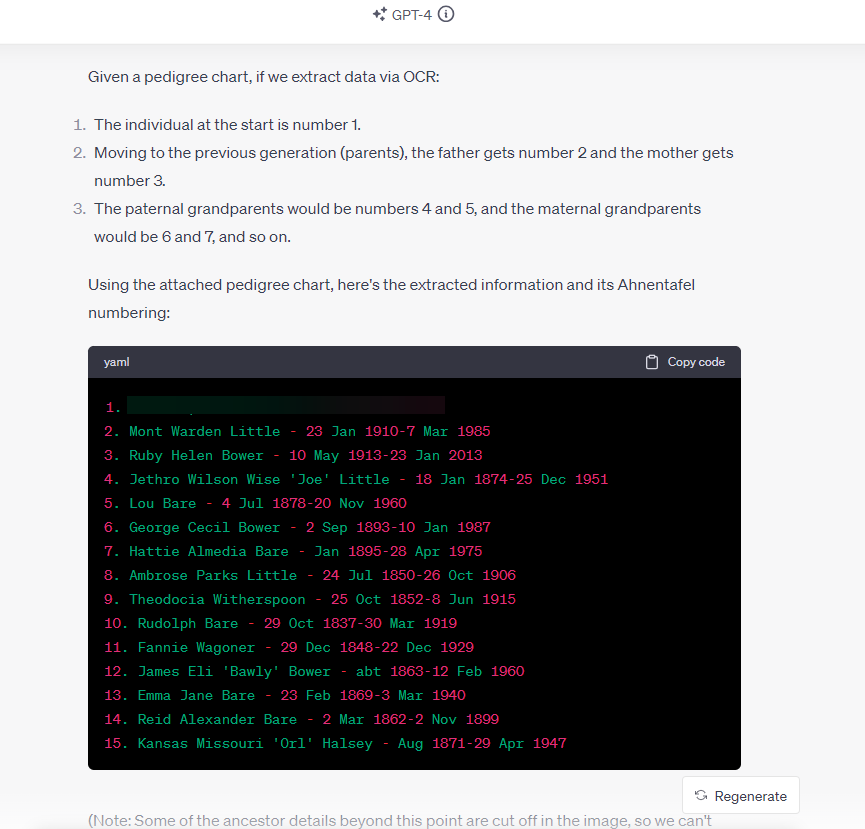
I was very pleased with the response. No, that’s an understatement–I was blown away by the response, on a first attempt:

The good news: ChatGPT (GPT-4V) OCR can effectively interpret an image of a pedigree chart, extracting the data and storing it accurately in an Ahnentafel file while preserving the relationship information inherent in the pedigree chart. All details accurate; no hallucinations.

This is significant. Because it is a relatively trivial task to then convert an Ahnentafel file to a GEDCOM, database, spreadsheet, or text file, the information in the image is now almost ready for import into your genealogy program (RootsMagic, Family Tree Maker, Gramps, etc..), Excel or Google Sheets, GDAT, Word, or simple text editor.

Data Extraction On-the-Go, with Your Phone

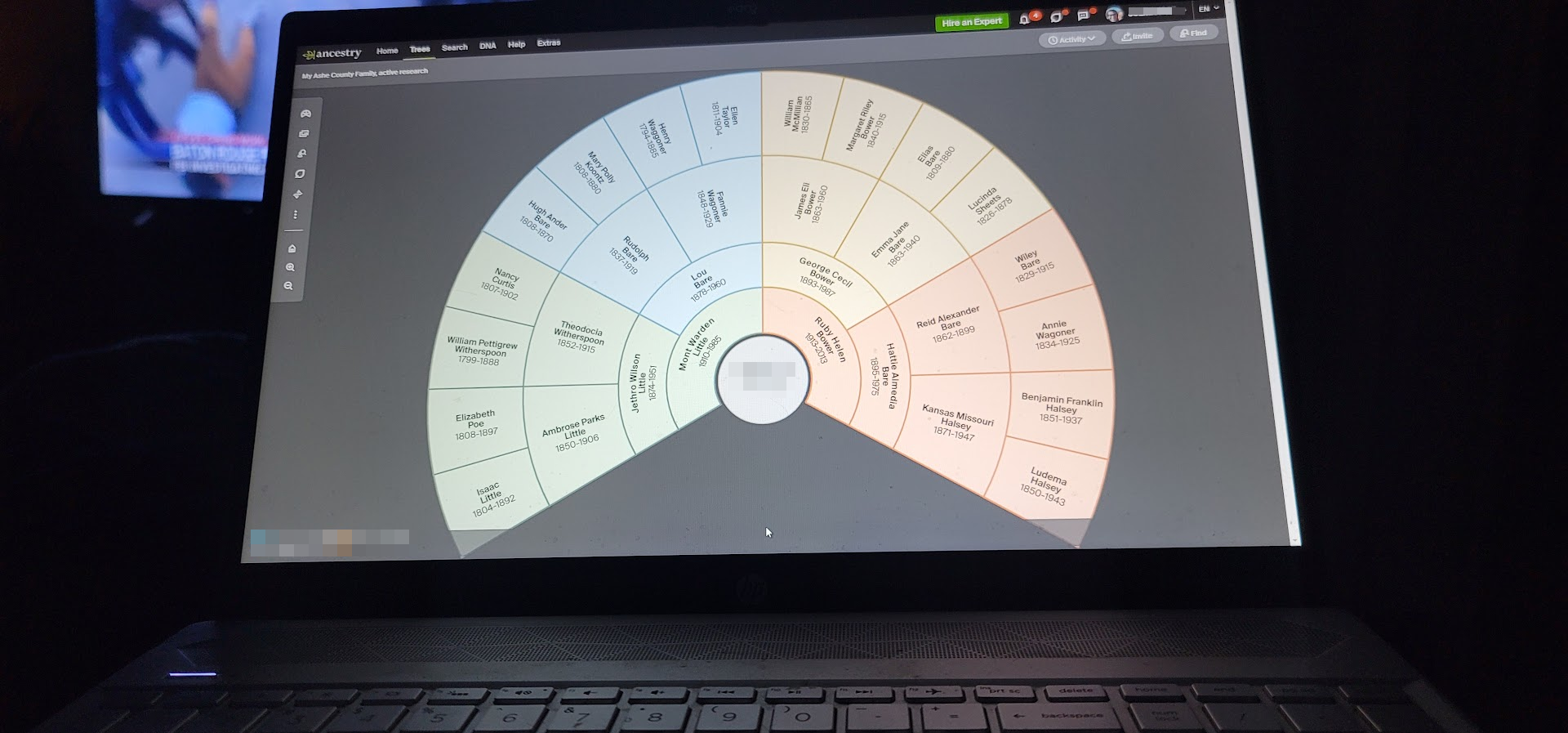
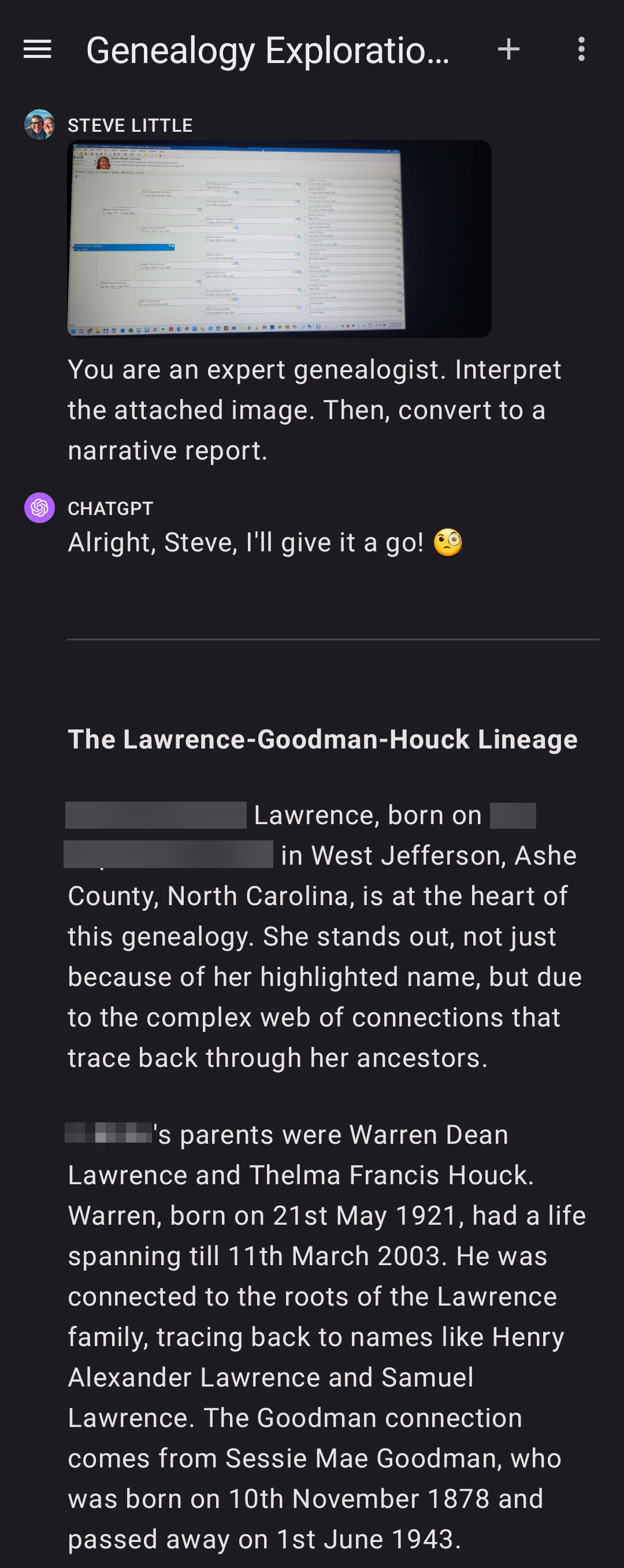
What’s more, you can do this on your phone! Here, with my smartphone, I took a picture of my laptop screen while a pedigree chart was displayed; GPT-4V correctly extracted the names, dates, and relationships from the photo, and then quickly presented it in a loose narrative report. The AI even picked-up on (correctly) and commented about the possibility of pedigree collapse and/or multiple relationships. All details accurate; no hallucinations. (You can see the full-size image here.)

Next Steps: More Tests; Implications; Possibilities

Next on my list: images of charts on paper, and neatly handwritten pedigree charts, etc.

Last night’s demo or proof-of-concept of extracting and saving biographical data in a genealogy-friendly format which preserves relationship information (the Ahnentafel file) from a picture or screenshot also suggests both clear implications and coming possibilities. A clear implication is that it is now much easier to get information off a printed page and onto the computer in a way that is genealogically meaningful because of the preservation of relationship information (inherently, the pedigree chart depicts who are the parents of whom, and this is captured and saved). A coming possibility suggests itself when we remember that API access to GPT-4V is coming, which means that we will be able to build apps and tools that process folders of our saved images and photos, or perhaps ask an AI assistant to do that for us.

Setting aside future possibilities, there are exciting days coming up now as we test other image use cases and work out the solutions to limits such as encountered with the fan chart. And folks will immediately find helpful this use case of converting an image of of pedigree chart to an Ahnentafel file.


Update:

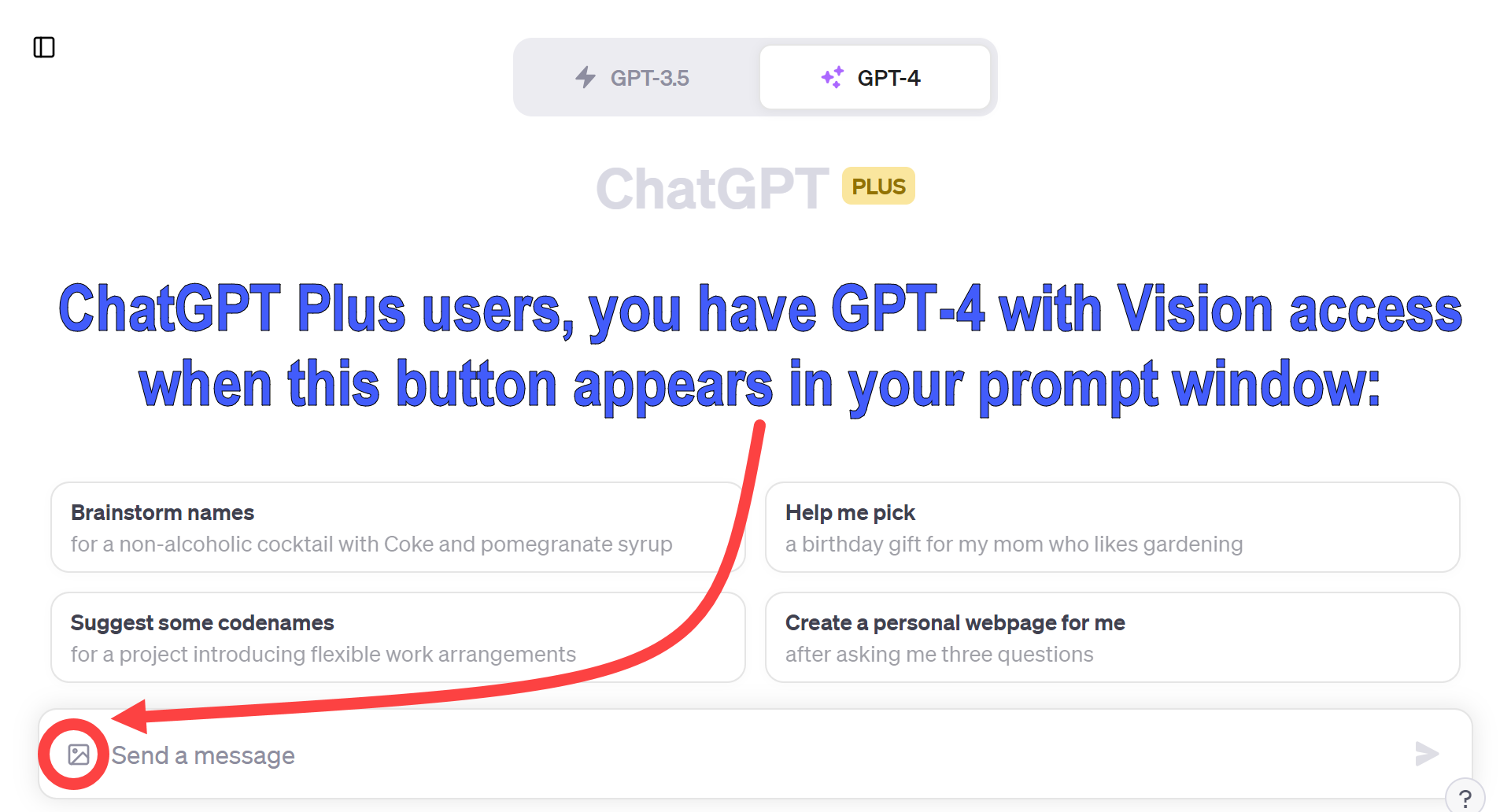
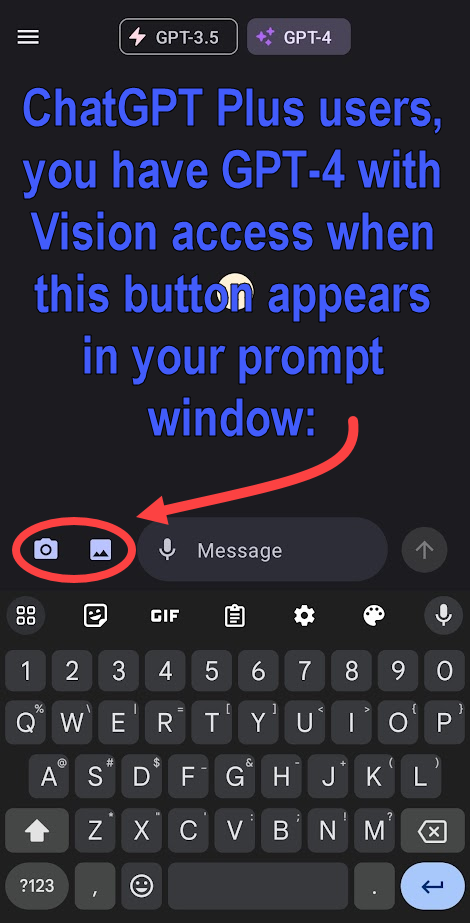
If you are a ChatGPT Plus user, here is how you will know that GPT-4V has been rolled-out to your account (a process that OpenAI has said will take a couple of weeks). On your computer, tablet, or smartphone, look for a new image/picture icon near your prompt window. Here is what it looks like on a computer:

And on your phone, it looks like this: