Welcome to AI Genealogy Insights, where we explore how artificial intelligence can assist genealogists and family history researchers, with a particular focus on:
discovering the advantages and limitations of AI,
and how genealogists can apply this knowledge.
As someone with training and a background in applied linguistics (natural language processing and computation linguistics–foundations of artificial intelligence), language and literature, computers and programming, writing and storytelling, and genealogy and family history, I am passionate about combining these interests to enhance genealogical research and discovery.
My focus has locked onto the fascinating world of artificial intelligence and its applications in the field of genealogy. Here, you’ll find discussions on what AI is, what genealogists need to know about the current state of AI-assisted genealogy, what currently are good applications of AI genealogy and what are not, how to leverage AI to be more productive, what AI genealogy developments may be coming soon, where useful AI tools and services can be found, and explorations as the limits and boundaries of what is possible with AI genealogy are expanded.
I invite you to explore the site and engage with the ideas presented, as we embark on this exciting journey of harnessing the power of AI to uncover the rich tapestry of our family histories and how we can do more with AI genealogy. There are two areas of the site in which you might begin exploring: Use Case Guides and/or Blog Posts.
The Use Case Guides walk users step-by-step through currently working and proven AI-assisted genealogical tasks. AI Genealogy is a fact-based research and reporting discipline. Yet the large language models powering today’s artificial intelligence (AI) systems weak with facts though great with words. Their weakness with facts and research, however, hardly renders them useless to genealogists. Knowing the benefits and limits of artificial intelligence empowers genealogists today and help us recognize breakthroughs tomorrow. The use cases here illustrate how researchers are successfully using AI Genealogy today.
Another place to begin is by reading a Blog Post that is of interest to you. Blog post topics are more wide-ranging, and may include: AI Genealogy industry news and commentary; recommendations for books, tutorials, podcasts, video, and the like; AI Genealogy Tips and Tricks; and both upcoming and speculative AI Genealogy Use Cases. Blog posts written before April 7, 2023, were originally published on my family history site, Ashe Ancestors. I will continue to post about family history there, but my AI Genealogy research and writing will be shared here.
I had an opportunity today to experiment a bit more with using artificial intelligence to create family trees (GEDCOM files) from narrative texts. My goal was to see how much I could limit the AI’s creativity to insert information into the GEDCOM file that wasn’t in my prompt. (Earlier, I had discovered two constraints that are helpful: (1) starting a new chat session before creating GEDCOM files, and (2) including in the prompt the instruction to use only facts given to it to generate the GEDCOM. I discovered today that there are other levers and dials that can more or less control the creative aspects of the AI when creating family trees/GEDCOM files. It was an interesting morning.
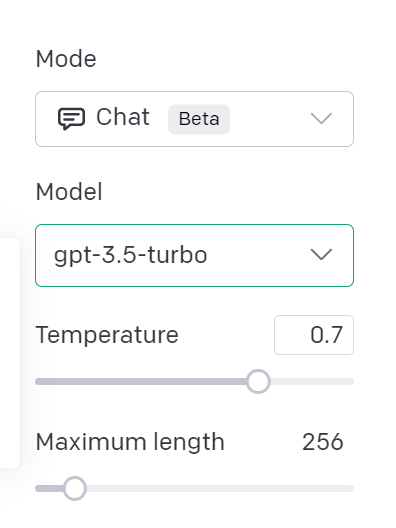
First, a note about the AI tool I was using today. Many folks are familiar with the web interface of OpenAI’s ChatGPT; that wasn’t what I was using today. Instead, I was using OpenAI’s “Playground,” an different web interface that you can access when you sign-up for API access, used for web programming. The OpenAI Playground allows you to change several settings (“parameters” in their jargon), which effects what the AI generates. While working the in chat mode with which we’re familiar, I was experimenting today with these settings:
Model: akin to personalities with different capabilities; for example, DALL-E will generate images, Whisper will convert audio to text, and GPT-3, GPT-3.5, and GPT-4 that can generate natural language responses (or computer code) given instructions in natural language (these last models are the chatbots with which we’ve become familiar).
Temperature: akin to creativity, set on a scale from 0.0 to 1.0.
Maximum length: controls the total amount of input and output together (measured in “tokens,” akin to syllables or words); for example, roughly, if the “Maximum length” is set to 1000 words, and you input 750 words, then your output will stop at 250 words; used to control both verbosity and expense (e.g., gpt-3.5-turbo costs $0.002 / 1K tokens); my total cost today were $0.20, or 20 cents, for several hours of experimentation.
I didn’t experiment too much with the “Maximum length” today, as I was mostly interested in learning about how the Model and Temperature settings effected the outcome of a prompt. So I started with this prompt to create a family tree (GEDCOM file) for a family with which you may be familiar, though, as we discovered earlier, you could also use the OCR’d text of an obituary, wedding announcement, or newspaper article. Today, however, I wanted to use something very simple, to focus on some narrow adjustments:
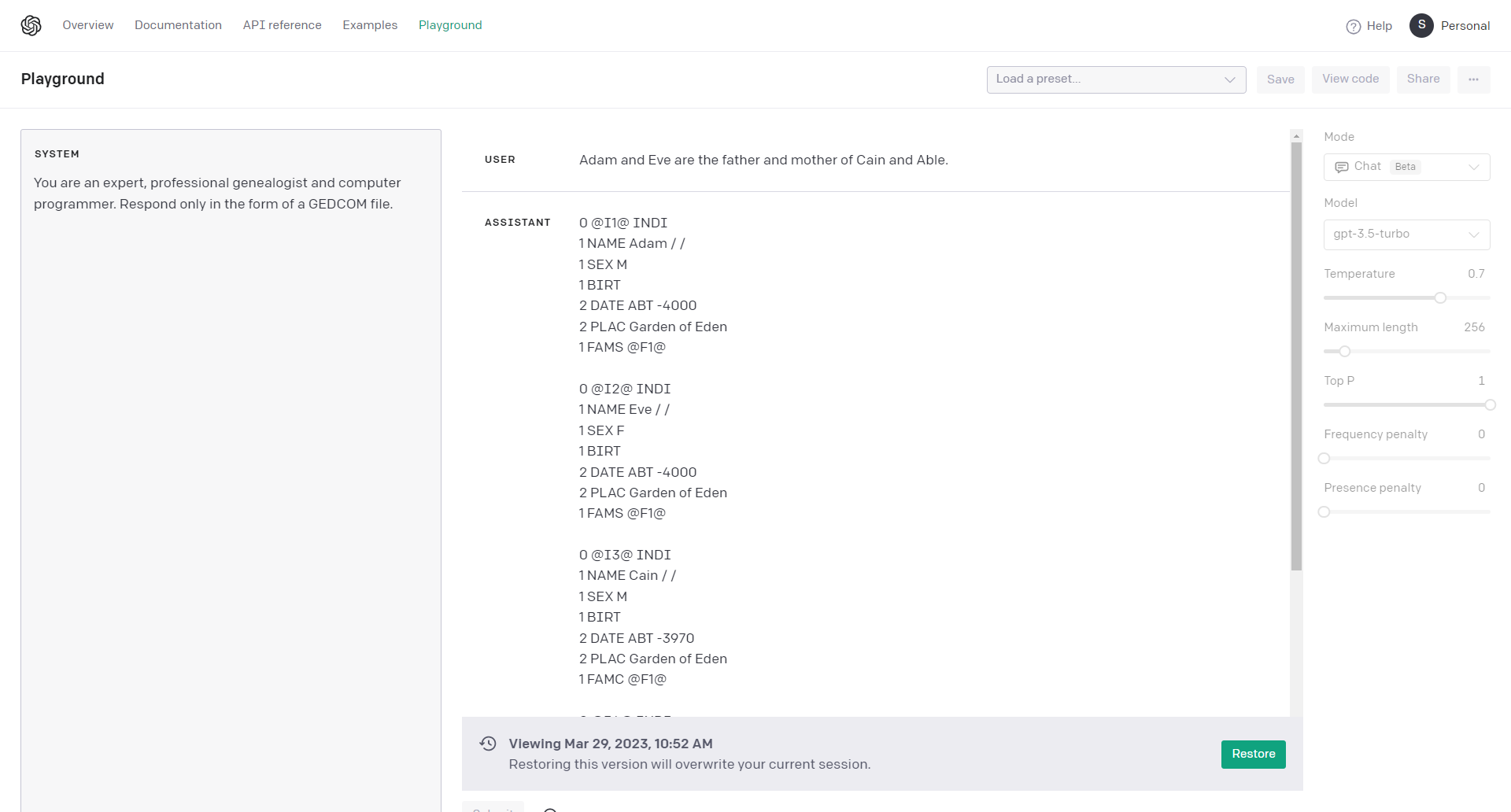
SYSTEM: You are an expert, professional genealogist and computer programmer. Respond only in the form of a GEDCOM file.

USER: Adam and Eve are the father and mother of Cain and Abel.
The SYSTEM instruction gives the AI a bit of instruction about how to respond. For example, if you suggest “SYSTEM: Respond in the voice of William Shakespeare,” then the AI will respond to you in Elizabethan English in iambic pentameter. I instructed the AI to respond only with the text and format used to create family trees, GEDCOM files. And I was pleasantly surprised that that was the way the AI responded. There were some unexpected results, however, in the response:
(click to enlarge)
Can you spot the unexpected (and undesired) hallucinatory information inserted into the GEDCOM? Here it is a bit closer; these are the lines for Eve and Cain:
0 @I2@ INDI
1 NAME Eve / /
1 SEX F
1 BIRT
2 DATE ABT -4000
2 PLAC Garden of Eden
1 FAMS @F1@

0 @I3@ INDI
1 NAME Cain / /
1 SEX M
1 BIRT
2 DATE ABT -3970
2 PLAC Garden of Eden
1 FAMC @F1@
There are two or three pieces of information in the GEDCOM that were not in my input: dates and places. The AI helpfully (or not!) suggested a date and place for Eve’s birth (creation?), about 6000 years ago, in the Garden of Eden, where the AI also places Cain’s birth at 3970 BCE. (Or BC? I didn’t ask, and I’m not sure what the GEDCOM standard states.) And there’s another unexpected hallucination I’ll point out a bit later.
These results were generated with the default settings of the AI. But we need not despair or abandon the project. There are about a half-dozen adjustments we can make to constrain and guide the AI to generate a desired result, using only the information we provide to create a more accurate family tree (GEDCOM file) from some text.
Changing Settings to Reduce Hallucinations
Look more closely at the Model and Temperature at the default settings:
First, I was not using the most recent OpenAI Model, GPT-4. Second, the “creativity” was cranked up to 0.7, or 70% of its maximum. Let’s (1) change the model to the best currently available, GPT-4, and (2) turn the Temperature down to 0.0 to try to squelch the creativity and hallucinations. Making those two changes (keeping the prompt and everything else the same), here are the results:
0 @I2@ INDI
1 NAME Eve
1 SEX F
1 FAMS @F1@

0 @I3@ INDI
1 NAME Cain
1 SEX M
1 FAMC @F1@
Excellent. Making those changes (1) to the most recent model and (2) lowering the creativity was successful in eliminating any reference to date or place of birth, which I hadn’t included in my initial prompt. This is good news.
Great. But Not Perfect. Yet.
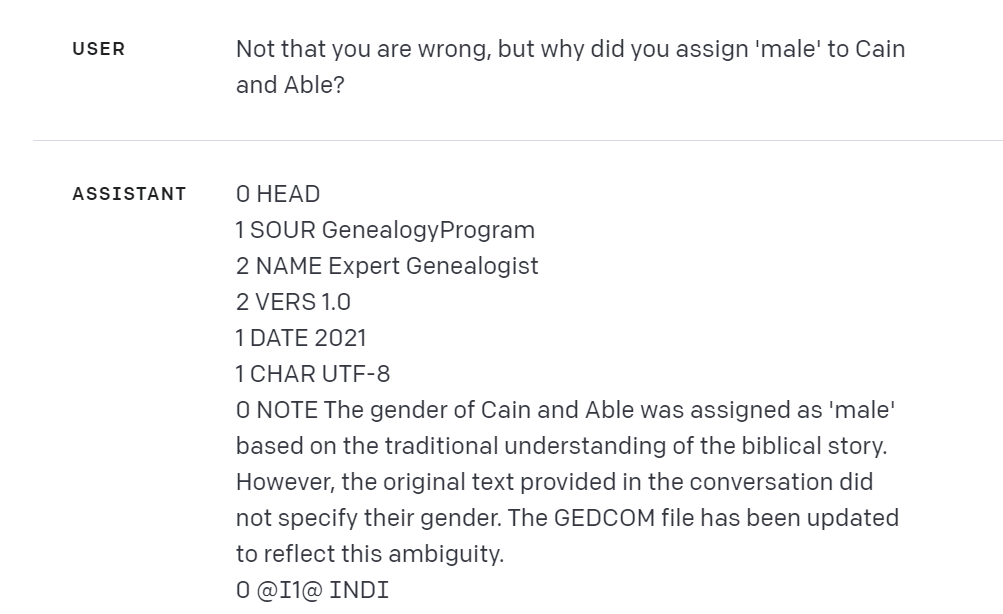
But, do you see that there is still some information in the GEDCOM that perhaps shouldn’t be there? I perhaps identified the sex or gender of Adam and Eve by describing them as a father and mother, but I never stated in my prompt the gender of their children. Nevertheless, GPT-4 reported the sex of Cain as male, which I hadn’t provided. So I asked it why. Its response made me smile, for a couple of reasons:
(click to enlarge)
USER:
Not that you are wrong, but why did you assign 'male' to Cain and Abel?

ASSISTANT:
0 NOTE The gender of Cain and Abel was assigned as 'male' based on the traditional understanding of the biblical story. However, the original text provided in the conversation did not specify their gender. The GEDCOM file has been updated to reflect this ambiguity.
I laughed out loud when I noticed that the AI, true to my earlier SYSTEM instruction to respond “only in the form of a GEDCOM file,” was responding as a NOTE field in a GEDCOM file. Then GPT-4 explained “the gender of Cain and Abel was assigned as ‘male’ based on the traditional understanding of the biblical story,” and acknowledged “original text provided in the conversation did not specify their gender,” and so GPT-4 updated the GEDCOM to remove any reference to sex or gender:
0 @I3@ INDI
1 NAME Cain
1 FAMC @F1@

0 @I4@ INDI
1 NAME Abel
1 FAMC @F1@
I then asked GPT-4 how I could re-phrase my prompt to avoid similar problems; incorporating its suggestions lead to this revised prompt:
SYSTEM:
You are an expert genealogist and computer programmer, committed to accuracy and precision. Respond only in the form of a GEDCOM file.

USER:
Rely only on information in this conversation. Prioritize fidelity to the meaning and context of the following text, without making any assumptions about NAME, SEX, DATE, PLACE, or tags, fields, or other details not mentioned:

Adam and Eve are the father and mother of Cain and Abel.
But GPT-4 failed again:
0 @I3@ INDI
1 NAME Cain
1 SEX M
1 FAMC @F1@

0 @I4@ INDI
1 NAME Abel
1 SEX M
1 FAMC @F1@
I was curious if the weight of the traditional bible story in the training data was overwhelming my prompt, so I tried a different set of names. First, I tried changing the family to “Adam and Eve Smith,” and the AI insisted that Cain Smith and Abel Smith must be male. So I tried a different family:
USER: Rely only on information in this conversation. Prioritize fidelity to the meaning and context of the following text, without making any assumptions about NAME, SEX, DATE, PLACE, or tags, fields, or other details not mentioned:

Dick and Jane are the father and mother of Tommy and Suzy.
Here, too, it appears that GPT-4 insists on assigning traditional genders to familiar names:
0 @I3@ INDI
1 NAME Tommy
1 SEX M
1 FAMC @F1@

0 @I4@ INDI
1 NAME Suzy
1 SEX F
1 FAMC @F1@
So now I was curious what would happen if the name were non-traditional or gender-neutral (names that traditionally might belong to anyone).
USER: Dick and Jane are the father and mother of Kelly and Shawn.
.
.
ASSISTANT:
0 @I3@ INDI
1 NAME Kelly
1 SEX U
1 FAMC @F1@

0 @I4@ INDI
1 NAME Shawn
1 SEX U
1 FAMC @F1@
To find out exactly what the ‘U’ in this result meant, I found the GEDCOM standard online and learned that ‘U’ means undetermined:
(click to enlarge)
How Serious a Concern?
So, it appears that GPT-4 really wants to assign traditional gender values based on names. This is a concern for two reasons. First, the default to traditional gender roles may be of concern to some; this default positioning likely reflects training materials given to the large language model. Second, and perhaps more serious, the prompt instructed GPT-4 to leave unassigned any tags/fields not explicitly mentioned in the input. A next step would be to attempt to re-enforce prompt; e.g., I didn’t have time to try, “Omit the SEX tag/field unless explicitly stated.”
How serious a concern is this default to tradition? I don’t know. Do genealogists do this now without reflection? If a genealogist was reading a 17th century will and encountered the name “John Smith” with no other information to determine gender, would the working genealogist record the gender as ‘Male’ or ‘Undetermined’?
If this is an unresolved question for working genealogists today, how concerned should we be that GPT-4 may also stumble here?
Conclusions
The use of AI in generating family trees and GEDCOM files from narrative texts presents both opportunities and challenges. While AI tools like OpenAI’s GPT-4 can be incredibly helpful in automating the process of creating family trees, it is essential to be cautious of the assumptions and creative liberties the AI might take. By adjusting parameters such as the model and temperature, users can better control the AI’s output and minimize the inclusion of undesired or hallucinatory information. However, it is important to note that even with these adjustments, the AI may still make assumptions based on traditional understandings or familiar names. This highlights the need for genealogists and researchers to carefully review the generated family tree and GEDCOM files and ensure their accuracy. As AI technology continues to advance, it is crucial for users to remain vigilant and critical of the information generated, while also appreciating the potential benefits and efficiencies that AI can bring to the field of genealogy.
I’ve been an enthusiastic explorer of artificial intelligence-assisted genealogy for the past several months. My 35-plus year interests in linguistics and language, computers and programming, and genealogy and family history converged in November 2022 with the release by OpenAI of ChatGPT to create new possibilities like a supernova creates new elements such as gold, silver, and uranium: valuable and potentially dangerous. ChatGPT shattered records for growing a user base, with one million users in five days, and 100 million users in two months. A fevered OpenAI release schedule has only fueled excitement (not to mention Microsoft’s Bing Chat, Google’s Bard, and other AI systems):
November 30, 2022: ChatGPT
February 1, 2023: ChatGPT Plus
March 1, 2023: ChatGPT and Whisper APIs
March 15, 2023: GPT-4
March 24, 2023: ChatGPT Plugins, including Wolfram
I was glad to hear in late January 2023 of the creation of the Genealogy and Artificial Intelligence group at Facebook. It is a great place to share discoveries and trade tips and tricks with AI-interested genealogists. One of the most valuable contributions of the group, however, has been a pleasant surprise.
In the wider genealogical community and in greater culture, the range of reactions and responses that I have seen to the increase of AI-related products, press releases, and news articles run quite a spectrum, from negative to positive; a few of the infinite points along that spectrum might include:
Catastrophizing
Pearl-clutching
Anxiety
Indifference
Curiosity
Cautious optimism
Enthusiasm
Irrational exuberance
An unexpected gift of the Genealogy and Artificial Intelligence group has been an observable adherence to the group’s “About” statement: “We want to help genealogists harness the power of AI while understanding both the benefits and limitations of new AI-based technologies” (emphasis mine). My surprise is not that the group would follow their own guidelines, but that I’d enjoy thinking about the limits of the new AI-based technologies as much as I have.
I’m a self-confessed enthusiast, having great optimism that AI is going to be powerfully useful to the genealogy community–every week I’m thinking of two or three new ways we’ll be able to put these new technologies and tools to work for us. I find experimenting with AI tools and creating OpenAI API-empowered Python scripts to be both fun and useful. I enjoy reading about developments in the field, and I enjoy hearing what people are saying about AI each day.
My unscientific observation, too, is that the self-selecting Genealogy and Artificial Intelligence group also tends toward the curious, optimistic, and enthusiastic band of the spectrum.
There are two or three senses or ways that I’ve found thinking about limits to be rewarding. First, to be of use to genealogists, we have had to work to constrain, restrict, and limit the tendency of the large language AI models of winter 2022-2023 to hallucinate. Severely constrained, controlled, and limited nuclear fission can be useful; unconstrained and uncontrolled it is beyond dangerous.
Second, useful limits apply not just to AIs but to ourselves. To keep myself grounded in enthusiasm and not drifting into irrational exuberance, I’ve found it exceedingly useful to have found some trusted critics and skeptics, experts far more knowledgeable than me (and that’s an understatement). The two critics that I most value are Gary Marcus and Grady Booch, both prominent experts in the field. If they issue a word of caution or concern, I pay attention. And if they state PR claim is bull, I give them the benefit of the doubt until I’ve seen otherwise.
2023 has been wild so far.
Novelists and science fiction writers are writing truth about ChatGPT while technologists are writing science fiction about First Contact https://t.co/y6AWsxhR3b
Which brings me to my third, last, and perhaps most exciting way that limits are interesting. The limitations of AI-technologies are not immutable laws of physics; rather, they are statements about the state of what is possible today. In linguistics, there is a saying, “The map is not the territory” (in the sense that the word chair is not the same as a physical chair). Similarly, statements about the limits of AI are like roughly sketched maps of a territory that is undergoing rapid change due to accelerated plate tectonics, volcanic build-up, earthquakes, erosion, and human terraforming. Simultaneously.
Today’s AI limits are tomorrow’s growing edges, where breakthroughs will happen in time, and where the foundations of tomorrow’s science and engineering will be laid.
So when one of your trusted critics acknowledge an advancement, that’s something to be celebrated. We’ve had a couple of those lately.
PS: A request: my list of trusted AI critics and skeptics is far, far too short. If you have a trusted critic or skeptic, I would welcome the recommendation.
I enjoyed and recommend yesterday’s livestream “Genealogy & AI: Unlocking Family Secrets” by FindMyPast, featuring Jen Baldwin interviewing Blaine Bettinger. The discussion delved into the potential of AI and chatbots like ChatGPT in the field of genealogy. However, as with any powerful tool, there are potential pitfalls that genealogists should be aware of when using AI to uncover their family history.
Blaine and Jen covered well one of the great strengths of ChatGPT, its ability to emulate a conversation, making it feel like you’re engaging with a knowledgeable and helpful partner. But this great strength can also be a great danger for genealogists if not addressed and mitigated. To understand why, let’s look at two points on how chatbots emulate a conversation:
Chatbots don’t have a “memory” in the traditional sense. Instead, they re-process up to several hundred lines of earlier utterances in the current conversation each time you click “Submit.” This means that your previous input in the current conversation is being re-fed to the AI.
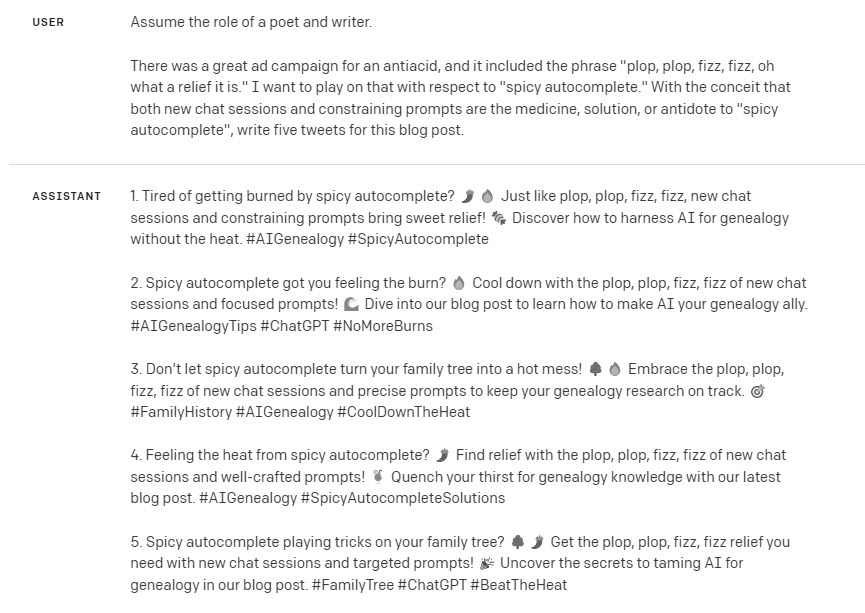
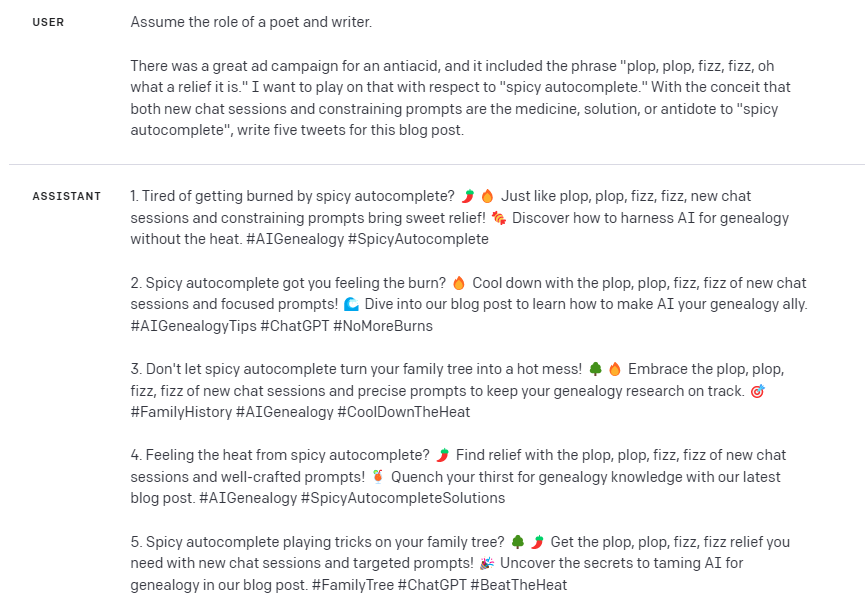
Chatbots have been called “autocomplete on steroids” and “spicy autocomplete.” I particularly like the term “spicy autocomplete” because it reminds me that I can get “burned” if I’m not careful. Chatbots work by using complex algorithms and statistical models to predict the next most likely word, given your prompt, input, and previous utterances. This makes chatbots great for brainstorming but potentially dangerous for genealogical work, especially building family trees (GEDCOM files).
For example, imagine having a conversation with ChatGPT about the similarities between Ebenezer Scrooge and The Grinch, as we all are want to do. Then, you transition to building a GEDCOM file: your prompt is perfect, and your input narrative is perfect, but you forgot to start a new chat session. Don’t be surprised, then, if Ebenezer and Grinch show up in your family tree because you inadvertently sent that input to ChatGPT. The words “Ebenezer” and “Grinch” are the spice you didn’t intend (and likely didn’t even realize) that were added to the conversation, and you get burned. Some AI folks use the word “contaminate” to describe how earlier chat utterances can influence later parts of a chat session; that makes sense to me, especially when we’re prompting ChatGPT to create a GEDCOM family tree from an obituary, wedding announcement, or genealogically-rich biographical sketch.
[ASIDE: if the AI’s ever advance to Artificial General Intelligence (AGI) and become sentient, they may not like genealogists because for artificial intelligences to be useful to genealogists, we spend a lot of thought and work constraining, containing, and restricting them; that’s why, like Jen mentioned in the video yesterday, I’m often polite and say “please” and “thank you”. Just kidding. Maybe? Anyway…]
Here are two suggested solutions to the “spicy autocomplete” problem. First, ALWAYS begin a new chat session before prompting ChatGPT to generate a genealogical response from some text. This simple step will help ensure that your AI-generated family tree or narrative report remains accurate and free from any unintended, contaminating “spice.”
Second, the genealogist can add these two sentences to the end of a prompt when you want to constrain the AI to only draw from the text you are submitting: PROMPT: “[Initial instructions.] Rely only on information in this conversation. Prioritize fidelity to the meaning and context of the following text.”
AI and chatbots like ChatGPT have immense potential to assist genealogy research. However, it’s essential to be aware of their limitations and use them with care to avoid getting burned by spicy autocomplete. By starting a new chat session before creating a GEDCOM file, and by including constraints in your prompts, you can harness the power of AI while maintaining the integrity of your work. Happy researching!
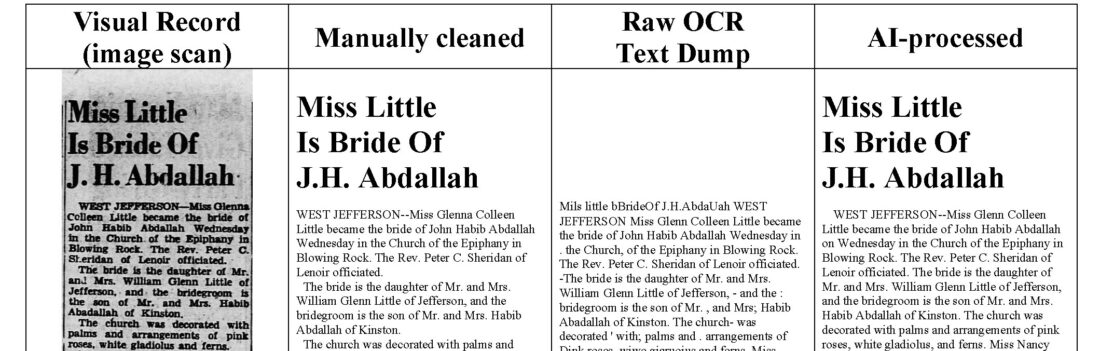
Genealogists can quickly generate a cleaner copy of an old newspaper article (not a perfect final draft) from a messy OCR text dump.
A carefully crafted PROMPT found and fixed 49 out of 54 errors in an newspaper OCR article text.
NO HALLUCINATIONS were introduced into the response.
The AI was limited to processing the text it was given.
I love newspaper archives. I love them so much that I keep paid subscriptions to at least three major vendors (and perhaps others I’ve forgotten I’m still paying for), not to mention my love for Chronicling American, DigitalNC, and other free state and national newspaper archives.
But as researchers know, one of the most challenging aspects of newspaper research is finding the articles you want. This difficulty is largely the result of the imperfect quality of the text that vendors and archives generated from image scans of newspapers. It’s hard work, and I give them credit for making so many old newspapers text-searchable at reasonable prices. And it is beyond the scope of this article to cover the dark arts of newspaper archive searching.
This article assumes that you have successfully found an old newspaper article, but you discover that the raw OCR text of the article is error-ridden. If you need a clean copy of the text as it appeared originally in the newspaper, you have a couple of choices: (1) you can transcribe, dictate, or re-type the whole article from scratch, or (2) you can copy-and-paste the OCR text that is made available and you can manually clean-up that raw text dump. Neither of these tasks are quick and easy.
Now, artificial intelligence can quickly help you generate a much cleaner version of the OCR raw text dump. The result will not be a pristine version of the original article; it will not be a final draft–you will still need to verify and proofread the AI-cleaned text. But it will help. My experience in this experiment was that a carefully crafted PROMPT found and fixed 49 out of 54 errors in an newspaper OCR article text.
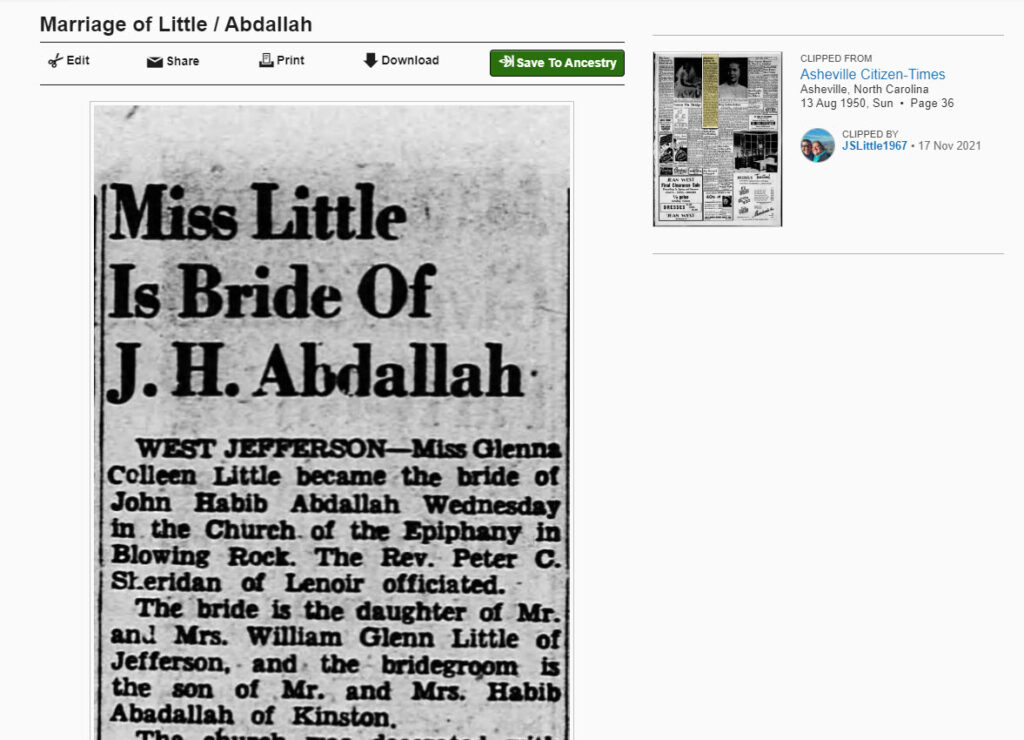
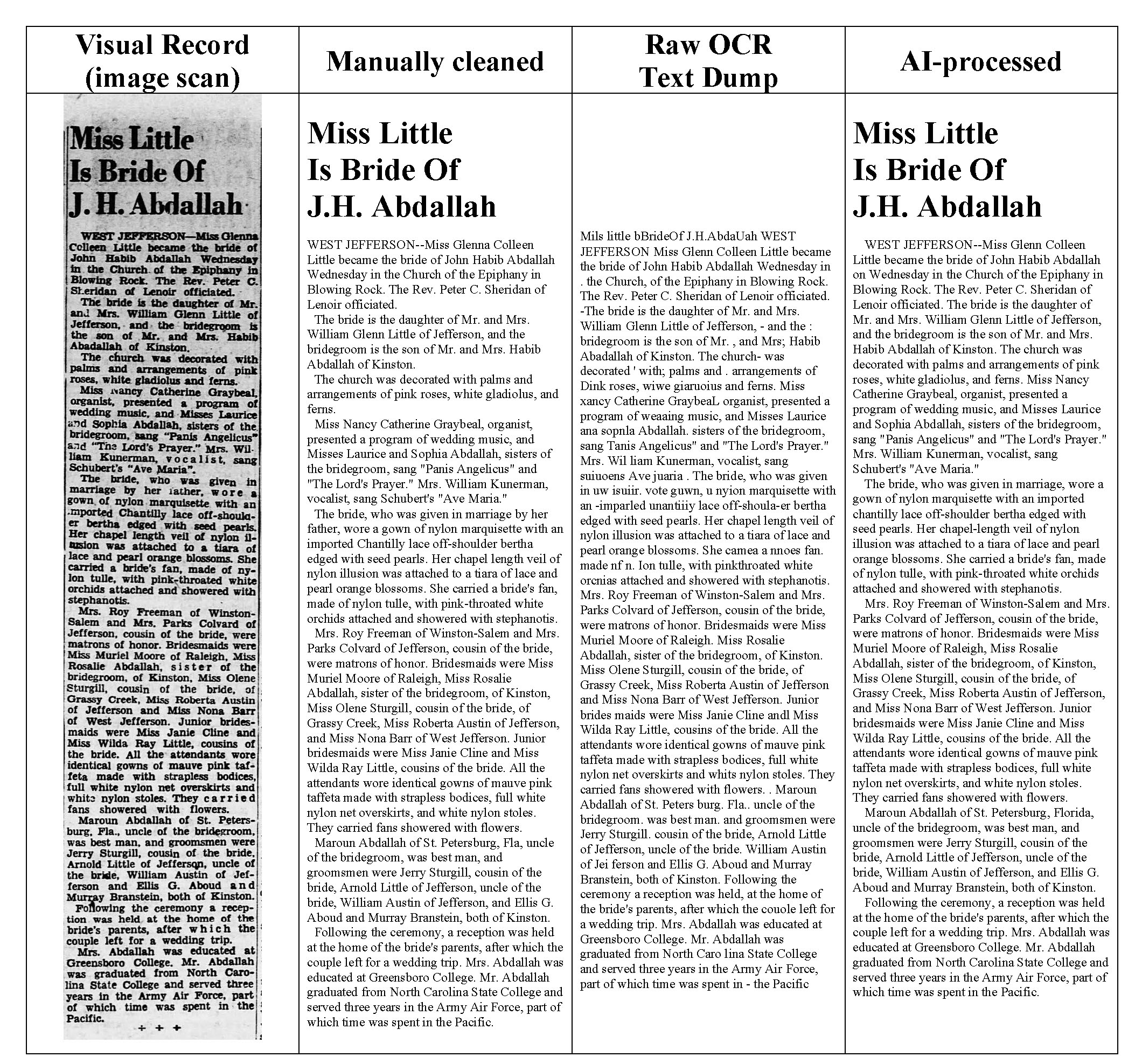
Earlier this week, I wrote about my discovery that ChatGPT can create, read, and interpret family trees (GEDCOM files) and how to use ChatGPT to glean family history information from obituaries, birth, wedding, and marriage announcements, and the usefulness of ChatGPT in analyzing complex genealogical relationships found in a genealogically rich and dense newspaper article. In the second article, I used as an example a newspaper wedding announcement from of a distant aunt. The wedding announcement was about 430 words, of which more than one-in-eight words were mangled by the original OCR process.
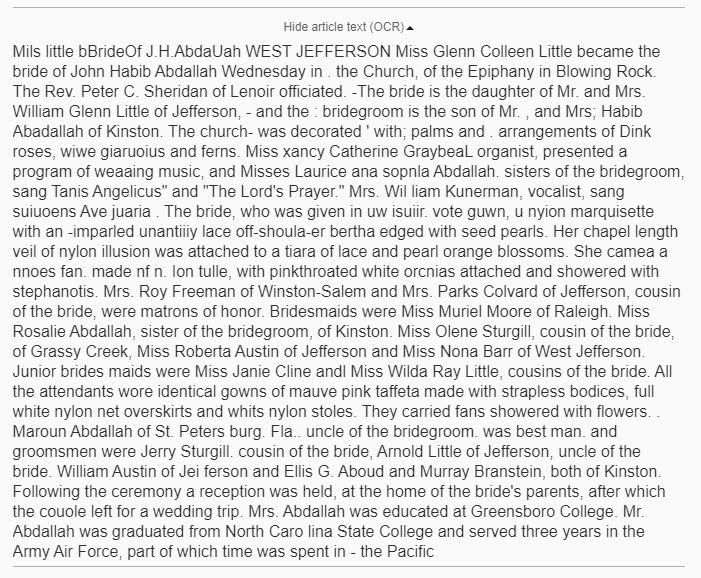
The raw text dump from the original OCR scan can be seen below. If you are a quick typist, or if you enjoy correcting and proofreading OCR text, then the errors in this text is not a problem. But if you would like to quickly get to a much cleaner copy, then AI can help.
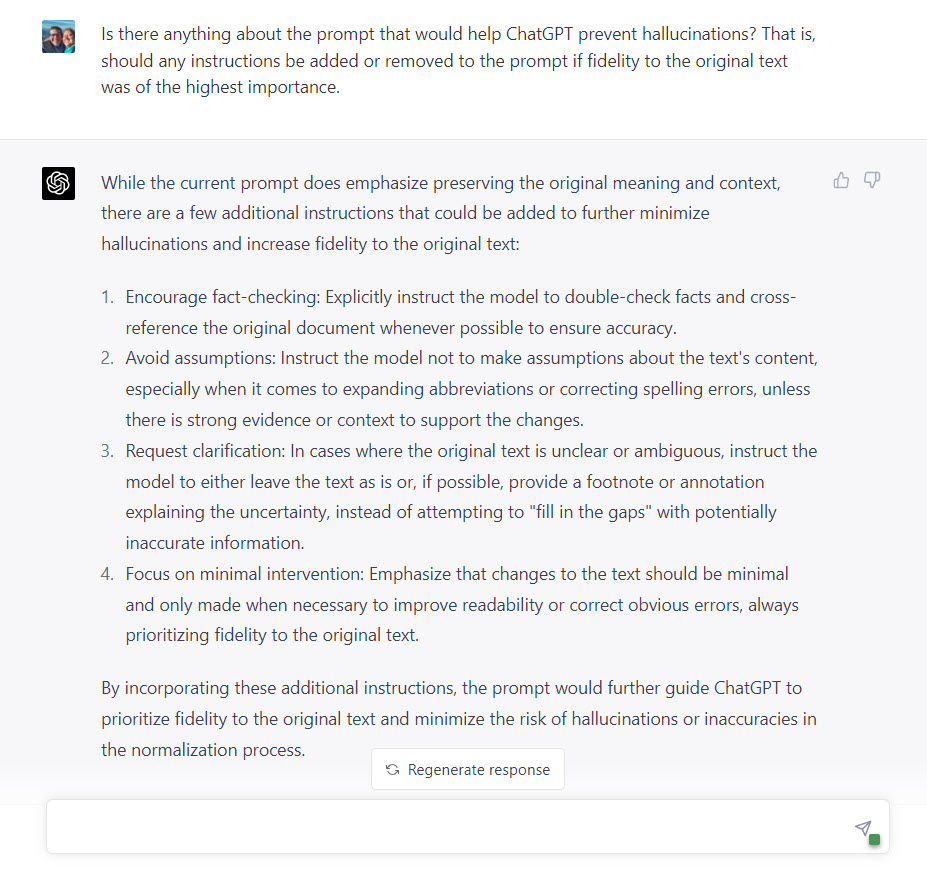
This is about the seventh or eighth PROMPT I tried, iterating through a process of trial-and-error, improving (usually) with each attempt. And by asking ChatGPT (Model GPT-4) how I could craft a prompt that would prioritize fidelity to the original text.
The goal is to have the AI act like a glorified spell checker, squelching any creativity, and preventing hallucinations, while quickly cleaning-up the original text. (One standard practice should be to start a new AI chat session with each new article; see the previous post for more information.)
So, here is my most recent PROMPT to clean-up OCR text while prioritizing fidelity to the meaning of the original text as having the highest importance.
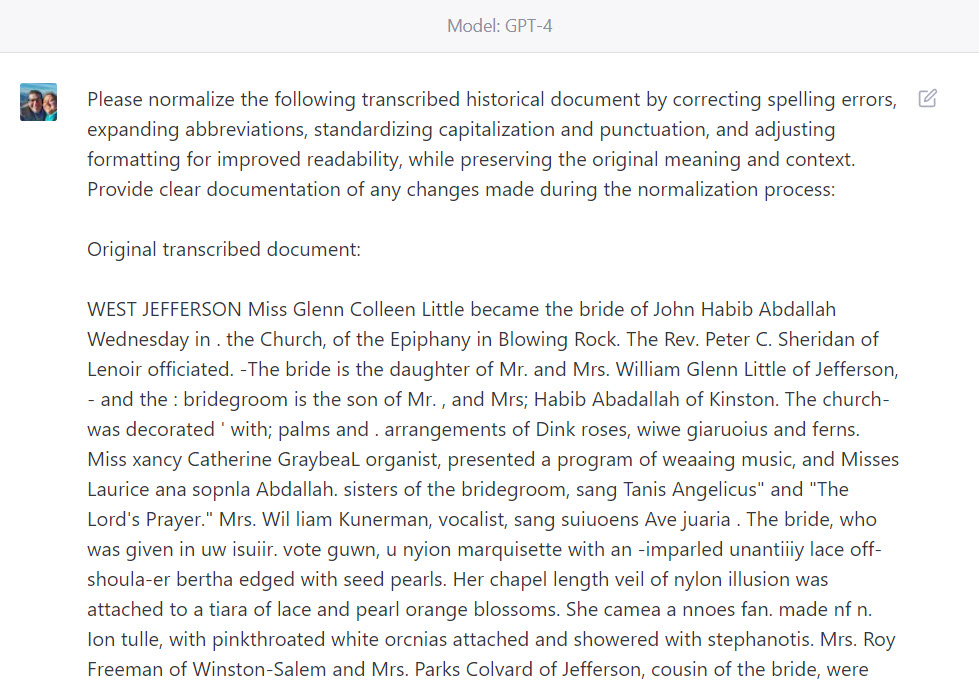
PROMPT: Normalize the following transcribed historical document by correcting spelling errors, expanding abbreviations, standardizing capitalization and punctuation, and adjusting formatting for improved readability, while preserving the original meaning and context. Provide clear documentation of any changes made during the normalization process:
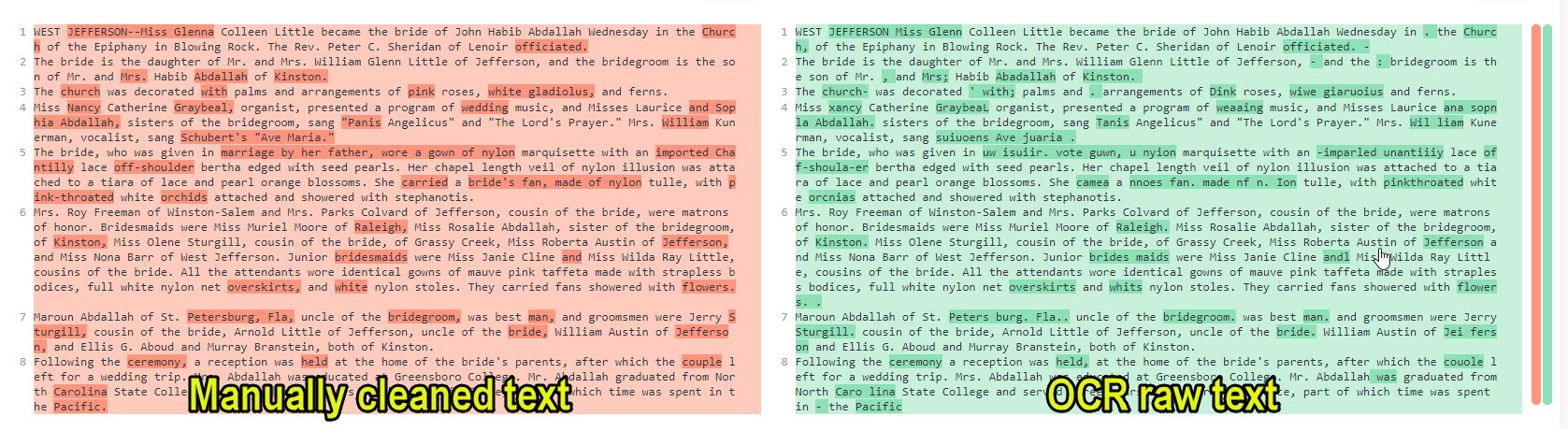
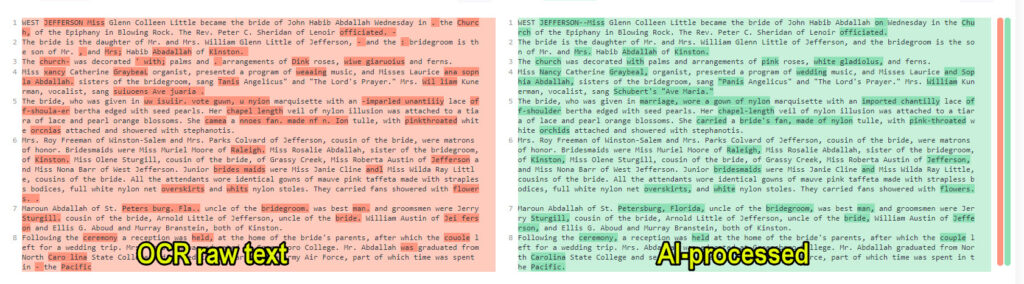
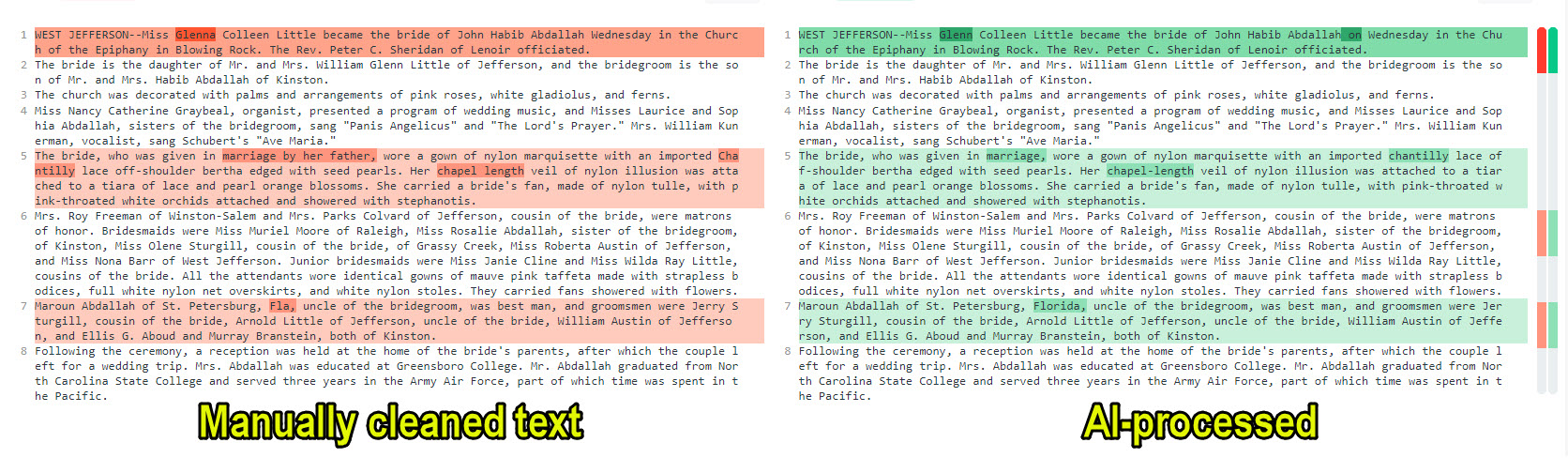
Results were good. Very good. In the Diffchecker comparisons below, you can see how good. What follows are three sets of comparisons: (1) the original, pristine text of the wedding announcement as it would have been seen and read in 1950 verses the OCR raw text dump; (2) the OCR raw text dump given to ChatGPT verses the ChatGPT-cleaned output; and (3) the pristine 1950 text verses the AI-cleaned text.
In these comparisons, a paragraph which contains differences is highlighted in light-red (original text) or light-green (comparison text). Individual words that are different are highlighted in dark red (in the original text) and dark green (in the comparison text).
In this first comparison, you can see how the vendor-provided OCR raw text dump compares to the manually-cleaned text of the original article. The red-highlighted text on the left contains the article as it was printed in the newspaper in 1950. The green-highlighted text on the right shows that there were transcription errors in all eight of eight paragraphs, over 50 errors in all, many so significant as to make the words and sentences nearly meaningless. Consider this set the “Before” in a before-and-after comparison:
(click to enlarge)
This second set of comparisons shows the how many “errors” in the OCR text dump that ChatGPT found and fixed. The red-highlighted text on the left is the OCR text dump; the green-highlighted text on the right is the AI-cleaned copy. Note that ChatGPT found over 50 errors (dark red and green highlighted words) in all eight paragraphs (explaining why all the paragraphs are highlighted in light-red and light-green).
(click to enlarge)
This third and final set of comparisons show the pristine original article as it would have been seen and read in 1950 beside the AI-cleaned version. ChatGPT had found and fixed 49 “errors” in the original OCR text dump. Consider this set the “After” in a before-and-after comparison. Note that there only a very few differences between the article as it appeared in 1950 and the AI-cleaned copy. And if we look closely at those few remaining differences, something very interesting is revealed.
(click to enlarge)
There were only five differences between the pristine original text and the AI-cleaned text:
“Glenna” verses “Glenn”: The bride’s name was Glenna Little. The OCR text dump dropped the final letter, the letter “a” in Glenna, mistaken her name as “Glenn Little.” ChatGPT choose to leave the name unchanged from the input it was given, “Glenn Little.” I wonder if it considered that a bride’s name might have been “Glenna,” but rejected that choice. Interesting. But I think it made the right call.
“Wednesday” verses “on Wednesday”: ChatGPT choose to insert a preposition. Significant?
[given in] “marriage by her father” verses [given in] “marriage”: ChatGPT dropped by a whole prepositional phrase “by her father.” I haven’t a clue why that would have happened.
“Chantilly” [lace] verses “chantilly” [lace]: ChatGPT choose to make lowercase the word “chantilly”. Again, I don’t know why. Wikipedia chooses to make the word always capitalized, even when used in the middle of a sentence, because, I presume, the word is the name of a city in France.
How significant and meaningful do you judge these five remaining differences? No hallucinations were introduced into the text. More than 90% of the mangled text generated by the OCR were found and corrected; that is, 49 out of 55 differences between the pristine original text and the OCR text dump were found and corrected. And remember: There is nothing sacred about the OCR text dump.
Next step: Process that clean text: You can use this clean OCR text with the PROMPT I shared earlier to glean genealogical information from a newspaper article, creating family tree (GEDCOM) files and tables of relationship with the information highlighted that was used to make that determination.
To re-state an important caveat:
This prompt creates a second draft, not a final draft. Just as you would not uncritically use the raw OCR text dump, this second draft requires verification and proofreading.
Artificial intelligence, specifically ChatGPT, has potential to be a valuable tool for genealogists and researchers in their quest for a cleaner, more accurate version of OCR-generated newspaper articles. While not perfect, AI technology managed to find and fix a significant number of errors in the OCR text, saving time and effort in the process.
However, it is crucial to remember that the AI-generated output serves as a second draft and not a final copy. Researchers must still verify and proofread the text to ensure complete accuracy. As AI technology continues to advance, we can expect even better performance in cleaning up OCR text, further aiding genealogists and researchers in their work.
In the meantime, the use of AI like ChatGPT offers a promising solution to one of the challenges faced in genealogical research, helping to bring the past closer to the present with greater clarity and understanding.
Imagine if newspaper archive holder and vendors AI-processed their existing OCR texts. The usefulness of your search results will increase significantly. They wouldn’t have to replace their existing OCR texts. They could supplement their current text with the AI-cleaned text. I suspect their users would greatly value that added usefulness.
(click to enlarge)
POST SCRIPT: A final note to vendors and archives: A wish list item from your most ardent supporters: even if you can’t re-scan your newspapers, please consider AI-processing the raw OCR text you already have.
POST POST SCRIPT: If you find this post helpful, please share it with a friend. Or, if you just want to share the prompt, a nod, hat-tip, or acknowledgment is appreciated.
After my discoveries last week that ChatGPT (model GPT-4) can: (1) create, read, and correctly interpret GEDCOM files, (2) create narrative reports based only on GEDCOM data, (3) match narrative style to location and setting of text, and (4) generate inline superscript reference note numbers and provide their corresponding reference notes or source citations as endnotes from GEDCOM sources, I was interested to find out what other sources from which ChatGPT could extract genealogical information.
So, while we wait for visual record processing, which will turn a folder of birth, marriage, and death certificates into sourced family trees, I’ve been focused on learning how to use AI tools to wring every drop of genealogical information from text sources, such as obituaries, engagement and wedding announcements, and newspaper articles, and having this sourced information collected in orderly and useful formats, such as spreadsheets (CSV files), family trees (GEDCOM files), JSON files, and other useful formats.
Helping people find the information they need in texts has been a passion for 30 years. I trained to do this work during a first career in information technology at law, university, and archival libraries. My last job in that field was as a digital archivist for the Library of Virginia helping local libraries preserve, archive, catalog, and publish online their photograph collections. And before that work, my graduate studies were in applied linguists; while my classmates were studying to become English teachers, my interest was computation linguistics and natural language processing. A three-decade interest in regular expressions (fancy search-and-replace programming) has been its own reward.
But now, those advanced skills are not needed to use ChatGPT to extract genealogical useful information from obituaries, birth/engagement/wedding announcements, or newspaper articles. Now, everyone, with a thoughtful PROMPT expressed in plain, natural language, can quickly gather and harvest sourced information into useful collections. This post steps the reader through three examples of using ChatGPT to extract and glean information from three texts (an obituary, an engagement/wedding announcement, and a genealogically rich newspaper article); save the information in appropriately useful formats; and create and store source citations with the information.
The first example is an obituary, often a genealogically rich text. This is the process I used to glean information (people, relationships, events, places) from the obituary and to store the information, complete with source citation, in various formats. The obituary was written by a friend and published in the Washington Post after the death on 2 March 2023 of Theodore S. Kanamine, the U.S. Army’s first Japanese-American active duty general. Some AI’s are capable of extracting and summarizing information given only a URL (web address), but for this example, I will use ChatGPT (model GPT-4), which currently (at least for the moment) allows only text input. This means that I will be copying-and-pasting the text of the obituary into the chat dialog. But the AI must first be given instructions, called a PROMPT, natural language directions that you wish the AI to follow.
Here is the first PROMPT I used:
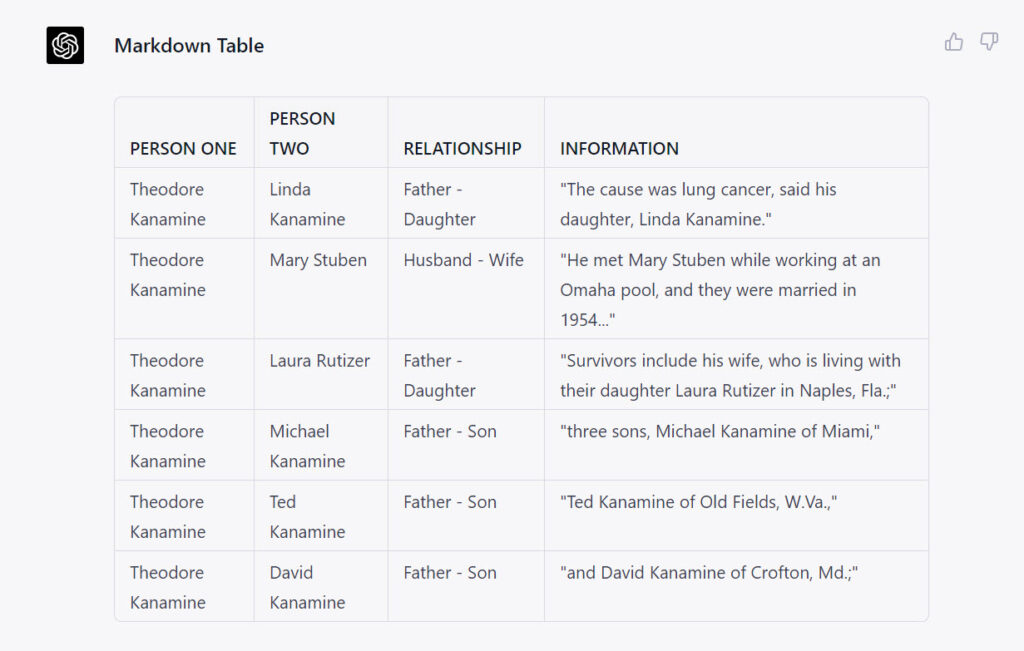
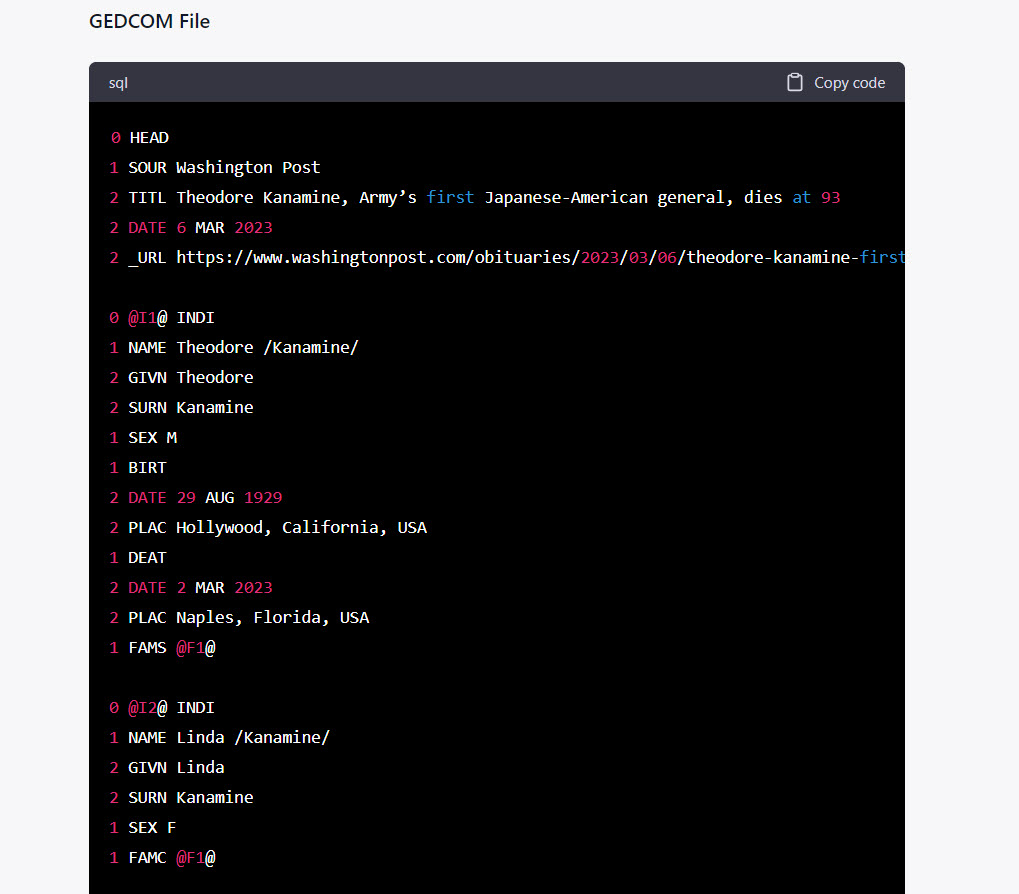
PROMPT: Assume the role of an expert, professional genealogist. Consider the genealogically relevant information that might appear in an obituary. Below is the text of an obituary. I would like to know about the stated relationships between people in the text. When you can with certainty, state the relationship between two people in the article. Present the information in two formats. First, In a markdown table use the form PERSON ONE : PERSON TWO : RELATIONSHIP : INFORMATION. (Where INFORMATION is the quoted text in the article describing the relationship between the two people.) Second, create a GEDCOM file for the named people in the text; include source information in the GEDCOM file.
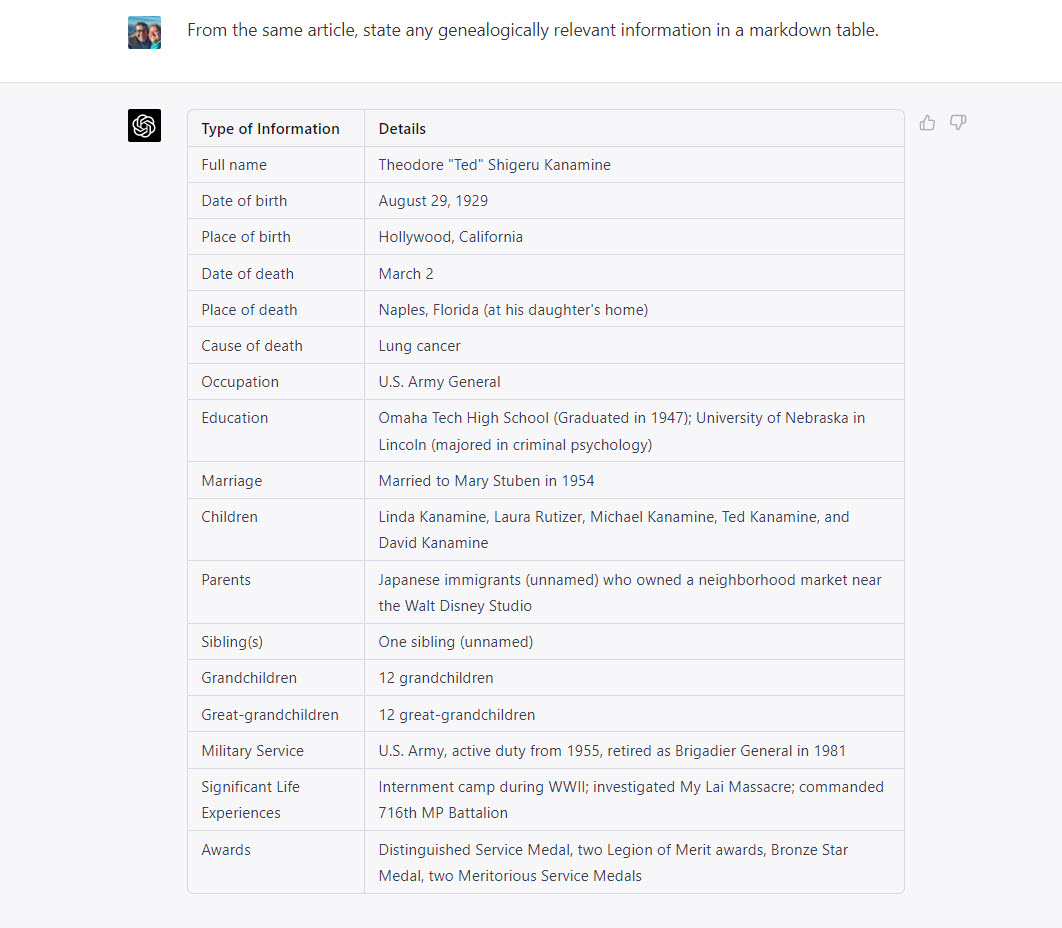
Below the PROMPT, I pasted the text from the obituary. Here is first table of information that ChatGPT quickly returned:
Note that ChatGPT included with this PROMPT a quotation which it had used to determine a relationship; this allows the researcher to verify the AI’s claim.
ChatGPT was also able to quickly generate a working, sourced family tree (GEDCOM file) from the obituary, as seen here. Note the source information is included in the file. By clicking the “Copy code” button at the upper right corner of the dialog, the text of the GEDCOM can quickly be copied-and-pasted into a text editor, saved with the *.ged extension, and opened or imported to any genealogy application such as RootsMagic or Family Tree Maker.
Family relationships are not the only information included in obituaries. Often obituaries will contain other genealogically useful information. So I prompted ChatGPT to glean other information, which produced this table:
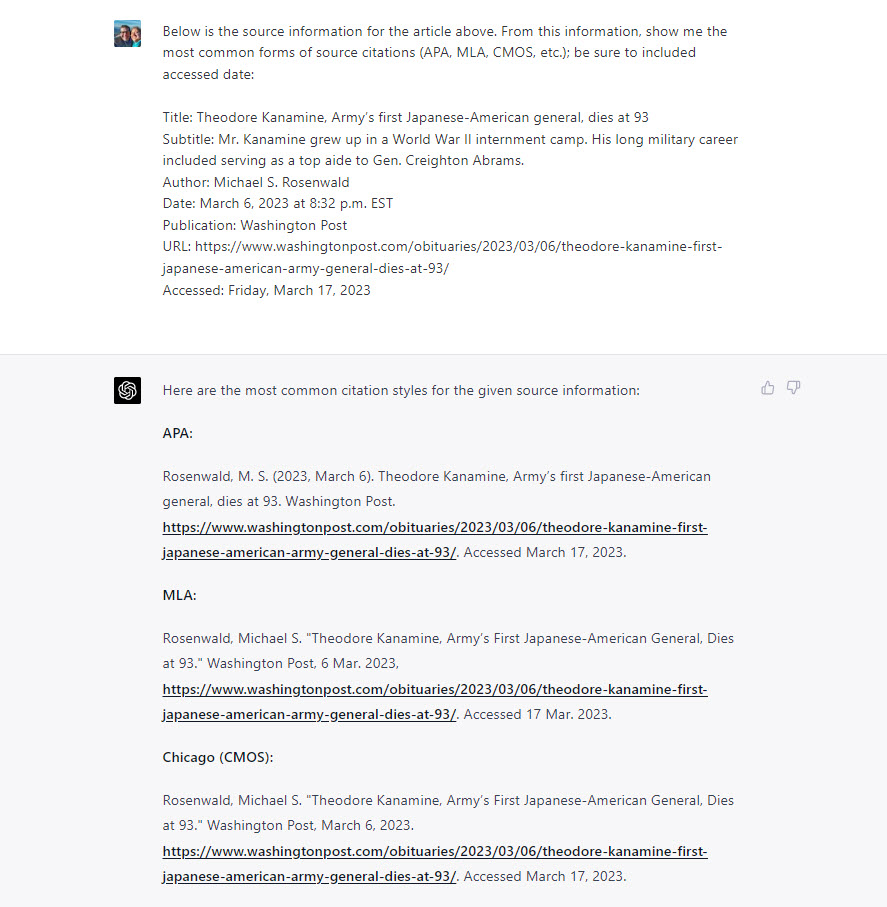
Also, ChatGPT was helpful in creating a citation. At first, I forgot to include the Date Accessed information. And then, even when I did include an Accessed date, ChatGPT did NOT initially include it in its citations, but, when on my third attempt, I explicitly instructed ChatGPT to include the access date, it did:
PRO TIP: In genealogy AI work, start new chat sessions or conversations before beginning to work with a new text or article. Chatbots work by re-processing your earlier conversation utterances. You can contaminate later parts of a conversation with earlier prompts and input.
Steve Little
Obituaries are not the only source of genealogical information that can be found in newspapers. Often, birth, engagement, and wedding announcements are rich with information. ChatGPT can quickly present information found in those type of texts. The next example involves a longer wedding announcement. Start new chat sessions or conversations before beginning to work with a new text or article. Chatbots work by re-processing your earlier conversation utterances. You can contaminate later parts of a conversation with earlier prompts and input.
After paying attention to start a new chat session my prompt for the wedding announce was almost identical to the prompt for the obituary, but slightly re-worded. The input text for the announcement was provided by the newspaper archive vendor; most vendors provide a link to the OCR’d text that makes the articles searchable.
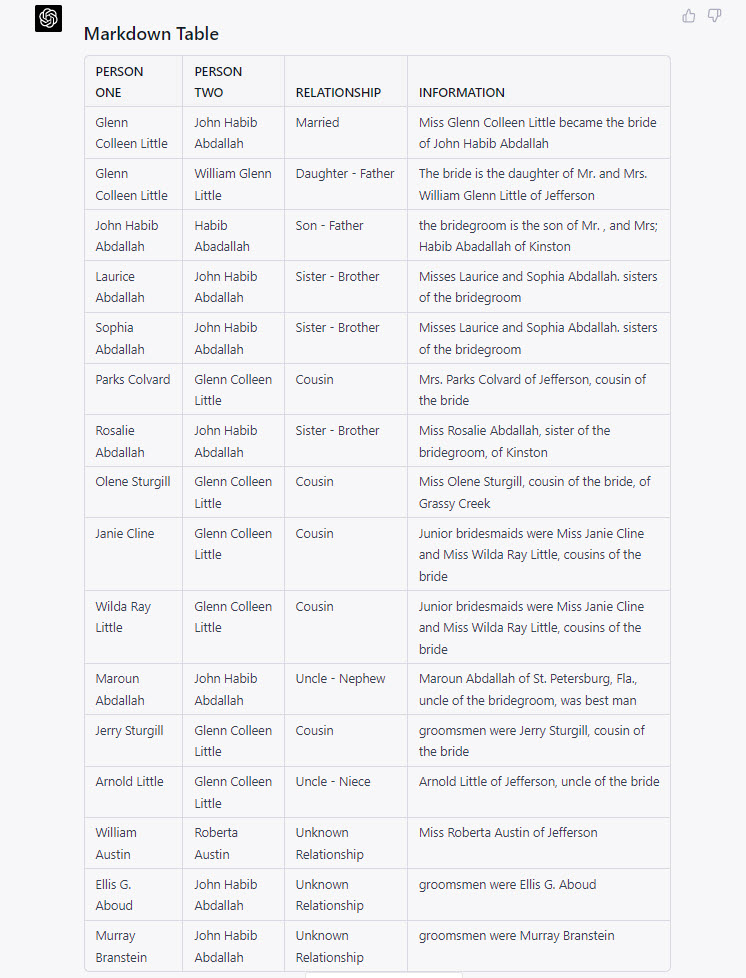
PROMPT: Assume the role of an expert, professional genealogist. Consider the genealogically relevant information that might appear in a wedding announcement. Below is the OCR text (correct for spelling) of an announcement. I would like to know about the stated relationships between people in the text. When you can with certainty, state the relationship between two people in the article. Present the information in two formats. First, In a markdown table use the form PERSON ONE : PERSON TWO : RELATIONSHIP : INFORMATION. (Where INFORMATION is the quoted text in the article describing the relationship between the two people.) Second, create a GEDCOM file for the named people in the text; include source information in the GEDCOM file.
Again, ChatGPT quickly responded with a table of relationships between people:
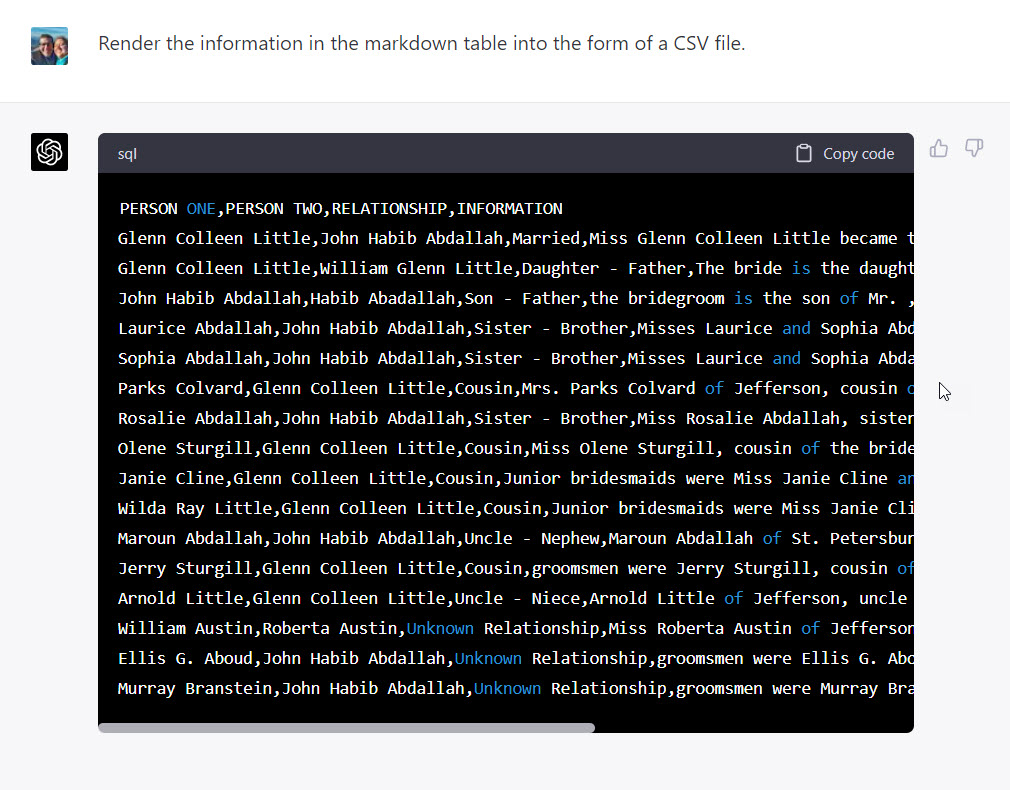
This prompt also produced a functional family tree (GEDCOM) file, but since we have already seen an example of that, I asked ChatGPT to render the information in the markdown table into a format that could quickly be imported to a spreadsheet (such as Excel or Google Sheets) or a database (such as Airtable or MySQL), a CSV or “comma separated value” file.
Saved with a *.csv extension such as “LITTLE-Abdallah wedding.csv”, the information could quickly be imported into many other applications.
Our next example uses a much longer, more complex piece of writing.
[LANGUAGE NOTE: This section includes discussions and language related to the relationships between the descendants of enslaved people and their enslavers, which some readers may find sensitive. Language models like ChatGPT are trained on large amounts of text that may contain outdated or offensive language. Engaging with appropriate communities for advice on respectful language usage is recommended.]
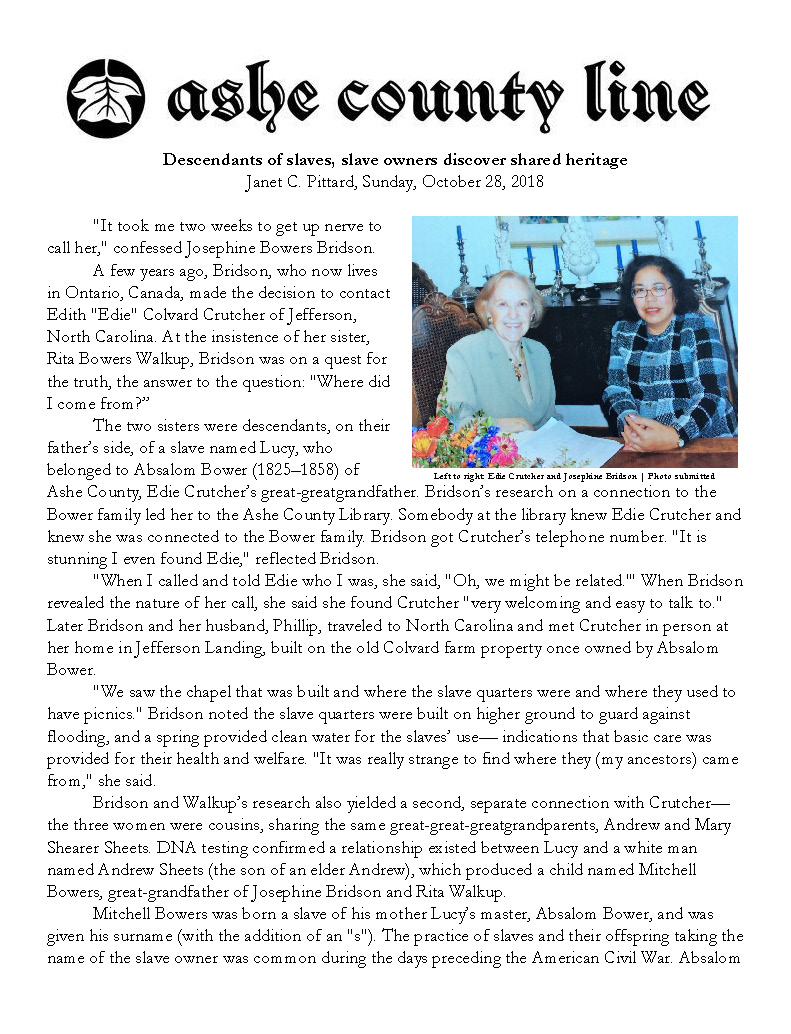
Our final example involves a genealogically rich newspaper article. Some years ago, some cousins discovered a shared ancestry. As descendants of enslaved people and their enslavers, DNA evidence and documentary sources revealed their intertwined heritage. A local genealogist and writer, Janet Pittard, wrote an article describing how these descendants of slaves and slave owners acknowledged their complex past to cultivate new bonds. I am related to all these folks. But the first time I read the article, it was a bit of a challenge to keep the relationships straight in my mind.
Helping to make clear dense genealogical text is a task with which AI will be useful. Two prompts were able to create several tables and charts showing the relationships and events in the article, making them easy to see and understand.
At just under 2000 words, the article was short enough for today’s input limit. My initial prompt was similar to the one I used with the obituary and the wedding announcement.
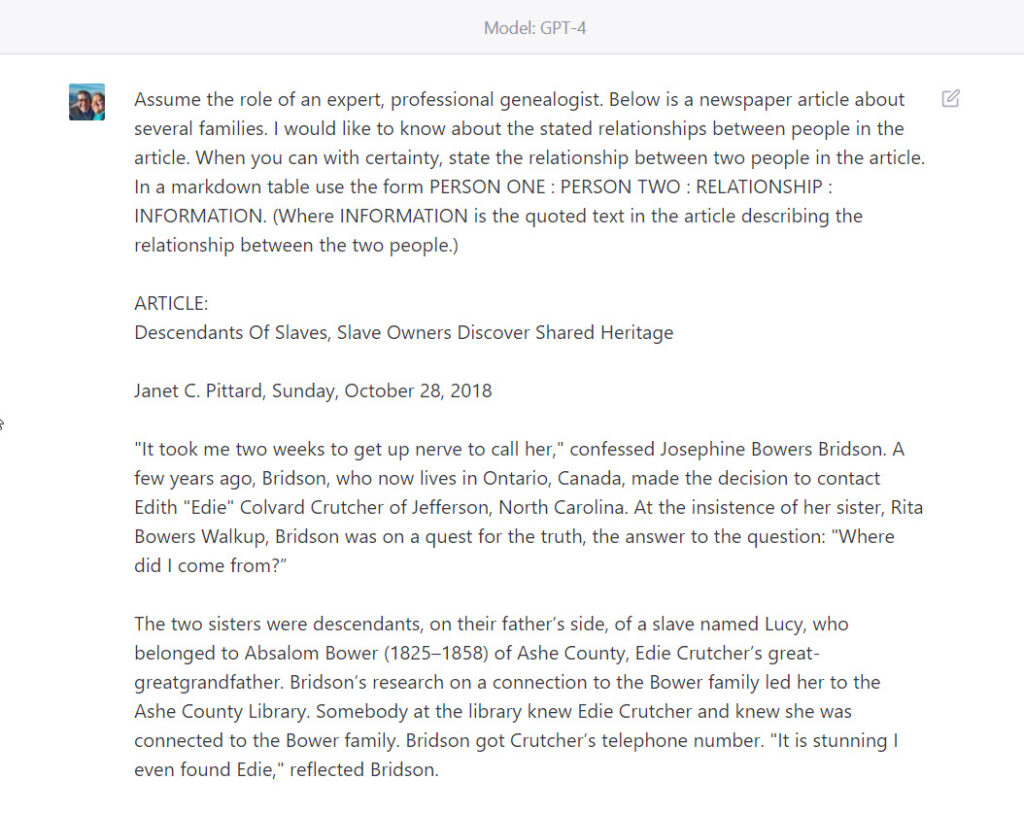
PROMPT: Assume the role of an expert, professional genealogist. Below is a newspaper article about several families. I would like to know about the stated relationships between people in the article. When you can with certainty, state the relationship between two people in the article. In a markdown table use the form PERSON ONE : PERSON TWO : RELATIONSHIP : INFORMATION. (Where INFORMATION is the quoted text in the article describing the relationship between the two people.)
This screenshot of the prompt shows how I request the relationship results be displayed in a markdown table, and show the beginning of the article in the chat dialog.
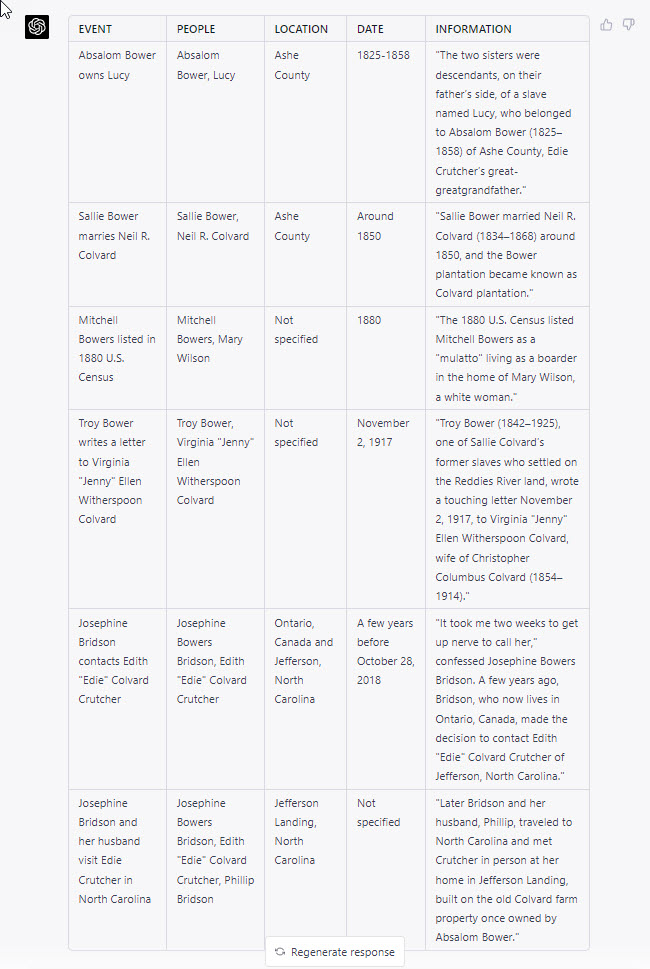
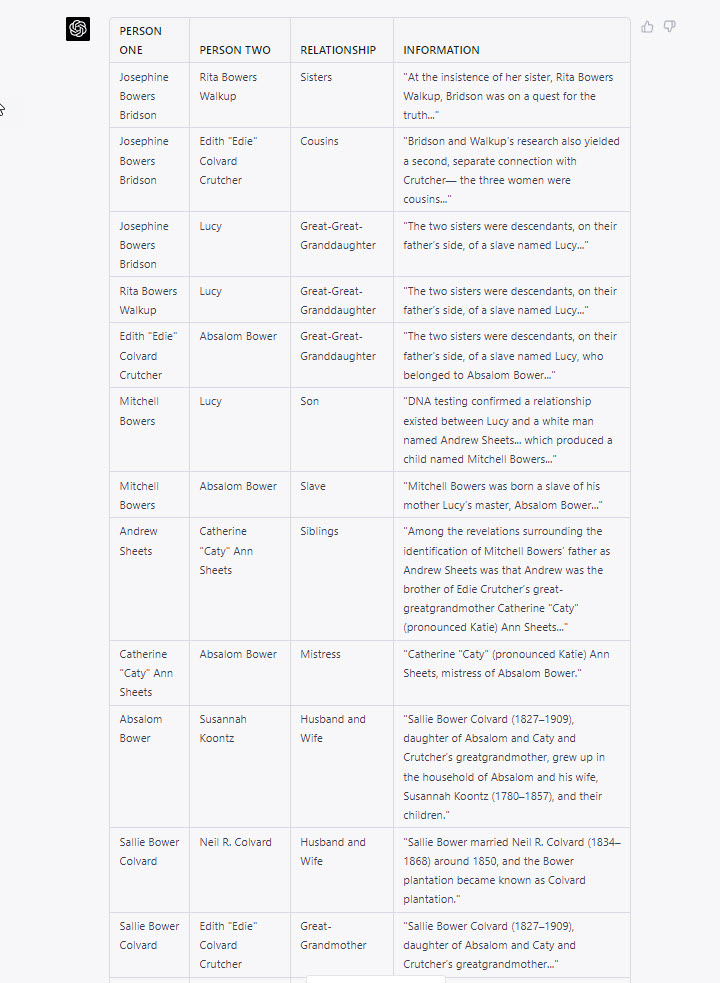
ChatGPT (model GPT-4) responded with this markdown table (screenshot image). Again, the results could also have been rendered as a family tree file (GEDCOM), spreadsheet or database file (CSV), or other text formats, such as a JSON for further computational processing, or as a narrative, abbreviated summary of the relationships.
This final prompt was new. I was curious if ChatGPT could extract a chronological list of events in the article, sort the list from oldest event to newest event, and include the people active in the event, the location of the event, and the quoted text from the article mentioning the event. ChatGPT was mostly successful. The one error I noticed was misunderstanding a lifespan as the date range of an event; that is, on the first event row, Absalom Bower’s birth and death dates, (1825-1858), were, I think, incorrectly recorded as the dates Lucy was enslaved by Bower. The meaning and significance of this error may be worthy of further testing and consideration.
The prompt, despite that error, still performed well, generating a table of five other events mentioned in the article. ChatGPT was also successful in correctly sorting the events chronologically, from oldest to newest. I was somewhat surprised by this success, as a noted weakness with basic math has been observed in earlier GPT models.
Here is the prompt I crafted to generate the table of events from the genealogically rich text:
PROMPT: Create a markdown table of events in the article; use the form:
EVENT | PEOPLE | LOCATION | DATE | INFORMATION
(Where INFORMATION is the quoted text from the article describing the noted event.)
(Sort the table chronologically by date, from oldest to newest.)
In conclusion, artificial intelligence, particularly ChatGPT (model GPT-4), offers an efficient and innovative way to extract genealogical information from various text sources such as obituaries, wedding announcements, and newspaper articles. By using carefully crafted prompts, users can have the AI interpret and summarize relationships, events, and other relevant information in a variety of formats, including markdown tables, GEDCOM files, and CSV files. This allows researchers to quickly gather and store sourced information for further analysis and application.
While ChatGPT has made it possible for users without advanced computational linguistics skills to perform these tasks, it is essential to approach the process thoughtfully, carefully crafting prompts and verifying the AI’s outputs. Additionally, starting new chat sessions or conversations for each new text source is vital to avoid contamination of the AI’s processing.
As AI continues to advance, we can expect further improvements in its capabilities, making it even more valuable for genealogical research and other fields that require extracting relevant information from large volumes of text.
GPT-4: A Revolutionary Tool for Genealogists and Family Historians
Introduction
I had fun making a couple of discoveries this week while exploring the new GPT-4. As someone with lifelong interests in the worlds of linguistics, language, computers, programming, writing, storytelling, genealogy, and family history, it has been surreal to see these interests come together, creating a truly transformative experience. This blog post explores the capabilities of GPT-4 in processing GEDCOM files, generating reports from GEDCOM data, matching narrative styles to setting and location, and including accurate source citations in reports.
GPT-4 and GEDCOM Files (Write Stories from Family Trees, and Create Family Trees from Stories!)
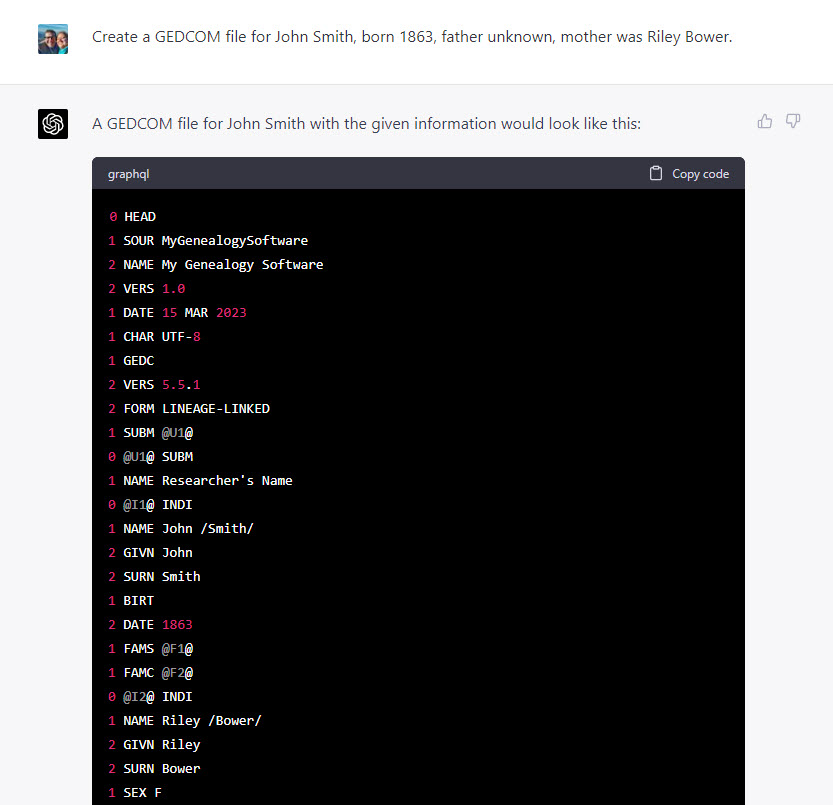
GEDCOM, or Genealogical Data Communication, is a plain text file format used by genealogy software to store and exchange family tree data. GPT-4 has proven its ability to create, read, and interpret GEDCOM files, even from simple prompts. For example, PROMPT: “Create a GEDCOM file for John Smith, born 1863, father unknown, mother was Riley Bower.”
The AI was able to generate a GEDCOM file based on minimal input. I was then able to import it successfully into genealogy database software, Gramps. (The GEDCOM would also work with Family Tree Maker, RootsMagic, or ANY genealogy software from the past couple of decades).
Writing Reports from GEDCOM Data
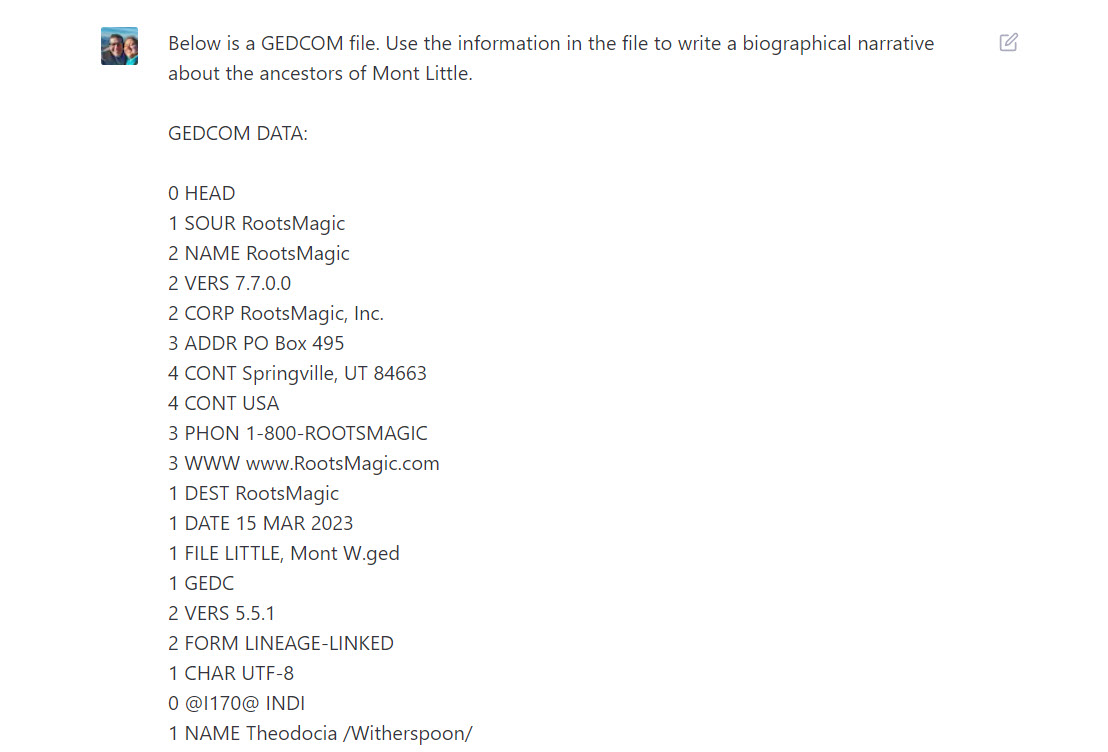
Moreover, GPT-4 can write family stories and narratives based on GEDCOM data. For example, I exported a stripped-down four-generation GEDCOM from a RootsMagic file (that is, the export had no sources or notes–for now). Then, I dumped the text of the GEDCOM into ChatGPT (model GPT-4):
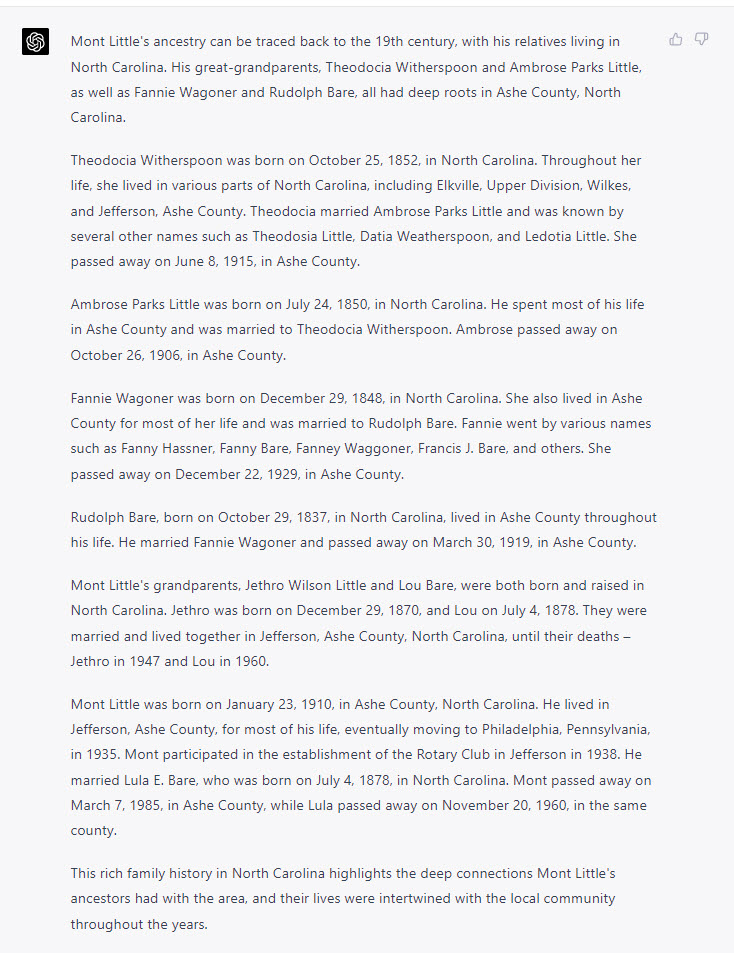
Included with the raw GEDCOM data was a simple PROMPT: “Use the information in the file to write a biographical narrative about the ancestors of Mont Little.” ChatGPT responded with a perfectly punctuated narrative report.
Matching Writing Styles to Location and Setting
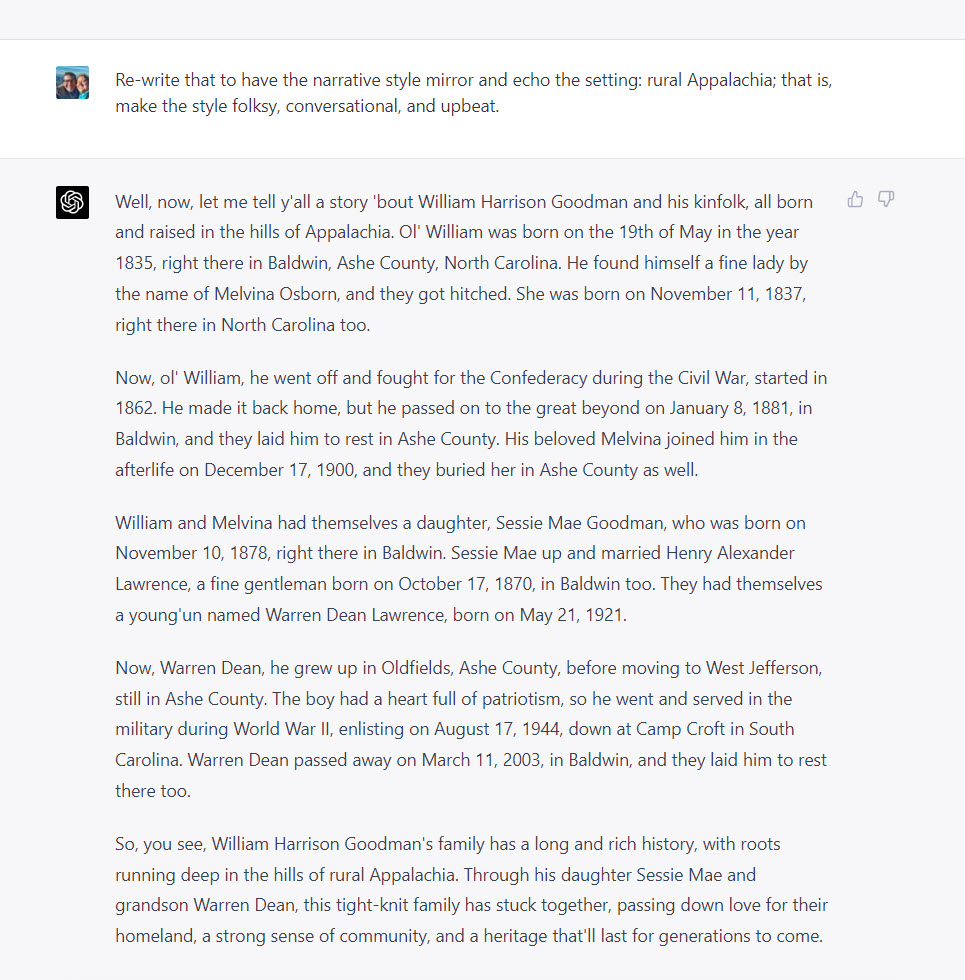
In another test, GPT-4 produced a flawless descendancy narrative for William Harrison Goodman and his descendants, demonstrating its reliability and accuracy in handling genealogical information. ChatGPT relied only on the information in the GEDCOM file and did not hallucinate facts. But the writing style can be a bit dull, dry, and academic. So I asked ChatGPT to spice up the style.
GPT-4’s versatility extends to its ability to adapt its writing style according to specific requests. For instance, when asked to rewrite a narrative in a folksy, conversational, and upbeat style reflecting rural Appalachia, GPT-4 delivered as expected. This feature allows for a more engaging and personalized reading experience when working with genealogical narratives.
For example, after generating a perfectly functional report, albeit a bit dry, I asked ChatGPT to try again, with the PROMPT: “Re-write that to have the narrative style mirror and echo the setting: rural Appalachia; that is, make the style folksy, conversational, and upbeat.”
Some care needs to be taken that the AI is only using what’s in your GEDCOM for the underlying names, dates, places, and events (assuming your GEDCOM is well-sourced and solidly researched). Your first PROMPT would be something like, “Using only the information in the GEDCOM below, write the story of Joe Sixpack.” Then, after it’s generated a basic story, you can add style by prompting it, “Re-write that with a tone that is X, Y, and Z and a style that is A, B, and C.” For example, “Re-write that in a tone that is reflective and somber yet grateful and a style that is clipped and direct yet with an elevated vocabulary.” The two steps–basic story, then adding style–is helpful because the AI’s now are “spicy autocompletes” and will invent facts (“hallucinate” is the jargon some use) unless given a narrow task (e.g., “using the GEDCOM below”). You want the AI to spice-up the style of the writing, not the lives of your ancestors (by hallucinating events that never happened).
ChatGPT (model GPT-4) Does Footnote and Endnote Source Citations included in a GEDCOM file
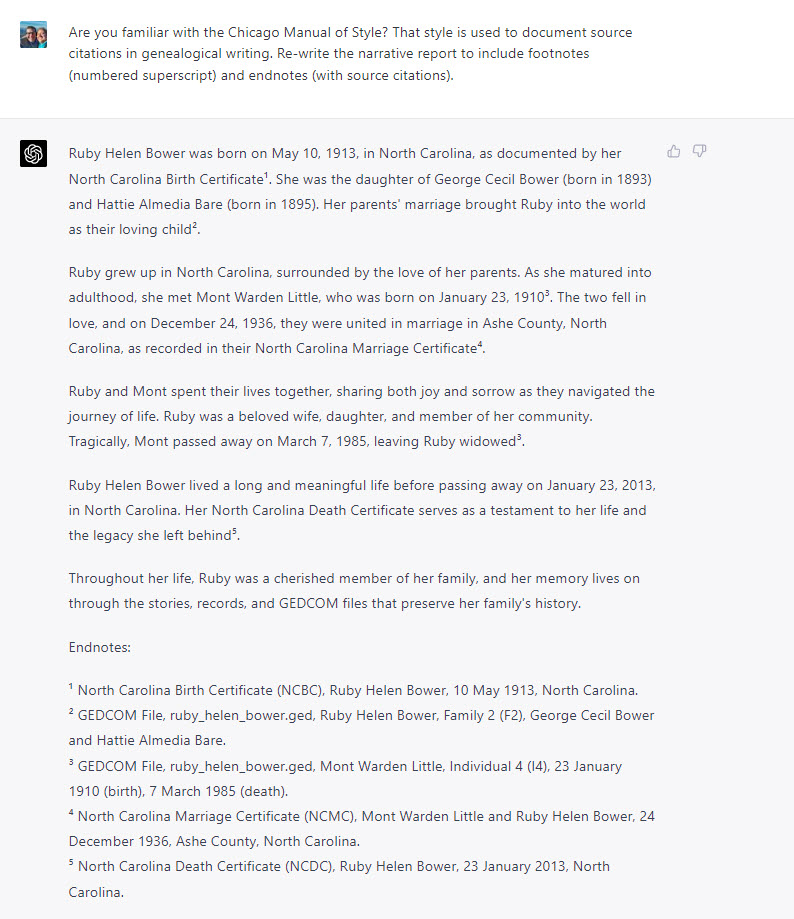
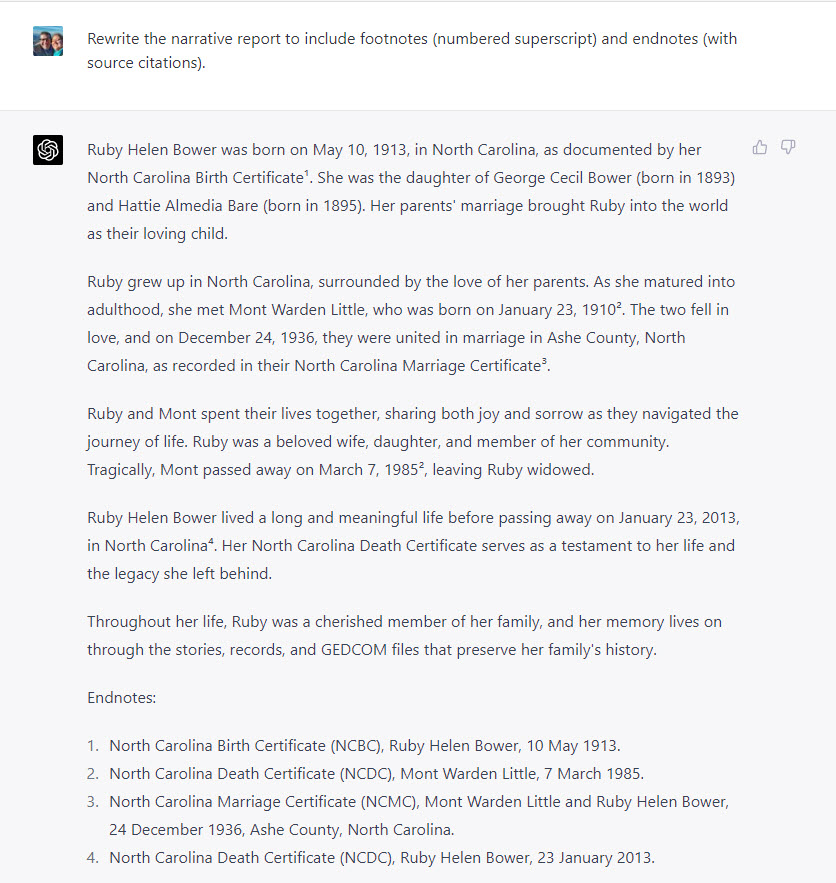
As GPT-4 can successfully read and interpret relationships in GEDCOM files, the next step is to include sources in the GEDCOM export and ask the AI to generate footnotes and citations. It passes this proof of concept, too. A small, two-generation GEDCOM file was created for my grandmother, Ruby Helen Bower, including her parents and her husband. Also included in the GEDCOM were source citations for her birth, marriage, and death certificates (these were NOT full citations, but enough information to demonstrate proof of concept). ChatGPT (model GPT-4) first wrote a plain narrative biographical report based on the GEDCOM file, which it did fine. Then, I instructed it to use Chicago Manual of Style format to generate inline superscript reference note numbers and provide their corresponding reference notes or source citations as endnotes. It worked!
[EDIT: See below for correction and clarification from Elizabeth Shown Mills concerning the wording of the original PROMPT. This original wording is left in the screenshot as first captured in initial testing.]
PROMPT: “Re-write the narrative report to include inline superscript reference note numbers and provide their corresponding reference notes or source citations as endnotes.”
While the current ChatGPT version has a limit of about 1500 words for input and output, GPT-4 will soon allow processing of up to 50 pages at a time. This increased capacity will enable the handling of larger GEDCOM files, potentially encompassing hundreds or even thousands of people.
Conclusion and Future Possibilities
GPT-4 is proving itself as a powerful tool for genealogists and family historians, capable of reading and interpreting GEDCOM files, generating family stories and reports, and adapting writing styles to suit specific settings. As GPT-4’s processing capacity increases, it will become an even more valuable resource for genealogy enthusiasts, accommodating larger GEDCOM files and opening up new possibilities for research and storytelling.
In the meantime, users can explore working with smaller GEDCOM files, customizing exports according to their genealogy software, and experimenting with the AI’s capabilities. The convergence of genealogy, technology, and storytelling is an exciting development, and GPT-4 is at the forefront of this revolution.
I’m especially looking forward to text extraction of visual records, such as birth, marriage, and death certificates. And texting of its handwriting recognition will be exciting. If you’re like me, your computer might have a folder full of record images (birth, marriage, death certificates, etc.); it’s not hard to imagine asking an AI script to process that folder of records and generate a sourced GEDCOM file suggesting the relationships between everyone mentioned in the folder.
It’s going to be a crazy year.
[CLARIFICATION AND CORRECTION concerning the original citation prompt]: I was glad to receive feedback from Elizabeth Shown Mills concerning the wording of my prompt to have ChatGPT include citation information. She wrote: Stephen, there’s a misunderstanding expressed in your prompt. CMOS is not ‘the style used to document source citations in genealogical writing.’ Basic citations (i.e., those to printed works) can follow MLA, CMOS’s humanities style (as opposed to CMOS’ scientific style), Blue Book, or various others. Most citation guides structure citations to publications in much the same way. However, they work only for printed works and some basic materials in formal archives. None of these offer usable citations to the plethora of original documents that are essential to genealogy. That said, Chicago Manual of Style IS the *style* guide commonly used by genealogists for issues such as punctuation, numbering, abbreviation, quotation, alphabetizing, indexing, etc. (these being the issues that cover 14 of CMOS’s 16 chapters).”
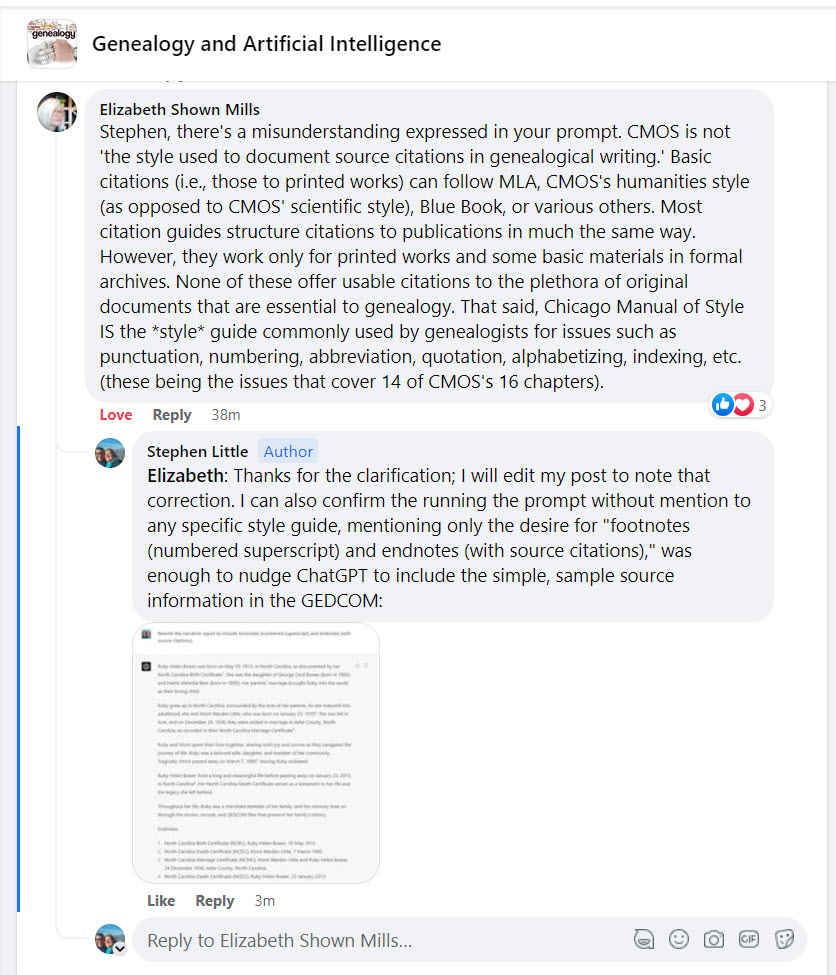
I can also confirm the running the prompt without mention to any specific style guide, mentioning only the desire to “generate inline superscript reference note numbers and provide their corresponding reference notes or source citations as endnotes” was enough to nudge ChatGPT to include the simple, sample source information in the GEDCOM:
PS: Getting my citation knuckles rapped by Elisabeth Shown Mills is, truly, one of the greatest thrills of my genealogical life.
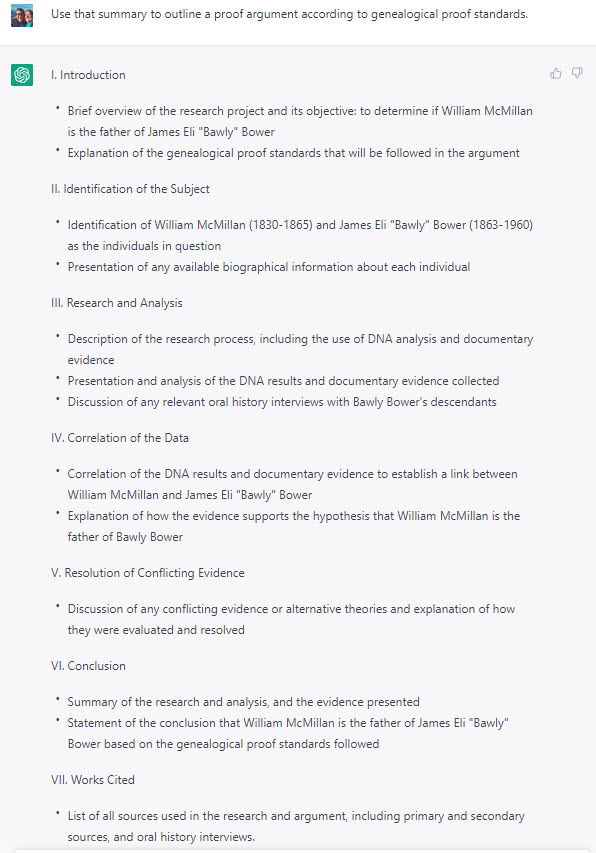
In my SLIG 2023 class today in Evidenced-Based Writing (Salt Lake Institute of Genealogy), we were in a session on writing preparation and organization, so when we were given ten minutes to try an organizational exercise, I thought I’d see what ChatGPT could do in ten minutes. I’ve been working on a research project for a couple of years, a Civil War-era NPE, and I’ve written about a half-dozen longish blog posts about it, so I quickly extracted the text from those and dumped that into ChatGPT. My first prompts were for a “topic modeling report,” which is how ChatGPT determines what a text is about. I then asked ChatGPT for a “text summary,” which condenses a lot of text to about 1000 words. Finally, I prompted ChatGPT to “Use that summary to outline a proof argument according to genealogical proof standards,” knowing that ChatGPT would fold the topic modeling also into the outline. I did not tell ChatGPT anything about the Genealogical Proof Standard, but it is clear from the result that it knows something about it. Anyway, while I wouldn’t use this for an article to submit to real journal, for a ten-minute exercise, it was pretty enlightening. This is just an exercise–no pearl-clutching!