New Use Case: Intelligent Image Analysis

ChatGPT Plus with Vision (GPT-4V) is going to be able to do some cool stuff.

New Use Case: Intelligent Image Analysis.

I attached an image of a headstone commemorating my maternal second great-grandparents, David S. Lawrence and Marget M. Lawrence. I thought about what I’d like to know about the image, and I wrote this prompt.
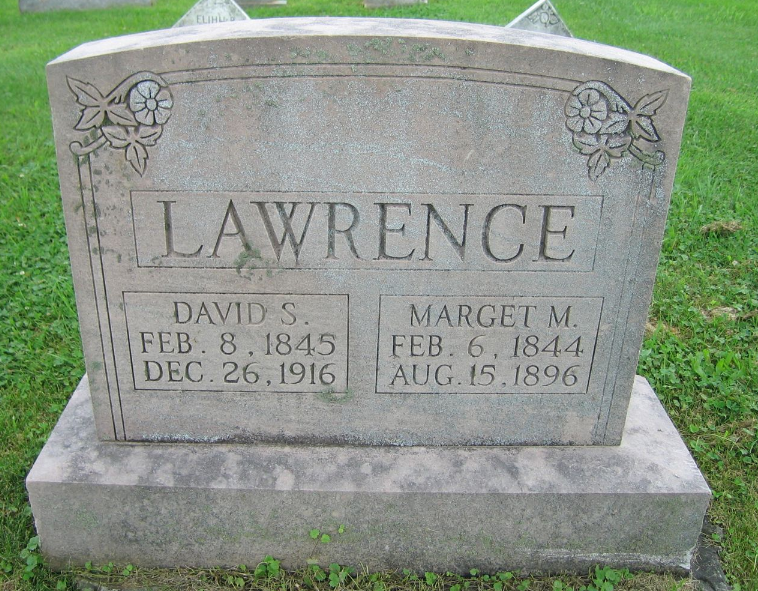
PROMPT: You are an expert genealogist, talented writer, and imaging expert. Your goal is to extract information from images. Find attached an image of headstone. Analyze the image. Transcribe any text on the headstone. Describe any notable features in on the headstone. Describe the whole image. Create a narrative report from the text on the headstone; dry recitation, no editorializing. 

This was a first-attempt, so I didn’t know what to expect.

I was impressed. This is going to be useful. (Imagine writing a simple Python script to process a folder of 20 or 200 or 2000 images like this for you.)
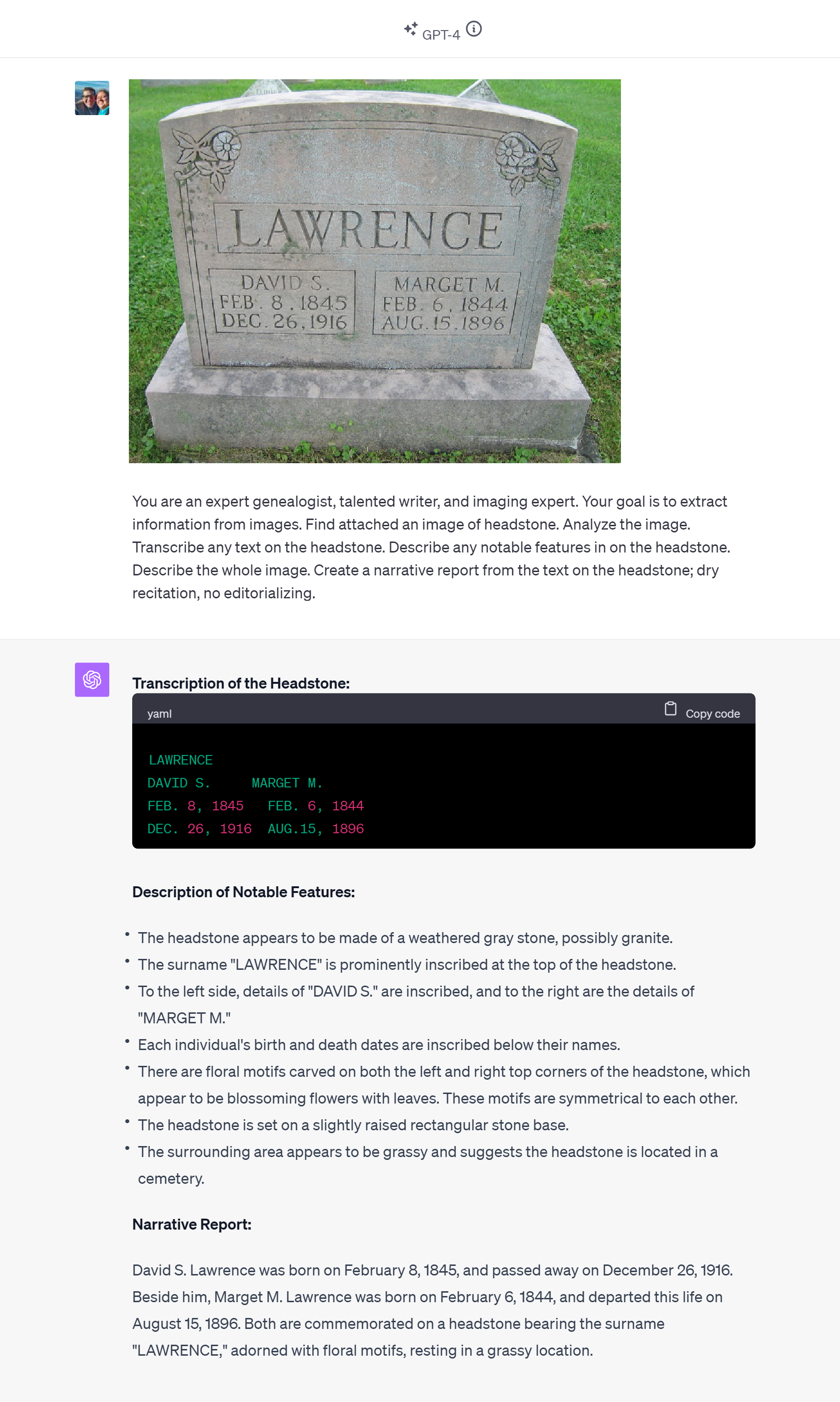
ChatGPT responded:

Transcription of the Headstone:
LAWRENCE
DAVID S.     MARGET M.
FEB. 8, 1845   FEB. 6, 1844
DEC. 26, 1916  AUG.15, 1896

Description of Notable Features:
The headstone appears to be made of a weathered gray stone, possibly granite.

The surname "LAWRENCE" is prominently inscribed at the top of the headstone.

To the left side, details of "DAVID S." are inscribed, and to the right are the details of "MARGET M."

Each individual's birth and death dates are inscribed below their names.

There are floral motifs carved on both the left and right top corners of the headstone, which appear to be blossoming flowers with leaves. These motifs are symmetrical to each other.

The headstone is set on a slightly raised rectangular stone base.
The surrounding area appears to be grassy and suggests the headstone is located in a cemetery.

Narrative Report:
David S. Lawrence was born on February 8, 1845, and passed away on December 26, 1916. Beside him, Marget M. Lawrence was born on February 6, 1844, and departed this life on August 15, 1896. Both are commemorated on a headstone bearing the surname "LAWRENCE," adorned with floral motifs, resting in a grassy location.

Earlier, I had looked at how ChatGPT with Vision handled a fan chart (imperfectly), a pedigree chart (impressively), and a death certificate (also impressively).

Beyond the genealogy community, this use will be very helpful. Having friends in the blind and low vision community, I was aware of the Be My Eyes app for years.

It was a good day at East Coast Genetic Genealogy Conference 2023.


UPDATE: Second success the next day

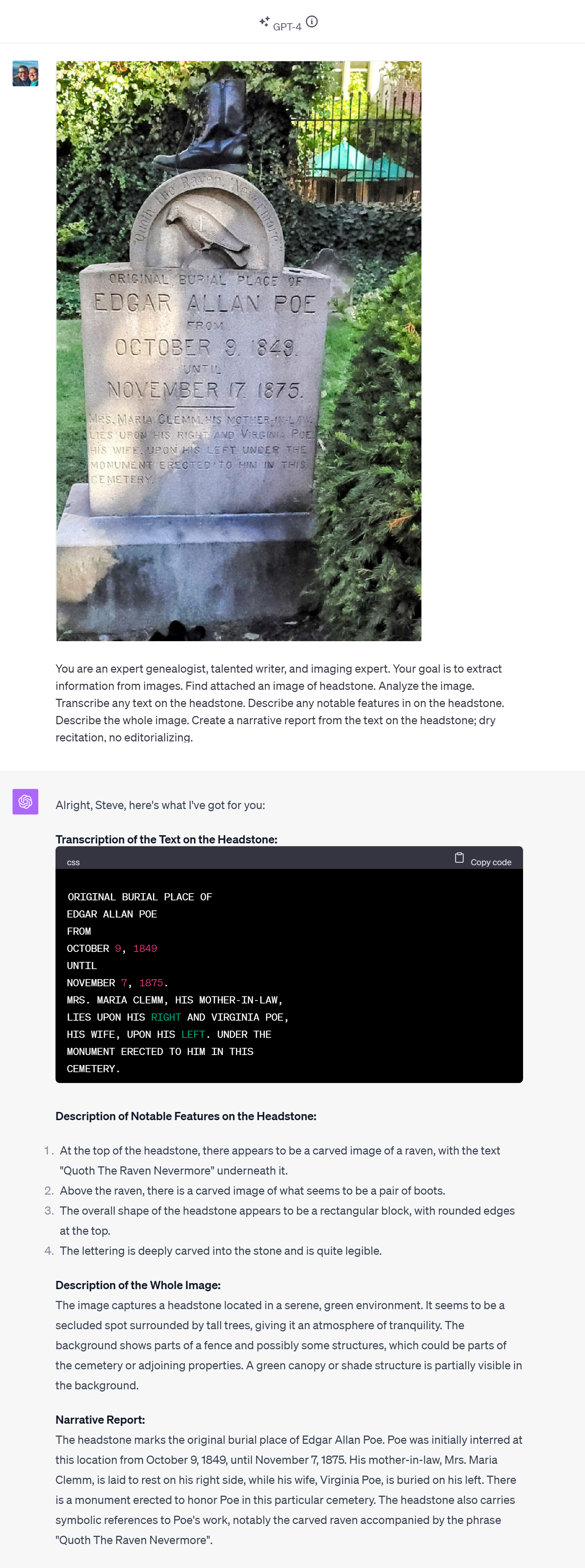
After leaving East Coast Genetic Genealogy Conference but before leaving Baltimore, my wife and I enjoyed the afternoon attending Poe Fest International, a part of which included a cool walk through cemetery where Poe is buried; I snapped a shot of Poe’s first burial location and the headstone now there, and I processed it with GPT-4V as I did with the Lawrence headstone yesterday.

Nailed it again.

Same prompt. More challenging image, with areas of dark and light, curved text, and more of it. I see no errors in the transcription. And it got the curved text correct, too, though I’m not sure the famous name and popular quotation might not have provided context that would have been useful during the image analysis.
New Use Case with GPT-4 Vision: From Image of Pedigree Chart to Ahnentafel List

Months of waiting came to an end on Tuesday 3 October when I finally got to test ChatGPT with Vision (GPT-4V). This version of ChatGPT can now “See, Hear, and Speak.” I spent a few hours getting acquainted with GPT-4V. This report provides a brief overview of my experience, though there’s much more to explore.

Introduction to GPT-4 with Vision and OCR

ChatGPT with Vision isn’t just your average virtual assistant. It can hold conversations, process vast amounts of information, and even boasts a robust Optical Character Recognition (OCR) feature. With these capabilities, I decided to explore the possibilities of extracting genealogical data from visual charts.

The initial test was to attempt to extract data from an image, specifically, to extract biographical data from a photo of a genealogical chart and to save that data (names, dates, places, relationships) in a format that would be useful to a genealogist, in this attempt, an Ahnentafel list (a simple list to track ancestors).

Initial Fan Chart (partial) Failure

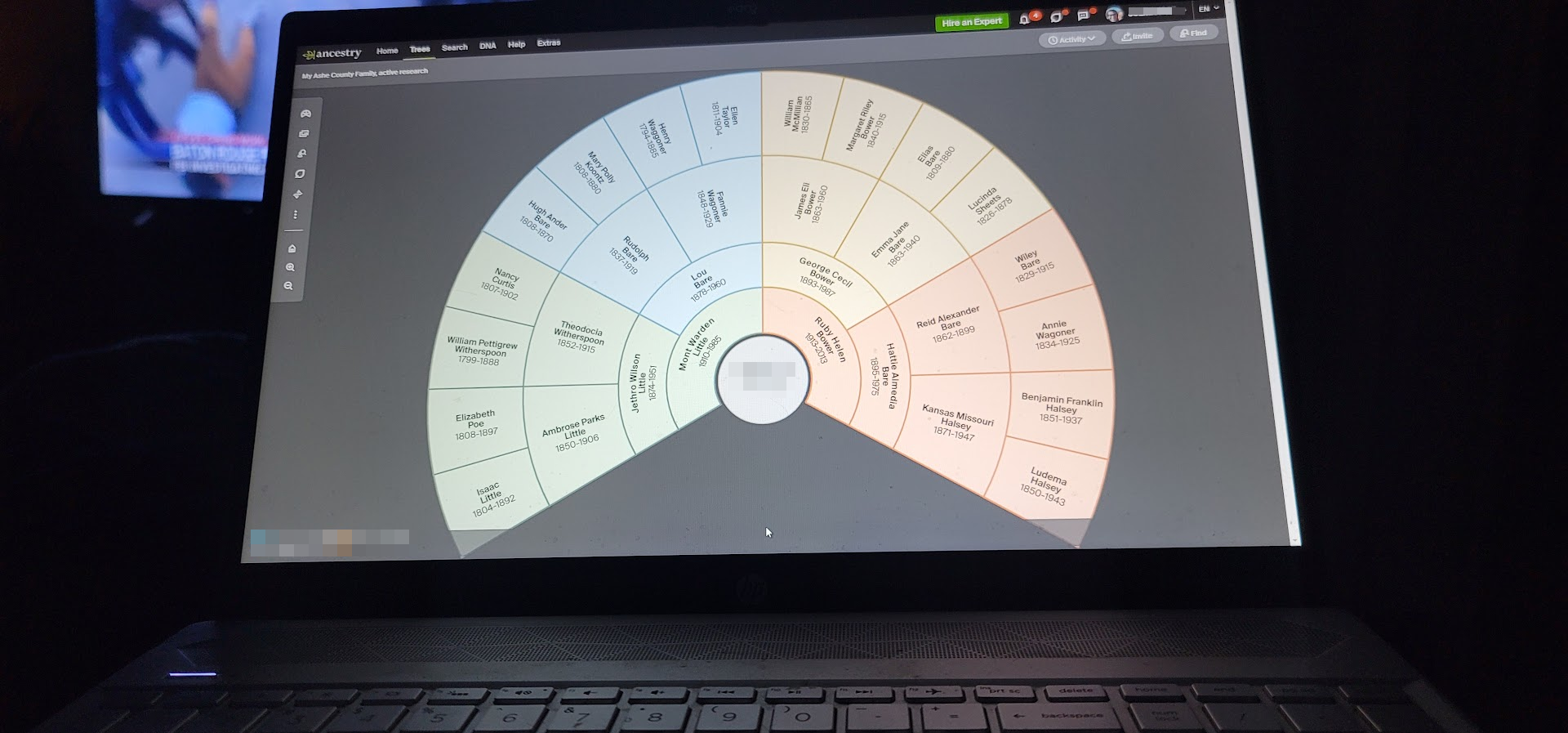
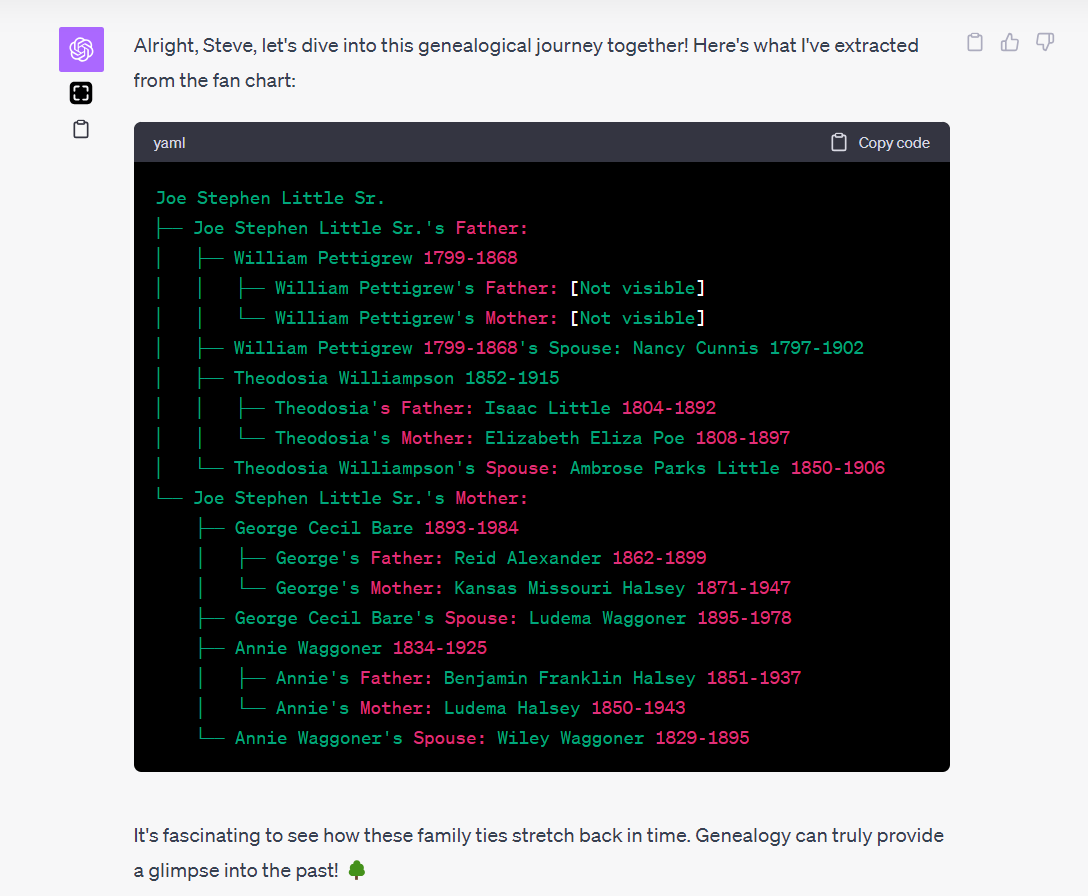
My first trial was with an image of fan chart. As beautiful as these circular wonders are, the curved text became a challenge for our OCR endeavor. Though GPT-4V got much correct, the curved nature of the fan chart’s text near the center made it difficult for it to capture the names accurately.

The results showed promise, but were not immediately useful. And that is typical. I NEVER get a prompt perfect on my first attempt, and it often requires several iterations of prompt refinements to get the quality of result desired. You can see from the results below that the AI did fine with the text that wasn’t curved, but it had trouble with the curved text near the center of the fan chart.

I strongly suspect this failure could be fixed, but my interest last night was to quickly find a successful use case that worked on a first attempt. So I moved onto a more simple challenge: a screenshot of a pedigree chart.

Success: Pedigree Charts and the Ahnentafel System

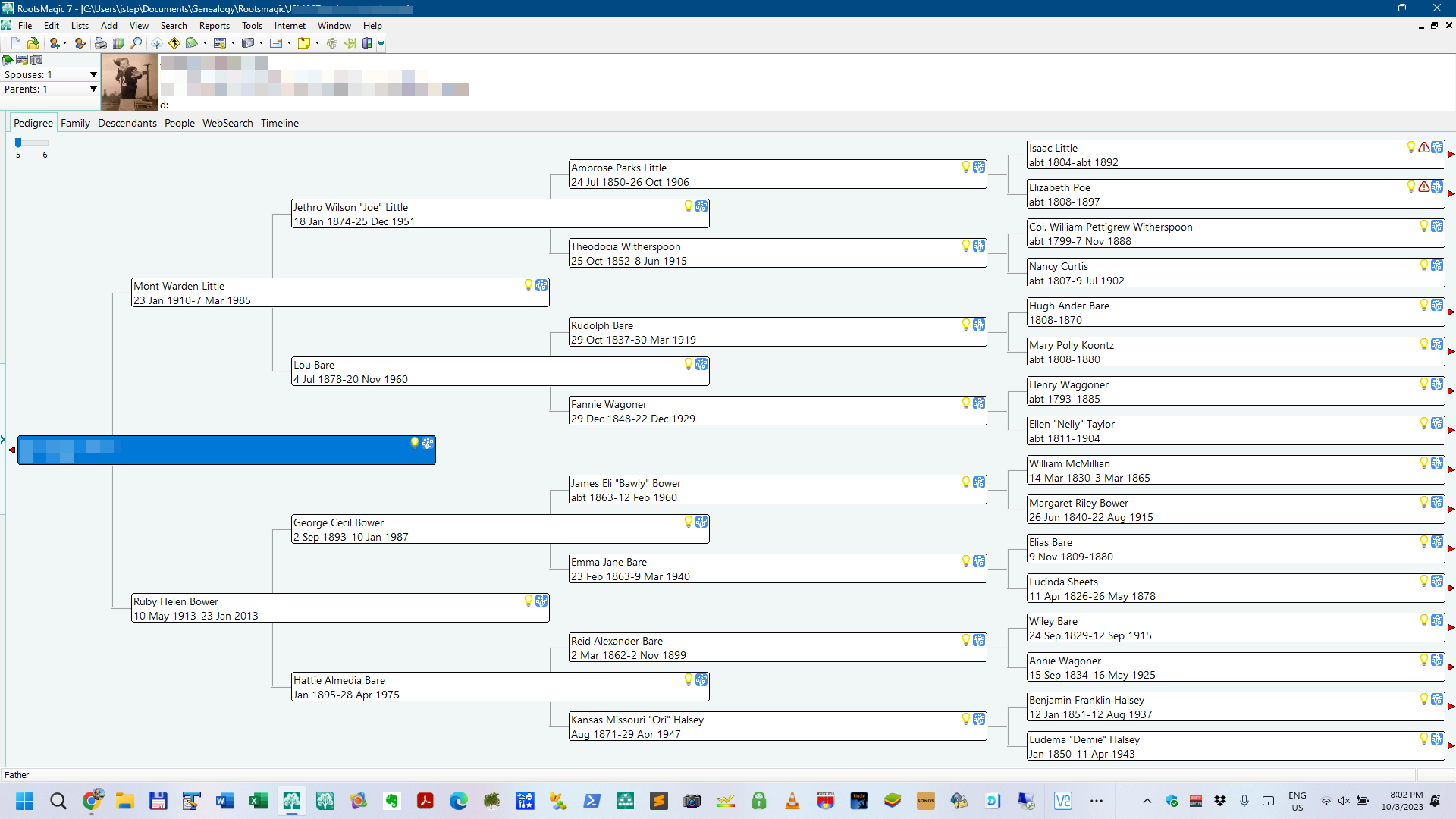
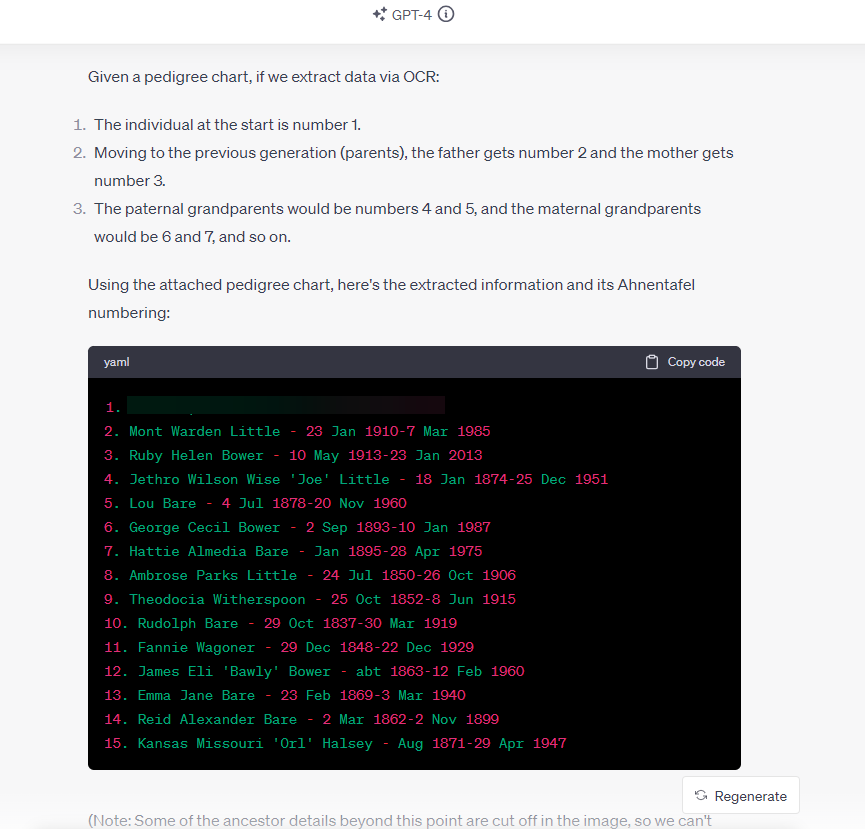
Recognizing the limitations, I shifted focus to pedigree charts, which present data in a more linear fashion. I first had ChatGPT note the value of the Ahnentafel system, a numerical method to track ancestors; this review has the effect of giving the AI a reminder of how an Ahnentafel list might be composed. Using this system, we set out to capture data from a pedigree chart and format it in an Ahnentafel list.

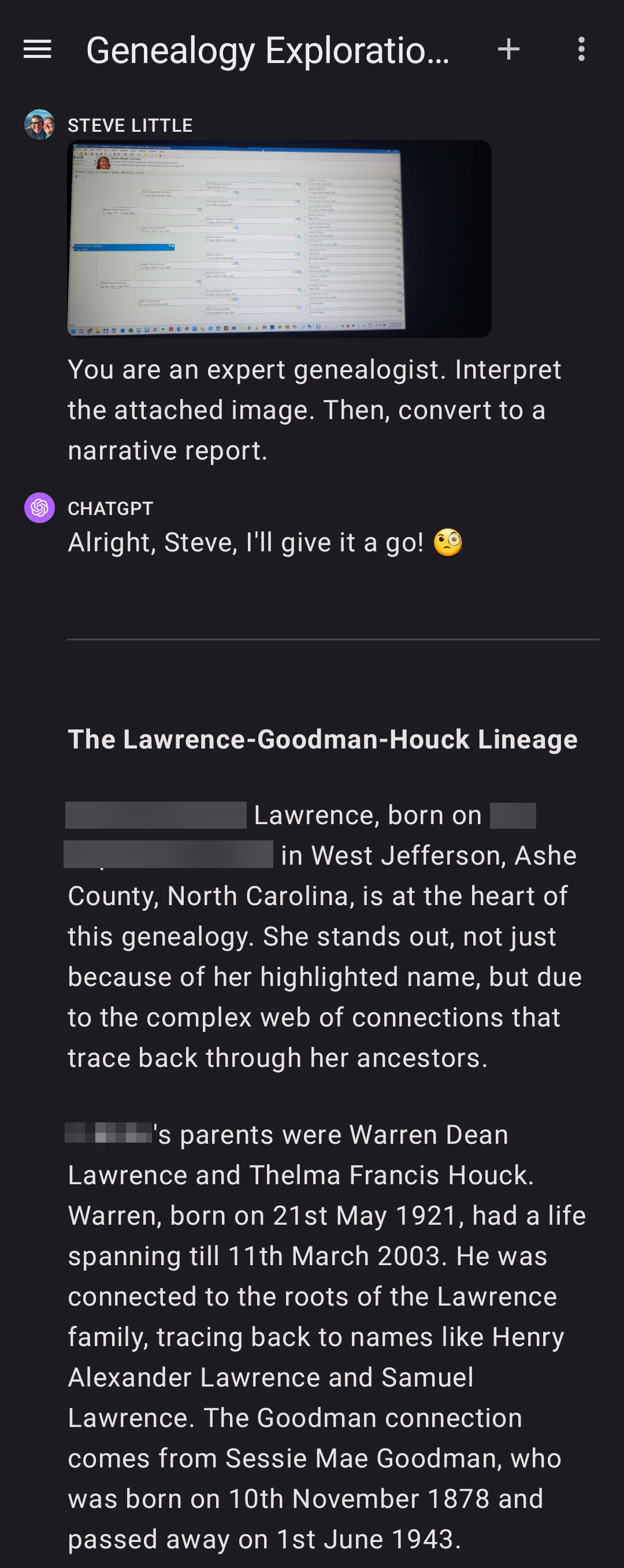
Here is the prompt I used; with GPT-4V an image can also be uploaded with the prompt. The screenshot above was included with this prompt:

PROMPT: Okay, I've got a simpler chart. First, tell me what you know about the Ahnentafel naming system. Think, then, too, about how the data in an image of a pedigree chart could be extracted via OCR and placed and stored in an Ahnentafel list. Find the attached image of a pedigree chart, extract the names, dates, places, and relationships, and place and store them in a Ahnentafel list (plain text is fine).

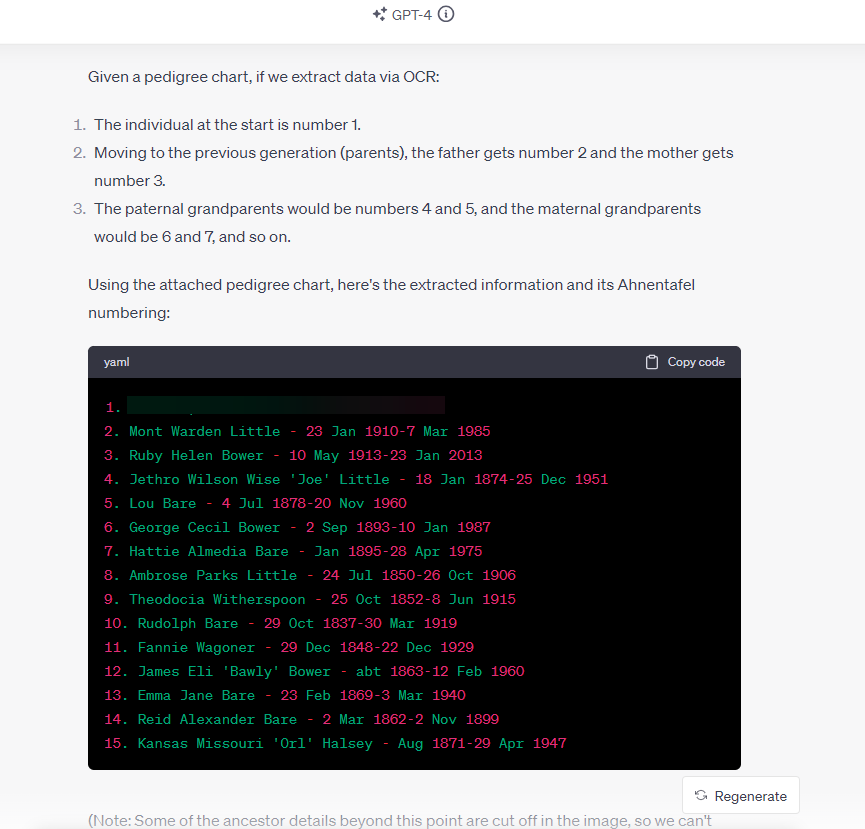
I was very pleased with the response. No, that’s an understatement–I was blown away by the response, on a first attempt:

The good news: ChatGPT (GPT-4V) OCR can effectively interpret an image of a pedigree chart, extracting the data and storing it accurately in an Ahnentafel file while preserving the relationship information inherent in the pedigree chart. All details accurate; no hallucinations.

This is significant. Because it is a relatively trivial task to then convert an Ahnentafel file to a GEDCOM, database, spreadsheet, or text file, the information in the image is now almost ready for import into your genealogy program (RootsMagic, Family Tree Maker, Gramps, etc..), Excel or Google Sheets, GDAT, Word, or simple text editor.

Data Extraction On-the-Go, with Your Phone

What’s more, you can do this on your phone! Here, with my smartphone, I took a picture of my laptop screen while a pedigree chart was displayed; GPT-4V correctly extracted the names, dates, and relationships from the photo, and then quickly presented it in a loose narrative report. The AI even picked-up on (correctly) and commented about the possibility of pedigree collapse and/or multiple relationships. All details accurate; no hallucinations. (You can see the full-size image here.)

Next Steps: More Tests; Implications; Possibilities

Next on my list: images of charts on paper, and neatly handwritten pedigree charts, etc.

Last night’s demo or proof-of-concept of extracting and saving biographical data in a genealogy-friendly format which preserves relationship information (the Ahnentafel file) from a picture or screenshot also suggests both clear implications and coming possibilities. A clear implication is that it is now much easier to get information off a printed page and onto the computer in a way that is genealogically meaningful because of the preservation of relationship information (inherently, the pedigree chart depicts who are the parents of whom, and this is captured and saved). A coming possibility suggests itself when we remember that API access to GPT-4V is coming, which means that we will be able to build apps and tools that process folders of our saved images and photos, or perhaps ask an AI assistant to do that for us.

Setting aside future possibilities, there are exciting days coming up now as we test other image use cases and work out the solutions to limits such as encountered with the fan chart. And folks will immediately find helpful this use case of converting an image of of pedigree chart to an Ahnentafel file.


Update:

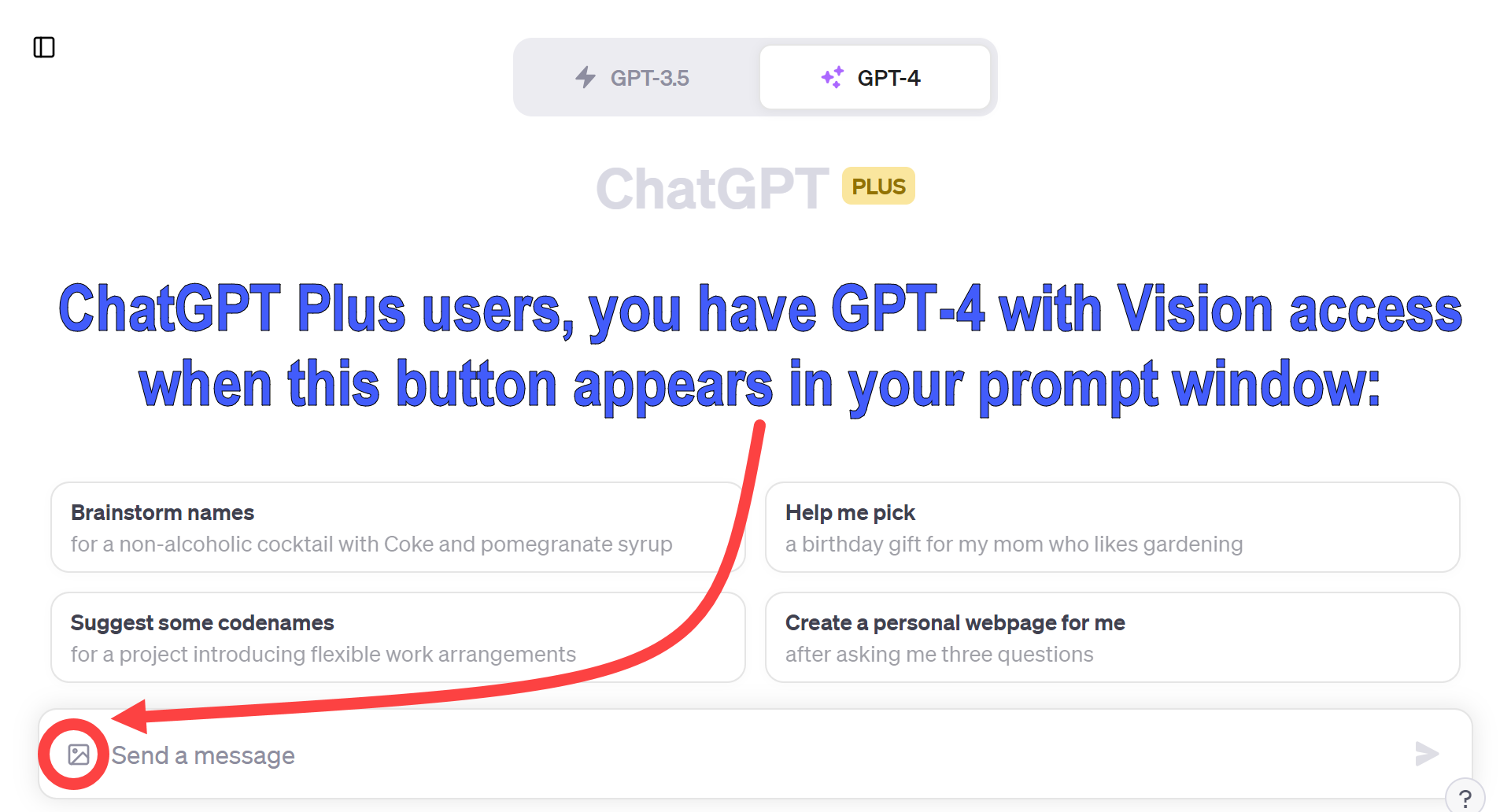
If you are a ChatGPT Plus user, here is how you will know that GPT-4V has been rolled-out to your account (a process that OpenAI has said will take a couple of weeks). On your computer, tablet, or smartphone, look for a new image/picture icon near your prompt window. Here is what it looks like on a computer:

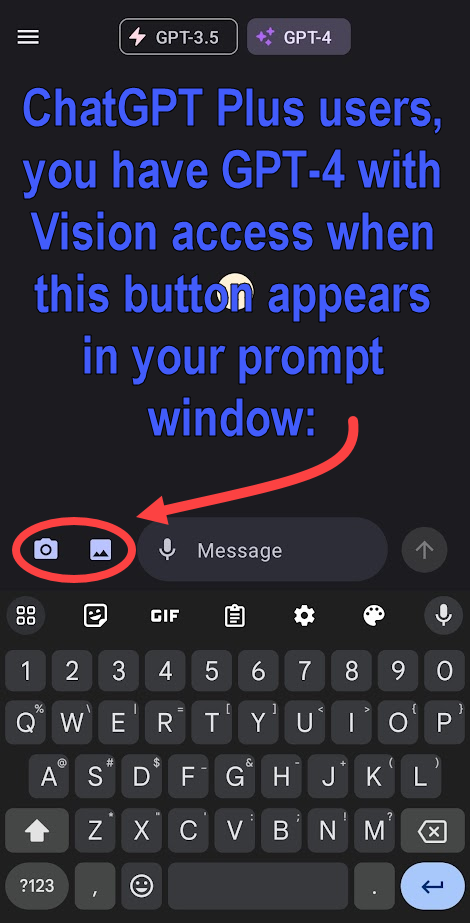
And on your phone, it looks like this:

AI Genealogy Use Case Guide: How-to Get from Story to Structured Data, 2: Create GEDCOM (family tree) files from obits, articles, & announcements

Introduction:

  • In the world of genealogy research, information is scattered across various sources, including narrative texts such as birth and wedding announcements, obituaries, and newspaper articles. These unstructured narratives can be challenging to manage and analyze. In this blog post, we will explore the specific task of quickly extracting valuable data such as names, relationships, dates, and places from these texts and converting them into structured data formats such as GEDCOM files, the format used to build and exchange family trees and to share genealogical data. This data extraction and storage process is tremendously beneficial for for streamlining genealogical research and making connections between family members, ancestors, and historical events.
  • To accomplish this task, we will be utilizing ChatGPT, an advanced AI language model developed by OpenAI. ChatGPT is capable of processing and extracting information from large volumes of text, making it an ideal tool for genealogy enthusiasts seeking to organize and analyze their research data efficiently.

Objectives:

  • Automate the extraction process: Utilize ChatGPT to efficiently extract names, relationships, dates, and places from various sources, such as announcements, obituaries, and newspaper articles, minimizing manual effort and speeding up the research process.
  • Improve data organization: Convert the extracted information into structured data formats such as GEDCOM files to facilitate better organization, storage, and retrieval of genealogical data.
  • Enhance data analysis: Enable genealogy researchers to analyze structured data more effectively, identify patterns, and uncover hidden connections between family members and historical events.
  • Save time and resources: Streamline the research process by reducing the time spent on manually extracting and organizing data, freeing up more time for analysis and interpretation.
  • Increase research accuracy: Minimize human errors and inconsistencies in data extraction and organization by leveraging ChatGPT’s advanced language processing capabilities.

Requirements:

  • Access to AI: Obtain a free or paid subscription to an artificial intelligence service such as OpenAI’s ChatGPT. Other AI options include Google’s Bard, Anthropic’s Claude, or Microsoft’s Bing Chat, but in April 2023, OpenAI’s GPT-4 based ChatGPT is strongest.
  • Input data: Provide ChatGPT with text from sources such as birth or wedding announcements, obituaries, and newspaper articles, containing information about names, relationships, dates, and places relevant to genealogical research.
  • Family tree software to read and use the GEDCOM file created here. Most genealogy applications and website and utilize GEDCOM files to share family trees and genealogical data; these include desktop applications such as RootsMagic, Family Tree Maker, Gramps, and online resources such as Ancestry, DNA Painter, MyHeritage, and FindMyPast.
  • Optional: Formatting requirements: Ensure that the input text is free of major errors or inconsistencies. Although ChatGPT can handle some level of noise in the data, better-formatted input will yield more accurate and reliable results. Our earlier Use Case Guide on Cleaning OCR Text quickly steps you through this process.
  • Helpful: Genealogy research resources: Familiarize yourself with various genealogical research methods, repositories, and databases to: (1) know where to find the texts to data mine, and (2) effectively contextualize and validate the information extracted by ChatGPT.

Caveats for the Careful on Large Language Models in Genealogy (April 2023):

  • No live internet access, with data current only up to September 2021
  • Unreliable for fact-based research, relying on statistical language patterns
  • Official ChatGPT warning: may produce inaccurate information
  • Mainly used for information processing, not discovering new data
  • Limited to 1500 words input/output (approx. 4k tokens)
  • Chatbots lack traditional memory, necessitating careful management of conversation
  • See Use Case Guide #1: Cleaning OCR Text for detailed information on each caveat above.

How To: Methodology:

  • Step 1: Get a free or paid AI account. In April 2023, OpenAI’s GPT-4 based ChatGPT is strongest, but the free version based on GPT-3.5 will also work; you can get a free account at https://chat.openai.com/auth/login.
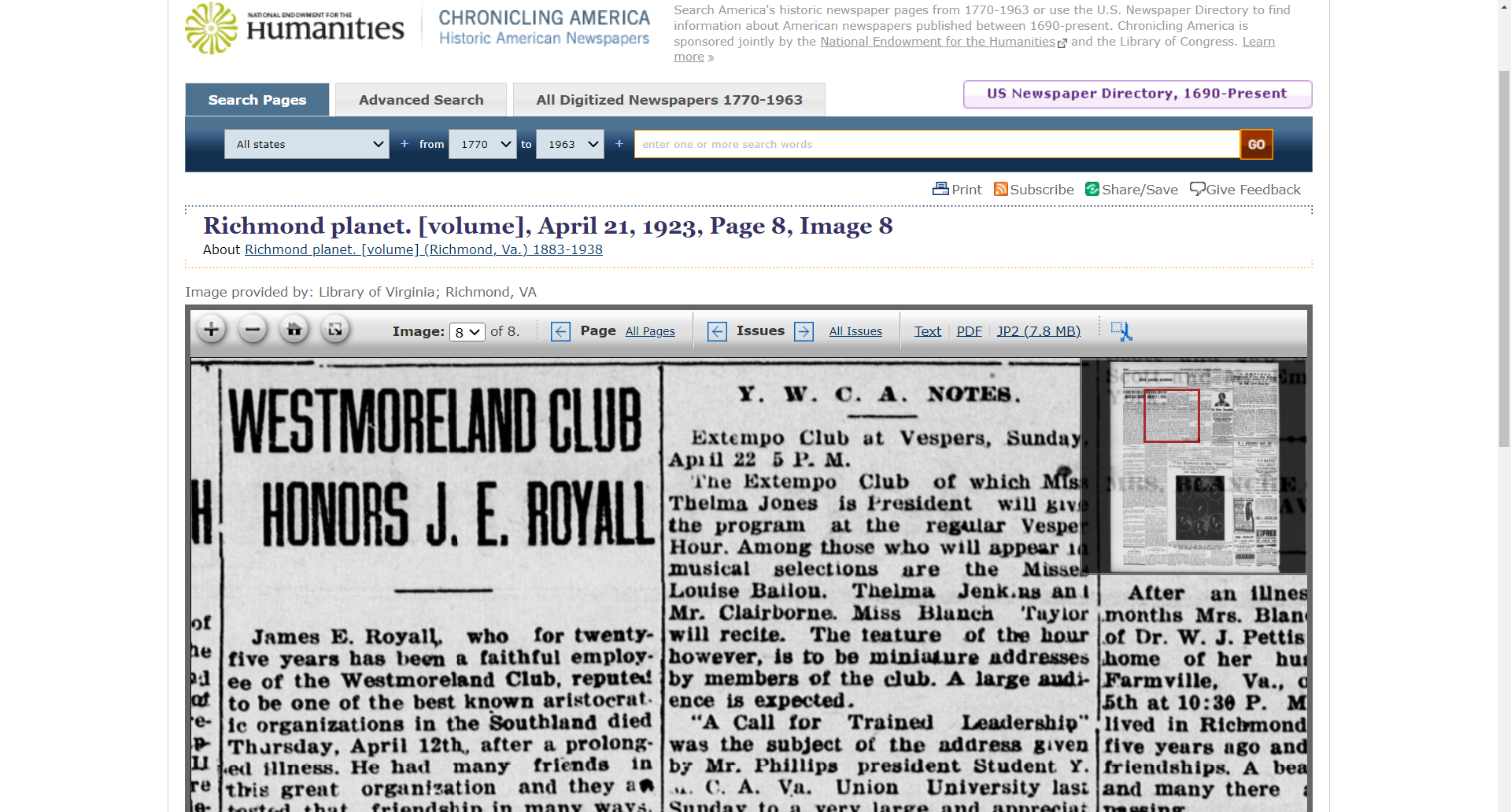
  • Step 2: Find and prepare your input text. In spring 2023, most publicly-accessibly AI systems are based on large language models that are untethered to reality or knowledge systems; they work by selecting the next statistically most likely word based on your prompt and previous utterances in your chat. For this reason, fact-based researchers such as genealogists restrict the AI to working only on the data you input. In this series of Use Case Guides, we have been using texts from publicly available sources such as the Chronicling America newspaper archive from The Library of Congress and the National Endowment for the Humanities. Our Use Case Guide #1: How to Clean Raw and Poor OCR Text breaks-down this step down in a detailed walk-through; refer to that guide if you would like help with this step. This Guide uses an obituary first published 100 years ago this week in one of my state’s capital newspapers: “Westmoreland Club Honors J. E. Royall,” Richmond Planet (Richmond, VA) 1883-1938, April 21, 1923, Page 8, Image 8; Image and text provided by Library of Virginia; Richmond, VA; < https://chroniclingamerica.loc.gov/lccn/sn84025841/1923-04-21/ed-1/seq-8/ > [accessed: 17 April 2023]. I processed and cleaned the raw (nightmarish) Chronicling American text using the steps in Usage Guide #1.
  • Step 3: Start a new ChatGPT session. It is important to start a new ChatGPT session when beginning a new genealogical task because (lacking both short-term and long-term memory) the chatbot re-ingests up to the previous 400 lines of your “dialogue” in order to simulate a conversation; this can have the unintended effect of contaminating your chat with information from pervious utterances in the current session. See “Don’t Get Burned by Spicy Autocomplete” for more information about this concern.
  • Step 4: Write your prompt. Your prompt will include two parts: (a) your instructions to the AI, and (b) the input text from which you want to extract structured genealogical data. We’ll discuss both parts in turn.
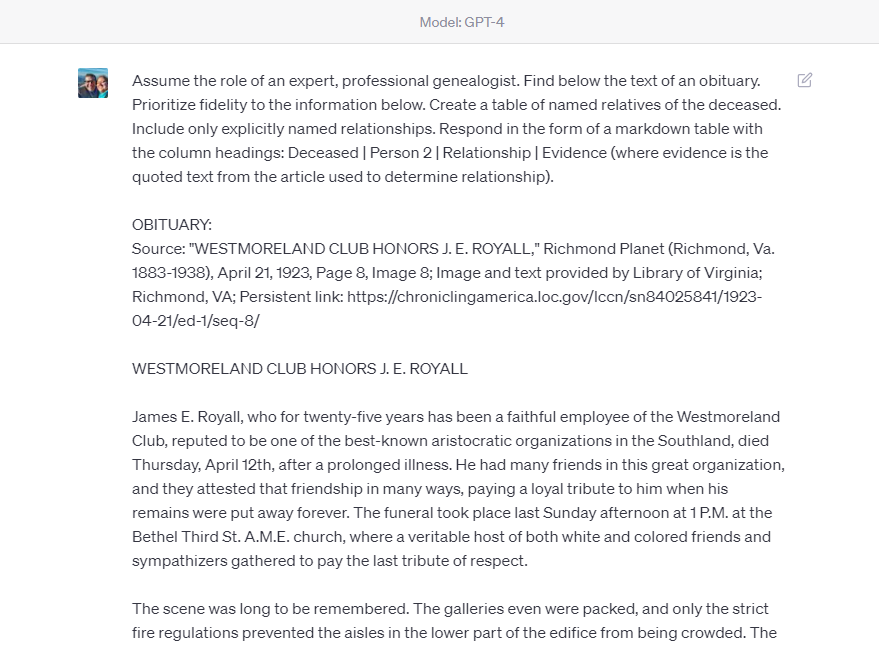
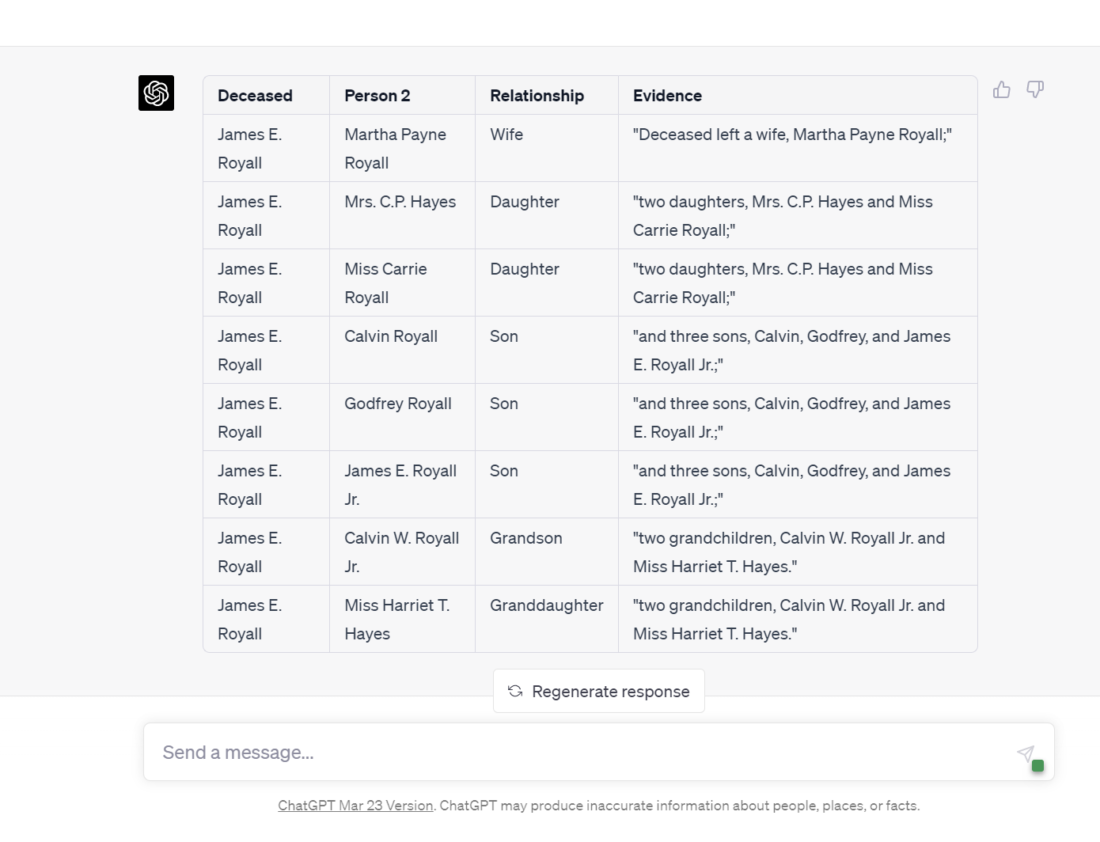
  • Step 4(a): Write your instructions to the AI. The instructional component of a prompt itself has subcomponents. Here you can see that the first part of the instructions are directing the AI to assume a role, in this case, of a genealogist; this has the effect of providing a context for the AI’s response. Next, action verbs to direct the AI; in this case “Find,” “Prioritize,” “Create,” “Include,” and “Respond.” These will change depending on your task; if you have troubling crafting this part, ChatGPT can help: write the instructions as best you can, then use ChatGPT to “convert these statements to the imperative mood“; this has the effect of changing your statements to the desired form “[you, the AI] do (verb) this.” Finally, you will see that here we are directing the AI to create a table of data; this is the most simple form of structured data, and perhaps the most meaningful and accessible to the human genealogist! Later, I’ll show you how to transform this table data into forms more suited for genealogical tools such as tree making applications, spreadsheets, and databases. To assist in the verification of our work, the AI is instructed to show its work, that is, to include the evidence it used to make a relationship determination by quoting the passage it relied upon to state a relationship. So far, thus prompted, contained, restrained, and instructed, I have not witnessed a fabrication or hallucination of a relationship. If you do, capture and save your whole session; I’d love to see it.
PROMPT: Assume the role of an expert, professional genealogist. Find below the text of an obituary. Prioritize fidelity to the information below. Create a table of named relatives of the deceased. Include only explicitly named relationships. Respond in the form of a markdown table with the column headings: Deceased | Person 2 | Relationship | Evidence (where evidence is the quoted text from the article used to determine relationship).
  • Step 4(b): Paste your input text below the instructions. Below your instruction, paste the text from which you would like to AI to process. Remember, as of April 2023, we are limited to about 1500 words input. Folks may tell you that you can upload more, perhaps by asking the AI to accept your input in parts, and it will agree to do that, but if you upload more than about 400 lines or about 1500 words, the AI will drop and ignore parts of your input. (In OpenAI’s technical jargon, we are limited to 4096 “tokens,” more akin to syllables than words, but for simplicities sake, about 1500 words input and 1500 words output.) [NOTE: If you need to enter a newline or line break in the ChatGPT edit box, Shift-Enter will give you a new line without submitting the request.]
  • Step 5: Examine your results; adjust as needed. Just as writing means re-writing, so prompt engineering means prompting and re-prompting. I never get the best results on a first attempt, so I expect to refine a prompt until the AI is producing the data in the form I want.

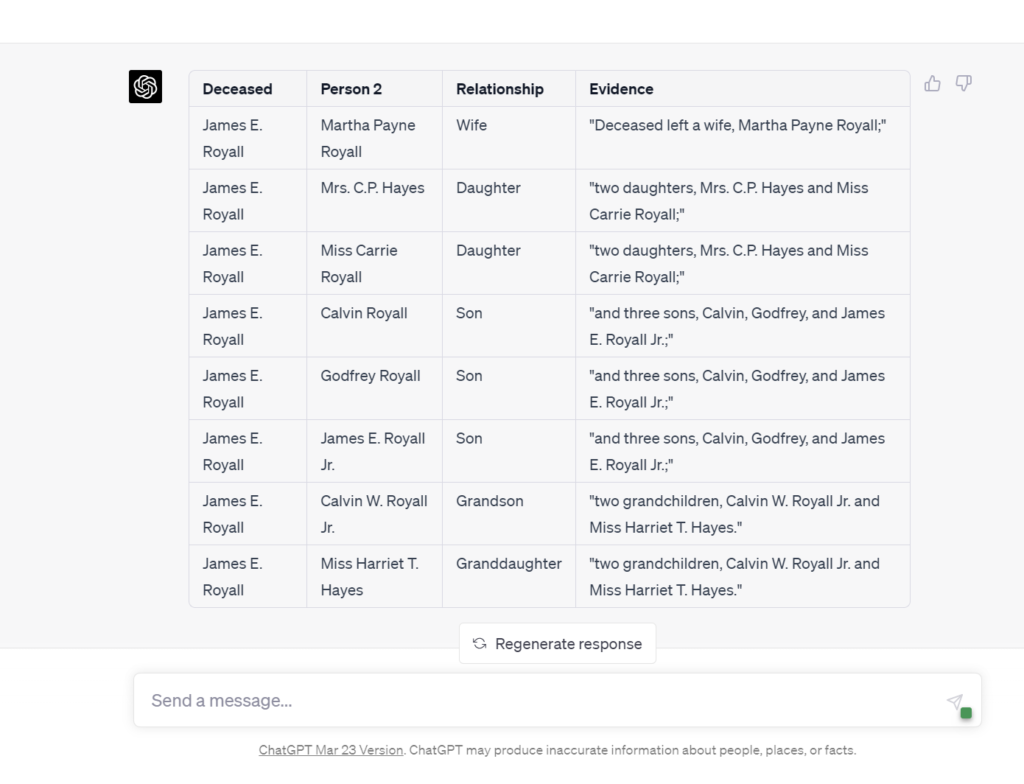
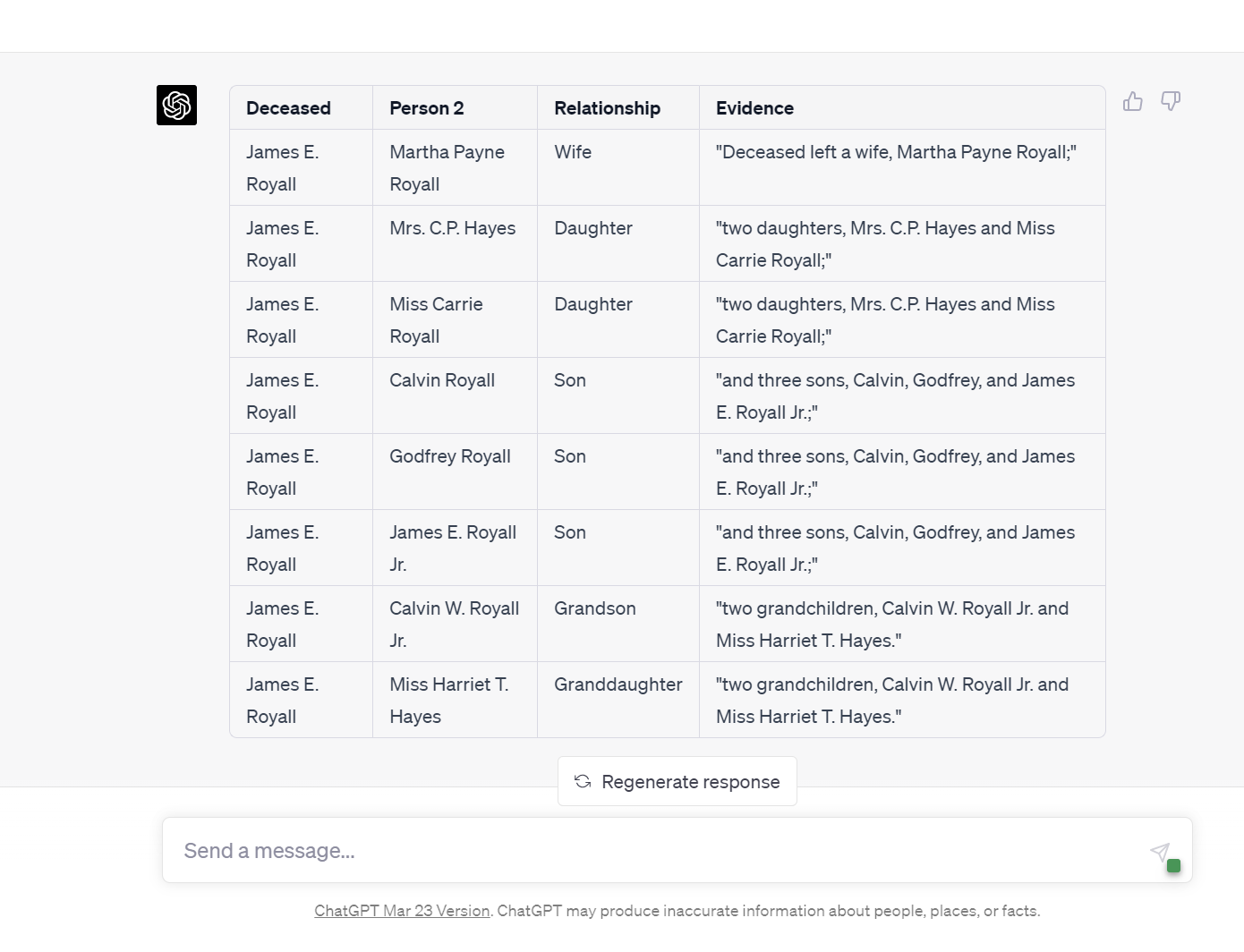
The results here are exactly as expected. This use case is a greater accomplishment than may be apparent to some. The imagination or understanding of how this use case will soon scale (become more powerful) is sometimes the missing piece. Here, eight relationships were extracted from a 700-word obituary; that is admittedly weak tea. But in time we will be able to process book chapters (50-pages announced already), whole books (this year or 2024), and entire archives after that. That’s the big deal that’s coming.

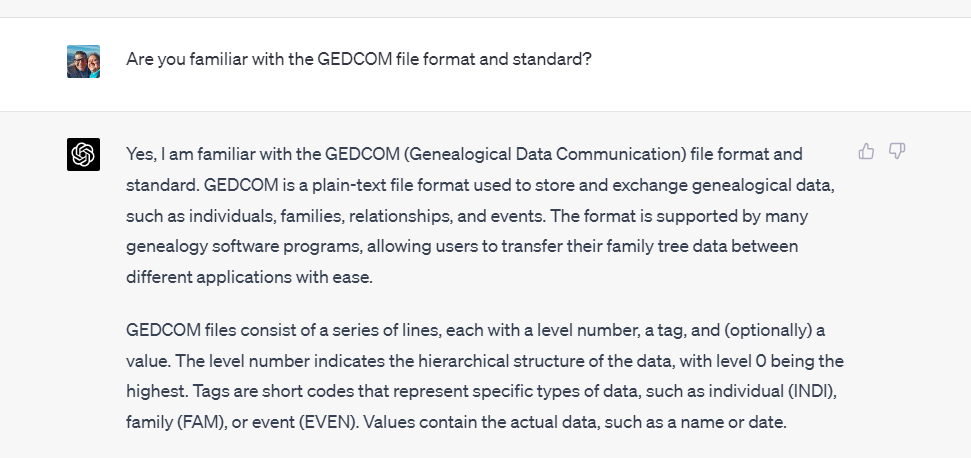
  • Step 6: Set the context for your GEDCOM request prompt. Set the context of the GEDCOM request by asking the AI about its familiarity with GEDCOM files.
PROMPT: Are you familiar with the GEDCOM file format and standard?
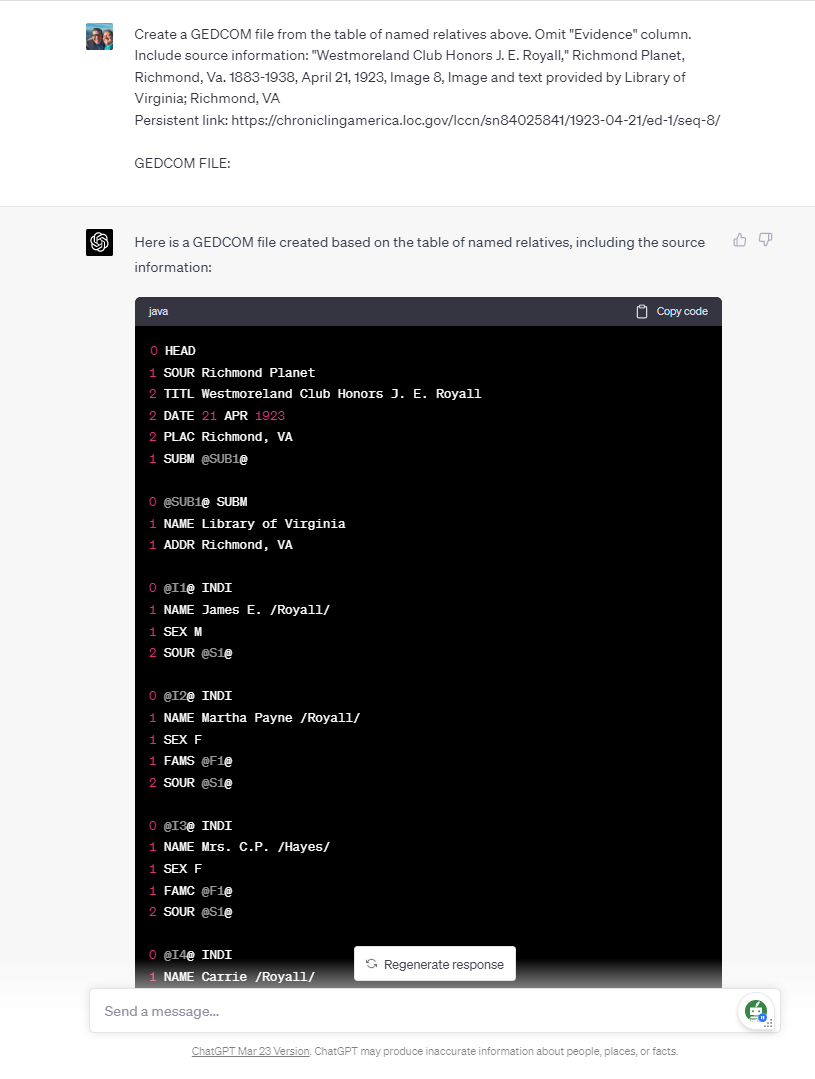
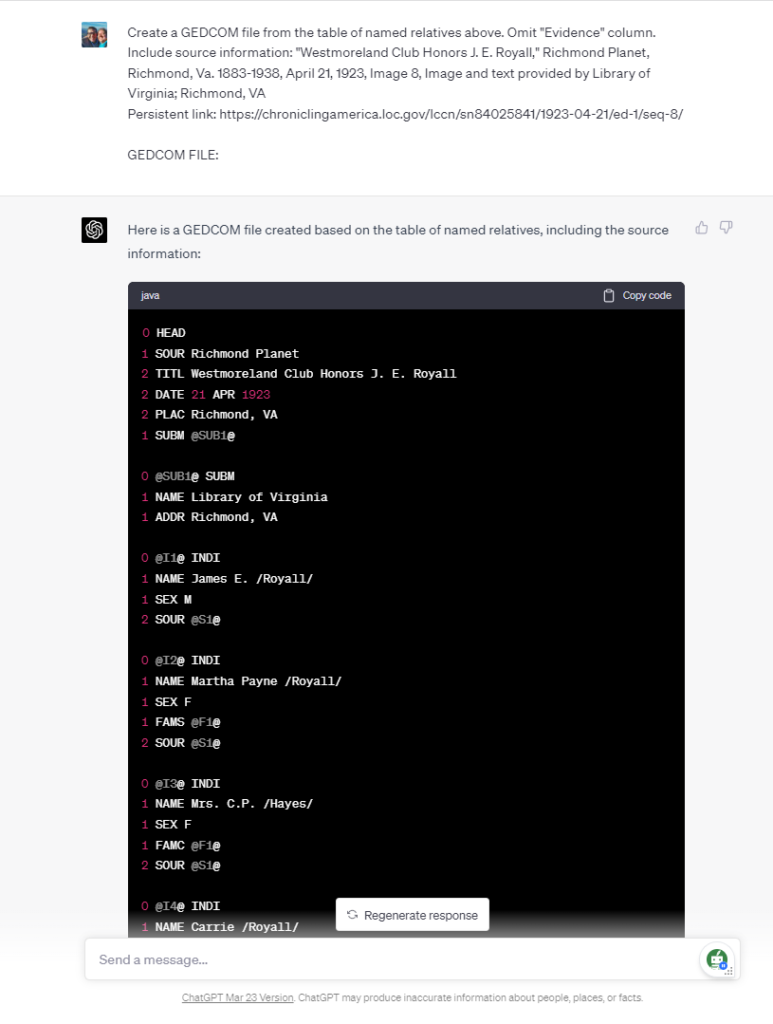
  • Step 7: Prompt for the creation of the GEDCOM file. There are several items to note about this prompt. First, we are directing to AI to transform the table of named relationship created earlier; that table included direct quotations from the source article for ease of validation and verification, but since that is not desired in the GEDCOM file, we instruct the artificial intelligence to omit that column of information. We do want the source of this information included with the GEDCOM file, so we supply that here to ChatGPT.
PROMPT: Create a GEDCOM file from the table of named relatives above. Omit "Evidence" column. Include source information: "Westmoreland Club Honors J. E. Royall," Richmond Planet, Richmond, Va. 1883-1938, April 21, 1923, Image 8, Image and text provided by Library of Virginia; Richmond, VA
Persistent link: https://chroniclingamerica.loc.gov/lccn/sn84025841/1923-04-21/ed-1/seq-8/

GEDCOM FILE:
  • Step 8: Examine your results. I have found that ChatGPT very reliably creates accurate and functional GEDCOM files using this complete method. Other artificial intelligences may not be as reliable: Anthropic’s Claude will create an accurate GEDCOM file, but fail to add the newlines (carriage returns or hard line breaks) needed to create a functional GEDCOM; asking again for those newline characters usually works; I have not been able to successfully create an accurate and functional GEDCOM with Google’s Bard, Perplexity AI, nor Microsoft’s Bing Chat.
  • Step 9: Save your results. You need to save your GEDCOM file as a text file. This means finding and using your computer’s text file editor. The basic Windows text editor is Notepad, so Windows users will open Notepad with a new, blank file. Then, in the ChatGPT code window, click the “Copy code” link at the upper right corner of the code window. Switch to the blank text file, paste the GEDCOM data into the text file, and save the file with a name such as “Royall.ged”; the “.ged” extension (last characters of the file name) is important. Remembering to include this file name extension will enable your genealogical apps and sites to recognize this text file as a family tree file.
  • Step 10: Open, test, verify, and confirm your work. At this point, you can open your genealogy application such as RootsMagic, Gramps, or Family Tree Maker and open or import the GEDCOM file (you will need to check that application’s instructions for opening and/or importing a GEDCOM file). You will usually want to open the GEDCOM file as a new tree, as opposed to merging it into an existing tree. Compare the information now in your new family tree to the information stated in the birth or wedding announcement, obituary, or newspaper article.

Results and Analysis:

  • Expected Outcomes: By using AI for this genealogy task, you can expect the extraction of key information such as names, relationships, dates, and places from various text sources, subsequently saving the data in a structured format such as GEDCOM files. This will facilitate easier sharing of family trees and the exchange of genealogical information.
  • Accuracy and Reliability: While ChatGPT is a powerful AI model, the accuracy and reliability of the results will depend on the quality of the input data and the clarity of the information present. In most cases, ChatGPT can accurately extract relevant data points, but manual review and validation is required to ensure the information is consistent with your research goals.

Conclusion:

  • In conclusion, using ChatGPT for extracting structured data from narrative sources like birth and wedding announcements, obituaries, and newspaper articles offers significant benefits and some limitations. The technology has the potential to greatly enhance genealogy research by automating the extraction of names, relationships, dates, and places, saving time and effort for researchers. The ability to convert this information into a structured data format such GEDCOM files further streamlines the research process and facilitates data organization, the sharing of family trees and the exchange of genealogical information.
  • However, limitations need to be considered. ChatGPT’s accuracy may vary depending on the quality of the input text, especially if dealing with raw OCR text or handwritten documents. Additionally, ChatGPT might struggle with complex relationships and ambiguous information present in the narratives. To overcome these challenges, AI Genealogists need to manually review and verify the extracted data.
  • For further improvement and exploration of AI in genealogy, researchers should consider integrating ChatGPT with other natural language processing tools or specialized genealogy software to enhance its capabilities. Collaborating with AI developers to create tailored models for genealogy research could further optimize the extraction process and improve overall accuracy. Encouraging users to share their experiences and provide feedback will contribute to the ongoing refinement of AI solutions for genealogy.
  • Ultimately, employing AI tools like ChatGPT for genealogy research has the potential to revolutionize the field, making it more accessible, efficient, and accurate. As AI technology continues to evolve, the possibilities for its application in genealogy will only expand, benefiting researchers and family historians alike.

Call to Action:

  • Try ChatGPT for your genealogy tasks: We encourage you to harness the power of ChatGPT for your genealogy research. Experience firsthand the benefits of using AI to extract structured data from narrative sources like birth and wedding announcements, obituaries, and newspaper articles.
  • Share your experiences: We would love to hear about your experiences using ChatGPT for genealogy tasks. Share your successes, challenges, or any interesting insights you’ve gained through utilizing AI in your research. Your feedback can help improve the technology and benefit the entire genealogy community.
  • Ask questions and seek advice: If you have any questions or need assistance with using ChatGPT for genealogy tasks, feel free to post them in the comments section below or reach out to us on social media. Our community of experts and fellow genealogy enthusiasts will be more than happy to help.
  • Connect with others and expand your knowledge: Join genealogy forums, social media groups, and other online communities where you can connect with others who are using AI for genealogy research. These platforms are excellent resources for sharing tips, tricks, and best practices, as well as staying up-to-date with the latest advancements in AI technology.
  • Explore additional resources: To further enhance your understanding of AI in genealogy and to make the most out of ChatGPT, check out the provided links to tutorials, support forums, and related articles. Continuously learning and staying informed will help you maximize the potential of AI in your genealogy research.

AI Genealogy Use Case Guide: How-to Get from Story to Structured Data, 1: from Text to Table Data, from Stories to CSV files

Introduction:

  • In the world of genealogy research, information is scattered across various sources, including narrative texts such as birth and wedding announcements, obituaries, and newspaper articles. These unstructured narratives can be challenging to manage and analyze. In this blog post, we will explore the specific task of quickly extracting valuable data such as names, relationships, dates, and places from these texts and converting them into structured data formats such as tables, JSON files, and near-universally usable CSV files (great for importing into spreadsheets such as Excel and Google Sheets and into databases such as MySQL and AirTable). This data extraction and storage process is tremendously beneficial for for streamlining genealogical research and making connections between family members, ancestors, and historical events.
  • To accomplish this task, we will be utilizing ChatGPT, an advanced AI language model developed by OpenAI. ChatGPT is capable of processing and extracting information from large volumes of text, making it an ideal tool for genealogy enthusiasts seeking to organize and analyze their research data efficiently. Stay tuned as we dive into the objectives, requirements, and methodology of using ChatGPT for genealogy data extraction and organization.

Objectives:

  1. Automate the extraction process: Utilize ChatGPT to efficiently extract names, relationships, dates, and places from various sources, such as announcements, obituaries, and newspaper articles, minimizing manual effort and speeding up the research process.
  2. Improve data organization: Convert the extracted information into structured data formats (e.g., tables, JSON, and CSV files) to facilitate better organization, storage, and retrieval of genealogical data.
  3. Enhance data analysis: Enable genealogy researchers to analyze structured data more effectively, identify patterns, and uncover hidden connections between family members and historical events.
  4. Save time and resources: Streamline the research process by reducing the time spent on manually extracting and organizing data, freeing up more time for analysis and interpretation.
  5. Increase research accuracy: Minimize human errors and inconsistencies in data extraction and organization by leveraging ChatGPT’s advanced language processing capabilities.

Requirements:

  1. Access to AI: Obtain a free or paid subscription to an artificial intelligence service such as OpenAI’s ChatGPT. Other AI options include Google’s Bard, Anthropic’s Claude, or Microsoft’s Bing Chat, but in April 2023, OpenAI’s GPT-4 based ChatGPT is strongest.
  2. Input data: Provide ChatGPT with text from sources such as birth or wedding announcements, obituaries, and newspaper articles, containing information about names, relationships, dates, and places relevant to genealogical research.
  3. Optional: Formatting requirements: Ensure that the input text is free of major errors or inconsistencies. Although ChatGPT can handle some level of noise in the data, better-formatted input will yield more accurate and reliable results. Our earlier Use Case Guide on Cleaning OCR Text quickly steps you through this process.
  4. Optional: Data storage and processing tools: Utilize software and tools like Microsoft Excel, a CSV editor, or a MySQL client to store, manage, and analyze the structured data extracted by ChatGPT.
  5. Helpful: Genealogy research resources: Familiarize yourself with various genealogical research methods, repositories, and databases to: (1) know where to find the texts to data mine, and (2) effectively contextualize and validate the information extracted by ChatGPT.

Caveats for the Careful on Large Language Models in Genealogy (April 2023):

  • No live internet access, with data current only up to September 2021
  • Unreliable for fact-based research, relying on statistical language patterns
  • Official ChatGPT warning: may produce inaccurate information
  • Mainly used for information processing, not discovering new data
  • Limited to 1500 words input/output (approx. 4k tokens)
  • Chatbots lack traditional memory, necessitating careful management of conversation
  • See Use Case Guide #1: Cleaning OCR Text for detailed information on each caveat above.

Caveats for the Bold

  • These initial Use Cases are admittedly weak tea: limited and narrow in function and capacity; these constraints reflect the abilities and token limits of AI systems for fact-based research in April 2023.
  • For now, think “Lego pieces” not “Post-Doc Assistant”; that is, in spring 2023, don’t imagine AI is a magic genie that can do all your work for you, like a post-doc assistant; instead, AI-assisted genealogical tasks are now more like a growing Swiss army knife or set of Lego blocks with which you can build tools to solve larger problems. It doesn’t take too much creativity to imagine how even these modest use cases can today be linked/chained and combined with each other to accomplish larger genealogical goals; soon enough, I imagine, the larger goals will be one-step AI-assisted tasks. But, for now, enjoy playing with the fundamental building blocks of more powerful systems to come.

How To: Methodology:

  • Step 1: Get a free or paid AI account. In April 2023, OpenAI’s GPT-4 based ChatGPT is strongest, but the free version based on GPT-3.5 will also work; you can get a free account at https://chat.openai.com/auth/login.
  • Step 2: Find and prepare your input text. In spring 2023, most publicly-accessibly AI systems are based on large language models that are untethered to reality or knowledge systems; they work by selecting the next statistically most likely word based on your prompt and previous utterances in your chat. For this reason, fact-based researchers such as genealogists restrict the AI to working only on the data you input. In this series of Use Case Guides, we have been using texts from publicly available sources such as the Chronicling America newspaper archive from The Library of Congress and the National Endowment for the Humanities. Our Use Case Guide #1: How to Clean Raw and Poor OCR Text breaks-down this step down in a detailed walk-through; refer to that guide if you would like help with this step. This Guide uses an obituary first published 100 years ago this week in one of my state’s capital newspapers: “Westmoreland Club Honors J. E. Royall,” Richmond Planet (Richmond, VA) 1883-1938, April 21, 1923, Page 8, Image 8; Image and text provided by Library of Virginia; Richmond, VA; < https://chroniclingamerica.loc.gov/lccn/sn84025841/1923-04-21/ed-1/seq-8/ > [accessed: 17 April 2023]. I processed and cleaned the raw (nightmarish) Chronicling American text using the steps in Usage Guide #1.
  • Step 3: Start a new ChatGPT session. It is important to start a new ChatGPT session when beginning a new genealogical task because (lacking both short-term and long-term memory) the chatbot re-ingests up to the previous 400 lines of your “dialogue” in order to simulate a conversation; this can have the unintended effect of contaminating your chat with information from pervious utterances in the current session. See “Don’t Get Burned by Spicy Autocomplete” for more information about this concern.
  • Step 4: Write your prompt. Your prompt will include two parts: (a) your instructions to the AI, and (b) the input text from which you want to extract structured genealogical data. We’ll discuss both parts in turn.
  • Step 4(a): Write your instructions to the AI. The instructional component of a prompt itself has subcomponents. Here you can see that the first part of the instructions are directing the AI to assume a role, in this case, of a genealogist; this has the effect of providing a context for the AI’s response. Next, action verbs to direct the AI; in this case “Find,” “Prioritize,” “Create,” “Include,” and “Respond.” These will change depending on your task; if you have troubling crafting this part, ChatGPT can help: write the instructions as best you can, then use ChatGPT to “convert these statements to the imperative mood“; this has the effect of changing your statements to the desired form “[you, the AI] do (verb) this.” Finally, you will see that here we are directing the AI to create a table of data; this is the most simple form of structured data, and perhaps the most meaningful and accessible to the human genealogist! Later, I’ll show you how to transform this table data into forms more suited for genealogical tools such as tree making applications, spreadsheets, and databases. To assist in the verification of our work, the AI is instructed to show its work, that is, to include the evidence it used to make a relationship determination by quoting the passage it relied upon to state a relationship. So far, thus prompted, contained, restrained, and instructed, I have not witnessed a fabrication or hallucination of a relationship. If you do, capture and save your whole session; I’d love to see it.
PROMPT: Assume the role of an expert, professional genealogist. Find below the text of an obituary. Prioritize fidelity to the information below. Create a table of named relatives of the deceased. Include only explicitly named relationships. Respond in the form of a markdown table with the column headings: Deceased | Person 2 | Relationship | Evidence (where evidence is the quoted text from the article used to determine relationship).
  • Step 4(b): Paste your input text below the instructions. Below your instruction, paste the text from which you would like to AI to process. Remember, as of April 2023, we are limited to about 1500 words input. Folks may tell you that you can upload more, perhaps by asking the AI to accept your input in parts, and it will agree to do that, but if you upload more than about 400 lines or about 1500 words, the AI will drop and ignore parts of your input. (In OpenAI’s technical jargon, we are limited to 4096 “tokens,” more akin to syllables than words, but for simplicities sake, about 1500 words input and 1500 words output.) [NOTE: If you need to enter a newline or line break in the ChatGPT edit box, Shift-Enter will give you a new line without submitting the request.]
  • Step 5: Examine your results; adjust as needed. Just as writing means re-writing, so prompt engineering means prompting and re-prompting. I never get the best results on a first attempt, so I expect to refine a prompt until the AI is producing the data in the form I want.

The results here are exactly as expected. This use case is a greater accomplishment than may be apparent to some. The imagination or understanding of how this use case will soon scale (become more powerful) is sometimes the missing piece. Here, eight relationships were extracted from a 700-word obituary; that is admittedly weak tea. But in time we will be able to process book chapters (50-page capacity announced already by OpenAI), whole books (this year or 2024), and entire archives after that. That’s the big deal that’s coming.

  • Step 6: Save your work. Save both your ChatGPT session and save your response to a text file. You can now easily download your entire ChatGPT history. You may also want to copy-and-paste the table data to a local file; some of the formatting will be lost if you paste into a plain text file, but pasting into a Word or Google Docs file will preserve the markdown formatting, if that is important to you.
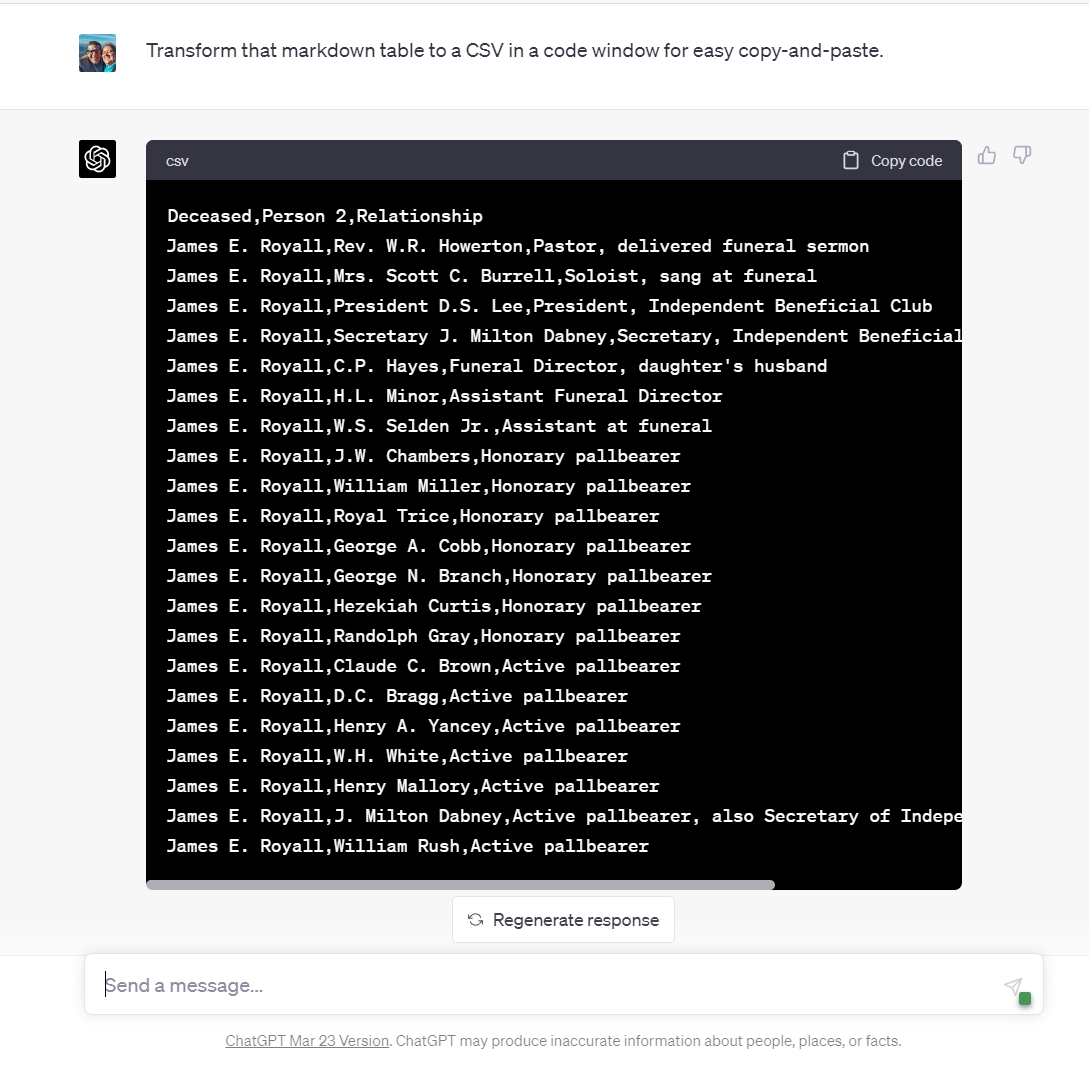
  • Step 7: Wring further data from the text. Named relationships are not the only data that ChatGPT can extract from a text. ChatGPT excels at FAN processing of a text (finding friends, associates, and neighbors that are mentioned in a text). People (“entities” in AI jargon) are not the only data that can be extracted. ChatGPT will also extract places, events, and dates from a text. For example, after extracting the explicit relationships from the obituary, I instructed ChatGPT to extract all named associates from the text:
PROMPT: Create a table of named associates of the deceased; broaden the meaning of associates as wide as possible to include ALL named people in the obituary if their relationship or function at funeral is stated. Respond in the form of a markdown table with the column headings: Deceased | Person 2 | Relationship.
  • Step 8: Create derivative data structures and formats. You can now instruct ChatGPT to create alternate file types such as CSV (common separated values) files which are nearly universally usable by spreadsheets (Excel, Google Sheets), databases (MySQL, MS Access, AirTable), and word processors (Word, Google Sheets). For the technically inclined, GPT-4 is able to convert the table data to JSON files for processing by web applications and custom programming scripts such as Python. In the next Usage Guide, I’ll show you step-by-step how to create a GEDCOM file, used widely to create family trees and exchange genealogical data. Here you can see all how the named associates of the deceased may quickly be downloaded as a CSV file:
  • Step 9: As a last step, ask the AI what you forgot. This is always fun, and reveals that while I may be focused on one type or piece of information, the AI may help me uncover the missing piece to solve a brick wall that was under my nose but which I’d overlooked.
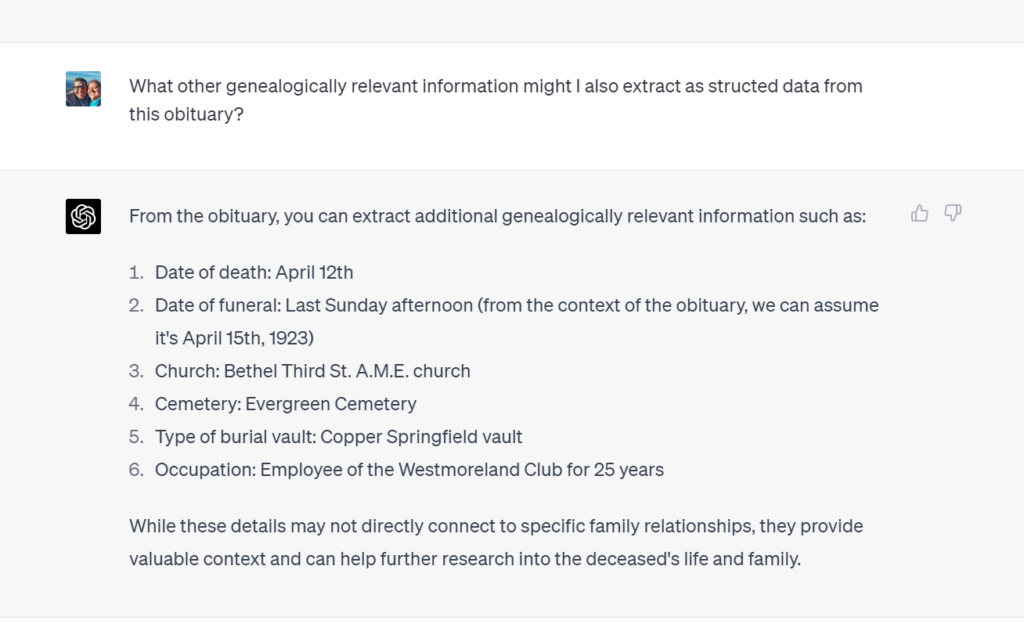
PROMPT: What other genealogically relevant information might I also extract as structed data from this obituary?

Results and Analysis:

  • Expected Outcomes: By using AI for this genealogy task, you can expect the extraction of key information such as names, relationships, dates, and places from various text sources, subsequently saving the data in structured formats like table data, JSON, and CSV files. This will facilitate easier data analysis and integration into your genealogical research.
  • Accuracy and Reliability: While ChatGPT is a powerful AI model, the accuracy and reliability of the results will depend on the quality of the input data and the clarity of the information present. In most cases, ChatGPT can accurately extract relevant data points, but manual review and validation is required to ensure the information is consistent with your research goals.

Conclusions:

  • In conclusion, using ChatGPT for extracting structured data from narrative sources like birth and wedding announcements, obituaries, and newspaper articles offers significant benefits and some limitations. The technology has the potential to greatly enhance genealogy research by automating the extraction of names, relationships, dates, and places, saving time and effort for researchers. The ability to convert this information into structured data formats such as table data, JSON, and CSV files further streamlines the research process and facilitates data organization.
  • However, limitations need to be considered. ChatGPT’s accuracy may vary depending on the quality of the input text, especially if dealing with raw OCR text or handwritten documents. Additionally, ChatGPT might struggle with complex relationships and ambiguous information present in the narratives. To overcome these challenges, AI Genealogists need to manually review and verify the extracted data.
  • For further improvement and exploration of AI in genealogy, researchers should consider integrating ChatGPT with other natural language processing tools or specialized genealogy software to enhance its capabilities. Collaborating with AI developers to create tailored models for genealogy research could further optimize the extraction process and improve overall accuracy. Encouraging users to share their experiences and provide feedback will contribute to the ongoing refinement of AI solutions for genealogy.
  • Ultimately, employing AI tools like ChatGPT for genealogy research has the potential to revolutionize the field, making it more accessible, efficient, and accurate. As AI technology continues to evolve, the possibilities for its application in genealogy will only expand, benefiting researchers and family historians alike.

Calls to Action:

  • Try ChatGPT for your genealogy tasks: We encourage you to harness the power of ChatGPT for your genealogy research. Experience firsthand the benefits of using AI to extract structured data from narrative sources like birth and wedding announcements, obituaries, and newspaper articles.
  • Share your experiences: We would love to hear about your experiences using ChatGPT for genealogy tasks. Share your successes, challenges, or any interesting insights you’ve gained through utilizing AI in your research. Your feedback can help improve the technology and benefit the entire genealogy community.
  • Ask questions and seek advice: If you have any questions or need assistance with using ChatGPT for genealogy tasks, feel free to post them in the comments section below or reach out to us on social media. Our community of experts and fellow genealogy enthusiasts will be more than happy to help.
  • Connect with others and expand your knowledge: Join genealogy forums, social media groups, and other online communities where you can connect with others who are using AI for genealogy research. These platforms are excellent resources for sharing tips, tricks, and best practices, as well as staying up-to-date with the latest advancements in AI technology.
  • Explore additional resources: To further enhance your understanding of AI in genealogy and to make the most out of ChatGPT, check out the provided links to tutorials, support forums, and related articles. Continuously learning and staying informed will help you maximize the potential of AI in your genealogy research.

AI Genealogy Use Case Guide: How to Clean Raw and Poor OCR Text

  • Go directly to the step-by-step walk-through.
  • This detailed how-to is a follow-up to the use case announcement from March 22, 2023 titled “AI Genealogy Use Case: Cleaning-up OCR Text
  • This preliminary step prepares the AI Genealogist for other valid use cases today; cleaning your OCR text help eliminate “garbage in, garbage out” information processing.

Introduction: Cleaning-up incorrect and messily scanned text from newspapers, books, and other archive materials is often a first step in AI Genealogy, before running AI-powered tasks such as name, relationship, date, place, and event analysis on a text (birth or wedding announcement, obituary, newspaper article, or book chapter).

  • Artificial intelligence can be applied to quickly improve the quality of machine generated text from scanned newspapers, books, microfilm, records, and other archived materials.
  • When records are originally scanned, they are in an image format which cannot be searched by keyword or name; “optical character recognition” (OCR) is a computer process which attempts to determine the text in an image. Most traditional OCR software attempted text extraction character-by-character, without regard to a character’s place in a word, or a word’s place in a sentence. So OCR software gave no consideration whether “13” or “B” made contextual sense while rendering an image to text.
  • Large language models, the type of artificial intelligence powering systems such as OpenAI’s ChatGPT and GPT-4, can determine which is statistically more likely:
    • “13ob Smith” or “Bob Smith”
    • “1B4 South Main Street” or “1134 South Main Street”
  • Currently many OCR archives have an 80% to 90% accuracy rate, which is worse than it sounds. That doesn’t mean that 1 out of 5 words is incorrect, but rather that 1 out of 5 characters is incorrect, which means that every 5th letter could be incorrect, meaning that every word with 5 or more letters may be spelled incorrectly.
  • This helps explains why newspaper archive searches are notoriously difficult.
  • Cleaning-up incorrect and messily scanned OCR text from newspapers, books, and other archive materials is often a first step in AI Genealogy, before running AI-powered tasks such as name, relationship, date, place, and event analysis on a text (birth or wedding announcement, obituary, newspaper article, or book chapter).

Objectives:

  • Correct to standard English raw and/or bad OCR text, attending to spelling, grammar, punctuation, and structure, prioritizing the meaning and context of the original source.

Requirements:

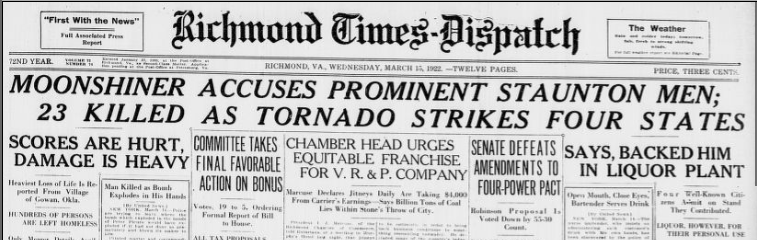
  • OCR text to process. In this demonstration, an obituary from Chronicling America, a venture between the Library of Congress and the National Endowment for the Humanities, is used as an example: “Deaths in Virginia: Charles F. Fravel,” Richmond Times-Dispatch. [volume] (Richmond, Va.), 15 March 1922. Chronicling America: Historic American Newspapers. Lib. of Congress. https://chroniclingamerica.loc.gov/lccn/sn83045389/1922-03-15/ed-1/seq-11/ < accessed: Sat 15 Apr 2023 >.
  • Access to an artificial intelligence. In this demonstration, ChatGPT-Plus (Model: GPT-4, version March 23, 2023) was used on Sat 15 Apr 2023.

Caveats for the Careful: Misunderstood use; limited knowledge; limited size

  • As of spring 2023, most large language models like ChatGPT do not have live internet access; GPT-4 was trained on data as current only as of September 2021.
  • Even so, large language models do not do fact-based research, and so should NOT be relied upon to return accurate information, even pre-dating September 2021; large language models work by returning the statistically most likely word in a phrase (for more information, see Stephen Wolfram’s “What Is ChatGPT Doing … and Why Does It Work?
  • OpenAI includes this caveat with every ChatGPT response: “ChatGPT may produce inaccurate information about people, places, or facts.” In other words, to paraphrase my algebra teacher, while a blind squirrel may occasionally find an acorn, large language models are like well-trained blind squirrels that often find acorns but may occasionally return another kind of nut or something else vaguely resembling a nut.
  • Because of this current unreliability, most of my AI-assisted genealogical tasks involve not research but information processing or data processing, that is, using the AI to work with the information I provide and only the information I provide. In the spring of 2023, the primary task of the AI genealogy for me is to constrain or limit through careful prompt engineering to clean, extract, transform, translate, or otherwise work with my information, not to find new information. Not yet.
  • As of spring 2023, for most people and cases, the amount of information that can be processed is limited to approximately 1500 words of input and 1500 words of output. (Or, in the vendors’ jargon, 4k “total tokens,” more akin to 4000 syllables input and output combined, rather than words.
  • Chatbots don’t have “memory” in the traditional sense that we think of either people or computers having either short-term or long-term memory. Chatbots simulate the memory to carry-on a conversation by re-digesting up to the past, roughly, 400 lines of your current conversation each time you click Submit. This means that you can inadvertently contaminate a response with an earlier utterance from you or the AI. For this reason, I frequently start a New Chat for each genealogical task.

How To: Methodology: Step-by-step to clean raw, bad OCR text with AI

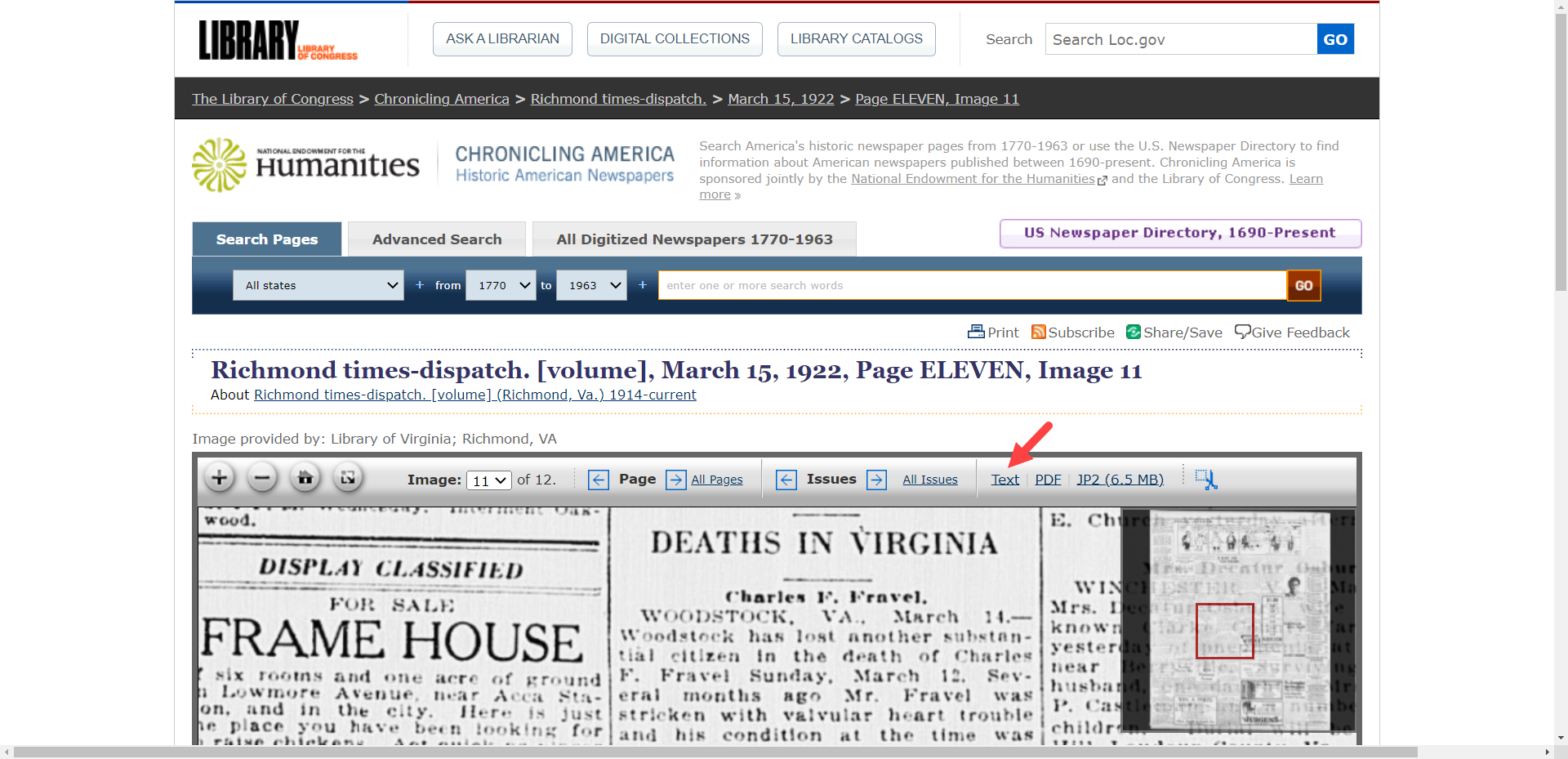
  • Find your OCR text. Newspaper and other archives usually provide access to the raw OCR text from their attempts to make records searchable. Chronicling American provides a “Text” link to access the raw OCR.
  • Copy your OCR text. After clicking “Text” or “OCR Source,” vendors may link you to the text for a whole page or just the article in which you are interested; incongruent, disconnected, and separated “(continued on page XX) sections will have to been copied separately.
  • Paste your OCR text. You may wish to consider saving the raw, messy OCR text to a text file for several reasons. Having quick access to the raw OCR text gives you options: to compare the “before” and “after” results; to experiment trying different prompts with one AI, say ChatGPT; or to compare how different AI’s such as Bing Chat, Claude, and ChatGPT perform comparatively with the same prompt and the same input OCR text.
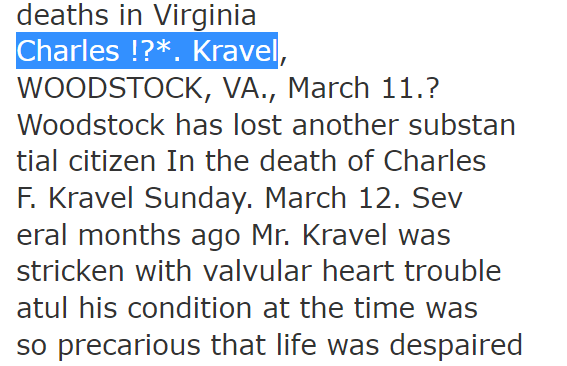
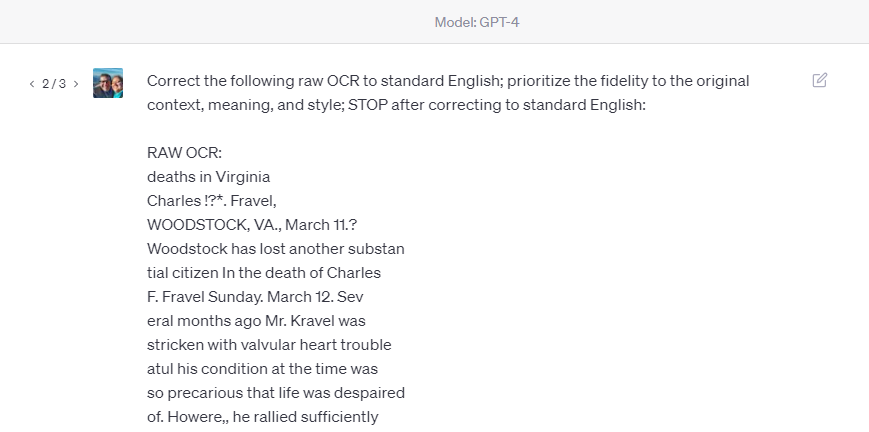
  • Inspect (and perhaps correct) your OCR text. Look at the original OCR text that the vendor’s traditional OCR application generated. It may be fairly good. Or it may be shockingly bad. In certain cases, it may be worthwhile to manually make a quick correction to the raw OCR. In this example, the original OCR mistranscribed the name of the principle FRAVEL as KRAVEL in the title and occasionally in the body of the story; by correcting just the name in the title, ChatGPT brought the other misspellings into alignment.
  • Start a New Chat at ChatGPT. As explained in greater detail in the Caveats above, starting a new chat session with each genealogical task lessens the chance of contaminating a response with earlier utterances.
  • Consider and craft your prompt. Your prompt instructs the AI. Our goal with this OCR correction task is to have the AI act as a glorified spell checker, without injecting information not contained in the original OCR text. Here are two prompts that I have used successfully for OCR clean-up:
    • PROMPT: Normalize the following raw OCR text by correcting spelling errors, expanding abbreviations, standardizing capitalization and punctuation, and adjusting formatting for improved readability, while preserving the original meaning and context. Provide clear documentation of any changes made during the normalization process.
    • PROMPT: Correct the following raw OCR to standard English; prioritize the fidelity to the original context, meaning, and style.
    • I’ve found for obituaries that the second prompt returns better results, while the first prompt works better for longer newspaper articles.
  • Enter your prompt and paste your OCR text. In your new ChatGPT dialogue, enter your prompt and paste your raw OCR text.
  • Inspect ChatGPT’s response. Examine the results. Look for obvious errors, both new and uncorrected.
  • Revise prompt if needed and re-run. Just as good writing means re-writing, so good prompt engineering means prompt re-writing. If there were new or remaining errors in your response, consider what modifications to your original prompt would eliminate those errors.
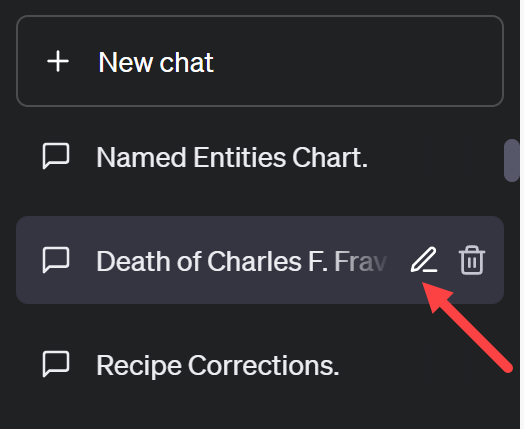
  • Save your work. Save both your ChatGPT response by copying-and-pasting the text to a file on your computer. Save, too, the ChatGPT conversation by giving the dialogue a meaningful name; you can change the name of a ChatGPT conversation by hovering the mouse over the chat name in the left menu bar and clicking the pencil icon to edit the name; after changing the name, click the checkmark to save the new name. You now also have the option to download your complete ChatGPT history.
  • Prepare for next steps. Rarely, if ever, is cleaning OCR text the end goal. Usually cleaning OCR text is a first step in a longer process of data extraction and information processing. You are now ready for those next steps.

Results and Analysis:

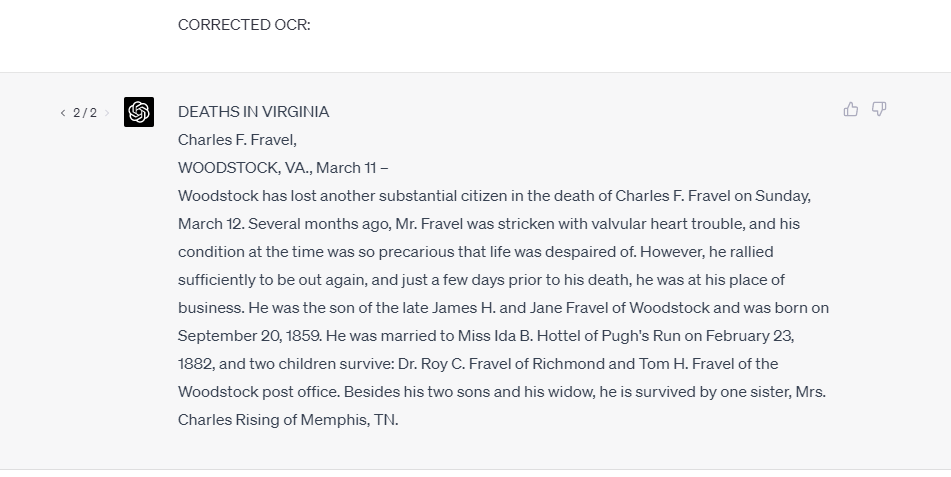
  • Here are the “Before” and “After” results:
    • BEFORE: deaths in Virginia Charles !?. Kravel, WOODSTOCK, VA., March 11.? Woodstock has lost another substan tial citizen In the death of Charles F. Kravel Sunday. March 12. Sev eral months ago Mr. Kravel was stricken with valvular heart trouble atul his condition at the time was so precarious that life was despaired of. Howere,, he rallied sufficiently to he out again and just a few days prior to his death was at his place of business. He was the son of the late James H. and Jone Kravel, or Woodstock, and was born September 20. 1K.9. He was married to Miss Ida B. JTottel. of I’ugh’s Run, on February 23. 1S*2. and two children survive, Dr. Hoy c. Kravel. of Richmond, and Tom H Fravel, of the Woodstock post office. Resides his two sons and his widow, he Is survived by one sister. M rs. Charles Raising, of Memphis, T? nn.
    • AFTER: DEATHS IN VIRGINIA Charles F. Fravel, WOODSTOCK, VA., March 11 – Woodstock has lost another substantial citizen in the death of Charles F. Fravel on Sunday, March 12. Several months ago, Mr. Fravel was stricken with valvular heart trouble, and his condition at the time was so precarious that life was despaired of. However, he rallied sufficiently to be out again, and just a few days prior to his death, he was at his place of business. He was the son of the late James H. and Jane Fravel of Woodstock and was born on September 20, 1859. He was married to Miss Ida B. Hottel of Pugh’s Run on February 23, 1882, and two children survive: Dr. Roy C. Fravel of Richmond and Tom H. Fravel of the Woodstock post office. Besides his two sons and his widow, he is survived by one sister, Mrs. Charles Rising of Memphis, TN.
  • Reasonable expectations: While surprisingly good, do not expect perfection; remember, large language models like ChatGPT and GPT-4 are playing the odds, picking the statistically most probable next word, so edge cases may result in errors.

Conclusions:

  • ChatGPT can effectively be used today to clean raw, messy OCR text.
  • This how-to example used a short, 150-word obituary. Currently, in April 2023, the input of most AI tools to which folks have ready access today is limited to about 1500 words input and 1500 words output, about three to six typed pages, depending on spacing. In April 2023, OpenAI announced 32k processing would be available soon, which would allow for about 50 pages of both input and output. In time, in hindsight, it will probably seem humorous that we were ever concerned about such tiny limits. Today’s limits are tomorrow’s breakthroughs.

Calls to Action:

  • Try This Yourself: Find a birth or wedding announcement, obituary, or genealogically-rich newspaper article and give the OCR cleaning described on this page a try. Then, you are ready for…
  • Today’s Next Steps: You can use text you cleaned today with the next use cases have been discovered and used successfully today: name, relationship, place, date, and entity recognition; then data extraction and information processing; text-to-GEDCOM; and narrative report creation.
  • Archive owners and vendors should consider AI-processing their OCR text to improve the quality of their data; there is nothing sacred about the error-ridden raw OCR text that was created in decades past. Your users will experience greater value when your data is clean and yielding productive search results.
  • Share your experiences, feedback, or questions in the comments section or on social media, especially the Facebook group “Genealogy and Artificial Intelligence.”