Use ChatGPT to Identify Related People In Family Archives

This article was originally published by Mark Thompson at MakingFamilyHistory.com

Identifying the people in a photo or letter collection is a top priority for family archive projects. It’s incredibly frustrating to have a beautiful stack of old photos or precious family letters and not know who is in them.

Unfortunately, identifying people in old collections is easier said than done: last names may be omitted, nicknames could be used instead of formal names, and letters might lack dates.

In larger collections, this problem is reduced because people are mentioned many times by different people. Each time they are mentioned by someone new, a new clue may be found. Each mention provides a clue that may help identify them.

However, in large collections, comparing and analyzing these clues can be overwhelmingly complex. Could ChatGPT simplify this challenge?

Comparing Items

Comparing the information found in each item in a collection is a daunting task. Comparing items in a large collection is especially challenging and requires both art and science to succeed.

On the science side, a complete research log is key. I use a spreadsheet-based research log, tuned to the needs of each project, to capture facts and dates about each item.  This makes it relatively easy to find relationships between items.

Here is a simple example to illustrate the spreadsheet I use:
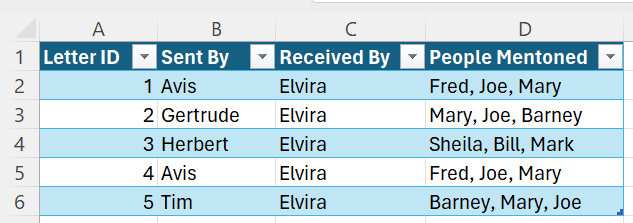
Letter Collection Example

On the art side, a good memory for names, facts, and patterns is a huge bonus. Like many genealogists, I live for the “Eureka! I’ve seen that name before!” moment after a multi-hour research session.

As much as I enjoy the adrenaline rush of these eureka moments, I don’t like to rely on my memory to make them happen. Developing processes that make these patterns easier to find is crucial to successful research.

Clustering

Clustering is a technique for finding the relationships between groups of people or things.  Even if they don’t use the term, genealogists use clusters every time they research.  For example:

  • The phone book clusters people who live in the same town into groups of people with similarly spelled last names.
  • Land maps cluster people into groups who own land that is close together.
  • The Leeds Method clusters people into groups who descend from the same grandparents.
  • Census records cluster people into groups of people who lived in the same building at the same time.
  • Friends, associates, and, neighbours (FAN) clusters group people together who are familiars of our family members.

Finding and understanding these clusters, and the relationships between the people in the cluster, can generate clues that are critical to breaking down genealogy brick walls!

The Manual Approach to Clustering

Before automating anything, it is important to learn how to do it the “manual” way.

Young girl in ponytails sorting blocks

To make it easier to identify clusters of people I start with a detailed research log. I track the names of each person mentioned in each item in the log. Then, using advanced spreadsheet techniques, identify the people who are mentioned together in the same items.

Knowing that these people are likely connected, I can then focus my efforts on determining how they are related. They might be friends, coworkers, or family. Knowing how they are related makes it easier to figure out who they are.

For large collections with hundreds of items and thousands of people, I use a network analysis tool named Gephi, to create diagrams for deeper analysis.

While invaluable, clustering with Excel and Gephi can be daunting initially. Even with a meticulous research log, this analysis technique can require 50 to 100 hours of practice to use with confidence.

How To Use ChatGPT To Simplify Clustering

image of a robot sorting blocks

Getting Started: Prompt Planning In a Nutshell

When approaching a new problem with ChatGPT, consider the following steps:

  • Determine how to provide the AI with the necessary information for the task.
  • Decide the best role for the AI to assume when tackling the task.
  • Define the specific task(s) you wish the AI to accomplish with the provided information.
  • Choose the format in which you want the AI to deliver its findings.

Prompt Planning Example: Clustering People Mentioned in a Collection of Letters

I’ll walk you through the prompt planning process that I used with a real-world family archive project so that you can try this, or something similar, yourself.  Note: The data mentioned in this article is sourced from an actual client project, with permission granted for its use here.

How to Provide the AI With the Information

As the archival information is stored in an Excel spreadsheet, the best option would be to find a way to use the existing spreadsheet directly in ChatGPT.

ChatGPT Plus added a feature today that was previously part of the “Advanced Data Analysis” plugin.  This proved especially good timing for this example because ChatGPT Plus can now read an Excel spreadsheet directly. As such, there was no need to convert the spreadsheet to text, or a CSV file, to place it in the chat prompt.

Assign a Role to ChatGPT

Next, it is important to assign a role for the AI to adopt when performing the task. The role assignment is critical to do first as it sets the context for how additional instructions will be understood by ChatGPT.

As I was trying to perform a relatively complex data analysis task with archival documentation, I wanted ChatGPT to assume a role that specialized in this type of work. This would give it the context to understand the rest of the prompt.

Prompt: Please act in the role of an expert data analyst who has a deep knowledge of archive and records management.

Define the Task you Want To Do

After some testing, it became clear that there were several steps in this particular task that worked best when described separately.

Find the Information

First, ChatGPT needed clear guidance on how to find the information in the spreadsheet.

Prompt: Look for the column titled “People Mentioned” on the “Letters” tab in the provided Excel file.

Understand the Information

Next, it needed guidance on what kind of information it was going to work with. Ensuring that ChatGPT understood what it was working on, and not just where it was found, would make it possible to perform tasks on the information using natural language.

Prompt: This column contains a comma separated list of the people mentioned in a letter. Each row in the spreadsheet refers to a different letter.

Extract The Information

Once I had “taught” the AI how to find and understand the people mentioned in the spreadsheet it was time to get down to the real work. The goal was to identify the people who were mentioned most frequently in the letters and then to find the cluster of people who were also mentioned with them in the letters.

As this collection of letters is between family members, I hoped that the resulting clusters of people would know each other somehow and that the clusters would help identify them.

Prompt: Identify the five people who are mentioned most frequently across all the letters. Then, identify the five people who are most frequently mentioned in the same letter as each of the people you just identified.

Choose the format for the AI to Present Its Results

While there are a few common forms for a cluster analysis to take, the first approach I tried was in a table.

Prompt: The response should be a table, with the first column containing the most frequently occurring names, and the second column containing a comma-delimited list of the names which are most frequently found along with them.

The Final Prompt

After testing each step in the prompt plan, here is the final prompt.

Prompt: Please act in the role of an expert data analyst who has a deep knowledge of archive and records management.

Look for the “Letters” tab in the provided Excel file. Each row in this spreadsheet contains information about a letter. The column “People Mentioned” on this tab contains a comma separated list of the people mentioned in a letter. Each row in the spreadsheet refers to a different letter.

Identify the five people who are most frequently mentioned across all the letters.
Then, identify the five people who are most frequently mentioned in the same letter as each of the people you just identified.

The response you provide should be a table, with the first column containing the most frequently occurring people, and the second column containing a comma-delimited list of the names which are most frequently found in the same letter with them.
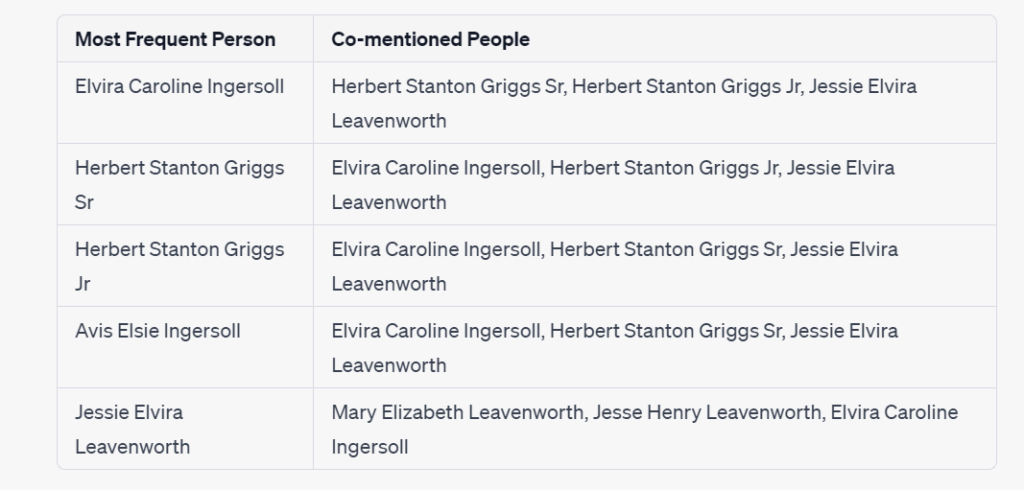
Cluster Table of Frequently Mentioned People

The Final Prompt – Cluster Diagram Edition

Although a table format helps see who else is mentioned in the same letters as the most frequently mentioned people, there is a graphical format that provides additional insight called a Cluster Diagram.

Cluster diagrams show relationships not just between individual people, but between groups of related people. This additional layer can provide insights that are easily missed in a table.

This follow-up prompt was also modified slightly to present a larger cluster of people for analysis.  However, a filter was used to limit the number of people in the chart so that it was easier to read.  Simply said, I wanted to identify the people who had an ongoing relationship with the most frequently mentioned people.

Prompt: Please draw me a cluster chart that shows relationships between the people mentioned in the same letter as those you identified in the table. Draw a connecting line between two individuals if they are mentioned together in at least two letters. The line weight should be the same for all relationships.

Letter Collection Cluster Chart

Why This Cluster Diagram Is So Amazing!

It’s Useful For Research

The diagram clearly shows two clusters of people that are mentioned in the same letters as the most frequently mentioned people.  And, the two clusters are connected by one individual, Elvira Caroline Ingersoll.

There is no need to go deeply into the family used in this example, but I will say that the cluster diagram is spot on!  Elvira was a prolific writer and recipient of letters. In one generation, she was a daughter who communicated frequently with her siblings and parents.  In the next generation, she was a mother who communicated extensively with her husband and children.

Any family historian or archivist would assume that this was a possibility if they saw this cluster chart.  In this case, this clue would quickly put them on the useful track!

It’s Conceptually Easy to Create

It is difficult to understand the concept of a cluster and how to determine which information is beneficial to include within it. ChatGPT was able to understand my direction in natural language and retrieve the necessary information directly from a spreadsheet.

It’s Technically Easy to Create

Filtering a cluster down to the most useful items is technically difficult to do in Excel or Gephi. The fact that I got an easy-to-read and easy-to-understand chart so easily was nothing short of mind-blowing. This shows huge potential for “quick and dirty” cluster analysis, something that is relatively difficult for genealogists and archivists to do today.

Total Time Saved Using ChatGPT

The way I usually make these charts takes about 30 minutes of spreadsheet work and 60-90 minutes of work in Gephi. Keep in mind, this is after about 100 hours of learning and practice.

To create these charts in ChatGPT took only 30 minutes. Although there was some conceptual overlap with learning how to do this manually, there were none of the technical challenges associated with using complex, and occasionally buggy, pieces of software.

To be fair, Gephi can handle more information and more complex types of clustering and visualization than ChatGPT.  While I will still need to use Excel and Gephi for more complex analysis, I won’t need Gephi for this type of quick and dirty cluster analysis anymore.

Navigating Challenges

Playing with a toy boat surrounded by sharks

Test Each Step Separately

This prompt involved several steps, and each step needed to be tested separately before it could be combined with the other steps. It was difficult to see where things were going wrong when I tried to test several steps at the same time.

New Chat Windows

I found it best to frequently start a new chat window during testing. Hallucinations and unexpected results were introduced when I tested several steps in the same chat window, particularly if something went wrong in a previous step.

The Importance of Clean Data

Starting with a clean, well-structured, research log is key to the success of any data analysis project. The old axiom of, “garbage in, garbage out” should never be forgotten.

Clustering with ChatGPT is about Insight, Not Tools

With ChatGPT, clustering becomes less about juggling complex software and more about spotting the helpful patterns in your data. Yet, there’s no silver bullet here; it still requires a knack for seeing the patterns in the first place.

Conclusion and Final Thoughts

When I started this article, I had high expectations for some parts and very low expectations for others. In the end, my expectations were exceeded in all areas!

Clustering is a very useful technique for identifying people in a family archive and determining the relationships between them. Although, it can be technically challenging to undertake this type of analysis.

ChatGPT had no difficulty accessing and understanding archival information in a complex Excel spreadsheet. Because of that, I had no difficulty interacting with the information in the spreadsheet using natural language.

ChatGPT made quick work of creating cluster tables and diagrams that showed the people most frequently mentioned in the archive.  It also had no difficulty identifying the people who were mentioned in the same letters along with them.

Amazingly, ChatGPT could apply filtering rules to these clusters of people, a conceptually and technically difficult activity to do with traditional clustering tools. The ease with which ChatGPT produced clear, comprehensible cluster diagrams, a feat usually only possible through significant learning and practice, cannot be understated.

I am super excited about the potential of ChatGPT to analyze archives. Dozens of use cases immediately come to mind where it will greatly speed up my work.

My next ChatGPT clustering challenge though will come from the field of genetic genealogy … DNA Match clusters!

I’m very excited to hear what you think about using ChatGPT to perform cluster analysis. What do you want to learn from Clustering?  What mysteries are waiting to be found in your family archive?

For Further Reading

Simplify Complex Family Tree Searches Using ChatGPT

Image Generated by DALL-E 3
This article was originally published by Mark Thompson at MakingFamilyHistory.com

A common goal when working on family archive projects is to figure out who the people are that are included in photographs or mentioned in letters. Identifying them can be crucial to answering questions about your family history and can lead to new clues to follow up on.

Although, as anyone who has tried to do this knows, it can be a painstaking and frustrating process.  Letters rarely include the information needed to identify everyone. As letters are usually between people who know everyone they’re writing about, they tend not to include last names, or even worse, first names.

I’ve developed Excel-based approaches over the years for identifying groups of people in these situations. Although, they can be time-consuming to put together, and require specialty skills in Excel to use them.

It occurred to me that I might be able to use artificial intelligence to identify people more easily. This blog post will describe how I tested this idea and what I learned that could help you do the same in your own genealogy research.

Before diving into the fictitious example I used to test this idea, it is helpful to understand how this kind of research is done “manually.”

How to Manually Identify People in a Family Archive

While there are many approaches for identifying people mentioned in a letter, one of the most common techniques used by genealogists is to figure out how the different people mentioned in the letter may be related. They might be friends, co-workers, or family. If you can figure out how they are connected, it is easier to figure out who they are.

After all, it’s easier to find several needles tied together in a haystack than it is to find an individual needle in the haystack.

How to Identify Family Members

For the rest of this article, the names that I use will all be taken from this example, fictitious, family tree.

When I suspect that people mentioned in a letter could be family members, I compare the names of the people to their family tree and try to find close relatives with those names. The assumption is that people tend to write about their immediate family.

For example, let’s say a letter written by “Clara” includes a line that says, “Walter and I went down to the train station to pick up Joe.” While the family tree might include dozens of people named Joe, Walter, and Clara; it will have fewer families (and hopefully, only one) where they are all immediate family members.

While this approach makes intuitive sense, it isn’t easy to use in practice. The problem is that online trees don’t have a button labeled, “Show me all of the families that have a person named Joe, Walter, and Clara in them.” As such, this approach requires repetitive searches of a family tree looking for clues about which family group might be the right one. Alternatively, spreadsheets, or third-party tools designed for this kind of search, can also be used.

Given the challenges in doing these searches the manual way, I decided to see if this problem could be solved more easily using artificial intelligence tools.

Using ChatGPT to Search a Family Tree

Given that ChatGPT is particularly good at finding patterns, it seemed a natural fit for this type of search. Now the big question was how to get ChatGPT to search a family tree? I needed a plan.

Prompt Planning with ChatGPT

Whenever I am working out how to approach a problem using ChatGPT, I think about the following:

  • How will I provide the AI with the information needed to do the work?
  • Which role should the AI take on when performing the work?
  • What is the work that I want the AI to do with the information I provide it?
  • What is the format that I want the AI to present its findings in?

I’ll walk through my planning process step by step so that you can try this, or something similar, yourself.

How to Give ChatGPT Your Family Tree

The first, and most difficult challenge in this example was to get ChatGPT the information from the family tree. To do the kind of search that I’m interested in, ChatGPT needed to be able to see the people in the tree and understand their relationship to each other.

Thankfully, there is a family tree format that ChatGPT can understand.

The GEDCOM File Format

Image Generated by DALL-E 3

The Genealogical Data Communications format, or GEDCOM for short, was created by the Church of Jesus Christ of Latter-day Saints as a way for exchanging family tree information between computer programs. The information that can be transferred using this format includes information about the people in the tree, (like name, and birth, marriage, and death dates) as well as information about the relationships between the people (like parent, child, and family group).

Of all of the formats for family tree information in use today, you may wonder why GEDCOM is good to use with ChatGPT?

Why GEDCOM Works Well with ChatGPT

Besides the fact that GEDCOM files contain the information needed for this search, there are a few things about the GEDCOM format that make it well-suited to working with ChatGPT.

  • GEDCOM is a text-based format and ChatGPT excels at working with text.
  • Even though ChatGPT was trained on information created several years ago, the version of GEDCOM used by the major genealogy companies is several years old. This means that the information that ChatGPT has in its training data is still accurate today.
  • The GEDCOM format, which has been in use for 40 years, has been the subject of thousands of online articles. In fact, Google found over 4 million web pages that mention GEDCOM! As a result, ChatGPT has been well-trained in how the GEDCOM format works.

Now that we know that the GEDCOM format is a good way to provide information to ChatGPT, how do we get our family tree into the GEDCOM format?

How to Export an Ancestry Family Tree in GEDCOM Format

To generate a GEDCOM file of my family tree at Ancestry, I completed the following steps.  Starting within Ancestry’s Tree View:

  • Select the three dots menu in the left navigation bar.
  • Select the “Tree Settings” menu.
  • Click the “Export tree” link.
  • Click the “Download your GEDCOM file” button.

Note, that depending on the size of your tree, it can take some time to create the export file before it can be downloaded.

I then saved the GEDCOM file to a known location on my computer, so that I could use it in the next steps.

Now that my family tree was exported to GEDCOM format, it was time to build the ChatGPT prompt.

Assigning a Role to ChatGPT

The process of building a prompt, often referred to as prompt engineering, starts by assigning a role for the AI to adopt when performing the work. The role assignment is important to do first because it sets the context for how additional instructions will be understood by the AI.

To understand why role assignment is important, consider how you ask different people to do work for you. For example, the way that you would ask your 12-year-old child to clean up your yard would be different than the way you would ask a person who works for a professional yard cleaning service. Even though you have very similar goals for them, you would phrase the request for each of them in a very different way because of who they are.

As I was trying to form a complex genealogy search of a GEDCOM file, I wanted ChatGPT to assume a role that specialized in this type of work:

PROMPT: Please act in the role of a professional genealogist who has a deep understanding of the GEDCOM file format.

While the work portion of the prompt seems incomplete by itself, combined with the role assignment in the first step, it had the context to be understood by ChatGPT.

Finally, I needed to tell ChatGPT how I wanted the information it found to be presented to me.

How Should the AI Present Its Findings?

In this example, my goal was to look at the results for clues about family groups. So, I wanted the response to include information about the relationships between the people found. And, because I was going to do these searches frequently, I wanted the results to be easy to interpret at a glance.

PROMPT: Should you find a family group that you believe includes these people, create a table that lists the full name of the people in the family group in one column, and their relationship to Joe in another column.

The Complete Prompt

After testing several different approaches, this is the final prompt. Note, that I’ve shared some of the failed attempts at the end of the article in the “Challenges to be Aware of” section.

PROMPT: Please act in the role of a professional genealogist who has a deep understanding of the GEDCOM file format.

I would like you to analyze the file that I will provide to you next. Please search the file for family groups that include the names Joe, Walter, and Clara.

Should you find a family group that you believe includes these people, create a table that lists the full name of the people in the family group in one column, and their relationship to Joe in another column.

After submitting the prompt, I opened the GEDCOM file in a text editor so that it would be easy to copy the file to provide it to ChatGPT. In my case, I used Notepad++, but you could do this with Notepad, Wordpad, or any other text editor.

Once I had selected and copied all of the text, I pasted the text directly into ChatGPT’s prompt box and then clicked the submit button.

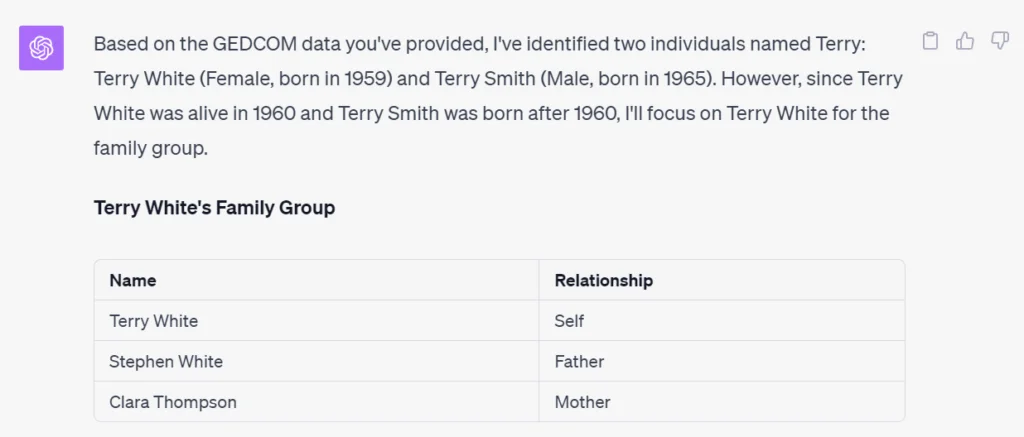
I was very happy to see that it found the correct family group, and displayed them in a way that was easy to confirm and check for additional clues!

Other Complex Searches Tested

I tried several different complex searches that I regularly come up against when doing this kind of project.

Finding More Than One Family Group

In a real-world search, it is likely that I would find more than one family group that included the names that I was looking for.

PROMPT: Please act in the role of a professional genealogist who has a deep understanding of the GEDCOM file format.

Please search for family groups that include the name Terry.

Should you find a family group that you believe includes this person, create a table that lists all of the people in the family group in one column, and their relationship to that person in the other column. Should you find more than one family group, create an additional table for each additional family group.

Focus on People That Were Alive at The Time

One way to zero in on the right family group is to only include people who were alive at the time the letter was written.

PROMPT: Please act in the role of a professional genealogist who has a deep understanding of the GEDCOM file format.

Please search for family groups that include a person named Terry who was alive in 1960.

Should you find a family group that you believe includes this person, create a table that lists all of the people in the family group in one column, and their relationship to that person in the other column. Should you find more than one family group, create an additional table for each additional family group.

This response is particularly interesting as it shows that ChatGPT, acting in the role of a genealogist, knows how to interpret a request for living people.

This is a textbook example of a natural language search.

And many, many more…

I tried several other, increasingly complex searches, and they all worked as long as the information that I was searching for was included in the family tree.

Challenges to Be Aware Of

ChatGPT Plus Can Only Accept 25,000 Characters

The most important limitation to be aware of is that there is a limit on how much text you can ask ChatGPT to process.  Because I used ChatGPT Plus in my testing, the limit is about 25,000 characters.

When I tried this test with a sample tree with hundreds of people in hundreds of family groups, ChatGPT said it was “too big.” When I performed my test on a smaller family tree with only a few dozen family groups, it worked successfully. As a result, I consider the approach used in this article a good proof of concept for me, and others, to use as a starting point for searches of larger and more family trees.

There is also a less well-understood limit that is based on the “complexity” of the file being processed. In the context of a GEDCOM, I believe this comes into play when there are more types of facts, and more relationships between people to track. Although, I wasn’t able to find a clear description of this limitation.

I expect that as ChatGPT evolves, these limitations will decrease.

GEDCOM Files Might Contain Personal Information

Be careful when exporting your family tree GEDCOM file format. If your tree contains private information, so will your GEDCOM file.

Ancestry’s GEDCOM export utility exports all the facts in your tree. If you would like to export a portion of your family tree, or only certain facts from your family tree, you will need to use a tool that supports this.

Family Tree Maker, for example, supports the partial export of a family tree.

Exercise Caution with Follow-up Searches

My testing was most successful when I used a fresh chat session in ChatGPT. When I tried follow-up searches in the same chat session, errors in the responses went up dramatically. When I spotted mistakes, I asked ChatGPT to double-check its results and explain how it came to its conclusion. In every case, it found the correct answer on the second try and apologized for its mistake.

Because of this issue, I quickly learned to follow up each response with a “please double check and explain your results” prompt.

Based on my testing, I believe that there are two likely sources for these errors:

  • The errors might come from answers generated in previous prompts. In other words, ChatGPT mixed its previous responses up with my subsequent requests.
  • The amount of information in the session grew too long after multiple requests, so information was being “forgotten” because of the space taken up by previous questions.

Final Thoughts

ChatGPT Plus can read and search GEDCOM formatted family trees and correctly interpret the genealogical information in them.

It can also do complex searches of family trees using natural language.  These complex queries can include searches for multiple people, family groups, relationships between people, and the time or place that people lived.

False responses were generated by some of the tests, especially when multiple follow up questions were used in the same chat session.

Like all genealogy research, results from ChatGPT need to be treated as clues that require further investigation before they can be relied upon as fact.

At the time of this writing, the approach used in this article is limited to “small” trees.  Alternative approaches, or improvements to ChatGPT Plus, will be necessary to search larger trees.

I’d Love To Hear From You

Have you tried any alternative approaches for complex searches of a family tree?

Do you know of a way to search larger family trees with a different approach?  If so, please let me know in the comments below.

Did You Find This article helpful?

For Additional Information