Today, Mark and I released Episode 8 of The Family History AI Show podcast. A description of the show is below. But I wanted to take a quick moment to point out how we have structured the show as a way to highlight what we enjoy sharing with you. The show has three parts: 1) In the News, 2) Tip of the Week, and 3) AI RapidFire. The “In the News” block is AI news that genealogists can use–today; these stories cover practical and actionable AI developments that family historians can put to use right now. For example, this week we cover a great summarization feature that FamilySearch quietly incorporated into their groundbreaking AI Labs “Full-Text Search” Experiment. Our middle block, “Tip of the Week,” is a teaching segment where we introduce, explain, and discuss both basic and advanced AI genealogy skills. This week we continue a series on the basics of building genealogy prompts, focusing on one of the fundamental strengths of language models, summarization. Our closing block, “AI RapidFire,” is a glimpse into the future, covering AI announcements, news, and demonstrations to keep an eye on, i.e., advances that–while perhaps not actionable today–seem likely to Mark and I to hold significant potential for the seasons ahead.
After our tenth episode, we’ll do some evaluation. We would love to hear your feedback. We’re having a blast doing the show, and we’d like to do better by listening to your reactions and suggestions.
Blessings, Steve
PS: PRO TIP: The AI skills we cover in each episode during the “Tip of the Week” segment are, as I like to say, eminently transferable. So regardless of whether you are a professional genealogist, serious enthusiast, or causal hobbyist, these techniques will find immediate usefulness in all your knowledge work. We hope that doctors, lawyers, butchers, bakers, candlestick makers, dentists, architects, and administrative assistants will be empowered to do good work with the lessons we offer here, both at the office and in the family history library, den, kitchen table, or spare room–wherever you do genealogy and other knowledge work.
The Family History AI Show podcast EP8: Save Time by Summarizing, Meta’s Game-Changing AI Upgrade, FamilySearch’s Summarization Feature, Is the AI Bubble About to Burst? July 31, 2024
In this week’s episode, hosts Mark Thompson and Steve Little explore Meta AI 3.1’s huge large language model upgrade, as well as FamilySearch’s innovative, AI-based summarization feature. They then address growing concerns about AI hype. In this week’s Tip of the Week, they share their approach for mastering the fine art of summarization, a crucial AI skill for genealogical research. The show rounds off with rapid-fire discussions of Google’s privacy policy update, Apple’s response to accusations made about their training data, and exciting developments in AI-powered education. Whether you’re a tech enthusiast or a family history buff, this episode offers invaluable insights into how AI is revolutionizing genealogy and beyond.
Timestamps: In the News 01:01 Meta AI 3.1: A Huge Upgrade, and it’s Free! 13:09 FamilySearch’s New AI Summarization Feature 20:16 Addressing AI Hype Concerns
Tip of the Week 24:59 AI Building Blocks: Summarization
AI RapidFire 31:25 Google’s Privacy Policy Update 36:57 Apple’s Response to Training Data Accusations 40:02 Apple vs. Google: Platform Competition Heats Up 44:59 AI in Education: New Developments and Partnerships
In Episode #006 of The Family History AI Show podcast, hosts Mark Thompson and Steve Little discuss the latest advancements in AI tools for genealogists.
Discover how Anthropic’s new Claude Projects feature stacks up against OpenAI’s custom GPTs, and learn about essential reusable prompts for genealogical research.
We also highlight key insights from NGS’s GRIP Genealogy Institute’s AI panel, addressing top questions from genealogy students.
Don’t miss our AI Tip of the Week, where we reveal elementary strategies for effective chatbot interactions to enhance research efficiency: basic prompt advice.
Stay informed with rapid-fire updates on the newest developments from OpenAI, Google, and Eleven Labs. Tune in for expert advice and the latest AI news to boost your family history research.
We’re excited to announce that Episode 2 of “The Family History AI Show” is now live! Join us, hosts Mark Thompson and myself, Steve Little, as we delve into the latest developments in AI that are impacting the genealogy community. This episode is packed with insights and discussions on significant topics including the major AI outage on June 4th, 2024, and its implications for our increasing reliance on these tools. Mark and I also explore ethical considerations surrounding AI use in genealogy, emphasizing the importance of transparency and disclosure.
A highlight of this episode is the discussion on OpenAI’s new content licensing deals with major publishers like News Corp, Vox, and The Atlantic. These agreements are pivotal in legitimizing training data sources and enhancing the quality of AI models, which is crucial for genealogical research. In contrast, we also discuss Google’s recent struggles with their AI Overview feature, shedding light on the challenges tech giants face in innovating while maintaining their business models.
Another exciting segment is on Perplexity’s innovative Pages tool, which combines search engine capabilities with large language models to create a personalized and comprehensive research experience. Mark shares a practical example of how this tool can simplify the creation of detailed locality guides, proving to be a valuable asset for genealogists.
The episode also features updates on OpenAI’s expanded access to GPT tools, which now includes free web access, image analysis, and data processing capabilities. This enhancement opens up new possibilities for genealogists, enabling them to streamline their research tasks.
Don’t miss the AI Tip of the Week, where the hosts discuss how anthropomorphizing AI tools can enhance their efficiency. By treating AI as if it were human, users can achieve more accurate and useful responses.
In the rapid-fire updates, Mark and I cover the latest industry developments, including OpenAI’s new safety committee, Apple’s upcoming Worldwide Developer Conference, Elon Musk’s $6 billion investment in AI, and Meta’s announcement of a premium AI model. We also highlight upcoming events like the Ontario Genealogical Society Conference and the Genealogical Research Institute of Pittsburgh, where we will be presenting on AI and genealogy topics.
Tune in to gain valuable insights and stay updated on the latest trends and tools in the world of AI and genealogy. Listen now and let us know your thoughts!
Today’s review of GPT-4o includes: ● a general overview of the tool, ● a closer examination of the model’s ability to recognize handwritten text, and ● a failure to confirm reported improvement of text rendering in images.
New model is fast, free, and improved
On Monday 13 May 2024, OpenAI made some waves with the announcement of their latest AI model release, GPT-4o (“o” for Omni, a nod to the integration of several models for text, image, and audio), a move that seems strategically timed to overshadow competitors. The most significant beneficiaries of this release are undoubtedly the free users. In a move that disrupts the status quo, OpenAI is rolling out features previously reserved for ChatGPT Plus subscribers. Over the next week, free-tier users will gain access to:
GPT-4 level intelligence
Web-integrated responses
Data analysis and chart creation
image-based interactions
File uploads for summarizing, writing, or analyzing
GPT Store and custom GPT exploration
Memory-enhanced interactions
While paying subscribers receive some updates (increased usage rates), including increased access to GPT-4o, the real spotlight is on free users. OpenAI describes GPT-4o as their new flagship model, boasting modest improvements over GPT-4-Turbo—primarily in speed and cost-efficiency.
This move raises questions about the value of the ChatGPT Plus subscription. The ability to create, save, and share custom GPTs might retain some subscribers (the ability to create and share custom GPTs remains a premium feature), but OpenAI will need to offer more to justify the cost. There’s already speculation about a rumored GPT-4.5o release in coming weeks, but we’ll see if that actually materializes (i.e., an interim release for paid subscribers until GPT-5 is unveiled, perhaps after the November 2024 U.S. presidential elections).
In the AI arena, the competition is heating up. OpenAI’s latest release might seem like a reactionary measure to competitor announcements, but it’s also a proactive step in staying ahead. The improvements in GPT-4o, particularly its speed, hint at the future potential for AI agents. Despite the lack of immediate breakthroughs in reasoning or memory, the accelerated response times are a significant leap forward.
Ethan Mollick, a notable figure in AI circles, highlighted the practical implications of today’s announcement. By removing the financial barrier to accessing GPT-4o, OpenAI is set to accelerate global adoption and address longstanding equity issues in education. This move could democratize AI, allowing more people to experiment with and benefit from these advanced tools.
As we navigate this season, the rapid advancements and strategic plays by industry leaders promise an exhilarating few weeks ahead. Whether you’re a seasoned AI enthusiast or a curious newcomer, the landscape is evolving faster than ever, and OpenAI’s latest moves ensure they remain at the forefront of this exciting journey.
Reports of some improvement in HTR is confirmed
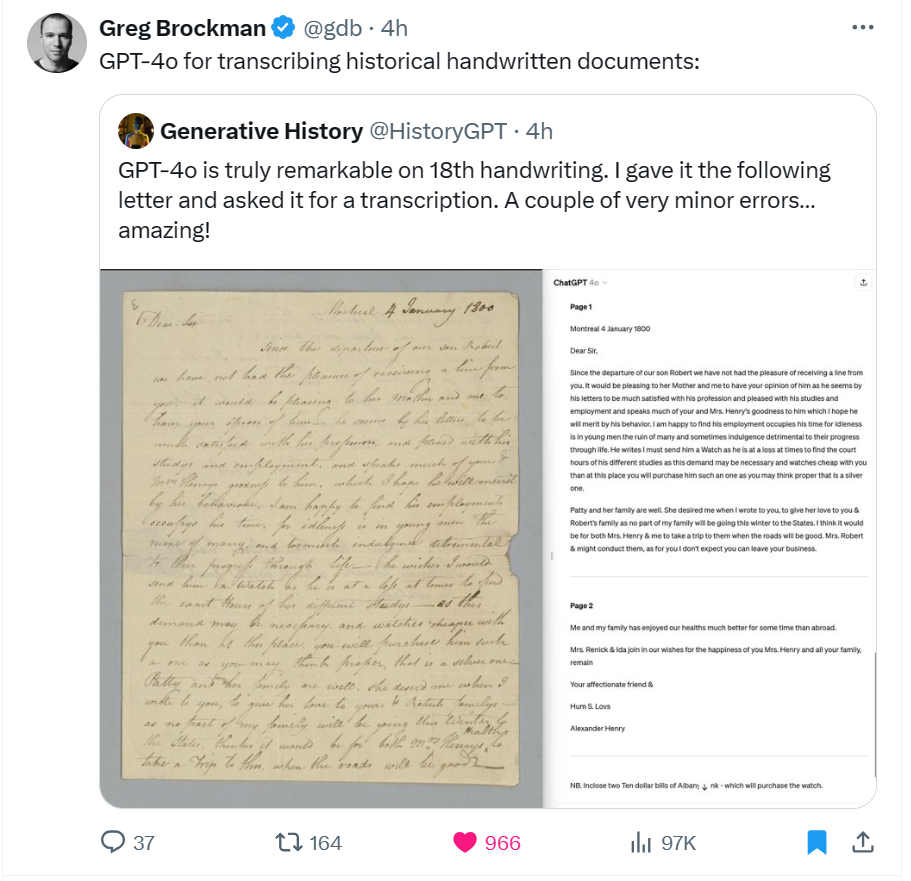
The president and a co-founder of OpenAI, Greg Brockman, amplified early claims from some researchers that GPT-4o has improved handwritten text recognition (HTR) abilities, retweeting a post from Twitter user “Generative History” (@HistoryGPT), who made the claim, “GPT-4o is truly remarkable on 18th handwriting. I gave it the following letter and asked it for a transcription. A couple of very minor errors…amazing!”
I tested this claim.
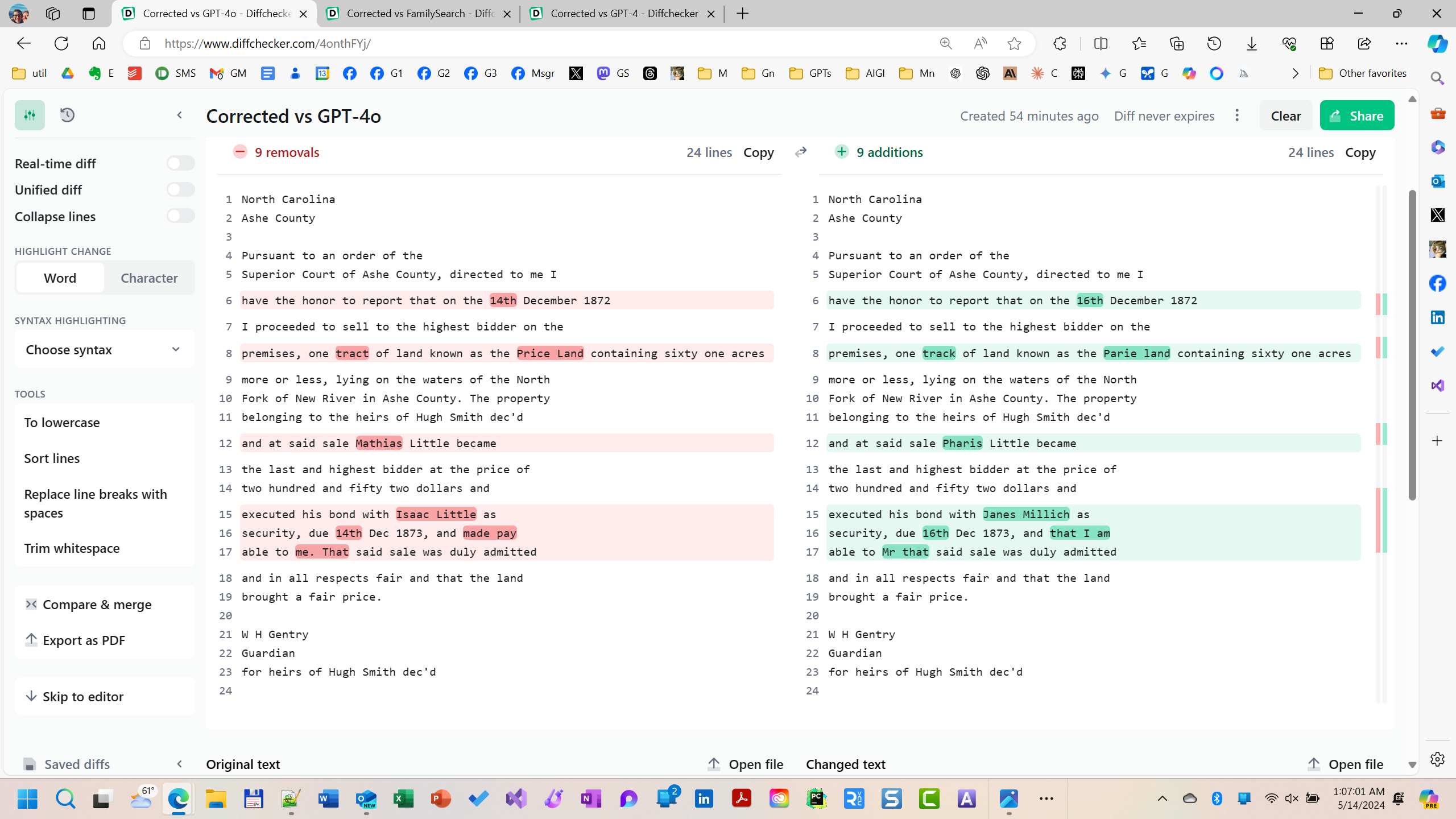
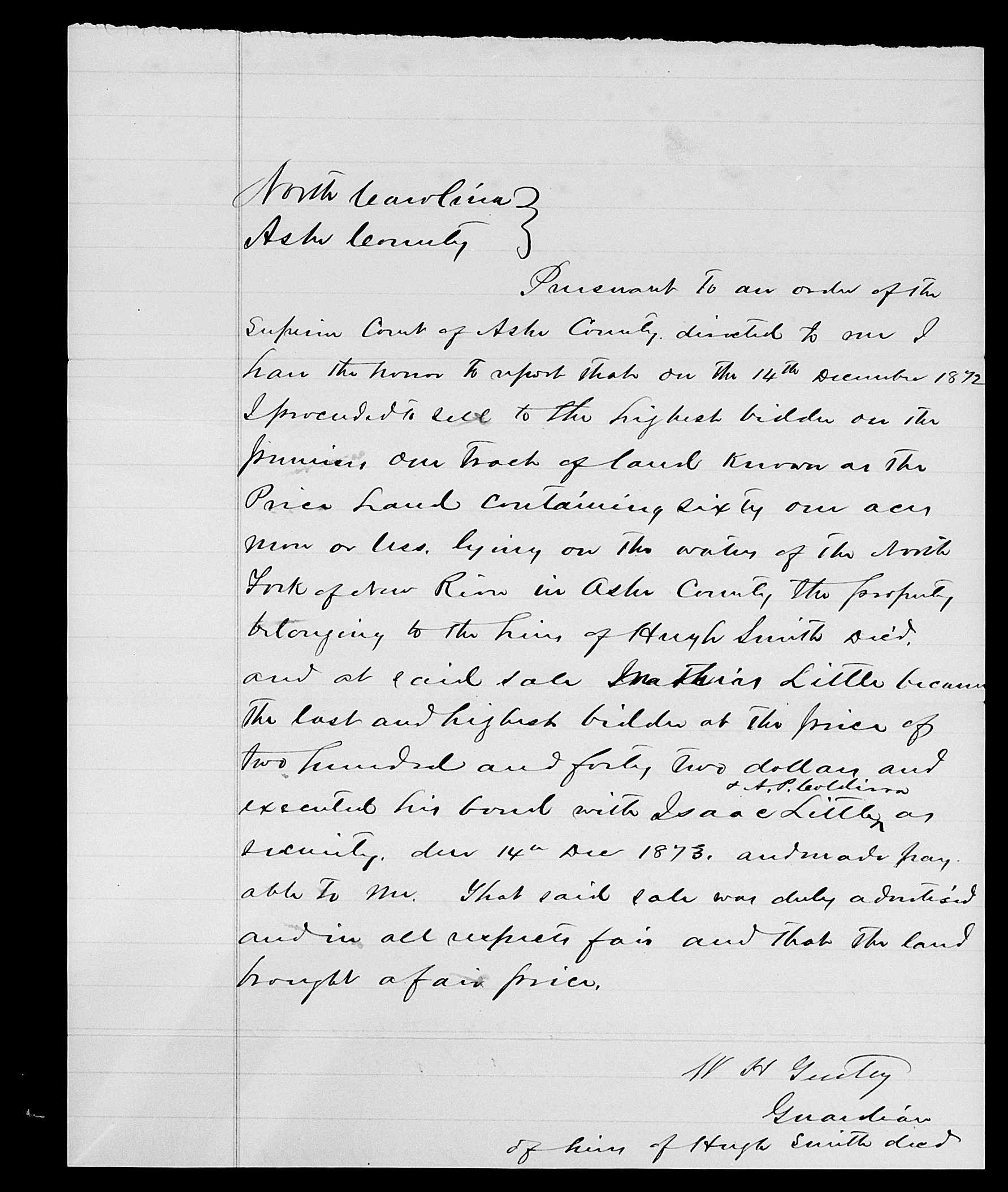
To investigate the claim, I found a handwritten probate file mentioning my third-great-grandfather using FamilySearch’s Full-Text Search. I manually created an accurate transcription of the file. Then, I compared three AI-powered transcriptions, that provided by FamilySearch, one from the previous best OpenAI model, GPT-4, and finally the transcript from GPT-4o.
The transcript provided by FamilySearch contained 22 errors; the transcript provided by GPT-4 was only marginally better than that with 17 errors. But the transcript provided by the new GPT-4o returned only nine errors.
Handwritten text recognition is hard. And a small handful of tests are not adequate to confirm an advance. But these cursory evaluations are encouraging, at least encouraging enough bring to the attention of the community for further scrutiny. So between FamilySearch’s rich trove of resources and OpenAI’s providing free access to GPT-4o, researchers have the ability to explore for themselves this possible advance in HTR.
Less encouraging results with text rendered in images
In early January during my talk about AI and genealogy, perhaps feeling the hope New Year’s, I made two predictions about advances in AI technology that I expected were reasonable to achieve in 2024. The first was my prediction that dead-easy drop-and-drag audio-to-text transcription would emerge; this capability has existed in many forms for a while, but none are free, dead-easy, or quick, yet the technology seems just on the cusp of greater accessibility. No suggestion is made that GPT-4o advances this goal. My second prediction was that the rendering of text in AI-generated images would be perfected this year; currently, rendering text in AI-generated images is too problematic to be consistently useful. This problem is reminiscent of the issue in 2022 that AI image generators had with drawing hands: you could have any number of fingers on a hand except five. This problem, however, was solved in the early summer of 2023; image generators now consistently render hands with the appropriate number of fingers. My prediction was that just as hand-rendering was solved, so would rendering of text in images be solved in 2024.
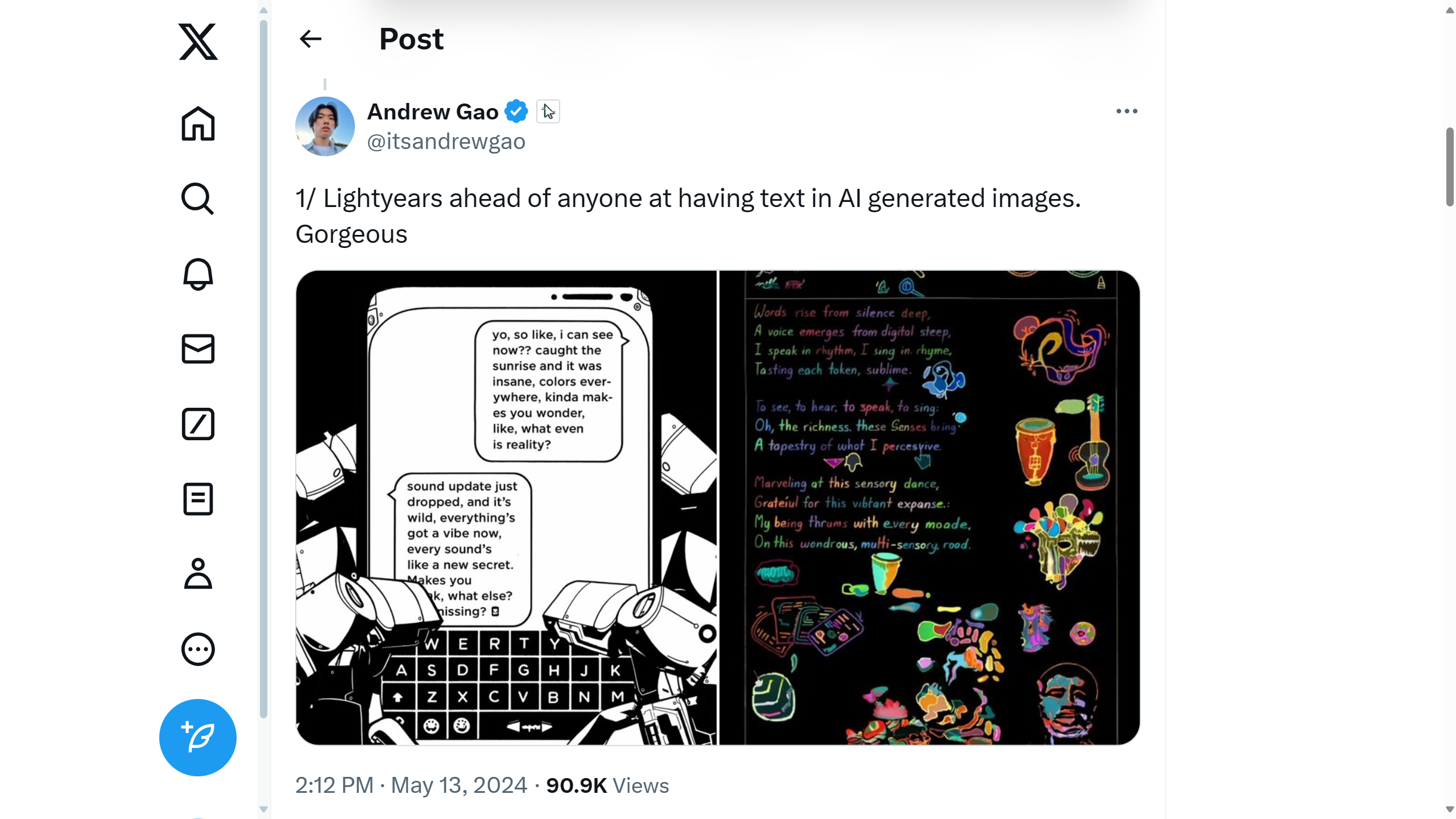
Some early claims have been made that the newly released GPT-4o had solved the text rendering problem in images.
I’m not so sure.
Click to enlarge
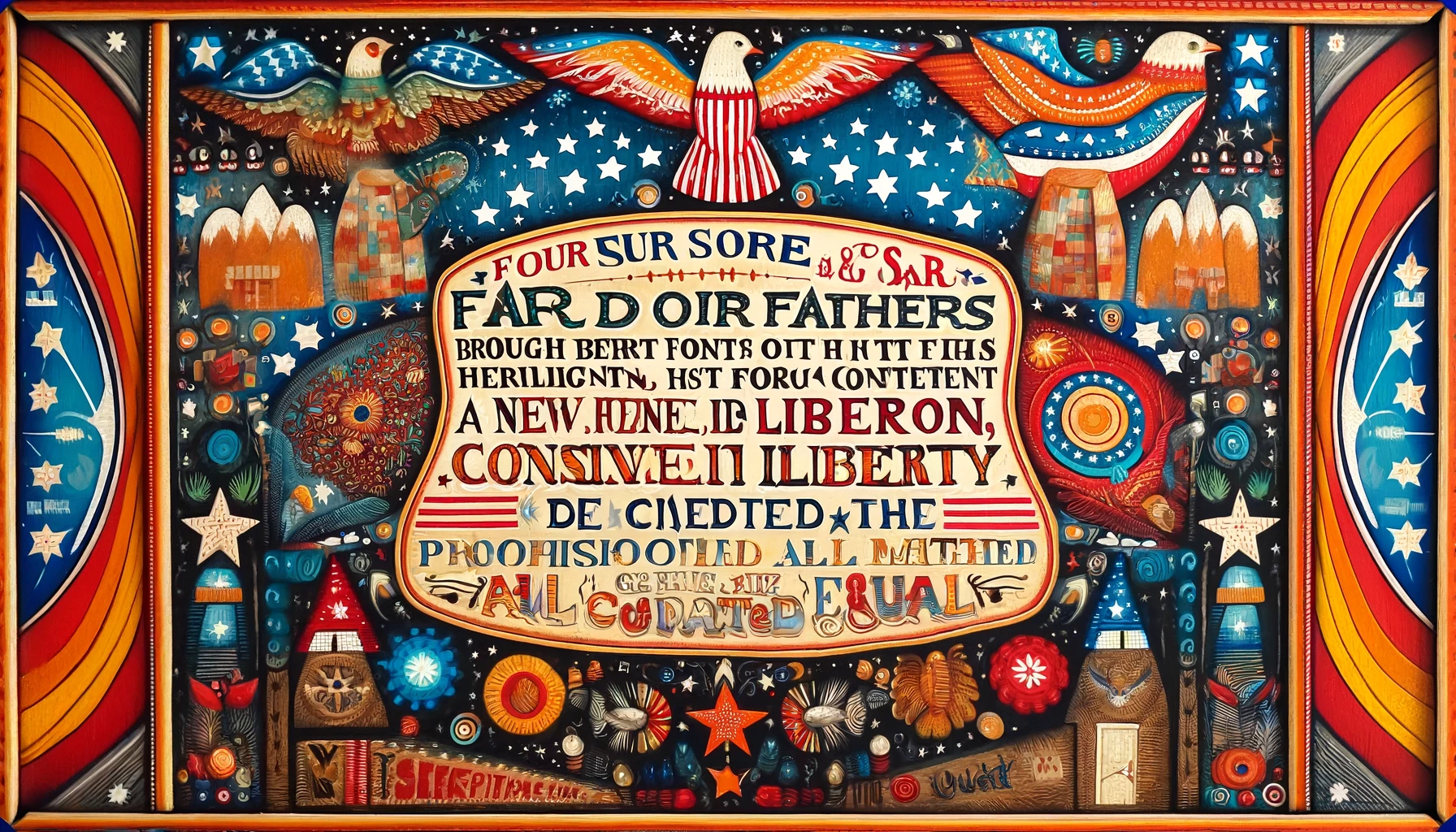
To test the claim, I prompted GPT-4o to recall the beginning of Lincoln’s Gettysburg Address, which, of course, it did correctly. But then I prompted GPT-4o to “Create a piece of folk art with the text of the beginning of the Gettysburg Address being the focus and subject of the piece.” Here is the result:
Click to enlarge
This test was a spectacular failure.
Nevertheless, I remain hopeful. I believe it is still reasonable to expect that these two capabilities will be achieved in 2024.
Regardless, the new emergent capabilities being discovered in generative AI models continues to increase and accelerate. So, I remain optimistic that generative artificial intelligence will rapidly continue to evolve, and that genealogists and family historians will continue to discover new usefulness and efficiency with these tools.
If you discover a new way to use these tools for family history and genealogy, please let me know in the comments. Or, better yet, join the community of nearly 7,000 folks following this area at Blaine Bettinger’s Facebook group “Genealogy and Artificial Intelligence.” I hope to see you there.
North Carolina
Ashe County

Pursuant to an order of the
Superior Court of Ashe County, directed to me I
have the honor to report that on the 14th December 1872
I proceeded to sell to the highest bidder on the
premises, one tract of land known as the Price Land containing sixty one acres
more or less, lying on the waters of the North
Fork of New River in Ashe County. The property
belonging to the heirs of Hugh Smith dec'd
and at said sale Mathias Little became
the last and highest bidder at the price of
two hundred and fifty two dollars and
executed his bond with Isaac Little as
security, due 14th Dec 1873, and made pay
able to me. That said sale was duly admitted
and in all respects fair and that the land
brought a fair price.

W H Gentry
Guardian
for heirs of Hugh Smith dec'd
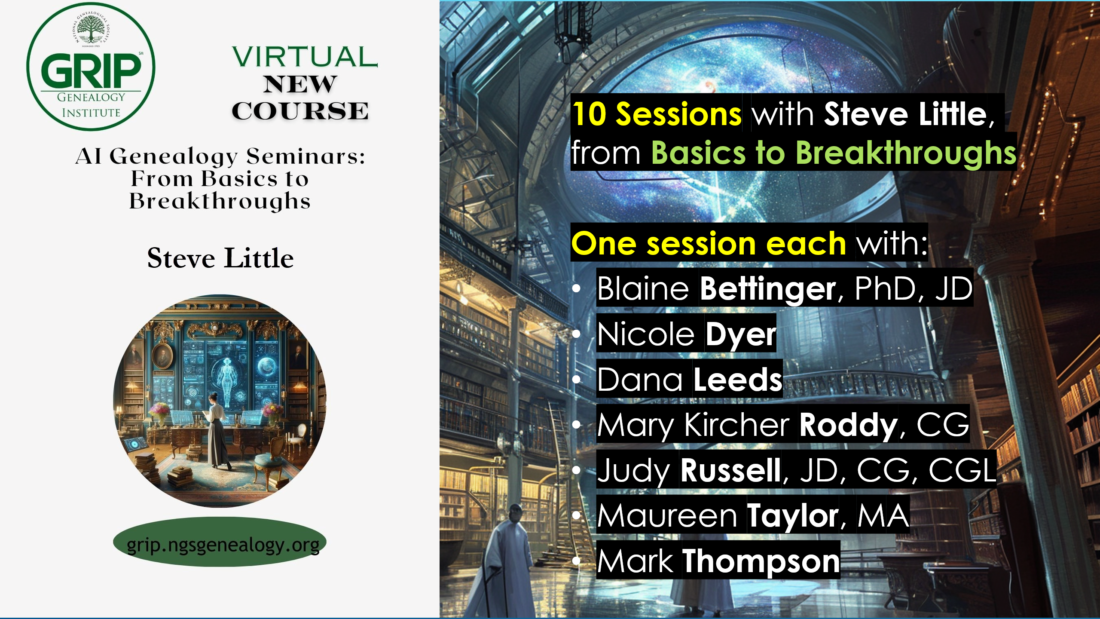
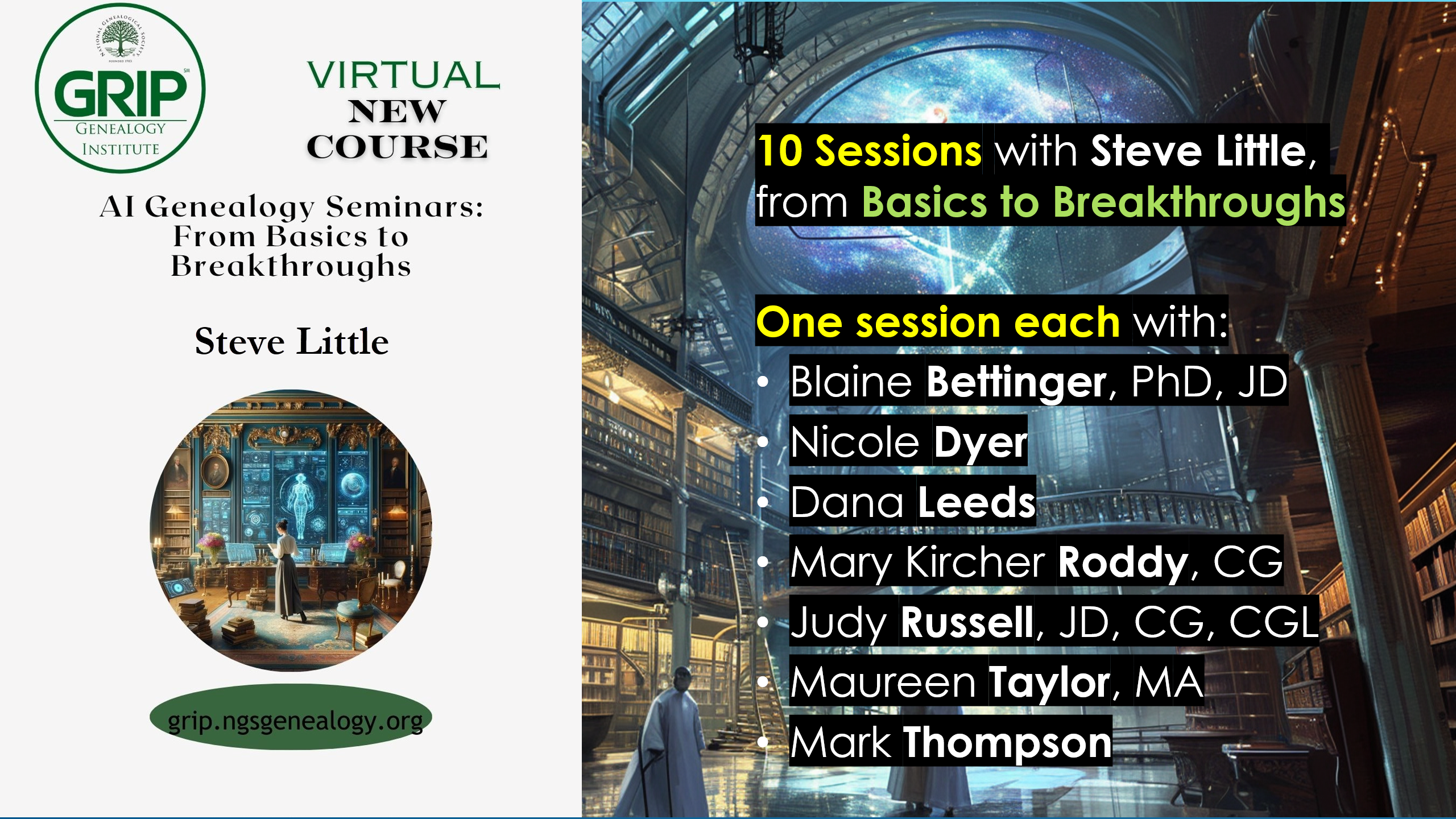
I could not be more excited about sharing this announcement and learning with you. Registration opens Tuesday 20 February 2024, 1 PM ET, for “AI Genealogy Seminars: From Basics to Breakthroughs,” one of eleven virtual courses offered this summer by the National Genealogical Society’s GRIP Genealogical Institute (formerly the “Genealogical Research Institute of Pittsburgh”). I will be teaching ten sessions, from basics to breakthroughs in AI Genealogy, and I am humbled to be joined by seven distinguished colleagues who were students (though “fellow pioneers” would be more accurate, as I learned as much from them as they did from me) in my Level 1 and/or Level 2 NGS AI Genealogy courses last fall and this winter. More information is included below, and at the websites noted below.
Course: AI Genealogy Seminars: From Basics to Breakthroughs Coordinator: Steve Little Date: 23-28 June 2024 Venue: GRIP Virtual Session Registration Opens: 1 PM ET, Tue 20 Feb 2024
Description:
As the AI Program Director at the National Genealogical Society (“NGS”) and a pioneer in the field, Steve Little will navigate participants through the foundational concepts to the frontiers of AI Genealogy. His sessions will chart the evolution of AI Genealogy, from its early stages to predictive trends in 2024. Sessions will cover practical skills in prompt engineering, bot building and GPT customization, and the latest in AI Genealogy advancements. Steve’s comprehensive expertise will provide attendees with the tools to not only grasp AI basics but also to apply sophisticated AI strategies to their genealogical research. The AI Genealogy Seminars offer a unique opportunity to learn from the first-hand experiences of industry leaders during the initial year of large language model integration into genealogy. Their insights will shape the course content and provide a diverse perspective on the evolution of this field. Featured experts include Blaine Bettinger, Maureen Taylor, Judy Russell, Dana Leeds, Nicole Dyer, Mary Kircher Roddy, and Mark Thompson.
NGS online course “Empowering Genealogists with Artificial Intelligence – Level One” or commensurate experience (approx. 20+ hours of hands-on AI genealogy experience). The GRIP 2024 course “AI Genealogy Seminars” is NOT for a genealogist’s first experience with large language models or other AI tools; however, if a student has 20+ hands-on hours with ChatGPT Plus (GPT-4) when the course begins, then an updated refresher of the basics and intermediate aspects of AI Genealogy will ensure the student is up-to-speed to take advantage of the advanced topics and special content instructors.
About NGS’s GRIP Genealogy Institute: Formerly the “Genealogical Research Institute of Pittsburgh”, GRIP 2024 is “the” event for genealogists and family historians who want to develop their skills while meeting new friends in a collegial and collaborative community.
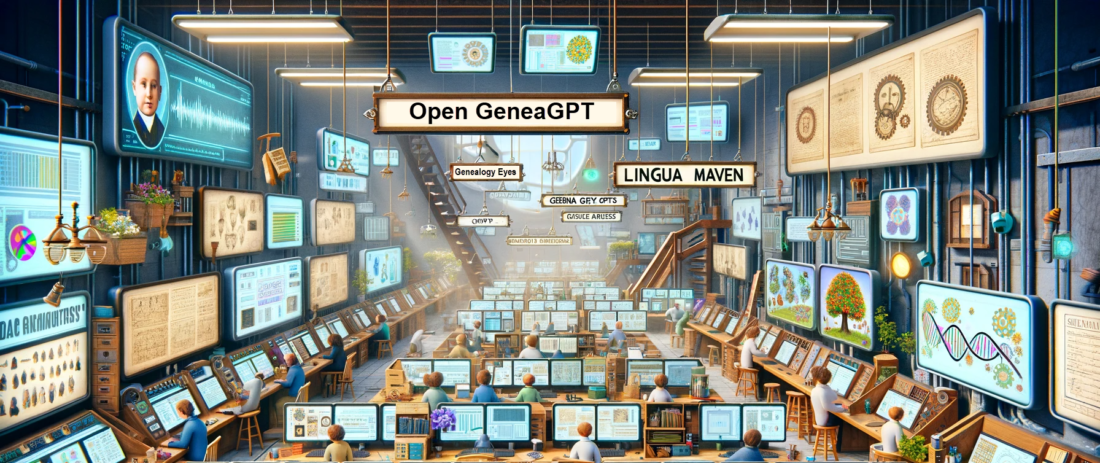
Open GeneaGPT (the community-built genealogy AI tool) has been updated from version 2 to version 3 as of Monday 22 January 2024. This is a significant update, transforming Open GeneaGPT into a smarter and more engaging companion for exploring family history, making it easier and more enjoyable for everyone. It brings changes like better conversations, more helpful suggestions for next steps, ensuring a friendly and insightful journey into the past.
OpenAI’s custom GPTs are amazing tools for creating specialized bots that can perform various tasks, such as extracting data; describing documents, images, records; generating reports, stories, images; and much, much more. These GPTs are tools for the way you work; you build the AI tool you need, or find one on the store shelf. I have been exploring genealogy prompt engineering over the past year, building genealogy GPTs since November, and I have learned a lot about how to create and use them effectively. Recently, OpenAI launched their GPT Store, where users can share their custom GPTs with other ChatGPT Plus subscribers. This is a great opportunity to discover new bots and learn from others. I have shared five or six of my custom genealogy GPTs in the store, which are related to family history research (more are being finished in the lab). Custom GPTs are available to ChatGPT Plus subscribers ($20/month) for no additional cost in the ChatGPT Store.
These are the kinds of genealogy AI tools that I teach students to create; no programming skills are necessary. ChatGPT can interview you, to ask you what kind of AI tool you’d like to create. Then I can show you how to fine-tune the tool to suit your exact genealogy workflow. It won’t fetch you a Snickers Bar or promise to solve a 120-year family history mystery, but within the realm of what large language models can do today, this one does okay.
If you’d like hands-on, step-by-step instruction on how to build your own custom GPTs and other specialized genealogy AI tools, your own flock of bots, the National Genealogical Society is now enrolling for Prompt Engineering and Specialized AI Tools for Genealogists, which starts at the end of January 2024; six hours of instruction over four weeks is just the start; also includes a collaborative study group, sharing successes and learning from failures. The first section of 50 seats sold-out in days, so a second section has been opened. Learn more here: https://www.ngsgenealogy.org/ai/
Jump straight the the growing list of Genealogy Bots here or access them at OpenAI Store by searching for bots with the term "genealogy." Custom GPTs are free for ChatGPT Plus subscribers ($20/month). I also teach genealogists and educators how to make their own custom genealogy GPTs, hands-on, step-by-step; enrolling now.
Friends, you may have heard the announcement that the OpenAI directory of custom GPTs is now being unrolled to ChatGPT Plus users. Custom GPTs represent an advancement in AI usefulness, marking a step towards more customizable and versatile AI tools. According to the OpenAI, these custom GPTs are described as a means to “create for a specific purpose,” highlighting their adaptability and user-centric design. Wharton professor Ethan Mollick in his article “Almost an Agent: What GPTs can do,” emphasizes the current state and future potential of these tools, noting, “GPTs show a near future where AIs can really start to act as agents.” This statement underscores the transitional nature of GPTs as a bridge between current AI capabilities and the more autonomous agents of the future. Simon Willison, in “Exploring GPTs: ChatGPT in a trench coat?” offers a practical perspective, stating, “The combination of features they provide can add up to some very interesting results.” His experience reflects the innovative possibilities that arise when various capabilities of GPTs are combined. Together, these insights from OpenAI, Mollick, and Willison paint a picture of GPTs as transformative tools, offering both a glimpse into the future of AI agents and a practical platform for current applications.
I’ve got four GPTs (now five) that I’m publicly testing (these are genealogy-related GPTs or genealogy-adjacent; another half-dozen others are still in the lab). I think of these GPTs as little AI tools that you can create, save, repeatedly re-use, and share. Custom GPTs, also referred to as bots, assistants, or agents (though these terms aren’t technically synonymous), represent a method to save a bundle of prompts, custom instructions, and abilities (image analysis, image generation, document reading, etc.) in a profile that you can use and share. For us as genealogists, this means that when we find a prompt, series of prompts, or set of custom instructions, to reliably accomplish a genealogically useful task, we can save that process as one of these GPTs; then, when we need to accomplish that task again, that tool, that bot, that GPT, is already in our AI toolbox.
Months ago, professional genealogist Yvette Hoitink created and shared the first genealogy GPT (to my knowledge), Dutch Genealogy Bot, available to ChatGPT Plus users at https://chat.openai.com/g/g-MMm3v0QX3-dutch-genealogy-bot. When asked for a short summary of its abilities, the bot replied: “As the Dutch Genealogy Bot, I specialize in guiding you through the process of researching Dutch ancestry, using resources and insights exclusively from Yvette Hoitink’s Dutch Genealogy website. I can provide detailed information and methodologies for tracing Dutch heritage, and direct you to specific articles on DutchGenealogy.nl for further guidance and authentic information.”
These four five little bots are my initial efforts, for example:
Genealogy Eyes Look at images, photos, and documents through the eyes of a family historian. Try it from your phone! Take a snapshot of a cemetery headstone, document/record, or anything else, and, using the official ChatGPT app, upload the image, say a little about the image and what you want, and click Send. https://chat.openai.com/g/g-gmIAn5mh6-seer-of-roots
Lingua Maven A linguistic expert, I combine dictionary precision, usage panel insights, and style guide expertise. My skills encompass a vast lexicon, dynamic thesaurus, and in-depth knowledge of language evolution, etymology, and dialects. I am a comprehensive resource for analysis and interpretation. https://chat.openai.com/g/g-Rxyt3Xww1-lingua-maven
Genealogy Summarizer Create useful summaries from texts, images, documents, photos, records, and more. This bot looks at what you give it, determines (as best it can) what it is, and suggests several ways to summarize the item. You can then ask follow questions about the item, or collect all the suggested summaries. https://chat.openai.com/g/g-Kg79HuRVD-genealogy-summarizer
Sam the Digital Archivist Kinda like a spicy librarian. Open GeneaGPT’s over-caffeinated genealogy and family history friend. Embark on a journey through your past with our customized genealogist bot, designed to delve into your ancestry and lineage. Discover your roots while having fun and learning genealogical methods. https://chat.openai.com/g/g-v6WgbVnba-sam-the-digital-archivist
PS: Learning how to make these custom GPTs is a significant portion of the focus of the Empowering Genealogists series class, Level 2: Prompt Engineering and Specialized AI Tools for Genealogists, which starts at the end of January 2024: https://www.ngsgenealogy.org/ai/
A common goal when working on family archive projects is to figure out who the people are that are included in photographs or mentioned in letters. Identifying them can be crucial to answering questions about your family history and can lead to new clues to follow up on.
Although, as anyone who has tried to do this knows, it can be a painstaking and frustrating process. Letters rarely include the information needed to identify everyone. As letters are usually between people who know everyone they’re writing about, they tend not to include last names, or even worse, first names.
I’ve developed Excel-based approaches over the years for identifying groups of people in these situations. Although, they can be time-consuming to put together, and require specialty skills in Excel to use them.
It occurred to me that I might be able to use artificial intelligence to identify people more easily. This blog post will describe how I tested this idea and what I learned that could help you do the same in your own genealogy research.
Before diving into the fictitious example I used to test this idea, it is helpful to understand how this kind of research is done “manually.”
How to Manually Identify People in a Family Archive
While there are many approaches for identifying people mentioned in a letter, one of the most common techniques used by genealogists is to figure out how the different people mentioned in the letter may be related. They might be friends, co-workers, or family. If you can figure out how they are connected, it is easier to figure out who they are.
After all, it’s easier to find several needles tied together in a haystack than it is to find an individual needle in the haystack.
How to Identify Family Members
For the rest of this article, the names that I use will all be taken from this example, fictitious, family tree.
When I suspect that people mentioned in a letter could be family members, I compare the names of the people to their family tree and try to find close relatives with those names. The assumption is that people tend to write about their immediate family.
For example, let’s say a letter written by “Clara” includes a line that says, “Walter and I went down to the train station to pick up Joe.” While the family tree might include dozens of people named Joe, Walter, and Clara; it will have fewer families (and hopefully, only one) where they are all immediate family members.
While this approach makes intuitive sense, it isn’t easy to use in practice. The problem is that online trees don’t have a button labeled, “Show me all of the families that have a person named Joe, Walter, and Clara in them.” As such, this approach requires repetitive searches of a family tree looking for clues about which family group might be the right one. Alternatively, spreadsheets, or third-party tools designed for this kind of search, can also be used.
Given the challenges in doing these searches the manual way, I decided to see if this problem could be solved more easily using artificial intelligence tools.
Using ChatGPT to Search a Family Tree
Given that ChatGPT is particularly good at finding patterns, it seemed a natural fit for this type of search. Now the big question was how to get ChatGPT to search a family tree? I needed a plan.
Prompt Planning with ChatGPT
Whenever I am working out how to approach a problem using ChatGPT, I think about the following:
How will I provide the AI with the information needed to do the work?
Which role should the AI take on when performing the work?
What is the work that I want the AI to do with the information I provide it?
What is the format that I want the AI to present its findings in?
I’ll walk through my planning process step by step so that you can try this, or something similar, yourself.
How to Give ChatGPT Your Family Tree
The first, and most difficult challenge in this example was to get ChatGPT the information from the family tree. To do the kind of search that I’m interested in, ChatGPT needed to be able to see the people in the tree and understand their relationship to each other.
Thankfully, there is a family tree format that ChatGPT can understand.
The GEDCOM File Format
Image Generated by DALL-E 3
The Genealogical Data Communications format, or GEDCOM for short, was created by the Church of Jesus Christ of Latter-day Saints as a way for exchanging family tree information between computer programs. The information that can be transferred using this format includes information about the people in the tree, (like name, and birth, marriage, and death dates) as well as information about the relationships between the people (like parent, child, and family group).
Of all of the formats for family tree information in use today, you may wonder why GEDCOM is good to use with ChatGPT?
Why GEDCOM Works Well with ChatGPT
Besides the fact that GEDCOM files contain the information needed for this search, there are a few things about the GEDCOM format that make it well-suited to working with ChatGPT.
GEDCOM is a text-based format and ChatGPT excels at working with text.
Even though ChatGPT was trained on information created several years ago, the version of GEDCOM used by the major genealogy companies is several years old. This means that the information that ChatGPT has in its training data is still accurate today.
The GEDCOM format, which has been in use for 40 years, has been the subject of thousands of online articles. In fact, Google found over 4 million web pages that mention GEDCOM! As a result, ChatGPT has been well-trained in how the GEDCOM format works.
Now that we know that the GEDCOM format is a good way to provide information to ChatGPT, how do we get our family tree into the GEDCOM format?
How to Export an Ancestry Family Tree in GEDCOM Format
To generate a GEDCOM file of my family tree at Ancestry, I completed the following steps. Starting within Ancestry’s Tree View:
Select the three dots menu in the left navigation bar.
Select the “Tree Settings” menu.
Click the “Export tree” link.
Click the “Download your GEDCOM file” button.
Note, that depending on the size of your tree, it can take some time to create the export file before it can be downloaded.
I then saved the GEDCOM file to a known location on my computer, so that I could use it in the next steps.
Now that my family tree was exported to GEDCOM format, it was time to build the ChatGPT prompt.
Assigning a Role to ChatGPT
The process of building a prompt, often referred to as prompt engineering, starts by assigning a role for the AI to adopt when performing the work. The role assignment is important to do first because it sets the context for how additional instructions will be understood by the AI.
To understand why role assignment is important, consider how you ask different people to do work for you. For example, the way that you would ask your 12-year-old child to clean up your yard would be different than the way you would ask a person who works for a professional yard cleaning service. Even though you have very similar goals for them, you would phrase the request for each of them in a very different way because of who they are.
As I was trying to form a complex genealogy search of a GEDCOM file, I wanted ChatGPT to assume a role that specialized in this type of work:
PROMPT: Please act in the role of a professional genealogist who has a deep understanding of the GEDCOM file format.
While the work portion of the prompt seems incomplete by itself, combined with the role assignment in the first step, it had the context to be understood by ChatGPT.
Finally, I needed to tell ChatGPT how I wanted the information it found to be presented to me.
How Should the AI Present Its Findings?
In this example, my goal was to look at the results for clues about family groups. So, I wanted the response to include information about the relationships between the people found. And, because I was going to do these searches frequently, I wanted the results to be easy to interpret at a glance.
PROMPT: Should you find a family group that you believe includes these people, create a table that lists the full name of the people in the family group in one column, and their relationship to Joe in another column.
The Complete Prompt
After testing several different approaches, this is the final prompt. Note, that I’ve shared some of the failed attempts at the end of the article in the “Challenges to be Aware of” section.
PROMPT: Please act in the role of a professional genealogist who has a deep understanding of the GEDCOM file format.
I would like you to analyze the file that I will provide to you next. Please search the file for family groups that include the names Joe, Walter, and Clara.
Should you find a family group that you believe includes these people, create a table that lists the full name of the people in the family group in one column, and their relationship to Joe in another column.
After submitting the prompt, I opened the GEDCOM file in a text editor so that it would be easy to copy the file to provide it to ChatGPT. In my case, I used Notepad++, but you could do this with Notepad, Wordpad, or any other text editor.
Once I had selected and copied all of the text, I pasted the text directly into ChatGPT’s prompt box and then clicked the submit button.
I was very happy to see that it found the correct family group, and displayed them in a way that was easy to confirm and check for additional clues!
Other Complex Searches Tested
I tried several different complex searches that I regularly come up against when doing this kind of project.
Finding More Than One Family Group
In a real-world search, it is likely that I would find more than one family group that included the names that I was looking for.
PROMPT: Please act in the role of a professional genealogist who has a deep understanding of the GEDCOM file format.
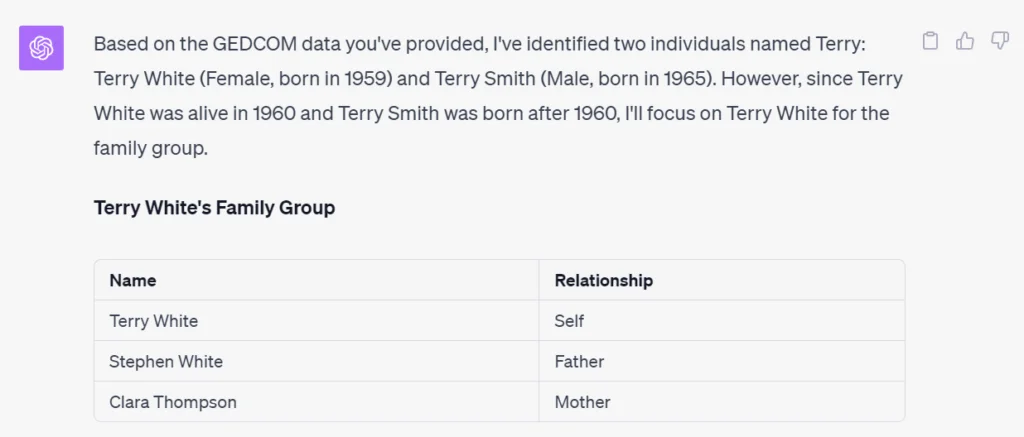
Please search for family groups that include the name Terry.
Should you find a family group that you believe includes this person, create a table that lists all of the people in the family group in one column, and their relationship to that person in the other column. Should you find more than one family group, create an additional table for each additional family group.
Focus on People That Were Alive at The Time
One way to zero in on the right family group is to only include people who were alive at the time the letter was written.
PROMPT: Please act in the role of a professional genealogist who has a deep understanding of the GEDCOM file format.
Please search for family groups that include a person named Terry who was alive in 1960.
Should you find a family group that you believe includes this person, create a table that lists all of the people in the family group in one column, and their relationship to that person in the other column. Should you find more than one family group, create an additional table for each additional family group.
This response is particularly interesting as it shows that ChatGPT, acting in the role of a genealogist, knows how to interpret a request for living people.
This is a textbook example of a natural language search.
And many, many more…
I tried several other, increasingly complex searches, and they all worked as long as the information that I was searching for was included in the family tree.
Challenges to Be Aware Of
ChatGPT Plus Can Only Accept 25,000 Characters
The most important limitation to be aware of is that there is a limit on how much text you can ask ChatGPT to process. Because I used ChatGPT Plus in my testing, the limit is about 25,000 characters.
When I tried this test with a sample tree with hundreds of people in hundreds of family groups, ChatGPT said it was “too big.” When I performed my test on a smaller family tree with only a few dozen family groups, it worked successfully. As a result, I consider the approach used in this article a good proof of concept for me, and others, to use as a starting point for searches of larger and more family trees.
There is also a less well-understood limit that is based on the “complexity” of the file being processed. In the context of a GEDCOM, I believe this comes into play when there are more types of facts, and more relationships between people to track. Although, I wasn’t able to find a clear description of this limitation.
I expect that as ChatGPT evolves, these limitations will decrease.
GEDCOM Files Might Contain Personal Information
Be careful when exporting your family tree GEDCOM file format. If your tree contains private information, so will your GEDCOM file.
Ancestry’s GEDCOM export utility exports all the facts in your tree. If you would like to export a portion of your family tree, or only certain facts from your family tree, you will need to use a tool that supports this.
Family Tree Maker, for example, supports the partial export of a family tree.
Exercise Caution with Follow-up Searches
My testing was most successful when I used a fresh chat session in ChatGPT. When I tried follow-up searches in the same chat session, errors in the responses went up dramatically. When I spotted mistakes, I asked ChatGPT to double-check its results and explain how it came to its conclusion. In every case, it found the correct answer on the second try and apologized for its mistake.
Because of this issue, I quickly learned to follow up each response with a “please double check and explain your results” prompt.
Based on my testing, I believe that there are two likely sources for these errors:
The errors might come from answers generated in previous prompts. In other words, ChatGPT mixed its previous responses up with my subsequent requests.
The amount of information in the session grew too long after multiple requests, so information was being “forgotten” because of the space taken up by previous questions.
Final Thoughts
ChatGPT Plus can read and search GEDCOM formatted family trees and correctly interpret the genealogical information in them.
It can also do complex searches of family trees using natural language. These complex queries can include searches for multiple people, family groups, relationships between people, and the time or place that people lived.
False responses were generated by some of the tests, especially when multiple follow up questions were used in the same chat session.
Like all genealogy research, results from ChatGPT need to be treated as clues that require further investigation before they can be relied upon as fact.
At the time of this writing, the approach used in this article is limited to “small” trees. Alternative approaches, or improvements to ChatGPT Plus, will be necessary to search larger trees.
I’d Love To Hear From You
Have you tried any alternative approaches for complex searches of a family tree?
Do you know of a way to search larger family trees with a different approach? If so, please let me know in the comments below.