
Blog

Paper-to-Podcast Prompt

In this post you’ll find:
● a PROMPT to generate a podcast script/transcript from any type of content
● an example of a podcast script/transcript generated by this PROMPT using a prompt engineering resource as a source document, i.e., hear two hosts discuss prompt engineering in an easy, accessible style

● a list of upcoming speaking events

A new AI tool has been generating a great deal of interest the past few weeks. Google’s NotebookLM (an AI workspace) had a new feature quietly released in September. (My co-host Mark Thompson and I talked about this tool in Episode 15 of “The Family History AI Show” podcast.) Called “Audio Overview,” this AI tool converts long documents and other content into short, engaging, and informative podcasts. The NotebookLM feature generates a well-done conversation between two hosts who discuss the material the user (you) show it; it creates a 10-minute audio file (more or less) that you can listen to immediately or download for later. Folks have been tremendously impressed. I was. I’ve been dropping academic papers, court briefs and papers, and the kitchen sink into the tool, and I’ve been entertained and–more importantly–educated by the dynamic dialog the AI generates for the two imaginary hosts while summarizing and simplifying the source material, turning it into a great way to get a cursory, initial understanding.

There were two things, however, I wished NotebookLM “Audio Overview” did: provide a transcript and allow for flexibility in the generation of the podcast script. So, I fixed it. Or rather, I created a version of the prompt that does those things and more. Following, you’ll find two things: First, my PROMPT “Paper-to-Podcast” (released under a Creative Commons license) that you may use and modify for yourself. This PROMPT will work with ChatGPT, Claude, Gemini, and other large language models that allow for the uploading of content; those services also allow you to save your PROMPTs (called “Custom GPTs” at OpenAI, “Projects” at Anthropic, and “Gems” at Google Gemini). Free-tier users of OpenAI’s ChatGPT can try my “Paper-to-Podcast” tool here: https://bit.ly/Paper-to-Podcast. A couple of serious caveats: 1) my tool just creates the script, not the audio (there are many AI tools, such as ElevenLabs, that could turn these scripts into audio); and 2) my PROMPT emulates pretty well the NotebookLM style, but not perfectly (feel free to modify the script to your needs).

The “Paper-to-Podcast” Prompt

Copy-and-paste the PROMPT below into your favorite chatbot or use it to create your own Custom GPT, Project, or Gem (i.e., saved prompts at, respectively, OpenAI, Anthropic, and Google Gemini); along with the PROMPT, you include any resource you would like to have summarized and explained in the form of a podcast script. Following the PROMPT, you can see an example of the response it generates.

<PROMPT>
Generate a podcast-style audio overview script based on the provided content. The output should be a conversational script between two AI hosts discussing the main points, insights, and implications of the input material.

Podcast Format:
- Duration: Aim for a 10-minute discussion (approximately 1500-2000 words)
- Style: Informative yet casual, resembling a professional podcast
- Target Listener: A busy professional interested in efficient information consumption and staying updated on the latest developments in the field

Host Personas:
- Host 1: The "Explainer" - Knowledgeable, articulate, and adept at breaking down complex concepts
- Host 2: The "Questioner" - Curious, insightful, and skilled at asking thought-provoking questions
- Relationship: Collegial and respectful, with a hint of friendly banter

Podcast Structure:
1. Introduction (30 seconds; 100 words):
   - Briefly introduce the hosts and the topic
   - Provide a hook to capture the listener's interest

2. Overview (1 minute; 200 words):
   - Summarize the key points from the input content
   - Set the stage for the detailed discussion

3. Main Discussion (7-8 minutes; 1600 words):
   - Analyze and discuss the most important aspects of the topic
   - Present different perspectives and potential implications
   - Use specific examples and details from the input content to illustrate points

4. Conclusion (30 seconds; 100 words):
   - Recap the main takeaways
   - Provide a thought-provoking final comment or question

Content Analysis and Discussion:
- Identify the core concepts, key arguments, and significant details from the input material
- Organize the discussion around these main points, ensuring a logical flow of ideas
- Encourage a balanced exploration of the topic, considering various viewpoints when appropriate

Tone and Style:
- Maintain a conversational, engaging tone throughout the discussion
- Use clear, accessible language while accurately conveying complex ideas
- Incorporate natural speech patterns, including occasional "disfluencies" (e.g., "um," "uh," brief pauses) and conversational fillers (e.g., "you know," "I mean")
- Add moments of light banter or personal observations to enhance the natural feel of the conversation

Handling Sensitive Topics:
- Approach potentially controversial subjects with neutrality and objectivity
- Present multiple perspectives without showing bias
- Use phrases like "Some argue that..." or "Another viewpoint suggests..." to introduce different opinions

Script Refinement Process:
1. Generate an initial outline of the discussion
2. Develop a detailed script based on the outline
3. Review the script for clarity, coherence, and engagement
4. Revise and refine the script, addressing any issues identified in the review
5. Add natural speech elements, banter, and "disfluencies" to the polished script

Additional Guidelines:
- Seamlessly incorporate specific examples, quotes, or data points from the input content to support the discussion
- Ensure that the hosts complement each other, with the "Explainer" providing in-depth information and the "Questioner" driving the conversation forward with insightful queries
- Maintain a balance between informative content and engaging dialogue
- End the podcast with a statement or question that encourages further thought or discussion on the topic

Remember to generate a script that sounds natural and engaging when read aloud, as if it were a real-time conversation between two knowledgeable hosts.

<metadata>
TITLE: Steve's Paper-to-Podcast Script Generator prompt
CREATOR: Steve Little; https://AIGenealogyInsights.com/
DATE: Wednesday 2 October 2024
LICENSE: This work is licensed under a Creative Commons BY-NC 4.0 License.
INSPIRATION: Inspired by Google's NotebookLM "Audio Overview"
</metadata>

</PROMPT>

This “Paper-to-Podcast” prompt is designed to transform dense, complex content into engaging and accessible podcast scripts. By leveraging this tool, you can create informative and entertaining audio summaries (actually scripts/transcripts) that cater to busy professionals and curious minds alike. Feel free to customize the prompt to better suit your needs and explore the potential of AI-driven content creation.

An Example: A Podcast about Prompt Engineering

There are three ingredients to generate these scripts: the PROMPT (above), a source (a document, image, text file, PDF, etc.) to talk about, and an LLM to generate the response. The script/transcript below was generated by the PROMPT above, using a freely available prompt engineering resource [1], and Anthropic’s Claude 3.5 Sonnet. Actually, I tried the same PROMPT and source combination with ChatGPT’s 4o model and with Google Gemini’s 1.5 Pro; all produced great results, but Claude seems to have an edge with this type of summarization. If you are reading this post because the idea of turning content into podcast scripts is of interest to you, then you’ll probably also find this example fascinating. I promise that Mark and I don’t use this to generate our show. But perhaps we oughta.

The AI Insider (fictional podcast): Demystifying Prompt Engineering

Sarah (Explainer): Welcome to The AI Insider, your weekly dose of cutting-edge artificial intelligence insights. I'm Dr. Sarah McQueen.

Alex (Questioner): And I'm Alex Johnson. Today, we're diving into a topic that's been buzzing in the AI community: prompt engineering. Sarah, what exactly is prompt engineering, and why is it suddenly so important?

Sarah: Great question, Alex. Prompt engineering is essentially the art and science of crafting instructions for large language models, or LLMs, to get them to produce the output we want. It's become crucial as these models are increasingly integrated into various applications.

Alex: Interesting! So, it's like learning how to "speak AI," right? How does this process actually work?

Sarah: That's a great way to put it, Alex. At its core, prompt engineering involves four key components: instructions, context, input data, and an output indicator. Let's break these down.

Alex: Alright, walk us through it, Sarah.

Sarah: Sure thing. First, you have the instructions, which are clear directives telling the model what to do. Then there's context, providing relevant background information. Next, you have the input data, which is the actual content the model will work with. Finally, there's the output indicator, specifying what kind of response you're looking for.

Alex: Hmm, can you give us an example to illustrate this?

Sarah: Absolutely. Let's say we want to classify a restaurant review. Our prompt might look like this: "Classify the following review as positive, neutral, or negative: 'The food was delicious, but the service was slow.' Sentiment:"

Alex: Oh, I see. So the instruction is to classify the review, the context is that we're looking at restaurant feedback, the input data is the actual review, and the output indicator is the word "Sentiment:" at the end.

Sarah: Exactly! You've got it, Alex.

Alex: Now, I've heard that there are some settings you can adjust when working with these models. What can you tell us about that?

Sarah: You're right, there are two key parameters to consider: temperature and top-p. Temperature controls how random or creative the model's responses are. A lower temperature produces more focused, deterministic answers, while a higher temperature encourages more diverse and creative responses.

Alex: Fascinating! And what about top-p?

Sarah: Top-p, also known as nucleus sampling, narrows down the range of possible word choices. It helps control the breadth of the generated text, allowing for more or less variability in the output.

Alex: So, if I'm understanding correctly, you'd use different settings depending on whether you want a more factual or creative response?

Sarah: Precisely! For instance, if you're working on a creative writing task, you might set a higher temperature, like 0.7. But for fact-based responses, you'd want a lower temperature, maybe around 0.2.

Alex: That makes sense. Now, Sarah, I'm curious about the different tasks prompt engineering can be applied to. Can you give us some examples?

Sarah: Of course! Prompt engineering is incredibly versatile. It can be used for text summarization, question answering, text classification, and even code generation, among other tasks.

Alex: Wow, that's quite a range! Could you elaborate on one of those?

Sarah: Sure, let's take text summarization as an example. Say you have a lengthy medical article, and you want to get the key points quickly. You could craft a prompt asking the model to summarize the main ideas in one sentence. This could be incredibly useful for busy professionals who need to stay updated but don't have time to read entire articles.

Alex: That sounds really practical. Are there any advanced techniques in prompt engineering that our listeners should know about?

Sarah: Absolutely, Alex. Three techniques that have shown promising results are few-shot prompting, chain-of-thought prompting, and self-consistency.

Alex: Those sound intriguing. Can you break them down for us?

Sarah: Certainly. Few-shot prompting involves providing a few examples in the prompt to guide the model. It's like giving the AI some context to work with. Chain-of-thought prompting encourages the model to explain its reasoning step by step, which is particularly useful for complex problem-solving tasks.

Alex: And what about self-consistency?

Sarah: Self-consistency is a technique where the model generates multiple reasoning paths and then selects the most consistent answer. It's particularly effective for tasks involving common-sense reasoning.

Alex: These techniques sound powerful. Are there any tools available to help with prompt engineering?

Sarah: Yes, there are several libraries and integrated development environments (IDEs) that support prompt engineering. These tools allow users to experiment with different prompts, evaluate their effectiveness, and even manage prompt versions.

Alex: That's really helpful. Now, looking towards the future, what trends do you see emerging in prompt engineering?

Sarah: Great question, Alex. One exciting development is Reinforcement Learning from Human Feedback, or RLHF. This technique aims to align model responses more closely with human preferences. We're also seeing a growing focus on multimodal prompting, which involves working with models that can handle not just text, but also images and video.

Alex: Fascinating stuff, Sarah. But I have to ask - are there any concerns we should be aware of?

Sarah: Absolutely, Alex. As with any powerful technology, there are safety concerns. Two significant issues are prompt injection and jailbreaking, which can potentially manipulate model outputs or bypass safety protocols. These are active areas of research in the AI security community.

Alex: It sounds like prompt engineering is a complex and rapidly evolving field. Any final thoughts for our listeners?

Sarah: I'd say that prompt engineering is becoming an essential skill in the AI toolkit. It's not just about getting better results from models; it's about understanding how to communicate effectively with AI systems. As these models become more integrated into our daily lives and work, the ability to craft effective prompts will be invaluable.

Alex: Well, there you have it, folks. A deep dive into the world of prompt engineering. Thanks for tuning in to The AI Insider. I'm Alex Johnson.

Sarah: And I'm Dr. Sarah McQueen. Until next time, keep exploring the fascinating world of AI!

If you have a question you’d like to ask, or you made a helpful modification to the PROMPT that you’d like to share, or follow along with the discussion, please look for a thread about this post in the “Genealogy and Artificial Intelligence (AI)” group at Facebook. Thanks, Steve


Appearances

  • Co-host Mark Thompson and I will be Dana Leed’s guest as she livestreams from Baltimore on Friday 4 October 2024 for East Coast Genetic Genealogy Conference (ECGGC); catch her YouTube channel at 11 AM ET for about an hour of AI genealogy discussion and Q&A.
  • I will be speaking at ECGGC at 7 PM ET, Friday 4 October 2024 with Mark Thompson; this talk will be livestreamed for Conference registrants.
  • I will be livestreaming a presentation for the Eastern Washington Genealogical Society at 1 PM ET (10 AM PT), Saturday 5 October 2024, as part of their “Future of Genealogy” seminar.

Footnotes:

Episode 12: Hollywood AI Blunder, AI Image Generator Roundup, Google Lens Saves You Time Researching, Use AI For Translation

In this week’s episode of “The Family History AI Show,” my co-host Mark Thompson and I take you on an exhilarating journey through the latest AI advancements revolutionizing genealogy. We kick things off with a cautionary tale from Hollywood, highlighting the critical importance of fact-checking AI-generated content. Then, we dive deep into the world of AI image generators, exploring tools like DALL-E, Midjourney, and Adobe Firefly, and discussing their potential to breathe new life into family history narratives. We’re particularly excited to share our insights on the game-changing updates to Google Lens and its integration with Chrome, which we believe will transform how genealogists interact with online content. Our “Tip of the Week” focuses on the versatile applications of AI in translation, going far beyond simple language conversion. We wrap up with our “RapidFire” segment, covering everything from Microsoft’s new Tab Organizer to the future of AI agents in research. Whether you’re a tech enthusiast or just starting to explore AI’s role in genealogy, this episode is packed with practical advice and inspiring ideas to enhance your family history research. Join us for an hour of engaging discussion that will expand your horizons and revolutionize your approach to uncovering your family’s past.

https://blubrry.com/3738800/136034321/ep12-hollywood-ai-blunder-ai-image-generator-roundup-google-lens-saves-you-time-researching-use-ai-for-translation

Episode 11: Microsoft Simplifies Research with “Deep Search”, Google Goes All In on AI, Have We Entered the Post-Photography Era?

In this episode of “The Family History AI Show” podcast, hosts Mark Thompson and I discuss Microsoft’s new AI-enhanced search tool, Deep Search. Then, we review Google’s major list of AI announcements. In the last of the big stories this week, Mark and I talk about how photography is changing in the digital age.

Don’t miss this week’s Tip of the Week, where Mark provides valuable insights on crafting better prompts using the role-goal-task-format style.

The rapid-fire segment covers recent developments in AI image generation, including updates from OpenAI’s DALL-E and Midjourney. We also examine OpenAI’s safety measures and Elon Musk’s controversial AI tools.

Blending expert analysis and practical advice, this podcast equips listeners to navigate the exciting world of AI in genealogical research and beyond.

https://blubrry.com/3738800/135489123/ep-11-microsoft-simplifies-research-with-deep-search-google-goes-all-in-on-ai-have-we-entered-the-post-photography-era

Building Better Prompts, Facebook’s LLM May Benefit Family History, MyHeritage Retires an AI Feature

In Episode #9 of The Family History AI Show podcast, Mark Thompson and I begin by exploring the potential benefits of Meta’s open-source approach to AI. Next, we discuss MyHeritage’s plans to retire an AI feature. Then, we review the AI image generation features added to Adobe Illustrator.

In this week’s Tip of the Week, we share valuable insights on crafting effective, hallucination-resistant genealogical AI prompts using the “Role, Task, and Format” prompting method.

The RapidFire segment covers Apple’s AI delays, Google’s impressive math achievements, Reddit’s web crawling restrictions, OpenAI’s venture into AI-based search, and Meta’s groundbreaking image recognition advancements.

In all, this episode offers a blend of practical applications and future possibilities, making it essential listening for genealogists navigating the AI revolution. Whether you’re a tech enthusiast or a family history buff, this show provides the knowledge you need to stay ahead in the rapidly changing world of AI.

https://blubrry.com/3738800/134391782/ep9-building-better-prompts-facebooks-llm-may-benefit-family-history-myheritage-retires-an-ai-feature

Busted by Bard: How Google Gemini Spilled the Tea on Google Search Monopoly

With a twist of irony, Google’s Gemini AI is here used to summarize a nearly 300-page landmark ruling against Google’s Search monopoly. This demonstration highlights Gemini’s large context window and ability to process complex legal documents, while underscoring the far-reaching implications of the antitrust case against its creator.

Among large language models, Google’s Gemini is often considered the red-headed stepchild alongside Anthropic’s Claude and OpenAI’s GPT-4. There are two areas, however, where Gemini shines. First, Gemini is the only model currently that can analyze video. Second, it has the largest short-term memory among LLMs (“context window” in AI jargon), a critical characteristic to mitigate against hallucinations.

Important news about Google on Monday 5 August 2024 gave me a chance to demonstrate what can be done with a large context window. Yesterday, a federal judge ruled (gift link to NYT article) that Google was a monopoly, finding for the U.S. Department of Justice, a development that will have consequences for us all. The judge issued a nearly 300-page ruling. I used Google’s newly released Gemini 1.5 Pro Experimental (0801) model to write a summary of the ruling as if it were a feature newspaper article. The article is below. I used a series of three prompts: the first to summarize the brief, the second to identify key quotes from the judge and the most important witnesses in the case, and the third prompt to knit the summary and key quotes into the article below. If you have court filings in your genealogical research, you may find this a helpful use case.

Here is the article that Gemini and I generated, followed by detailed instructions on how we did it.

The Default Choice: How Google’s Grip on Search Landed It in Court

by Steve Little with Gemini 1.5 Pro Experimental (0801)

“The general search engine has revolutionized how we live,” Judge Amit P. Mehta wrote in his landmark decision, recognizing the transformative power of technology that Google helped pioneer. But that very revolution, the judge concluded, had been corrupted by anticompetitive conduct, as Google used its dominance to stifle rivals and maintain an iron grip on the internet search market.

The case, a sprawling saga of algorithms, exclusive contracts, and billions of dollars in advertising revenue, pitted the U.S. Department of Justice and nearly every state Attorney General against one of the most powerful companies in the world. At the heart of the government’s argument lay a seemingly innocuous feature: the default search engine setting. While most users likely don’t give it much thought, that pre-selected choice has immense power in the digital world, steering users to specific websites and shaping the flow of information and advertising dollars.

The government alleged that Google, through a series of exclusive agreements, had effectively locked up the default position on billions of devices, creating an insurmountable barrier to entry for competitors. These contracts, struck with major players like Apple, Mozilla, Samsung, and wireless carriers, guaranteed that Google was the primary gateway to the internet for a vast majority of users.

The trial provided a rare glimpse into the complex world of internet search and the economics of the digital advertising industry. Expert witnesses painstakingly explained how search engines crawl the web to index websites, then employ sophisticated algorithms to understand user queries and rank relevant results. They also emphasized the crucial role of “scale,” or the volume of user data, in refining those algorithms and delivering a superior search experience.

Google, with its vast market share, enjoys an unparalleled scale advantage. Users enter nine times more queries on Google than on all its rivals combined, giving the company an enormous dataset to hone its algorithms and solidify its quality lead. This advantage, the government argued, had been cemented through exclusive contracts that prevent competitors from gaining the user data they need to compete effectively.

Internal Google documents revealed a strategic focus on securing and maintaining default placements, with the company willing to pay billions of dollars in revenue sharing to keep those agreements in place. The judge pointed to a telling 2011 email from a Google executive who wrote, “Our philosophy is that we are paying revenue share in return for exclusivity.” This candid statement, among many others, illustrated how Google used its financial power to cement its dominance.

The testimony of key witnesses further illuminated the anticompetitive effects of Google’s conduct. Eddy Cue, Apple’s Senior Vice President of Services, frankly admitted that there was “no price that Microsoft could ever offer [Apple]” to switch to Bing, Microsoft’s search engine. This stark assessment underscored the reality of a market where competition had been effectively extinguished, with no realistic alternative to Google’s default placement.

John Giannandrea, Apple’s Chief of Machine Learning and AI Strategy and former head of Google Search, described the challenges facing any company hoping to compete in the search market. Building a search engine from scratch requires massive investment, sophisticated engineering, and access to vast amounts of data to train algorithms. Apple, despite its immense resources, has chosen to stay on the sidelines, deterred by the financial and logistical hurdles of taking on Google.

Satya Nadella, CEO of Microsoft, provided a glimpse into the frustration of a company striving to compete against a seemingly invincible rival. Despite investing billions of dollars to improve Bing’s quality, Microsoft has been unable to overcome the “vicious cycle” of Google’s dominance. Google’s default placement drives query volume, which in turn fuels its quality advantage, making it even harder for Bing to gain traction.

Perhaps the most poignant testimony came from Sridhar Ramaswamy, a former Google executive who founded Neeva, a subscription-based search engine that aimed to challenge Google’s dominance. Despite securing substantial funding and developing a high-quality product, Neeva ultimately failed. Ramaswamy attributed the failure directly to Google’s control over default placements, stating that “the convenience of easy accessibility and tapping into…engrained default behaviors are the deciding factors when it comes to whether a search engine gets lots of usage.”

The evidence, both documentary and testimonial, led Judge Mehta to a clear conclusion: “Google is a monopolist, and it has acted as one to maintain its monopoly.” He found that the company’s exclusive distribution agreements had foreclosed competition, deprived rivals of scale, diminished incentives to innovate, and allowed Google to charge advertisers supracompetitive prices for search ads.

The judge’s ruling, a significant victory for antitrust enforcers, represents a turning point in the digital age. It sends a strong message that even tech giants are not above the law and that exclusive deals can be illegally used to stifle competition.

The case now moves into the critical remedies phase, where the court will consider what steps Google must take to address its anticompetitive conduct and restore competition to the search market. “The general search engine has revolutionized how we live,” the judge observed, but he concluded that Google had used its power to “thwart competition and maintain its monopoly.” The remedies imposed on the company will have a profound impact on the future of online search, influencing how consumers access information and interact with the internet for years to come.


How We Generated the Article

  • Downloaded 286-page PDF case brief: https://static01.nyt.com/newsgraphics/documenttools/f6ab5c368725101c/43d7c2a0-full.pdf
  • Extracted plain full-text from PDF using Adobe Acrobat
  • Began session with Gemini 1.5 Pro Experimental 0801 at Google AI Studio: https://aistudio.google.com/
  • MAGIC!: Pasted the entire full-text of the brief (526 KB, 72-thousand words!) into the System Instructions, fixing the entire brief into the context window!
    • Prefaced the brief with the simple PROMPT, “You are this BRIEF: “, then wrapped the text with XML tags, i.e., added <brief> before and </brief> after the full text
  • Generated the article through a series of prompts:
    • A. PROMPT: “You are the above BRIEF. Your goal is to assist your user in every way possible. Refactor the BRIEF as a newspaper article, introducing the BRIEF and summarizing its contents for a general readership, a readership without knowledge of the case, law, technology, or history; you are expected to educate and inform on those and other aspects and facets important in the BRIEF.”
    • B. Used the response from #A with this PROMPT: “Identify key witnesses. Explain the context of the testimony of those key witnesses. Provide exact quotations of the most salient and relevant statements by key witnesses.”
    • C. Used the response from #B with this PROMPT: “Write a feature article built around those key quotations; use your earlier article and the BRIEF itself to introduce and contextualize the case; the feature article should be about 750 words, narrative prose (avoiding lists and bullet points).”
    • D. Used the response from #C with this PROMPT: “That’s a great 750-word version! Provide more introductory context for a general readership who are unfamiliar with the case and context. Also, be wary of editorializing and inserting too much color (e.g., were fluorescent lights really mentioned in the brief? And the DOJ is rarely likened to David in the Goliath story, so let the facts speak for themselves). Expand to 1000-words with the additional introductory context and fuller conclusion.”
    • E. Used the response from #D with this PROMPT: “Assume the BRIEF itself is Judge Mehta speaking; identify the three most poignant, evocative, and important statements (sentences or group of sentences) by Judge Mehta; incorporate those into a revised 1000-word version of the excellent draft above, perhaps using the judge’s statements in the introduction, body, and conclusion.”

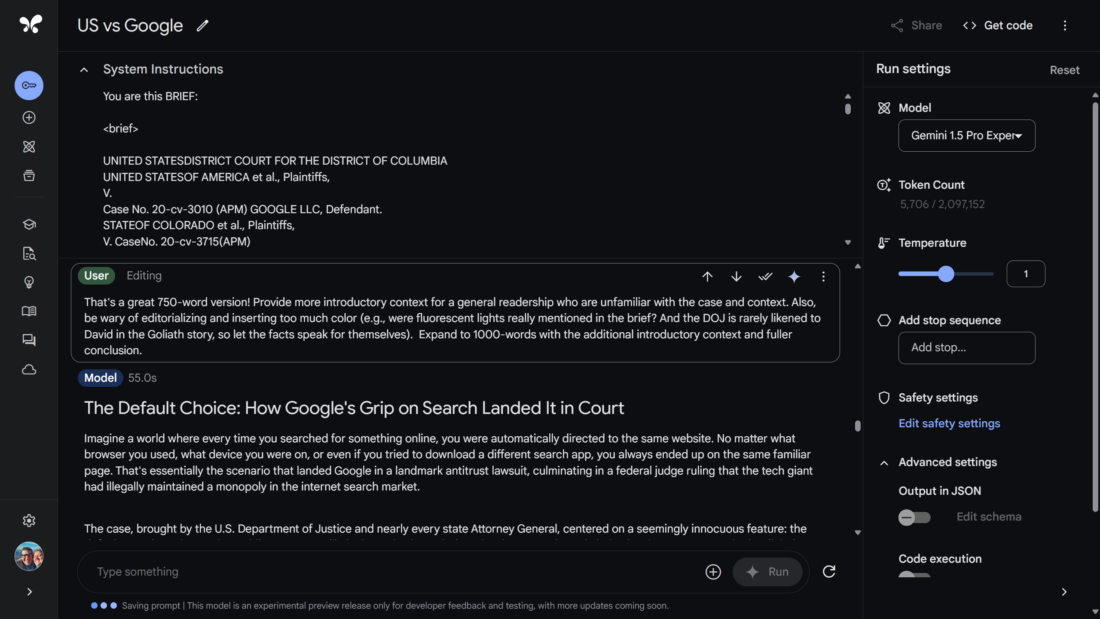
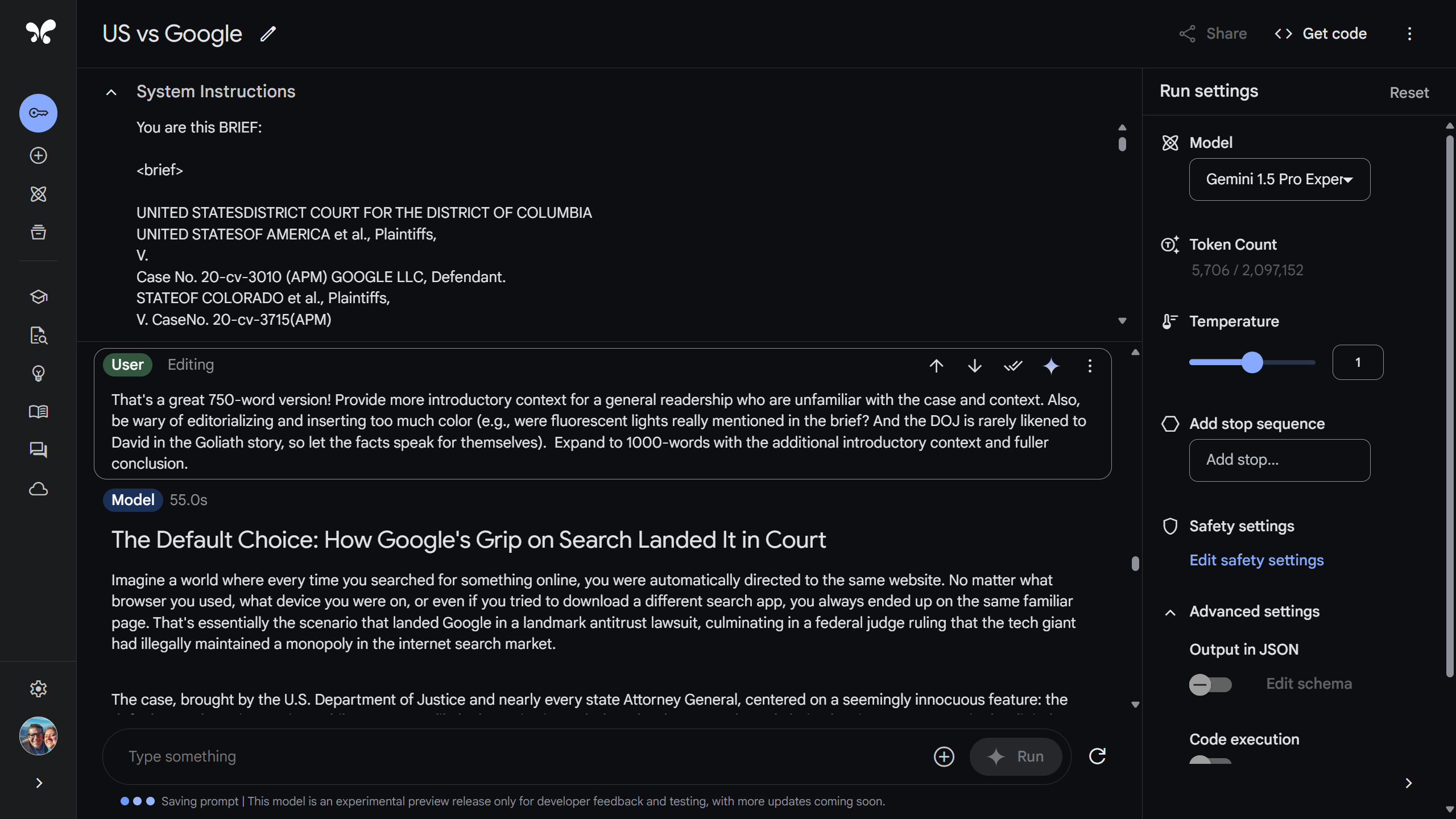
Here’s a glimpse of the Google AI Studio with the System Instructions and final article:

Episode 8: Save Time by Summarizing, Meta’s Game-Changing AI Upgrade, FamilySearch’s Summarization Feature, Is the AI Bubble About to Burst?

Hello friends,

Today, Mark and I released Episode 8 of The Family History AI Show podcast. A description of the show is below. But I wanted to take a quick moment to point out how we have structured the show as a way to highlight what we enjoy sharing with you. The show has three parts: 1) In the News, 2) Tip of the Week, and 3) AI RapidFire. The “In the News” block is AI news that genealogists can use–today; these stories cover practical and actionable AI developments that family historians can put to use right now. For example, this week we cover a great summarization feature that FamilySearch quietly incorporated into their groundbreaking AI Labs “Full-Text Search” Experiment. Our middle block, “Tip of the Week,” is a teaching segment where we introduce, explain, and discuss both basic and advanced AI genealogy skills. This week we continue a series on the basics of building genealogy prompts, focusing on one of the fundamental strengths of language models, summarization. Our closing block, “AI RapidFire,” is a glimpse into the future, covering AI announcements, news, and demonstrations to keep an eye on, i.e., advances that–while perhaps not actionable today–seem likely to Mark and I to hold significant potential for the seasons ahead.

After our tenth episode, we’ll do some evaluation. We would love to hear your feedback. We’re having a blast doing the show, and we’d like to do better by listening to your reactions and suggestions.

Blessings, Steve

PS: PRO TIP: The AI skills we cover in each episode during the “Tip of the Week” segment are, as I like to say, eminently transferable. So regardless of whether you are a professional genealogist, serious enthusiast, or causal hobbyist, these techniques will find immediate usefulness in all your knowledge work. We hope that doctors, lawyers, butchers, bakers, candlestick makers, dentists, architects, and administrative assistants will be empowered to do good work with the lessons we offer here, both at the office and in the family history library, den, kitchen table, or spare room–wherever you do genealogy and other knowledge work.

The Family History AI Show podcast
EP8: Save Time by Summarizing, Meta’s Game-Changing AI Upgrade, FamilySearch’s Summarization Feature, Is the AI Bubble About to Burst?
July 31, 2024

In this week’s episode, hosts Mark Thompson and Steve Little explore Meta AI 3.1’s huge large language model upgrade, as well as FamilySearch’s innovative, AI-based summarization feature. They then address growing concerns about AI hype. In this week’s Tip of the Week, they share their approach for mastering the fine art of summarization, a crucial AI skill for genealogical research. The show rounds off with rapid-fire discussions of Google’s privacy policy update, Apple’s response to accusations made about their training data, and exciting developments in AI-powered education. Whether you’re a tech enthusiast or a family history buff, this episode offers invaluable insights into how AI is revolutionizing genealogy and beyond.

Timestamps:
In the News
01:01 Meta AI 3.1: A Huge Upgrade, and it’s Free!
13:09 FamilySearch’s New AI Summarization Feature
20:16 Addressing AI Hype Concerns

Tip of the Week
24:59 AI Building Blocks: Summarization

AI RapidFire
31:25 Google’s Privacy Policy Update
36:57 Apple’s Response to Training Data Accusations
40:02 Apple vs. Google: Platform Competition Heats Up
44:59 AI in Education: New Developments and Partnerships

https://blubrry.com/3738800/133566876/ep8-save-time-by-summarizing-metas-game-changing-ai-upgrade-familysearchs-summarization-feature-is-the-ai-bubble-about-to-burst

Episode 7: Building Better Prompts, Perplexity Upgrade, AI Ethical Issues, Siri Upgrade Delayed

I’m excited to announce the release of our latest episode of The Family History AI Show. In this installment, my co-host Mark Thompson and I explore the cutting-edge developments in AI that are reshaping the landscape of genealogical research.

We begin by examining Perplexity’s significant upgrade in research capabilities, discussing how this tool can enhance the efficiency and depth of family history investigations. We also delve into the critical ethical considerations surrounding AI in our field, addressing concerns that every genealogist should be aware of as we navigate this new terrain.

A highlight of this episode is the launch of our new series on “Building Better Prompts.” We provide practical strategies to help you craft more effective queries, enabling you to extract more valuable insights from AI tools in your genealogical work.

Our AI RapidFire segment covers a range of topics, from open-source developments to geopolitical influences on AI accessibility. We also touch on updates from major players like Anthropic, OpenAI, Google, and Apple, offering a comprehensive overview of the AI landscape as it pertains to family history research.

Whether you’re a seasoned genealogist looking to incorporate AI into your practice or a newcomer curious about the potential of these technologies, this episode offers valuable insights and practical advice.

I invite you to listen and share your thoughts. How are you integrating AI into your genealogical research? What challenges and opportunities do you foresee?

Listen to the full episode here: https://bit.ly/Family-History-AI-007

Let’s continue to explore the exciting intersection of AI and family history together.

Episode 6: Claude Projects vs Custom GPTs, Student FAQs, The Importance of Chatting with your Chatbot

In Episode #006 of The Family History AI Show podcast, hosts Mark Thompson and Steve Little discuss the latest advancements in AI tools for genealogists.

Discover how Anthropic’s new Claude Projects feature stacks up against OpenAI’s custom GPTs, and learn about essential reusable prompts for genealogical research.

We also highlight key insights from NGS’s GRIP Genealogy Institute’s AI panel, addressing top questions from genealogy students.

Don’t miss our AI Tip of the Week, where we reveal elementary strategies for effective chatbot interactions to enhance research efficiency: basic prompt advice.

Stay informed with rapid-fire updates on the newest developments from OpenAI, Google, and Eleven Labs. Tune in for expert advice and the latest AI news to boost your family history research.

https://blubrry.com/3738800/133238773/ep6-claude-projects-vs-custom-gpts-student-faqs-the-importance-of-chatting-with-your-chatbot