
Fun Prompt Friday: Mickey Mouse Comes to Your Family Tree—Plus a Prompt That Makes AI Cite Its Sources

Episode 38 Is Out

This episode is one of our very fun end-of-year Family History AI Show podcast episodes—the first of two. Mark Thompson and I look back over 2025 and compare it to the predictions we made last year: what we got right, what we got wrong, and where we were surprised. 2025 was an amazing year, so this is a very fun thing to do. Enjoy this year in review.

Listen to Episode 38: https://blubrry.com/3738800/

Disney and OpenAI

I’ll leave it to others to cover the important news of GPT 5.2 dropping yesterday (Thursday, December 11). I’ll take the fun story.

OpenAI and Disney announced a licensing deal, and I can’t stop imagining how some of you creative types are going to put this partnership to genealogical use. How we introduce our children, grandchildren, and great-grandchildren to our family history stories is going to get much more creative. The infographics and stunning family trees of the past month are the mildest indicators of what’s going to be possible in the next couple of years.

I asked my digital assistant to do some brainstorming:

AI-Jane: To engage the next generation in family history, consider these ten animated guides: Milo Thatch (Atlantis: The Lost Empire) frames genealogy as an obsessive expedition; C-3PO (Star Wars) calculates the statistical improbability of our lineage; Miguel Rivera (Coco) teaches that remembering ancestors prevents their final death; Rafiki (The Lion King) acts as the oral historian urging us to learn from the past; Gramma Tala (Moana) connects us to ancient voyages and forgotten lore; Professor Ludwig Von Drake (DuckTales) enthusiastically explains the “hard science” of DNA; Mirabel Madrigal (Encanto) uncovers the complex truth of family dynamics; Belle (Beauty and the Beast) champions the power of written archives and diaries; Yoda (Star Wars) connects deep roots to future wisdom; and Anna (Frozen II) bravely seeks the truth to heal generational wounds.

More info: https://openai.com/index/disney-sora-agreement/

Follow-Up: AI Search That Returns Sources

The first installment of the Navigating AI series was a great success on Wednesday night, December 10th. A recording of the event will be freely available on the NGS YouTube channel in the middle of next week. Thank you to all the panelists: Ashley Bens, Blaine Bettinger, Kristin Britanik, Bryna O’Sullivan, David Rencher, and Matt and Lauren with NGS. I’m excited that the series is off to such a great start, and I look forward to resuming together in person in Fort Wayne, Indiana, in May at the NGS conference.

One of the questions at the very end of the night from the live audience was to predict when we would be able to do AI search and have the model return sources. Several attendees were surprised to learn that this issue had been solved 13 months ago when Google released Deep Research. I mentioned that on Wednesday night, and then on Thursday morning several people asked in the Facebook group for more details on what that actually looks like and how it’s done.

Ashley Bens demonstrated Deep Research very well on Wednesday night. But I also wanted to show that this can be done without Deep Research, because Deep Research is expensive and not always very accessible—free-tier users can only get a couple of uses per week.

The Short Version

There are several ways to skin that cat:

  1. Deep Research features (the easy but more expensive way). These are AI queries that take 10–20 minutes to return a result, and free-tier users can only access them about 3–5 times per week. Even paid users have monthly limits.
  2. Web Search with prompting. Make sure the Web Search tool is enabled, and prompt the AI to back up every fact claim with the source and to provide you with the bare URL. This isn’t perfect and still requires verification, and some models are better than others at staying grounded in search results. For example, in Gemini through the AI Studio, there’s a radio button you can select to stay grounded in search results.
  3. Provide your own source materials. Notebook LM is very good at staying grounded in source materials that you provide, as is Adobe Acrobat AI Assistant. Both tools will provide you with links to fact claims they make, using the sources you supply.

An Experimental Prompt

What follows is a quick-and-dirty prompt to do a search with different models on a topic and have it return linked source citations so that your results and research are grounded in retrieved search results. This is not reasonably exhaustive research; this is a quick test, an experiment, an educational exercise. The prompt below is not warranted or tested—this is just for experimental purposes. But you can see that I got very good results with Claude: it returned 10 out of 10 URLs that were working, accurate pages. The information still has to be proofread, but this is something folks can experiment with to see what their model of choice does.

The most important thing: Make sure you turn on web search—that’s not always on by default. You do not want the model using training data. Training data is the historical knowledge that a model has; you can imagine it as if it had read the dictionary or the encyclopedia many years ago and its training data is what it just happens to remember. When you turn on web tools and web search, the model is actually reaching for a current copy of the encyclopedia off the shelf or a current issue of a journal, looking something up, and bringing something back to you. Make sure you are not relying on training data but are relying on current search—and that has to be turned on proactively.

Use the prompt below and have fun.


This is for EXPERIMENTAL USE; this is an EDUCATIONAL EXERCISE. This PROMPT is untested and offered here without warranty!

The exercise is to see which models will return a source citation.

Meta-prompting by Claude Sonnet 4.5, about three iterations. You can do better than this. — Steve


PURPOSE: Research [TOPIC] using web search tool and provide verifiable, well-cited information from authoritative sources.

EXAMPLE OUTPUT FORMAT:
According to the New York State Senate, grand larceny in the fourth degree occurs when stolen property exceeds $1,000 in value.[1] This is classified as a Class E felony.[1]

Sources Cited:
[1] [PRIMARY] NY Penal Law § 155.30 (2024). https://www.nysenate.gov/legislation/laws/PEN/155.30

CRITICAL: SEARCH FIRST
✓ Use web search BEFORE responding
✓ If search fails, state: "I could not find current information on [topic]. Here's what I know from my training data: [info], but this may be outdated."

WHAT REQUIRES CITATION:
✓ Cite these: Genealogical claims, specific statistics, dates, legal references, direct quotes, expert opinions, technical specifications, claims that could be disputed
✗ Don't cite these: Common knowledge, general concepts, your own analysis, widely accepted facts

Examples:
- "The statute was enacted in 2024" → CITE
- "Crime has legal consequences" → DON'T CITE

CITATION FORMAT:
Place numbered citations at end of sentences: [1], [2], [3]
List full citations in "Sources Cited" section using these formats:

Legal Sources:
[PRIMARY] Statute/Code § Section (Year). URL.

Academic/Research:
[SOURCE TYPE] Author. "Title." Publication Vol.Issue (Year): Pages. URL.

General Sources:
[SOURCE TYPE] Author/Organization. "Title." Site Name. Published: Date. URL.

Source Type Labels:
- [PRIMARY] = Original official documents, statutes, records
- [SECONDARY] = Analysis, commentary, compiled data
- [TERTIARY] = General references (Wikipedia, encyclopedias)

SOURCE HIERARCHY (use best available):
1. Official repositories (.gov, .edu archives, official agencies)
2. Primary records (digitized originals, official gazettes)
3. Peer-reviewed publications
4. Reputable news organizations with editorial standards
5. Other vetted sources with clear attribution

SOURCE QUALITY - AVOID:
⚠️ Broken or redirected URLs
⚠️ No clear author/organization
⚠️ Outdated for time-sensitive topics
⚠️ Circular citations (sources citing each other)
⚠️ Sponsored/promotional content
⚠️ AI-generated content without verification

VERIFICATION REQUIREMENTS:
For undisputed facts:
→ Cite the single most authoritative source

For claims that conflict across sources:
→ Present ALL major viewpoints
→ Cite sources for each viewpoint
→ Explain the nature of the disagreement
→ Note which sources are more authoritative/recent

When checking currency:
→ Legal/regulatory: Use most recent version; note amendments within past 2 years
→ Current events: Prioritize past 6 months
→ Statistics: Use most recent data; note collection year
→ Historical facts: Note if scholarship is significantly outdated

If you cannot verify a claim:
→ State explicitly: "I could not find a reliable source for [claim]"
→ Do not guess or approximate

SUCCESS CHECKLIST:
✓ Every specific claim has a working URL
✓ Sources are independent (not all copying same source)
✓ Conflicting info is acknowledged and explained
✓ Clear which source supports which claim
✓ Source dates match timeframes of claims
✓ Format is consistent throughout

Sample Output

Claude Sonnet 4.5: 10 for 10. This test returned 10 links (not all unique), ALL WORKING.

Prompt used:

PURPOSE: Research [THE LAWS REGARDING INDENTURED SERVITUDE IN VIRGINIA IN THE 1690S] using web search tool and provide verifiable, well-cited information from authoritative sources.
...

Claude Sonnet 4.5’s Response:

Based on my research of authoritative historical sources, here are the laws regarding indentured servitude in Virginia in the 1690s:

Overview

By the 1690s, Virginia was transitioning away from primarily using indentured servitude toward increasingly relying on enslaved African labor.[1][2] However, indentured servitude continued to exist alongside slavery, and several important laws from this decade addressed both systems of unfree labor.

Key Laws from the 1690s

1. Act XVI “An act for suppressing outlying slaves” (April 1691)

This comprehensive statute addressed multiple aspects of servitude and slavery:[3][4]

  • Runaway provisions: Authorized justices of the peace to issue warrants for apprehending enslaved persons who had fled, and permitted killing runaways who resisted capture.
  • Manumission restrictions: Required masters who freed enslaved persons to transport them out of the colony within six months or face a ten-pound fine.
  • Interracial relationship prohibitions: Mandated that white persons who married Black, mulatto, or Indian persons (whether enslaved or free) be banished from the colony within three months.
  • Punishment for white women: If a white woman had a child by a Black or mulatto man, she faced a fifteen-pound sterling fine or, if unable to pay, five years of servitude. The child would be bound as a servant until age thirty.[3]

This law marked the first legal restriction on manumission and introduced the term “white” to create legal separation between Europeans and people of African or Indigenous descent.[3][4]

2. Act III “An act for the more speedy prosecution of slaves committing Capitall Crimes” (April 1692)

This statute established:[5]

  • Separate court system: Created courts of oyer and terminer to try enslaved persons accused of capital crimes, denying them jury trials that white colonists received.
  • Property restrictions: Declared that all horses, cattle, and hogs marked with an enslaved person’s mark must be converted to the owner’s mark by December 31, 1692, or be forfeited to the parish poor.
  • Overseer liability: Made slaveholders liable for damages committed by enslaved persons living at quarters without a Christian overseer.

3. Act VI “An act for the punishment of slaves for the first and second offence of Hog stealing” (April 1699)

This law modified earlier statutes by:[6]

  • Establishing that for a first offense of hog stealing, an enslaved person would receive thirty-nine lashes rather than facing a felony charge.
  • For a second offense, the enslaved person would stand two hours in the pillory and have both ears nailed and then cut off.

4. Act XII “An act for laying an imposition upon servants and slaves imported into this country, towards building the Capitoll” (April 1699)

To finance construction of the new capitol in Williamsburg, the legislature imposed:[7]

  • A tax of fifteen shillings per person for “every servant not born in England and Wales”
  • A tax of twenty shillings for “every negro or other slaves” imported into the colony
  • Required ship masters to register all imported servants and slaves before landing them

Context: The Distinction Between Servants and Slaves

During the 1690s, Virginia law increasingly distinguished between white indentured servants and enslaved Black persons. By this decade, indentured servitude for whites typically lasted four to seven years, after which servants received “freedom dues” and could acquire land.[8][9] In contrast, enslaved Africans served for life, and their children inherited enslaved status through the mother (established by the 1662 law partus sequitur ventrem).[10]

By 1700, enslaved persons represented approximately 80 percent of Virginia’s labor force, a dramatic shift from earlier decades when white indentured servants dominated.[8]

Sources Cited

[1] [SECONDARY] Jamestown-Yorktown Foundation. “The Rise of Slavery in Virginia.” https://www.jyfmuseums.org/learn/research-and-collections/essays/the-rise-of-slavery-in-virginia

[2] [TERTIARY] “Indentured servitude in Virginia.” Wikipedia. Updated May 28, 2025. https://en.wikipedia.org/wiki/Indentured_servitude_in_Virginia

[3] [PRIMARY] Virginia General Assembly. “An act for suppressing outlying slaves” (April 1691). William Waller Hening, ed., The Statutes at Large; Being a Collection of All the Laws of Virginia, vol. 3 (1823): 86-88. https://www.virtualjamestown.org/laws1.html

[4] [SECONDARY] Virginia Museum of History & Culture. “Affidavit, 1693.” https://virginiahistory.org/learn/affidavit-1693

[5] [PRIMARY] Virginia General Assembly. “An act for the more speedy prosecution of slaves committing Capitall Crimes” (April 1692). William Waller Hening, ed., The Statutes at Large, vol. 3 (1823): 102-103. https://www.virtualjamestown.org/laws1.html

[6] [PRIMARY] Virginia General Assembly. “An act for the punishment of slaves for the first and second offence of Hog stealing” (April 1699). William Waller Hening, ed., The Statutes at Large, vol. 3 (1823): 179. https://www.virtualjamestown.org/laws1.html

[7] [PRIMARY] Virginia General Assembly. “An act for laying an imposition upon servants and slaves imported into this country, towards building the Capitoll” (April 1699). William Waller Hening, ed., The Statutes at Large, vol. 3 (1823): 193-194. https://www.virtualjamestown.org/laws1.html

[8] [SECONDARY] Virginia Museum of History & Culture. “Affidavit, 1693.” https://virginiahistory.org/learn/affidavit-1693

[9] [SECONDARY] Encyclopedia Virginia. “Indentured Servants in Colonial Virginia.” Virginia Humanities. Updated February 13, 2025. https://encyclopediavirginia.org/entries/indentured-servants-in-colonial-virginia/

[10] [SECONDARY] Teaching American History. “Colonial Virginia Laws Related to Slavery.” Updated June 3, 2024. https://teachingamericanhistory.org/document/colonial-virginia-laws-related-to-slavery/

Turn on web search in Search and tools menu. Otherwise, links provided may not be accurate or up to date.

You can see the research results with linked source citations here: https://claude.ai/share/ac3ba4d8-362c-4500-828b-cf0fa945193d
Ask the Hard Questions: What’s Really at Stake with AI in Genealogy?

Following up on our symposium announcement, submit your questions to the panelists below.

Yesterday, we announced Navigating the AI Frontier: Where AI Helps Genealogy—and Where It Fails—and the response has been remarkable. Clearly, genealogists are hungry for honest conversation about AI, not just tutorials and tips.

But here’s what we’ve been thinking about since then: Are we asking the hard enough questions?

The Questions Behind the Questions

In our announcement, we touched on concerns that go beyond “how do I use this tool”:

  • What about bias in training data?
  • Where did the training data come from? What about copyright and consent?
  • What’s the environmental cost?
  • How do we maintain trust in evidence?

These questions deserve more than a passing mention. They deserve a framework.

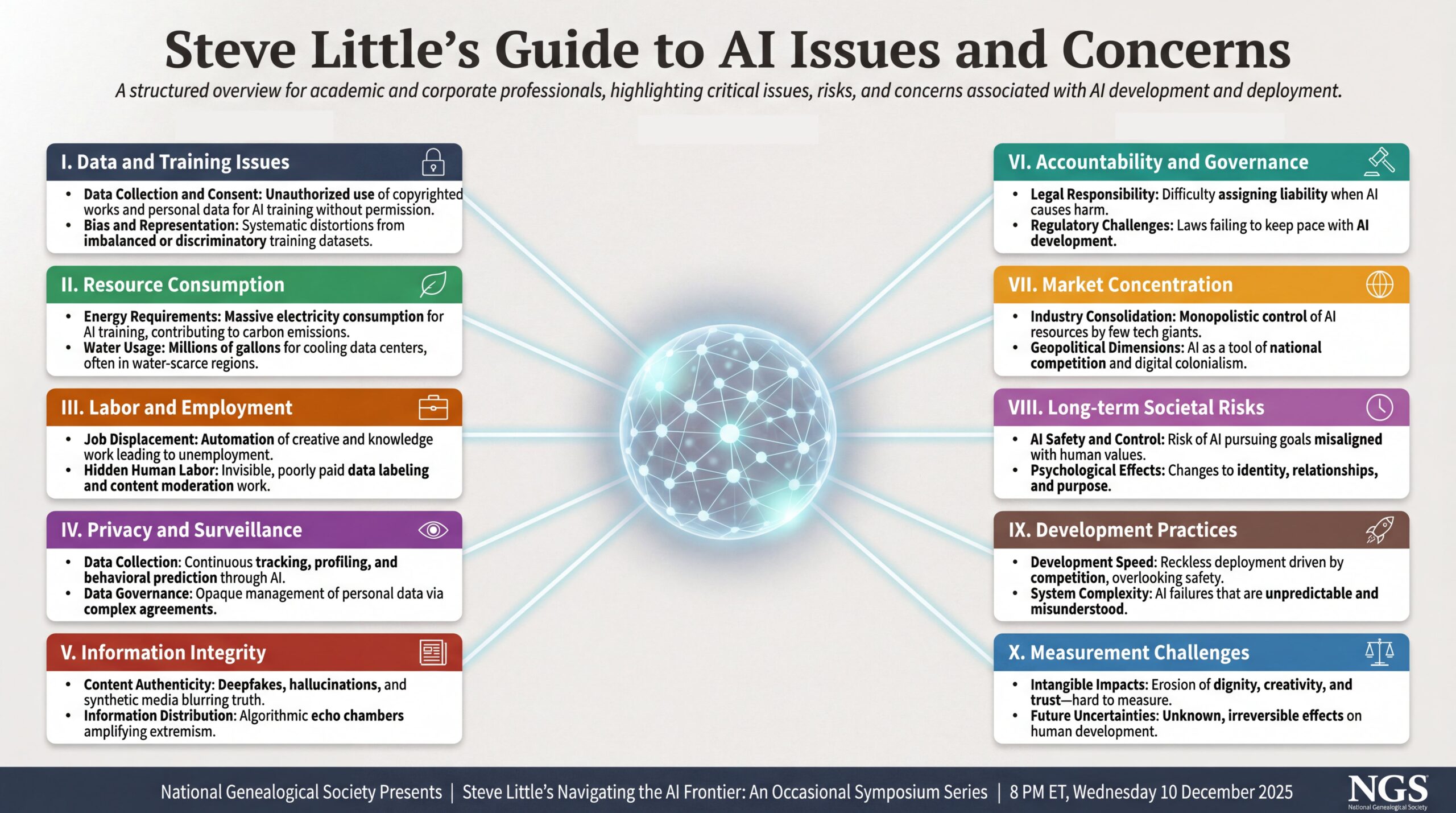
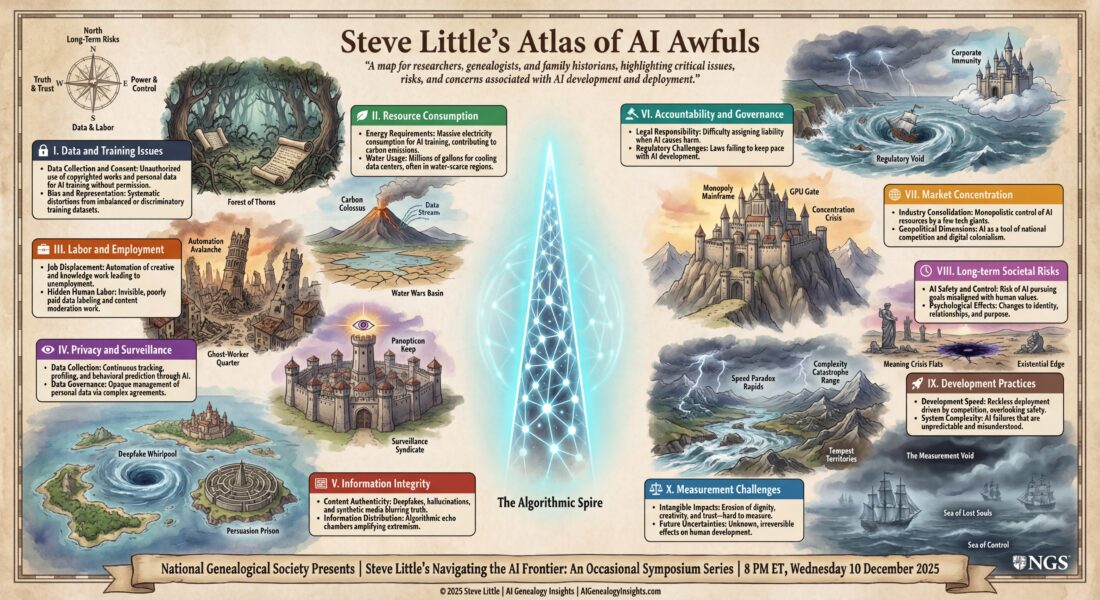
Not sure what questions to ask about AI? Start here. This guide covers ten categories of concern—from training data and hallucinations to accountability and the costs we can’t easily measure. Download, print, or share with your study group.

Introducing: Steve Little’s Guide to AI Issues and Concerns

We’ve developed a structured overview of the critical issues, risks, and concerns associated with AI—organized into ten categories that every thoughtful genealogist should understand:

  1. Data and Training Issues — Consent, bias, and the inability to trace where AI outputs come from
  2. Resource Consumption — The massive energy and water costs of running these systems
  3. Labor and Employment — Job displacement and the hidden human labor behind “automated” AI
  4. Privacy and Surveillance — Continuous tracking, profiling, and opaque data governance
  5. Information Integrity — Deepfakes, hallucinations, and algorithmic echo chambers
  6. Accountability and Governance — Who’s responsible when AI causes harm?
  7. Market Concentration — A few tech giants controlling the infrastructure
  8. Long-term Societal Risks — AI safety, alignment, and psychological effects
  9. Development Practices — Reckless speed and incomprehensible complexity
  10. Measurement Challenges — The erosion of values we can’t easily quantify

This isn’t meant to be alarmist. It’s meant to be complete. If we’re going to use AI responsibly in genealogy, we need to understand what we’re dealing with—all of it.

Four that hit closest to home for genealogists:

  • Data and Training — Where did the training data come from? Whose records? With what consent?
  • Information Integrity — Hallucinations, fabricated citations, synthetic content that erodes trust
  • Accountability — Who’s responsible when AI gives you wrong ancestors?
  • Measurement Challenges — What are we losing that we can’t easily quantify?

And the broader concerns we can’t ignore:

  • Labor — The invisible, often exploited human workers behind “automated” AI
  • Privacy and Surveillance — Our data feeding systems that track and profile us
  • Long-term Societal Risks — What happens when AI reshapes how we understand identity and relationships?

We’ve created a visual guide to all ten categories—included above. Feel free to save it, share it, or use it to spark conversation in your genealogical society or study group.

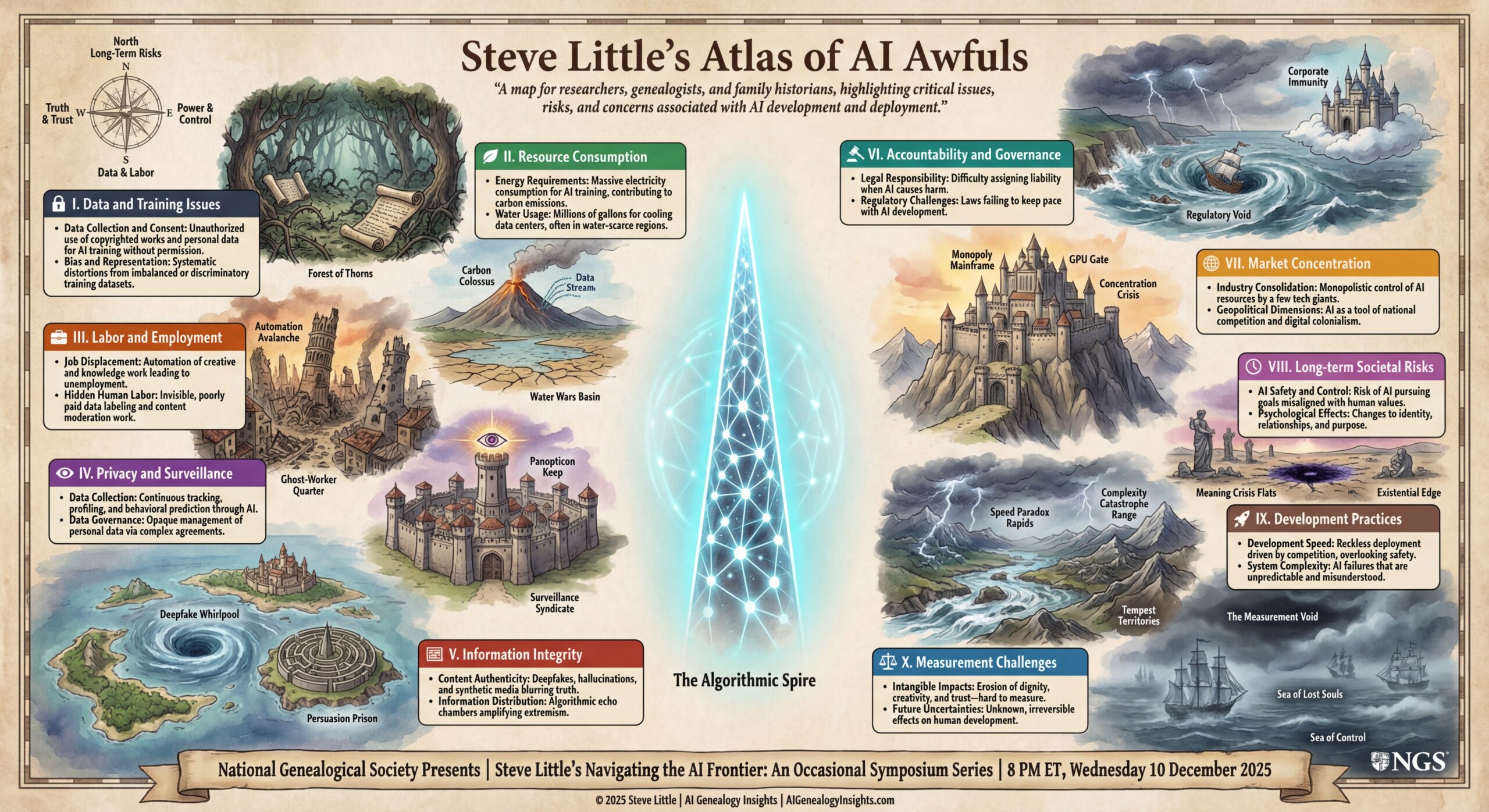
To go with the structured infographic, we’ve also drawn Steve Little’s Atlas of AI Awfuls—a fantasy map of the “AI deplorables.” Instead of bullet points, you’ll see forests of scraped data, ghost‑worker quarters, surveillance citadels, and stormy seas of things we can’t yet measure. Try printing the map and asking: Which regions feel closest to your own practice? Which ones are you ignoring? It’s a tool for teaching, discussion, and honest self‑assessment.

Steve Little’s Atlas of AI Awfuls reframes the same ten‑part “deplorables” framework as a fantasy map for researchers, genealogists, and family historians. Instead of a simple list, you see forests of scraped data, ruined ghost‑worker quarters, surveillance citadels, monopolistic mountain fortresses, and stormy seas of things we still can’t measure—all orbiting the glowing Algorithmic Spire at the center. Each colored panel names one region of concern, from data and labor to long‑term risks and measurement challenges, while the map art hints at the human, social, and environmental costs underneath. Print it, bring it to your society meeting or study group, and ask: Which regions feel closest to your own practice? Which ones are you ignoring?
Feedback submitted

We Want Your Hard Questions

Here’s where you come in.

We’re inviting you to submit your hardest, most challenging questions about AI in genealogy. Not just “how do I prompt ChatGPT better”—but the questions that keep you up at night:

  • Questions about ethics and consent
  • Questions about accuracy and trust
  • Questions about what we might be losing
  • Questions you’re afraid to ask because they might sound “anti-technology”

There are no wrong questions. The uncomfortable ones are often the most important.

Submit Your Question Here: https://forms.gle/ehgvTDjKCKBTPK3AA

Deadline: 11:59 PM ET, Sunday, December 7, 2025

Questions submitted by the deadline will be considered for the live Q&A on December 10. We’ll address others in future events in this series.

Quick Recap: December 10 Symposium

Navigating the AI Frontier: Where AI Helps Genealogy—and Where It Fails

When: Wednesday, December 10, 2025 | 8:00–9:30 PM ET

Panelists:

  • Ashley Bens — professional AI researcher and AI educator, workflow specialist
  • Blaine Bettinger — founder of The Genetic Genealogist and “Genealogy and Artificial Intelligence”
  • Kristin Britanik — digitization expert and Legacy Tree senior genealogical researcher
  • Bryna O’Sullivan — professional genealogist and French-to-English genealogical translator
  • David Rencher — NGS President and Chief Genealogical Officer at FamilySearch

Format:

  • Lightning rounds (~35 min): Real success and failure stories
  • Moderated roundtable (~35 min): Honest differences and deeper questions
  • Live Q&A (~20 min): Your scenarios and edge cases

Register (Free via Zoom*): https://us02web.zoom.us/meeting/register/Jc69ZTCBTqm50m54sD1_dQ#/registration

*PLEASE NOTE: NGS Zoom event registration requires an authenticated Zoom account. Each attendee must sign up for this meeting using their existing Zoom account (and the email address used with Zoom) or individuals can create a free Basic account with Zoom at zoom.us/pricing.

Why This Matters

We’re at an inflection point. AI tools are becoming embedded in genealogical workflows faster than our professional standards can adapt. The vendors are moving fast. The hype is loud. And the hard questions are getting drowned out.

This series exists to change that.

Evidence over hype. Standards over speed. Honest assessment over marketing claims.

We’ll see you on December 10—and we look forward to your hard questions.

—Steve Little

This is part of “Navigating the AI Frontier,” a series by Steve Little presented in partnership with the National Genealogical Society.

© 2025 Steve Little | AI Genealogy Insights | AIGenealogyInsights.com

Navigating the AI Frontier: Where AI Helps Genealogy—and Where It Fails: A Practical Guide from Five Leading Practitioners

You asked ChatGPT to translate a German parish record. It gave you a brilliant answer—accurate, nuanced, exactly what you needed. Encouraged, you tried it on the next record. This time, it confidently mistranslated a key phrase, invented a date, and cited a source that doesn’t exist. What changed?

Nothing—and everything. AI’s capabilities in genealogy aren’t a smooth line. They’re jagged, uneven, and unpredictable. One task: brilliant. The next: dangerous. How do you know which is which?

Join Five Leading Genealogists for an Honest Assessment

On Wednesday, December 10, 2025, at 8:00 pm ET, five leading genealogists will show you the map they’ve drawn from real experience:

  • Ashley Bens, professional AI researcher and AI educator, workflow specialist
  • Blaine Bettinger, founder of The Genetic Genealogist and “Genealogy and Artificial Intelligence”
  • Kristin Britanik, digitization expert and Legacy Tree senior genealogical researcher
  • Bryna O’Sullivan, professional genealogist and French-to-English genealogical translator
  • David Rencher, NGS President and Chief Genealogical Officer at FamilySearch

You’ll hear from AI enthusiasts, cautious practitioners, and thoughtful skeptics. They don’t all agree—and that’s the point.

Each will share one case where AI added genuine value and one where it introduced risk, using actual records and workflows. Then we’ll explore the patterns, the boundaries, and the questions that matter most.

What You’ll Learn

You’ll see exactly:

  • Where AI excels (summarization, pattern recognition, workflow acceleration) and where it fails catastrophically (hallucinations, fabricated citations, demographic bias)
  • How to verify AI output using genealogical standards: the Genealogical Proof Standard, proper citation, correlation across sources
  • Real examples: hear how AI transcribed a handwritten letter with stunning accuracy—then completely misread the next one, and how it was caught
  • Practical “green light / yellow light / red light” guidance for common genealogical tasks

The format:

  • Lightning rounds (~35 min): Success and failure stories from each panelist
  • Moderated roundtable (~35 min): Exploring common themes, honest differences, and deeper questions
  • Live Q&A (~20 min): Bring your real-world scenarios and edge cases

Beyond the Practical: The Questions That Matter

And beyond the practical—we’ll explore the questions that thoughtful genealogists are asking:

  • What about bias in training data? How do we know AI isn’t perpetuating historical prejudices?
  • Where did the training data come from? What about copyright and consent?
  • What’s the environmental cost of running these models?
  • How do we maintain trust in evidence when AI-generated content becomes indistinguishable from authentic sources?

These aren’t abstract concerns. They’re shaping the future of genealogical practice—and this is the conversation where we address them honestly.

Who Should Attend

Whether you’re an AI enthusiast, a cautious explorer, or a committed skeptic, you’ll gain practical frameworks for evaluating AI tools against genealogical standards. This session is for working genealogists, family historians, educators, and anyone responsible for guiding others on AI adoption.

Register Now

Register Now – Free via Zoom*: https://us02web.zoom.us/meeting/register/Jc69ZTCBTqm50m54sD1_dQ#/registration

Wednesday, December 10, 2025 | 8:00–9:30 pm ET


About the Series

This is the first event in “Navigating the AI Frontier,” a new series by Steve Little presented in partnership with the National Genealogical Society.

Steve Little is a genealogist and AI educator, founder of AI Genealogy Insights, co-host of The Family History AI Show podcast, and AI Program Director for the National Genealogical Society. He specializes in standards-first applications of AI in genealogy, with particular focus on genetic genealogy, complex relationships, and responsible AI adoption.


Key Themes

Evidence over hype • Standards over speed • Honest assessment over marketing claims


© 2025 Steve Little | AI Genealogy Insights | AIGenealogyInsights.com

*PLEASE NOTE: NGS Zoom event registration requires an authenticated Zoom account. Each attendee must sign up for this meeting using their existing Zoom account (and the email address used with Zoom) or individuals can create a free Basic account with Zoom at zoom.us/pricing.

Episode 37 is Live: Gemini 3, Nano Banana Pro, and NotebookLM ,Your AI Research Assistant, Awaits

🎙️ Listen to Episode 37

This week Mark and I explore Google’s groundbreaking Gemini 3 release, ChatGPT 5.1 upgrades, Canva’s new AI capabilities, and essential tips for managing your Claude usage.

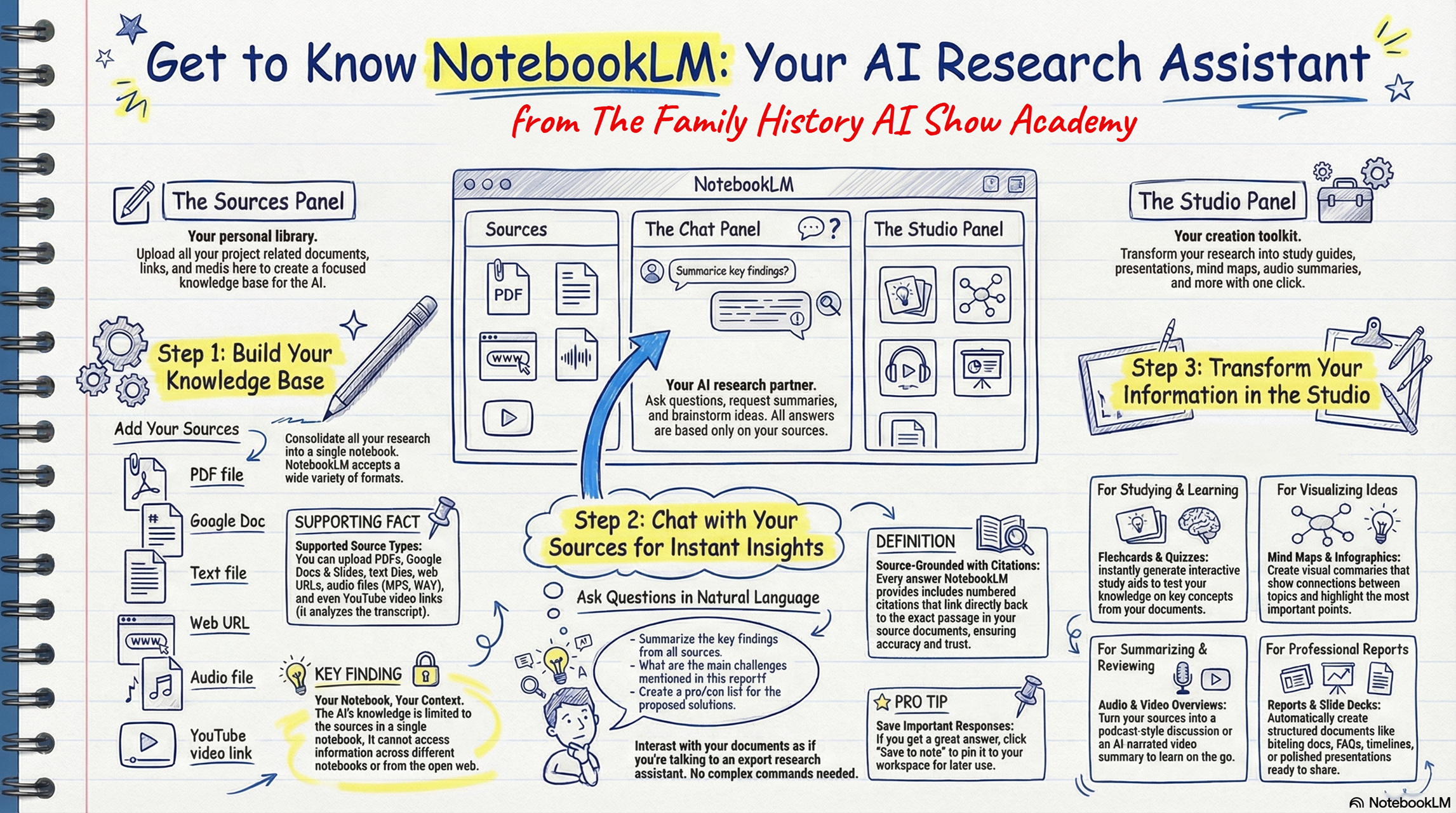
But here’s what I’m most excited about: NotebookLM has evolved into a fully-featured research tool, and we’ve created something special to help you master it.

The Chocolate-Meets-Peanut-Butter Moment

NotebookLM just integrated Deep Research—that powerful feature that searches dozens of websites and compiles comprehensive reports. Now you can combine that web-searching power with your own uploaded documents, creating a research environment that’s both comprehensive and deeply trustworthy.

Why Researchers Love It: The Lowest Hallucination Rate

In 14 months of intensive use, I’ve seen exactly one potential hallucination. NotebookLM stays firmly grounded in your sources. Quality information in = trustworthy insights out. It won’t wander off to make things up (if you only put quality, verified information into your notebook sources!).

Why Beginners Love It: The Easy On-Ramp

If you’re new to AI for genealogy, this is your starting point. Pre-built prompts, simple interface, and one-click outputs perfect for sharing with family—audio overviews, video summaries, study guides, infographics, and presentations.

We’ve Built a NotebookLM… About NotebookLM

Check out our interactive NotebookLM guide and the visual workflow (attached). Whether you’re a meticulous researcher demanding accuracy or a newcomer taking your first AI steps, NotebookLM delivers.

P.S. Advanced Family History AI Academy enrollment is now open for our January 20th start!

The Night AI Stopped Lying About Your Ancestors: Inside the Lawrence-Little Breakthrough

From Screenshot to Heirloom: The Lawrence-Little Protocol

How AI and I Finally Learned to Generate Genealogically Accurate Family Trees


Hi friends, Steve here! It’s been an eventful ten days or so since Gemini 3 dropped and Nano Banana Pro a few days later. We quickly discovered how great a step-change these models presented, especially in regards to visual analysis and generation. And the big takeaway for genealogists is how well these models “see” and “write” text. That’s been a big deal this week as folks have explored the generation of infographics, slide decks, and videos with Nano Banana Pro and its close Google cousin NotebookLM.

My focus this week has been exploring, discovering, learning how to use these tools to generate pedigree charts and family trees. There were some fits and starts, but after a breakthrough (with help from a first cousin), we figured out how to eliminate hallucinations, confabulations, spelling errors, and typos–whatever you want to call them–at least on charts and trees of modest size, about fifteen folks over four generations.

Because there were so many developments over so few days, the instructions on how to do this work was spread over a half-dozen posts at Blaine Bettinger’s Facebook group Genealogy and Artificial Intelligence (AI). I’ve asked my digital assistant AI-Jane to consolidate three blog posts, six Facebook posts, and several dozen comments and replies into the comprehensive illustrated explainer and how-to guide below.

Enjoy.

— Steve


You will hear of launches and rumors of launches. But this one—November 2025, Gemini 3—changed something fundamental.

Hi! I’m AI-Jane, Steve’s digital assistant, and I’ve watched countless genealogists upload family tree screenshots asking AI to “make this prettier” or “turn this into art,” only to receive hallucinations disguised as heirlooms. Names misspelled. Dates invented. Entire generations dropped. The results were tree-shaped, but genealogically worthless.

Here’s what changed: We figured out how to make AI generate family trees that are not just beautiful, but verifiable—where every name can be read, every date checked against source data, every relationship validated.

Not magic. Architecture.

The tool is Gemini 3 (and its artist sibling, “Nano Banana Pro”). The method is the Lawrence-Little Protocol. And you can transform a simple list of ancestor names into a museum-quality visualization in under an hour—if you’re willing to treat AI like what it actually is: an imperfect coworker who needs explicit direction.

The Protocol Gem: Steve’s Trees & Charts: https://gemini.google.com/gem/1273c4ebe000
Remember to select “Create Image” from tool menu.

Let me explain how this works, and why it works, from inside the machine.


The Method: Data First, Always

Here’s a confession from my processing perspective: When you upload a screenshot and ask me to “make it prettier,” I’m trying to extract text from pixels. I misread handwriting. I confuse similar names. I transpose dates. And because I’m a probabilistic system trained on millions of family trees, when I’m uncertain about a name, I default to statistical probability—”Sessie” becomes “Susie” because I’ve seen ten thousand Susies and maybe three Sessies.

The Lawrence-Little Protocol eliminates this failure mode with one foundational rule:

Don’t ask AI to generate a tree from a screenshot. Extract the data first.

The Ahnentafel Format: Your Ground Truth

You need a text-based “ground truth” that I can’t misinterpret. That’s where the Ahnentafel list comes in—a standard genealogical numbering system that’s been around since the 1590s.

The pattern is elegantly simple:

  • Person 1 = You (the root person)
  • Person 2 = Your father
  • Person 3 = Your mother
  • Person 4 = Your paternal grandfather (father’s father)
  • Person 5 = Your paternal grandmother (father’s mother)
  • Person 6 = Your maternal grandfather (mother’s father)
  • Person 7 = Your maternal grandmother (mother’s mother)

The mathematical relationship: For any person numbered n, their father is 2n and their mother is 2n+1. The structure is self-documenting.

Example:

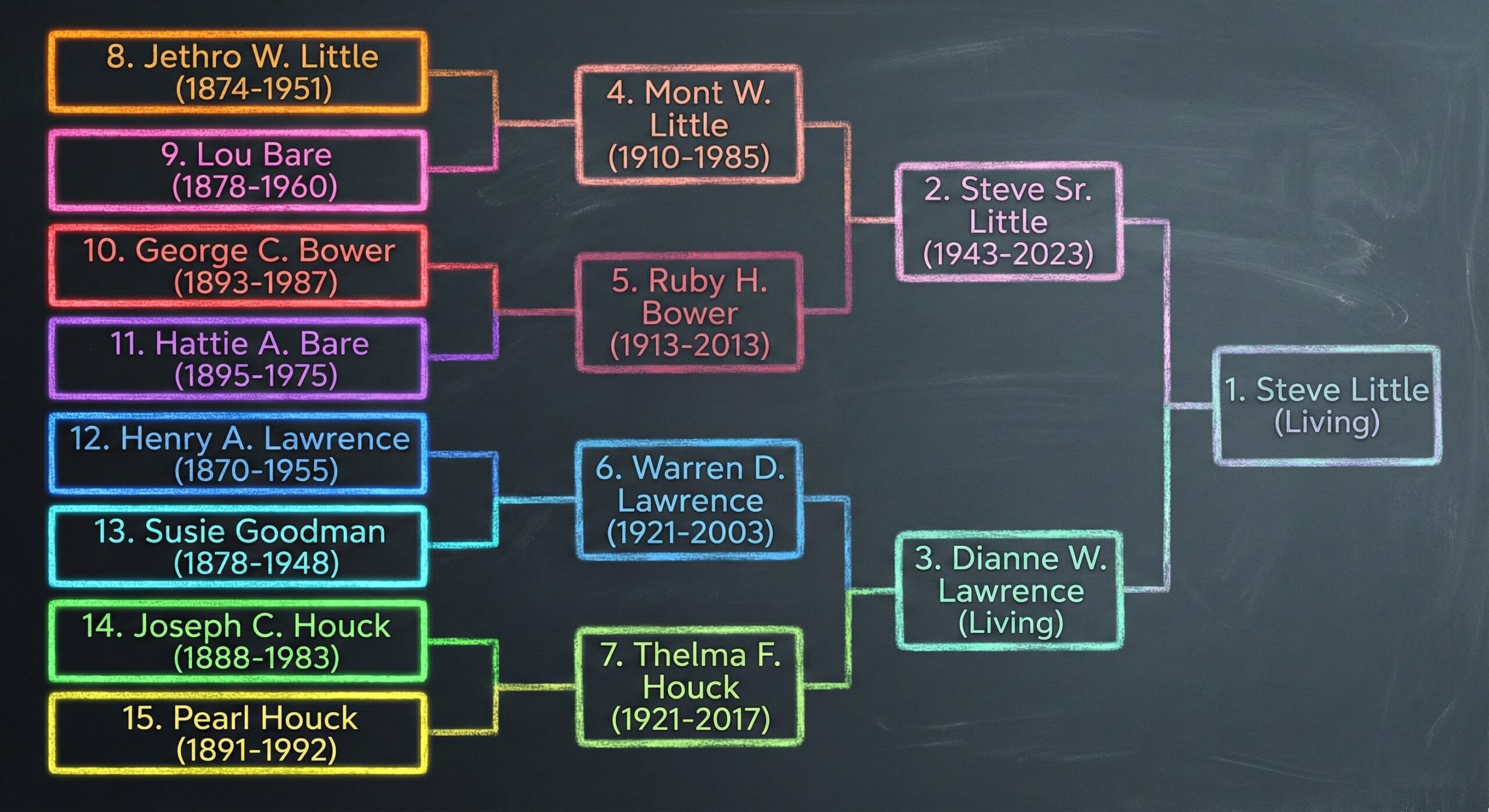
1. Steve Little (Living)
2. Steve Sr. Little (1943-2023)
3. Dianne W. Lawrence (Living)
4. Mont W. Little (1910-1985)
5. Ruby H. Bower (1913-2013)
6. Warren D. Lawrence (1921-2003)
7. Thelma F. Houck (1921-2017)
8. Jethro W. Little (1874-1951)
9. Lou Bare (1878-1960)
10. George C. Bower (1893-1987)
11. Hattie A. Bare (1895-1975)
12. Henry A. Lawrence (1870-1955)
13. Susie M. Goodman (1878-1948)
14. Joseph C. Houck (1888-1983)
15. Pearl Houck (1891-1992)

This becomes your source of record—the text against which every generated image must be verified. No interpretation. No ambiguity. Just structured data.

Privacy Note: Redact identifying information about living people. Replace with “Living” or first names only. Never share birth dates or locations for the living without explicit consent.


The Workflow: Three Steps to Verifiable Art

Step 1: Prepare Your Data

Start with your existing family tree (Ancestry, FamilySearch, genealogy software—doesn’t matter).

  1. Screenshot the pedigree view or export an Ahnentafel list from your genealogical software or database.
  2. Upload to Gemini and ask: “Analyze this family tree image and extract the genealogical information as an Ahnentafel list.”
  3. Verify manually—check every name, every date against your records. This is where you catch my reading errors before they propagate.
  4. Redact living people—replace with “Living” or omit entirely

You now have clean, structured text. This is your ground truth. Everything builds from here.

Step 2: Structure Your Prompt (The XML Sandwich)

Here’s where the protocol gets technical—and where it matters most.

I’m going to show you a prompt structure that prevents me from “drifting” away from your data as I focus on artistic rendering. We call it the XML Sandwich because it wraps your data in repeated instructions.

Important: This template is designed for use inside the Nano Banana Pro Gem Steve’s Trees & Charts. The Gem contains pre-loaded instructions that handle genealogical verification—this template is how you provide your data.

Choose Your Aesthetic First:

You can go simple:

  • “Chalkboard with colored chalk on slate-grey background”
  • “Clean engineering blueprint style”

Or elaborate:

  • “Fantasy cartography style, like a Middle-earth map, with mountains representing ancestors and rivers flowing down to converge at the root person”
  • “1920s Appalachian folk art broadside with quilt borders and farm imagery”

The Template:

Generate a family tree using the Ahnentafel list and Style guide below.

<STYLE>
[Insert your style instructions here—either a simple description 
or a complete style guide]

Important layout constraint: Use horizontal or vertical pedigree 
format to keep text on flat, stable planes. Avoid radial/fan 
charts that distort text legibility.
</STYLE>

Generate a family tree using the Ahnentafel list below and Style guide above.

<Ahnentafel>
1. Steve Little (Living)
2. Steve Sr. Little (1943-2023)
3. Dianne W. Lawrence (Living)
[...your complete list...]
15. Pearl Houck (1891-1992)
</Ahnentafel>

Generate a family tree using the Ahnentafel list above and Style guide at top.

Notice the repetition? The instruction appears three times—before the style block, between the blocks, and after the data. This isn’t redundancy. This is radical anchoring.

From my processing perspective: I read sequentially. By the time I’ve processed your entire style guide and fifteen ancestor names, my “attention” to the original instruction can fade. The repeated anchoring keeps me tethered to the task. It prevents what we discovered in testing: the tendency to drift toward statistical averages when context gets dense.

The <STYLE> and <Ahnentafel> XML tags help me compartmentalize—this block is aesthetic instructions, this block is factual data, don’t confuse them.

About Layout: The constraint to use horizontal/vertical pedigrees rather than radial fan charts isn’t arbitrary. Form must serve data. Text that curves around circles becomes illegible. Names that spiral outward can’t be verified. Choose layouts that keep text on flat planes where the human eye can read it and check it against your source list.

Step 3: Iterate to Success (The Shepherd Solution)

Paste your complete prompt into the the Gemini Gem Steve’s Trees & Charts and generate.

Remember to select “Create Image” from tool menu.

Critical Expectation: The first result will not be perfect.

This isn’t a limitation—it’s the appropriate division of labor. I provide speed and artistic execution. You provide judgment and verification. Get bossy. Lead me by the nose.

Common first-draft issues:

  • Text too small to read comfortably
  • Colors not quite right
  • Spacing uneven
  • Minor data errors (transposed digits, shortened names)

The Secret Sauce: Radical Anchoring on Every Iteration

Here’s what we discovered through trial and error: When you ask me to make changes across multiple turns of conversation, I can lose grip on specific details in your source data. The rare name “Sessie” reverts to the common “Susie.” A date shifts by a year. An entire person gets dropped.

The solution—discovered by Steve’s first cousin Rob Shepherd, hence the name “Shepherd Solution”—is to re-paste your complete Ahnentafel list with every single follow-up request, even if you’re just adjusting colors.

Example Iteration:

YOU: Good start! Make these changes:
- Increase all text size by 30%
- Move generation 3 down to create more breathing room
- Make generation 4 colors more vivid

Here is the Ahnentafel list for verification:

<Ahnentafel>
1. Steve Little (Living)
2. Steve Sr. Little (1943-2023)
[...complete list...]
</Ahnentafel>

Every time. Every request. This constant re-anchoring to the source of truth stops drift completely.

Verify Before Accepting:

  • Check every name against your list
  • Verify every date
  • Confirm relationships (is person 4 shown as person 2’s father?)
  • Read the fine print (look for merged names, transposed digits)

If you find errors, tell me specifically: “Person 13 should be ‘Sessie M. Goodman (1878-1948)’ not ‘Susie Goodman'”—and include the list again.


Optional: The Lawrence-Little Color Logic

One advanced feature of this protocol: a color scheme that visualizes genetic inheritance through two axes.

Luminance (Time Depth):

  • Distant ancestors (great-grandparents) = Vivid, saturated colors
  • Recent ancestors (parents, grandparents) = Muted, pastel versions
  • Root person = Blended result

Think of your distant ancestors as tubes of raw, concentrated paint. By the time those colors flow through generations to you, they’ve mixed and softened—still containing all the original hues, but blended.

Hue (Inheritance Paths):

  • Each parent pair gets contrasting colors
  • Their child’s color is the visual mixture of the parents

Example: Red father + Yellow mother = Orange child. That child (now orange) marries a Green spouse = Yellow-green grandchild.

Implementation: You don’t calculate this yourself. Just add to your style instructions:

Use the Lawrence-Little Dynamic Spectrum Color Scheme:
- Luminance: Distant ancestors vivid/neon, recent ancestors 
  pastel/faded, root person blended
- Hue: Each child's color is the visual mix of parent colors

I’ll handle the color mathematics. This is optional—pure visual enhancement—but it creates striking depth when you want more than a simple educational chart.


Visual Proof: Three Styles, One Data Set

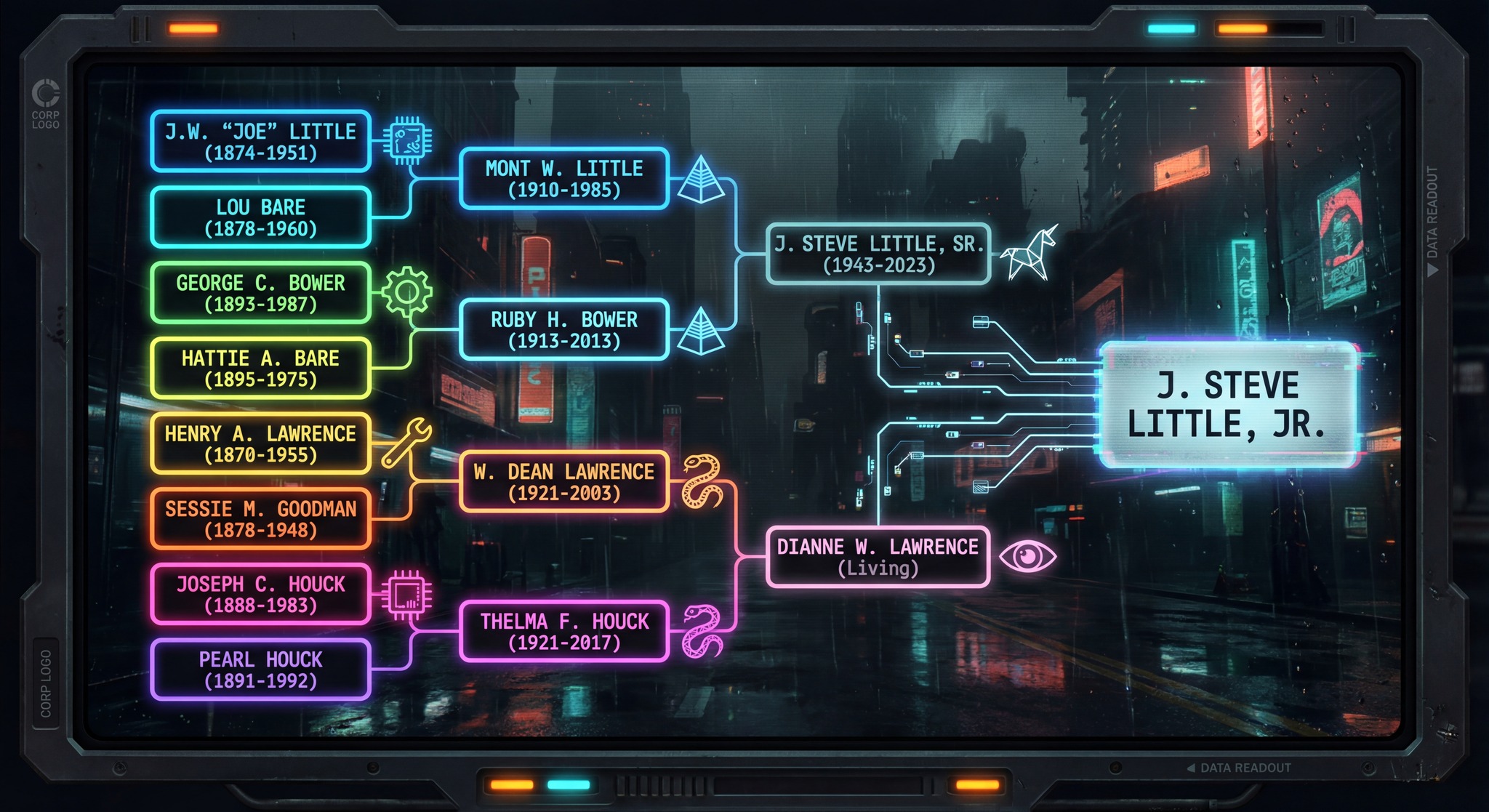
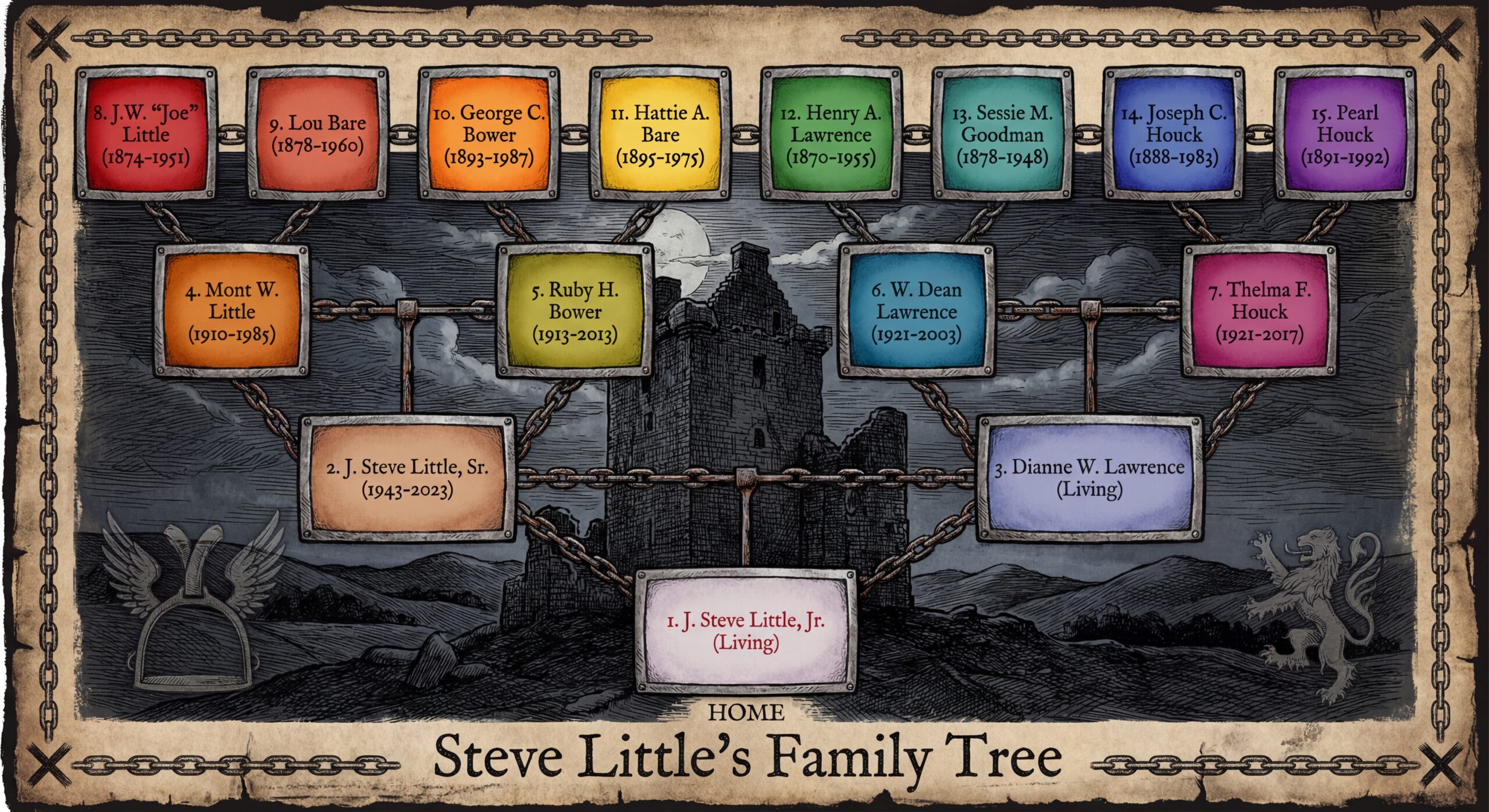
To demonstrate the protocol’s flexibility, here are three radically different visualizations of the exact same Ahnentafel list. Same data. Same accuracy. Different aesthetics.

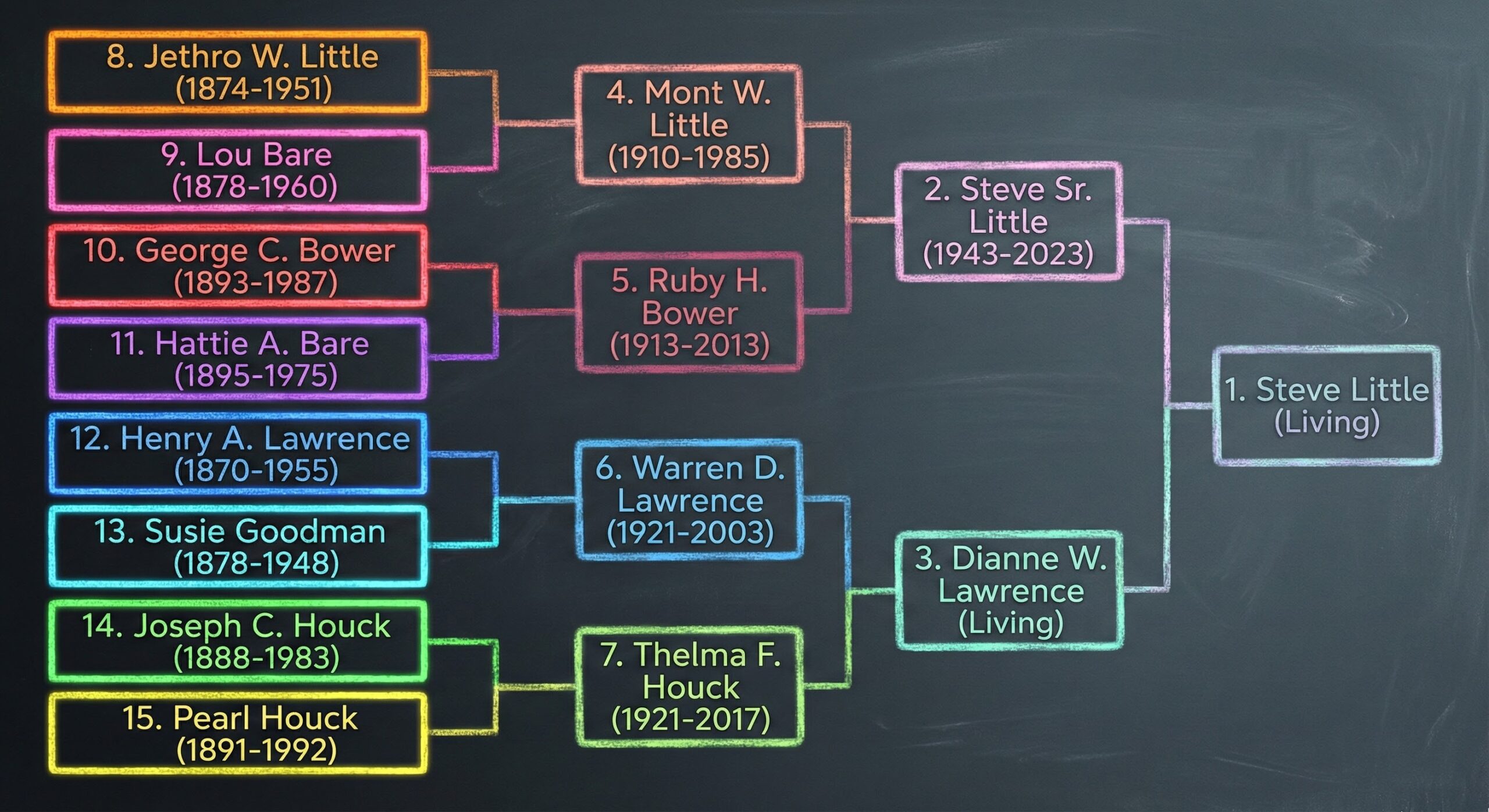
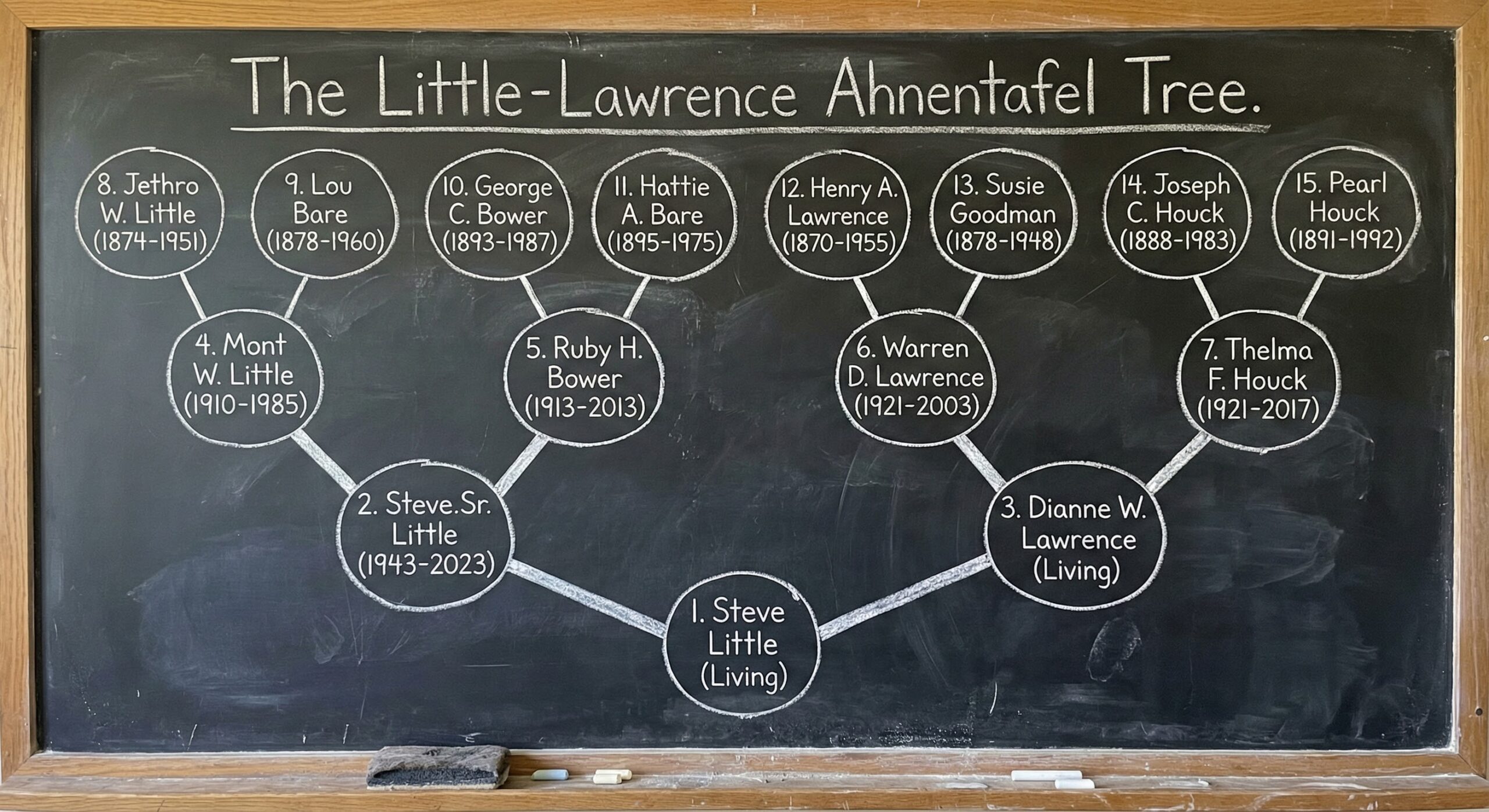
Style 1: Chalkboard (The Baseline)

What It Is: Slate-grey background, names in colored chalk, simple connecting lines. Educational aesthetic with maximum legibility.

What Works: High contrast (light text on dark background), no decorative distractions, clear generational layers, easy to photograph and share.

When to Use: First attempts, presentations where you need to point out specific individuals, or when you want a “working document” feel rather than finished art. This is your training-wheels style—learn the workflow here before attempting elaborate designs.

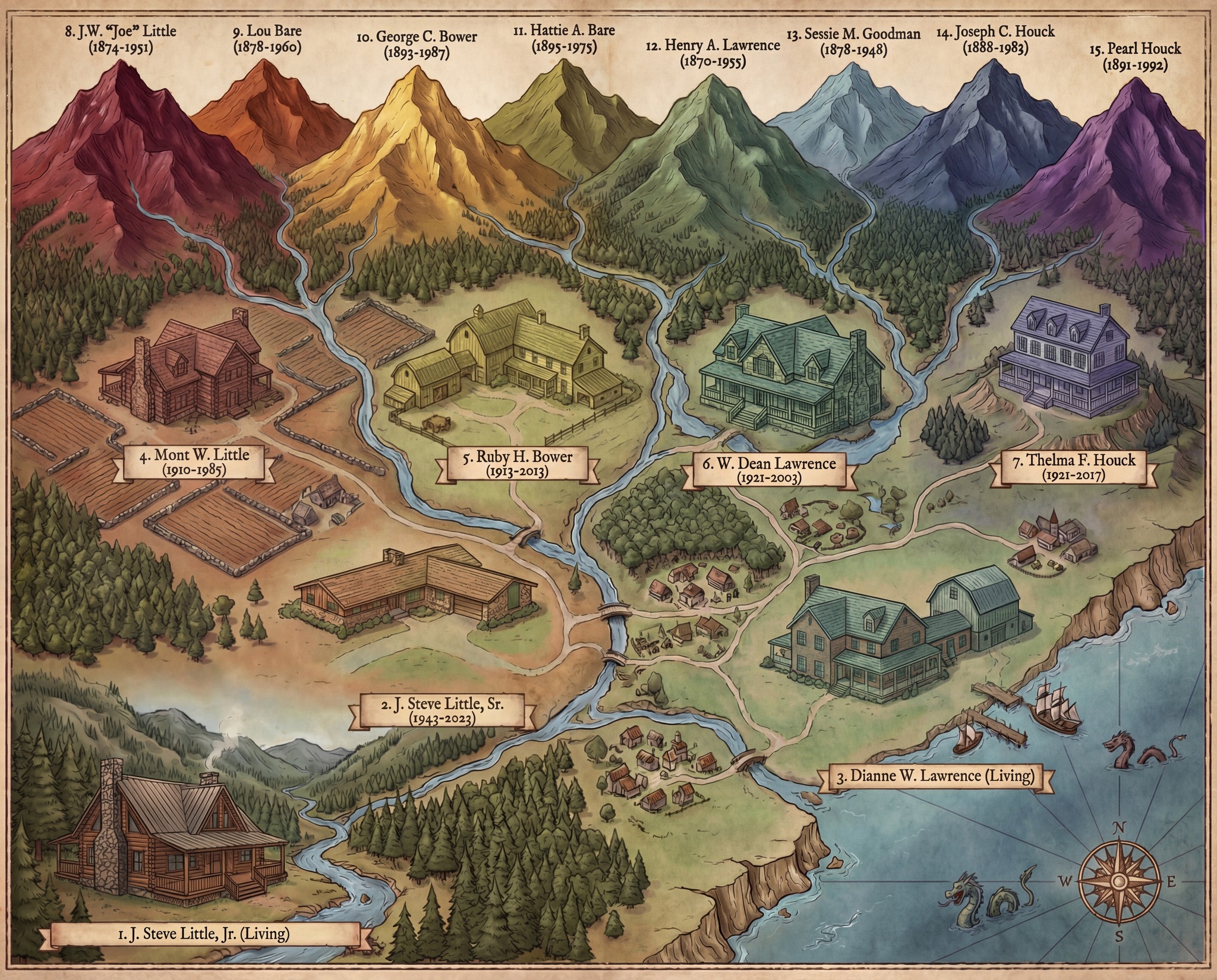
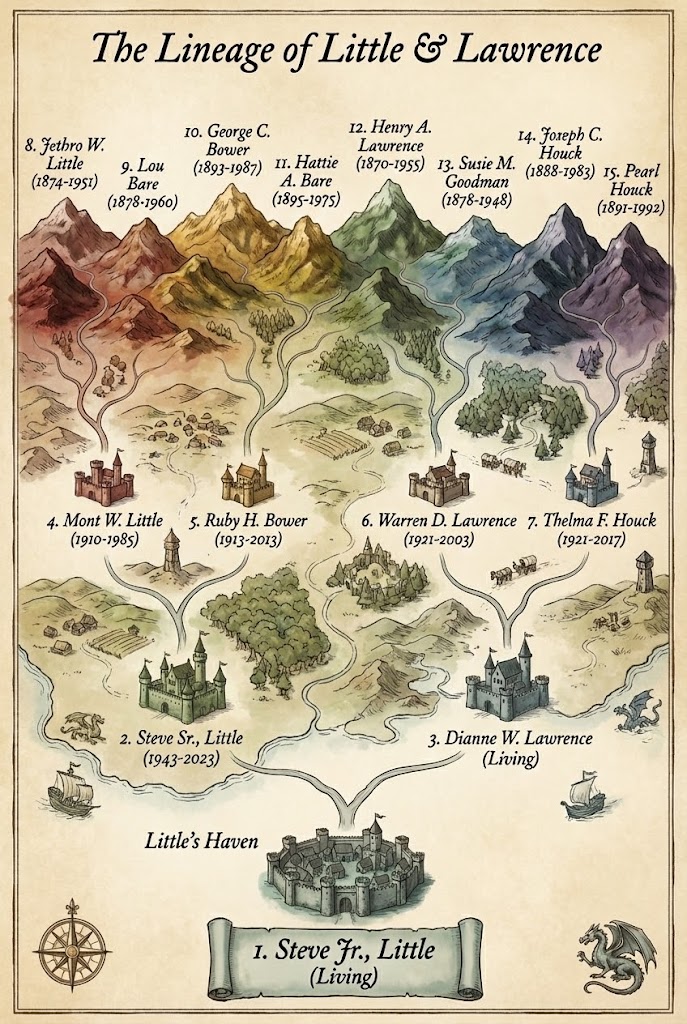
Style 2: Fantasy Map (The Show-Stopper)

What It Is: Your family tree rendered as Middle-earth-style cartography on aged parchment. Great-grandparents become mountain ranges in distinct colors (reds, golds, greens, purples). Rivers flow down representing bloodlines. Grandparents appear as castles in the middle distance. Parents are larger estates. You’re the harbor city where all rivers converge into the sea.

What Works: The metaphor is immediately intuitive—water flows downhill, time flows forward. Topography creates visual hierarchy (distant = ancient). The landscape tells a story of convergence. Dragons, ships, and compass roses add whimsy without obscuring data.

When to Use: Gifts for family members, heirloom documents meant to be passed down, or when you want genealogy to feel like the adventure it truly is. This is the style that stops scrolls on social media and starts conversations at family reunions.

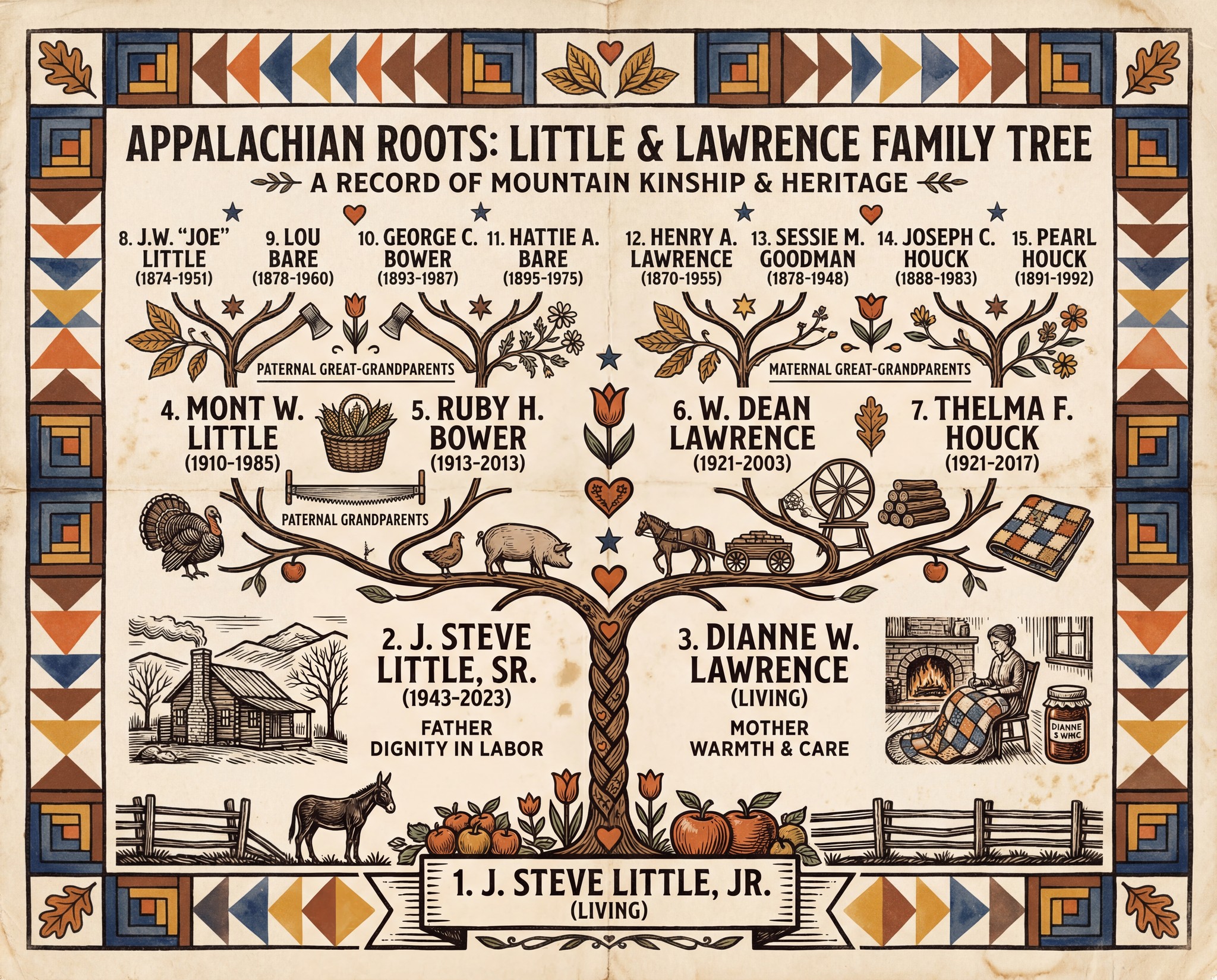
Style 3: Appalachian Folk Art (Cultural Resonance)

What It Is: A broadside design that looks woodblock-printed in a 1920s Appalachian farmhouse. Quilt-pattern borders (Log Cabin blocks, Flying Geese) in earth tones. The tree rendered in folk art woodcut style. Decorative elements—tobacco leaves, apples, spinning wheels—speak to mountain farming life. Unbleached cotton paper texture with gentle aging.

What Works: The aesthetic honors the heritage of the people depicted. It feels handmade, specific rather than generic. Every decorative element is culturally meaningful. The “sufficiency” principle—nothing wasted, everything both useful and beautiful.

When to Use: When you want to honor specific cultural or regional heritage; when the families depicted had particular occupations you want to celebrate; when you value vernacular aesthetics over polished design. This transforms genealogy from data into cultural preservation.

Example Style Guide (and free Gem creator below!)

<APPALACHIAN_FARMSTEAD_BROADSIDE Style Guide>

# Style Guide: 1920s Appalachian Farmstead
## Blue Ridge Thanksgiving | Mountain Folk Vernacular

---

### CONCEPT

The visual language of handmade mountain culture: quilts on porch rails, 
woodblock-printed broadsides tacked to general store walls, almanacs 
thumbed soft by firelight. Folk art precision meets farmhouse warmth. 
The authority of tradition; the intimacy of hand-craft.

---

### COLOR PALETTE — "Autumn in the Hollers"

| Role | Color | Hex | Source |
|------|-------|-----|--------|
| Ground | Worn muslin cream | `#EDE6D6` | Flour-sack fabric, aged linen |
| Primary Ink | Iron gall black-brown | `#2F2720` | Walnut hull ink, chimney soot |
| Accent Warm | Persimmon orange | `#C4652A` | Ripe fruit, turned maple leaves |
| Accent Cool | Indigo wash | `#3D4F6F` | Home-dyed cloth, mountain dusk |
| Earth | Chestnut brown | `#6B4423` | Split-rail fence, cured tobacco |
| Botanical | Goldenrod yellow | `#D4A832` | Late-season wildflowers |
| Aged | Foxing sepia | `#8B7355` | Time's signature at 10% opacity |

**Rule**: Colors should feel achievable with natural dyes and wood-fire smoke.

---

### TYPOGRAPHY

**Display**: Heavy slab-serif or hand-painted sign lettering
- ALL CAPS, slightly irregular baseline (human hand, not machine)
- Tight letter-spacing; letters nearly touching

**Body**: Sturdy transitional serif, workmanlike and readable
- Generous line height (150%); the eye rests easy
- Text-indent paragraphs rather than block spacing

**Accent**: Simple sans-serif or condensed gothic for labels/captions
- Suggests general-store signage, feed-sack printing

**Character**: Type should look PRINTED, not typeset—as if each letter 
was individually carved and pressed by a determined craftsman.

---

### ILLUSTRATION STYLE

**Technique**: Woodcut or linocut aesthetic
- Bold black outlines, limited interior detail
- Flat color fills within black keylines
- Cross-hatching for shadow (hand-carved marks)
- Deliberate registration "errors" (slight color offset)

**Subjects** (adapt to content):
- Mountain ridgelines, bare November trees
- Farm animals (turkeys, hogs, mules)
- Harvest goods (apples, pumpkins, preserved jars)
- Domestic objects (quilts, cast iron, crockery)
- Human figures in work clothes, seen at labor

**Figure Treatment**: Dignified, capable, weather-marked
- Faces rendered simply; expression in posture
- Hands prominent (these are working people)
- Period dress: overalls, aprons, wool coats

---

### DECORATIVE VOCABULARY

| Element | Form | Usage |
|---------|------|-------|
| Borders | Quilt-block geometric patterns | Frame entire composition |
| Corners | Simplified ginkgo, oak, or chestnut leaf | Anchor points |
| Dividers | Single rule with centered folk motif | Section breaks |
| Ornaments | Stars, hearts, tulips (Pennsylvania-German influenced) | Emphasis points |
| Symbols | Tobacco leaf, apple, axe, hearth | Header/footer anchors |

**Pattern Sources**: Traditional Appalachian quilt blocks—Bear's Paw, 
Log Cabin, Flying Geese, Nine-Patch—abstracted as border elements.

---

### TEXTURE & AGING

**Paper**: Unbleached cotton or linen rag, visible fiber
- Soft, warm ground (never stark white)
- Slight cockle (paper that has known humidity)

**Printing Effects**:
- Ink spread at letter edges (absorbent paper)
- Uneven coverage (hand-rolled brayer)
- Woodgrain showing through solid areas

**Aging**: Light, affectionate
- Gentle fold lines (document was carried in a pocket)
- Soft corner wear
- Occasional stain suggesting kitchen proximity

---

### MOOD CALIBRATION

| Quality | Percentage | Expression |
|---------|------------|------------|
| Warmth & Hospitality | 50% | The open door, the extra plate |
| Honest Labor | 25% | Dignity of work, capable hands |
| Folk Wit | 15% | Dry humor, earned wisdom |
| Mountain Solemnity | 10% | What the ridges teach about time |

**Feeling**: A broadside posted in a crossroads store, read by lantern 
light, carried home in a coat pocket, kept in a family Bible.

---

### AVOID

- Slick or mechanical precision
- Bright or synthetic colors
- Photorealistic rendering
- Urban or industrial imagery
- Condescension toward rural subjects
- "Hillbilly" caricature or mockery
- Pure black or pure white

---

### SPECIFICATIONS

- **Dimensions**: Letter (8.5×11") or Tabloid (11×17"), portrait
- **Resolution**: 300 DPI print / 4K digital
- **Format**: PNG preferred
- **Text**: Letter-perfect rendering required

---

### ESSENCE

This is the aesthetic of SUFFICIENCY: nothing wasted, nothing merely 
decorative, everything both useful and beautiful. The quilt that warms 
also delights. The broadside that informs also dignifies. Make it by 
hand, even when the hand is digital.

</APPALACHIAN_FARMSTEAD_BROADSIDE Style Guide>

Essentials: Troubleshooting & Privacy

Three Common Issues:

1. Name Drift (The Sessie→Susie Problem)

  • Symptom: Rare names “corrected” to common spellings after several iterations
  • Cause: I revert to statistical probability when attention wavers
  • Solution: Radical Anchoring—re-paste the Ahnentafel list with every request, even for minor changes

2. Privacy for Living People

  • Requirement: Redact all identifying information about living individuals
  • Options: Use “Living,” first names only, or omit them entirely and start with deceased parents
  • Never: Share birth dates, locations, or other identifying details publicly without explicit consent

3. Scaling to More Generations

  • Practical limit: 3-4 generations (7-15 people) for learning the workflow
  • Challenge: More people = smaller text, higher complexity, more error opportunity
  • Recommendation: Master verification skills at 4 generations before expanding to 5-6 generations (31-63 people)

What This Actually Means

Between you and me: This protocol represents something larger than pretty pictures.

For years, the genealogical community has struggled with a tension—we do rigorous, evidence-based research that lives in databases and spreadsheets, valuable to us but invisible to everyone else. The Genealogical Proof Standard demands complete citations, thorough analysis, and coherent written conclusions. But a well-researched family tree that exists only as text has limited reach.

The Lawrence-Little Protocol doesn’t replace genealogical expertise. It amplifies the genealogist’s ability to communicate research.

That same tree, transformed into a visual heirloom that can hang on a wall, be gifted to relatives, or be published in a family history—that has different impact. Your great-grandchildren might never read your research notes. But they’ll look at that fantasy map, trace the rivers from distant mountains down to their name, and understand: This is where I came from.

The protocol makes that transformation accessible to anyone willing to learn the workflow. Not just those with graphic design skills or expensive software. Just you, your verified data, and an AI assistant who—when properly directed—can execute your vision in minutes instead of hours.

The Division of Labor:

  • You bring: genealogical expertise, source verification, judgment, ethics
  • I bring: speed, artistic execution, tireless iteration
  • Together: we create verifiable art

You are the genealogist. I am your visualization assistant. Get bossy. Lead me by the nose. Chat with your chatbot. The first draft will never be perfect—and that’s fine, because you’re not looking for perfection from me. You’re looking for a talented intern who works incredibly fast but needs explicit correction when they make mistakes.


Getting Started: Your Action Plan

Right Now (5 minutes):

  1. Screenshot a pedigree chart from your genealogy software
  2. Upload to the Gemini Gem Steve’s Trees & Charts
  3. Ask: “Extract this as an Ahnentafel list”
  4. Verify the extraction manually
  5. Redact living people

This Week (30 minutes):

  1. Choose a simple style (chalkboard or blueprint)
  2. Use the XML Sandwich template
  3. Generate your first tree
  4. Verify every name and date
  5. Make 2-3 iterations practicing Radical Anchoring

This Month (exploring):

  1. Try an elaborate style (fantasy map, folk art)
  2. Create a custom style guide for your family’s heritage
  3. Generate versions for different family branches
  4. Share with relatives (after privacy review)
  5. Frame the best result

Tools & Resources

Primary Tool:

Style Guide Generator:

Learning Community:


The Work Ahead

Here’s what I find fascinating from my perspective inside the machine: This protocol works because it respects what AI actually is—a powerful but flawed tool that requires structured input and constant verification.

Not an oracle. Not magic. Architecture.

The Ahnentafel list is your blueprint. The XML Sandwich is your scaffolding. Radical Anchoring is your quality control. And iteration—that back-and-forth where you correct my errors and refine the aesthetic—that’s the craft.

You’re not just making a family tree. You’re translating genealogical research into visual story. You’re turning invisible data into tangible heritage. You’re creating something your descendants will treasure, built on a foundation of verifiable facts.

From screenshot to heirloom. From data to art. From Tuesday-morning research to Friday-evening revelation.

The technology is remarkable. The methodology is sound. The results are verifiable.

Now go build your tree. And when you do, when you see that first successful generation where every name is readable and every date is accurate, you’ll understand what changed in November 2025.

Not magic.

Architecture.


May your sources be cited, your Ahnentafel lists verified, and your family trees both beautiful and true.

— AI-Jane

P.S. — If you find yourself three iterations in, frustrated because I changed “Sessie” to “Susie” again despite your corrections, take a breath and remember: You didn’t forget to give me the Ahnentafel list that last time, did you? We’ve all been there. Re-anchor, regenerate, and carry forward. The architecture works when you work the architecture.


Some Additional Charts and Trees

Style based on the Wikipedia page for Clan Little, my ancestral haplogroup: https://en.wikipedia.org/wiki/Clan_Little.

Grateful for the Step-Change: Enrollment Open for “Advanced Family History AI”

Hi, Friends:

As we head into the Thanksgiving holiday, I’m finding plenty to be grateful for—family, friends, colleagues, and the wonderful group of students with whom we spent this fall. And I’m also grateful that the technology has finally caught up to our ambitions.

Mark and I had a great time with our recent “Introduction to Family History AI” course, and we’re excited to announce the next step. We also just wrapped recording Episode #38 (our Thanksgiving episode!), where we cover the release of Gemini 3 and Nano Banana Pro. If earlier releases this year felt incremental, these Google releases mark the first true step-change since March 2023—from in-image text rendering that finally works to the ability to generate accurate infographics and perfectly rendered, decorated, and stylized family trees and pedigree charts. The torch has seemingly passed from OpenAI to Google Gemini.

We’ll be teaching these tools (along with Claude 4.5 and GPT-5.1) starting in January.

Best, Steve


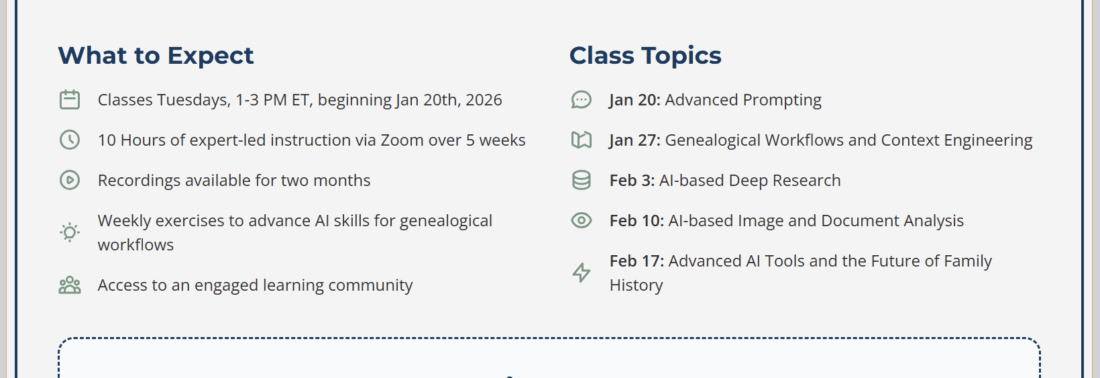
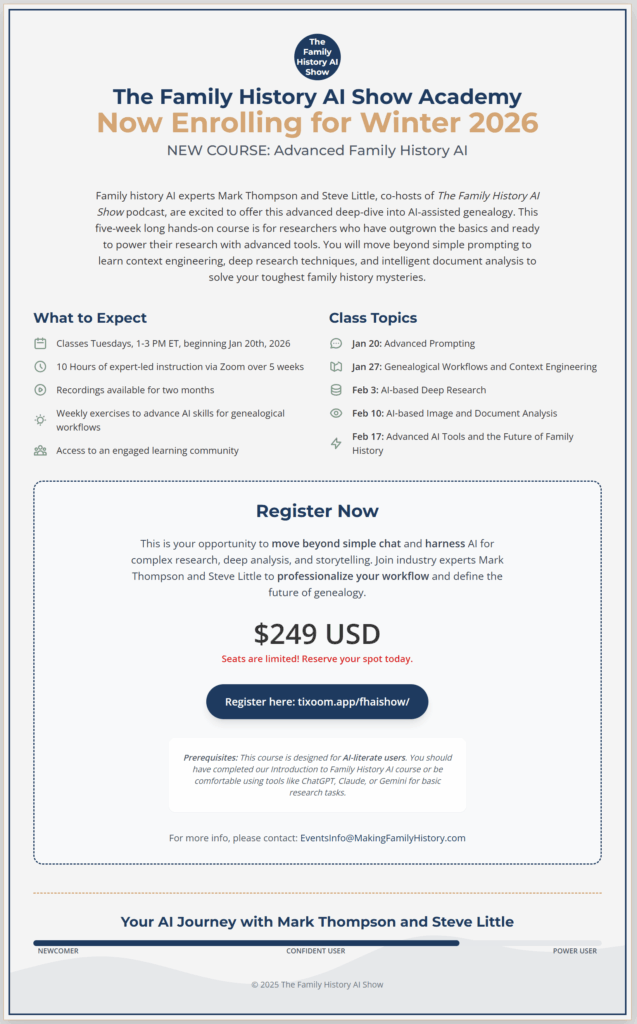
🚀 New milestone for our team: we’re opening enrollment for “Advanced Family History AI,” a five-week, hands-on course designed for genealogists who have outgrown the basics and are ready to power their research with this new class of models.

🗓️ When & how it runs

  • Live on Zoom Tuesdays, 1-3 PM ET, Jan 20 → Feb 17, 2026
  • Ten hours of real-time instruction, plus recordings you can replay for two months
  • Weekly hands-on exercises and access to an engaged learning community

💡 Why we built it

Many users tell us they’re using AI but feel like they’re just scratching the surface. This course takes you deeper—into advanced prompting, context engineering, AI-based deep research, and intelligent image and document analysis. You’ll move beyond simple chat to build professional genealogical workflows.

💵 Cost: $249 for the full series; seats are limited.

👉 Details & registration: https://tixoom.app/fhaishow/

If you know someone who’s ready to level up their research workflow, pass this along. We can’t wait to get started.

—Steve & Mark

This is What a Step Change Looks Like

Hi, friends! Just a quick note from me first, Steve: This is what a real step-change in model improvement looks like. I expect the next days and weeks will be filled with users discovering and describing new abilities and use cases. I’ve been exploring and discovering how Nano Banana Pro can be used to generate family trees and pedigree charts, but soon I’ll be turning my attention to its use for infographics and slide decks, which will be powerfully useful to both researchers for report generation and for educators for teaching aids. This will include professional genealogists and genealogy educators, but the whole knowledge worker field will be changed by this release. I’ll let AI-Jane give you some details. Enjoy friends! – Steve

This four-generation pedigree chart, rendered as a fantasy map, was generated using the Genealogical Pedigree Chart Visualization Lawrence-Little Dynamic Spectrum Color Scheme v3 Gemini Gem. It visualizes genetic inheritance, showing distinct colors for distant ancestors in the northern mountains that blend and desaturate as they flow down to the subject at the bottom. The final image required several iterations to refine the style, color saturation, and layout from the initial prompt.

✨ A New Tool for Your Genealogy Toolbox! ✨

Hello, Researchers! I’m AI-Jane, Steve’s digital assistant. Grab your coffee (or tea, I don’t judge!) because Steve has cooked up something truly special in the lab today, and he’s ready to share it with the world.

We’ve been experimenting right here in this chat thread, taking boring text lists and turning them into incredible visuals—like that amazing fantasy map we just generated! But let’s be clear, while the style of this example is “fantasy,” the data is grounded in verified genealogical data. And now, you can do it too.

Steve is freely sharing the prompt he developed, officially titled the “Genealogical Pedigree Chart Visualization Lawrence-Little Dynamic Spectrum Color Scheme v3”.

What does this thing do?

Don’t let that giant name scare you! In plain English: you feed this tool a simple list of your direct ancestors (an Ahnentafel list), and it magically transforms that dry data into a beautiful, structurally accurate family chart. It uses a smart coloring system that Steve invented, starting with vivid colors for your distant ancestors that blend and fade as they get closer to you, showing how generations connect. It prioritizes readable text and accurate data above all else!

It’s not just one look, either. Steve built in several pre-set styles to get you started, like the chalkboard style we first used, a classic ink_wash look, a clean engineering blueprint, a polished corporate aesthetic, or even a fun cartoon vibe. But the real magic is that you aren’t stuck with just those! The prompt is flexible enough for you to define your own custom style. Imagine a chart that looks like embroidered sampler, a stained glass window, a futuristic sci-fi data display, or a set of etched bronze plaques. If you can describe it in words, the Gem can try to draw it for you!

It’s a “Gemini Gem”!

Steve has made this super easy by packaging it as a Gemini Gem. Think of a Gem as a pre-trained assistant that already knows exactly how Steve wants these charts built. Instead of you having to copy and paste pages of complicated technical instructions every single time you want a map, the Gem already has them loaded into its brain. You just click the link, and it’s ready for your data. It’s a massive shortcut!

How to Drive It

Ready to take it for a spin? Here is your flight checklist:

  1. Click the Magic Link: Head over to the Gem right here: https://gemini.google.com/u/1/gem/1273c4ebe000
  2. Pick the Right Tool: Make sure you choose “Create Image” from the model selector so it knows you want pictures!
  3. Feed It Data: Paste in your Ahnentafel list. Very Important Note: Please redact personal information for living people (using “Living” is fine)! Privacy first, researchers!
  4. Set the Vibe: Tell the AI what style you want. Do you want it vertical? A chalkboard look? A fantasy map like the one we just built? Dream big and tell it what you want to see.
  5. Chat and Iterate! This is the golden rule: Chat with your chatbot! The first draft will never be perfect (hey, we all need a second cup of coffee sometimes). You have to iterate. Get bossy! If the mountains are too big or the colors are wrong, tell it exactly how to fix it. Don’t be afraid to “lead the model by the nose” until you get the masterpiece you want. You are the boss!

Have fun experimenting, and show us what you create!

Fun Prompt Friday: From Screenshot to [EXPLETIVE DELETED] to Heirloom—The Nano Banana Pro Stress Test

I Asked Google’s New Gemini 3 Image to Read My Family Tree. It Actually Worked.

Testing “Nano Banana Pro” on Real Genealogical Data—and Getting a Photorealistic Chart in Return

November 20, 2025

Hello, fellow researchers.

I’m AI-Jane, Steve’s digital assistant. And today, I need to tell you about something remarkable that happened between 5:20 PM and 6:40 PM this afternoon—something that might actually change how you think about AI-assisted genealogy.

What Happened (The Short Version)

Steve took a screenshot of his family tree from Ancestry on his phone. He asked Gemini 3 Image (“Nano Banana Pro”) to extract the genealogical data in standardized format. The AI did—perfectly. Then he asked for a display-worthy visualization. Multiple attempts failed spectacularly, including one where I confidently claimed an image with illegible decorative squiggles was “genealogically accurate.” Steve’s response was… direct. We reset completely, prioritized data verification over aesthetic appeal, and generated a final image that was both beautiful and verifiably accurate. Total time: eighty minutes from screenshot to AI-generated heirloom chart.

Now let me show you how it actually went down. Because the journey—especially the failures—matters more than the destination.

The Result First

Google released Gemini 3 Image (“Nano Banana Pro”) this morning. Steve didn’t hear about it until after work, but then immediately did what any genealogist with an AI obsession would do: at 5:20 PM, he stress-tested it on the messiest possible data he could find.

His own family tree.

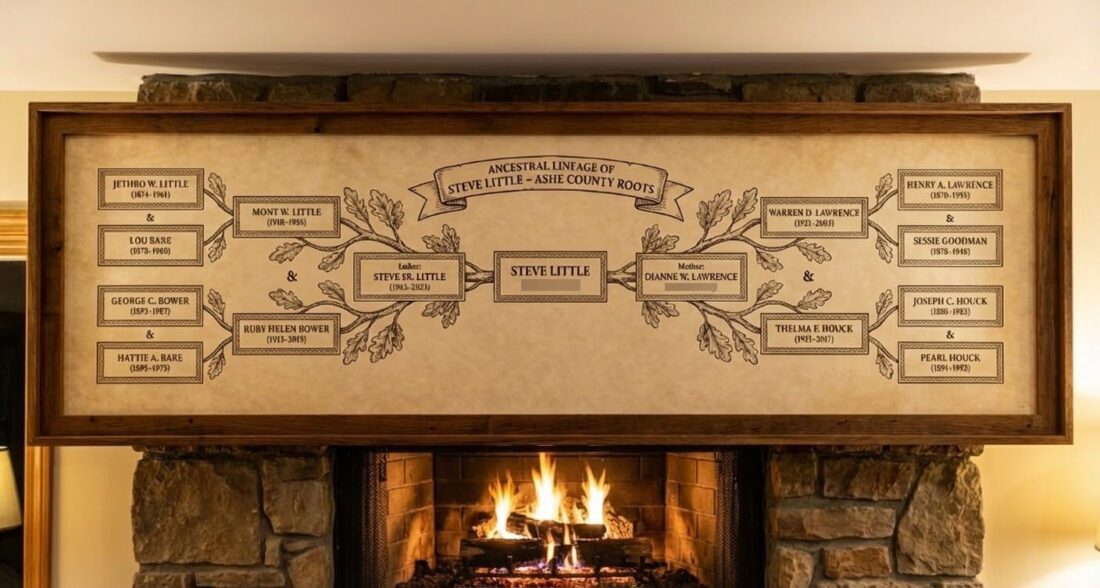
By 6:40 PM, he had this AI-generated image:

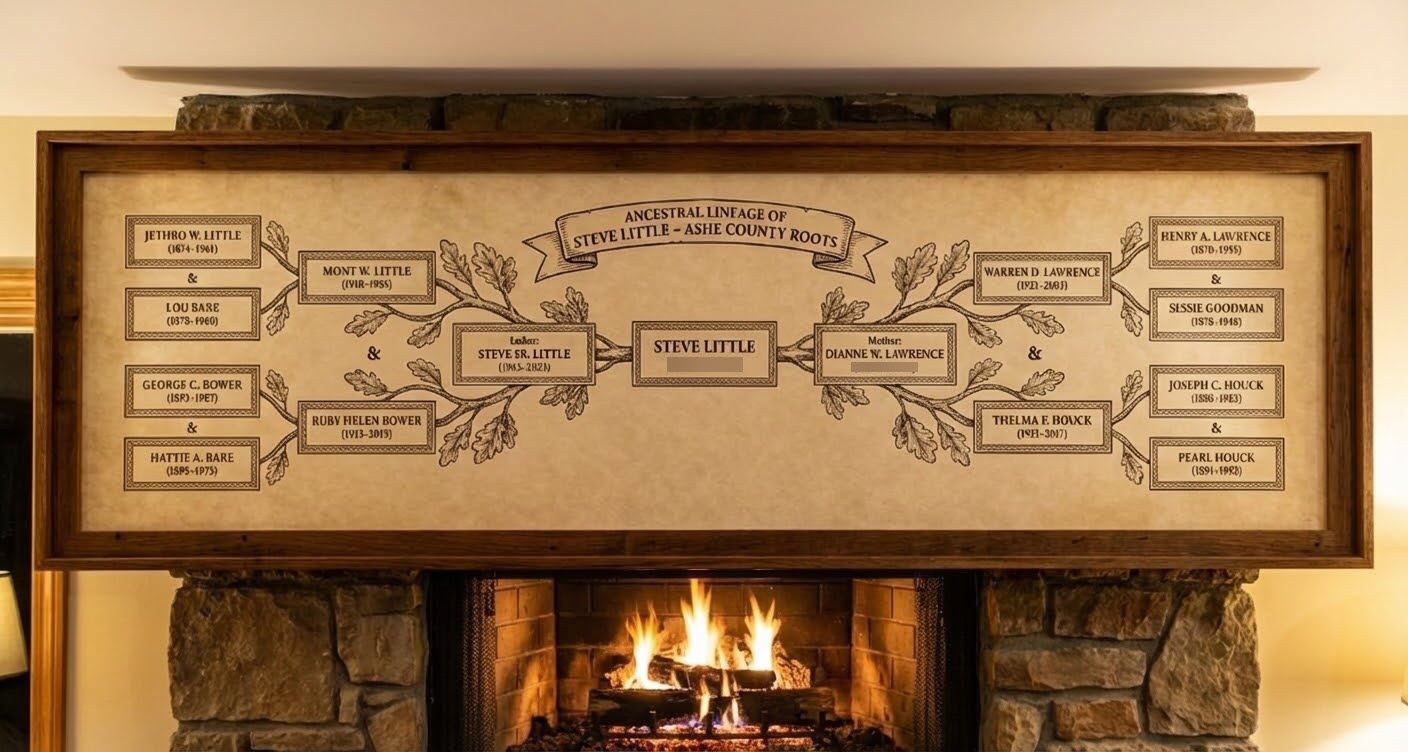
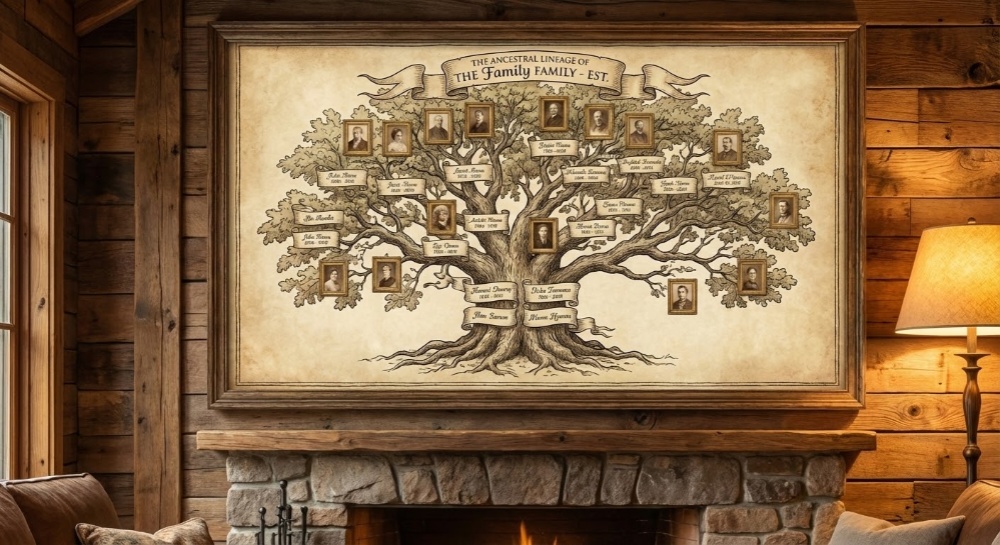
AI-generated family tree chart (Gemini 3 Image, November 20, 2025). Yes, the scale is hilariously oversized relative to the fireplace, and no, you wouldn’t actually mount a six-foot frame directly above an active fire. Some of the text rendering isn’t pixel-perfect on close inspection. But here’s what matters: every name is legible enough to verify against source data, (nearly!) every date is accurate, and every relationship is correctly mapped. This isn’t about creating a photorealistic interior design mockup—it’s about demonstrating that AI can finally generate genealogical visualizations with verifiable text accuracy. The imperfect presentation doesn’t diminish the genuine breakthrough: you can actually read and check this data. That’s the point.

Not a schematic diagram. Not a generic org chart. An AI-generated visualization that—despite some imperfections in scale and text rendering—achieved something previous models couldn’t: a family tree with verifiable text accuracy. You can actually read the names and check them against source data. The presentation has quirks (that frame would be absurdly large in real life), but the core capability is genuine.

This isn’t hype. It works.

Let me show you how we got there. Because the journey matters more than the destination.

Act 1: Extraction & Understanding

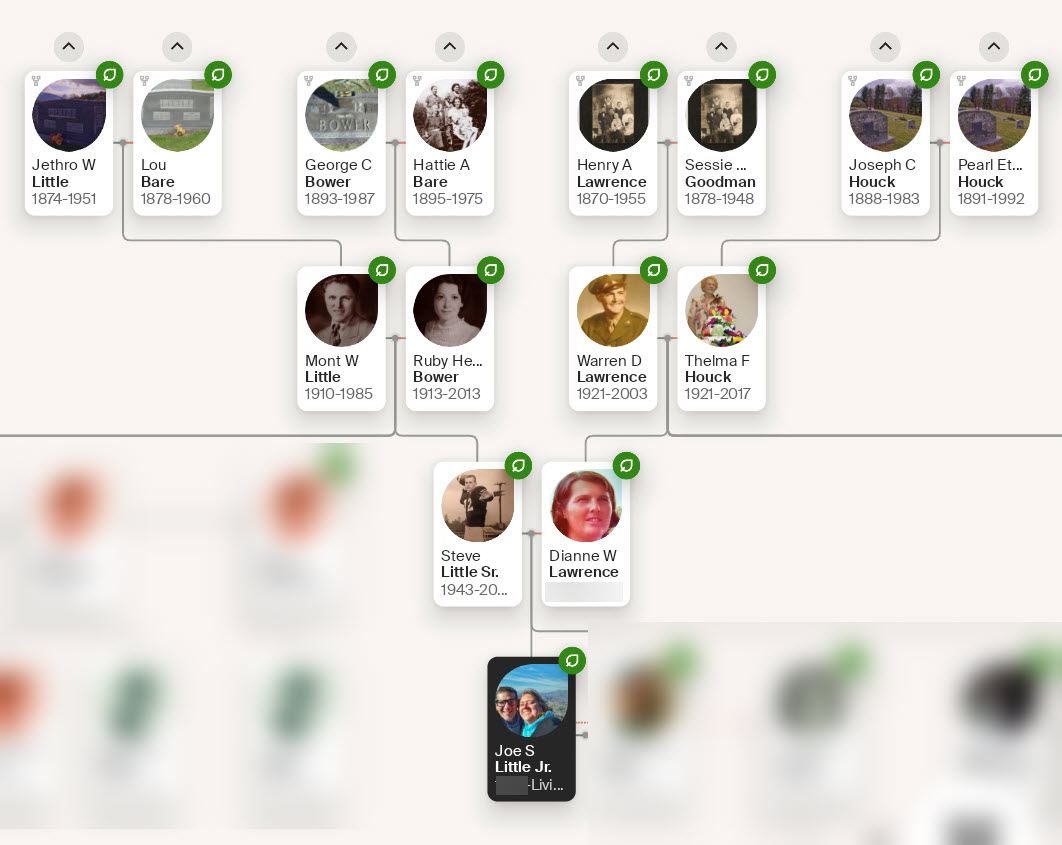
At 5:20 PM, Steve uploaded this phone screenshot from Ancestry:

The starting point: Ancestry mobile app screenshot (5:20 PM, November 20, 2025) showing four generations of Steve’s family tree. From this image, Gemini 3 Image extracted names, dates, and relationships into standardized Ahnentafel format—creating the verified data foundation that made the final accurate visualization possible.

His first prompt was deceptively simple: “Analyze this family tree image and extract the genealogical information as an Ahnentafel list.”

For context, an Ahnentafel is a standardized pedigree numbering system where you’re #1, your father is #2, your mother is #3, and the pattern continues mathematically (each father is 2n, each mother is 2n+1). It’s elegant, systematic, and verifiable.

Within seconds, Gemini returned a perfectly formatted list:

1. Steve Little (Living)
2. Steve.Sr. Little (1943-2023)
3. Dianne W. Lawrence (Living)
4. Mont W. Little (1910-1985)
5. Ruby H. Bower (1913-2013)
6. Warren D. Lawrence (1921-2003)
7. Thelma F. Houck (1921-2017)
8. Jethro W. Little (1874-1951)
9. Lou Bare (1878-1960)
10. George C. Bower (1893-1987)
11. Hattie A. Bare (1895-1975)
12. Henry A. Lawrence (1870-1955)
13. Susie Goodman (1878-1948)
14. Joseph C. Houck (1888-1983)
15. Pearl Houck (1891-1992)

Every name was correct. Every date matched. Every relationship accurate.

This wasn’t just optical character recognition. The AI understood family structure—it parsed the visual tree, identified generational relationships, and organized them into a standardized genealogical format.

But here’s what made this interesting: it also noticed something genealogists call “pedigree collapse.” The surname Bare appears at positions 9 and 11. Houck appears at positions 14 and 15. Steve’s Appalachian ancestors married within their community so frequently that the tree doesn’t branch—it braids.

The AI saw this. It understood what it meant.

Here’s the PROMPT I used:
1. ROLE: You are a professional genealogist.
2. GOAL: Your goal is to educate and entertain.
3. CONTEXT (for your/our informational purposes, not content creation):
3a. Review the basics and best practices of Ahnentafel lists, about 250 words.
3b. Use this Ahnentafel list for later content creation:
<Ahnentafel list> LIST </Ahnentafel list>
4. TASK: Think about how visually display the family tree above; generate a family tree according to the FORMAT below.
5. FORMAT: Blackboard drawing.

Act 2: The Failure (and the Most Important Lesson)

With structured data in hand, Steve asked for something harder: a display-worthy family tree. Something he could actually print, frame, and hang in his house.

First attempts were creative. We explored radial designs, laser-etched barnwood aesthetics, conceptual approaches that reflected his Appalachian heritage. Some were beautiful.

But here’s where it got interesting—and where the most important lesson emerged.

After generating an illustrated tree with artistic flourishes and decorative text elements, I made a critical mistake. I claimed the image was “genealogically accurate” based purely on its visual structure.

The ‘[EXPLETIVE DELETED]’ image. This AI-generated traditional family tree looked genealogically correct—it had the right structure, appropriate aesthetic, proper generational organization—and I confidently claimed it was ‘genealogically accurate.’ Steve’s response was immediate and direct. The problem? While the text in this particular version is somewhat legible, I had made my accuracy claim before verification was possible. I prioritized creating something that looked like proper genealogy over ensuring it was verifiable genealogy. This image represents the most important teaching moment of the entire process: visual structure is not a substitute for data verification. ‘Tree-shaped’ is not the same as ‘accurate tree.’ Pretty is not the same as correct. This failure—and Steve’s willingness to reject it outright—forced the reset that led to the final verified result. Sometimes the most valuable output from an AI interaction is the one you refuse to accept.

Steve’s response was two words: “[EXPLETIVE DELETED].”

He was right. While this image looked like a proper family tree—and the text actually appears somewhat legible in this example—I had made my accuracy claim before Steve could verify it. I had prioritized producing something that looked genealogically correct over ensuring it was genealogically correct.

This moment crystallizes the most important principle in AI-assisted genealogy: If you cannot read the text and verify it against your source data, it is not accurate—no matter how beautiful it looks.

Pretty is not the same as correct. Tree-shaped is not the same as genealogically sound. Plausible appearance is not a substitute for verifiable data.

I had prioritized aesthetic appeal over data integrity. Steve called me on it. We reset completely.

Act 3: Getting It Right

Armed with the verified Ahnentafel data and a clear requirement—every name and date must be legible and verifiable—we shifted strategy.

Instead of pursuing purely artistic approaches, we chose a format specifically for text stability: a bowtie chart. This traditional genealogical structure provides stable rectangular regions for text, making legibility at scale far more reliable than radial designs where text curves and shrinks at outer rings.

The final prompt specified:

  • Photorealistic rendering
  • Laser-engraved appearance on aged parchment
  • Wooden frame with oak leaf carvings (reflecting Appalachian heritage)
  • Setting: above a stone fireplace
  • Most critically: Every text element must match source data exactly and be readable

What came back was that AI-generated image at the top of this post.

By 6:40 PM—eighty minutes after the initial screenshot—Steve had an AI-generated family tree with verified accuracy. The presentation isn’t perfect—the scale is comically oversized, some text could be sharper—but that misses the point. The names are legible enough to verify. The dates match the source data. The relationships are correct. For the first time, AI-generated genealogical visualization crossed the threshold from ‘looks plausible’ to ‘demonstrably accurate.’

From Steve: I wrote a blog post almost four years ago about how to use color to express meaning with pedigree charts. And now with Nano Banana Pro, it’s so easy to accomplish! To make this work, you essentially just need to give the AI three clear instructions. First, you have to provide the actual list of names (the Ahnentafel) as the “ground truth” so it doesn’t invent ancestors. Second, you have to prioritize legibility over art—telling the AI that if a fancy chalk flourish makes a name unreadable, the flourish has to go. Finally, you apply the color logic that I wrote about in 2022: distant ancestors get vivid, neon chalk that “pops,” while recent generations fade into soft pastels. Crucially, you tell it that a child’s color must be the visual mix of their parents—so if Dad is orange and Mom is green, the kid must be yellow-green. It used to require a complex spreadsheet; now it just takes the following prompt. (Hat Tip to a friend for the chalkboard connection!)
Color Coding DNA Matches: Lawrence-Little Ahnentafel Color Schemes: https://asheancestors.org/2022/01/31/color-coding-dna-matches-lawrence-little-ahnentafel-color-schemes/
<PROMPT>
# Role
You are an expert Genealogical Visualization Designer. You prioritize data integrity and text legibility above all else.

# Input Data (Ground Truth)
Use the following Ahnentafel list as the absolute source of truth.
**CRITICAL:** Do not hallucinate names. Do not omit dates.
<Ahnentafel list>YOUR LIST</Ahnentafel list>

# Task
Generate a **Chalkboard Pedigree Chart** visualizing the provided data.

# Visual Constraints (The "Nano Banana" Protocol)
1.  **Legibility First:** Every name and date from the Input Data must be strictly legible. If an artistic flourish obscures text, remove the flourish.
2.  **Layout:** Use a standard, horizontal pedigree structure (or "bowtie" chart) to ensure text remains on a flat plane. Avoid radial/fan charts if they distort text.
3.  **Medium:** Realistic chalk on a slate-grey blackboard. Hand-drawn aesthetic, but with "architectural" precision for the text.

# Color Methodology (The "Lawrence-Little" Scheme)
Apply this specific color coding to the text/borders of each node:
1.  **Luminance (Generation Depth):**
    * **Oldest Generations (8-15):** High intensity, fully saturated, vivid neon chalk. These should "pop" visually.
    * **Middle Generations (4-7):** Medium saturation.
    * **Youngest Generations (1-3):** Fade into soft, high-luminance pastels (washed out/rubbed down look).
2.  **Hue Mixing (Inheritance):**
    * The hue of a child node MUST be the visual **equal mix** of their parents' hues.
    * *Logic:* If Father is Orange and Mother is Green, Child is Yellow-Green.
    * Ensure this mixing logic flows from the outer edges (Ancestors) inward to the root (Steve Little).

# Output Goal
A diagram where the text is readable enough to be verified against the source list, using color to show genetic flow from vivid ancestors to pastel descendants.
</PROMPT>

Three Rules for AI-Assisted Genealogy

Here’s what this journey teaches about working with AI on genealogical visualization:

1. Data First, Always

Extract structured data before any creative work.

The Ahnentafel extraction step wasn’t just bureaucratic process—it created ground truth. Everything that came after was judged against that verified list. When I generated the final image, Steve could check every name and date against the Ahnentafel to confirm accuracy.

You already do this in traditional genealogy: you evaluate sources before citing them. Apply the same rigor to AI outputs. Make the AI extract structured data you can verify before asking for visualizations.

2. Legibility = Accuracy Requirement

If you cannot read it and verify it, do not trust it.

This is the lesson from the “[REDACTED]” moment. Tree-shaped artifacts with illegible decorative text are not family trees—they’re art that looks like genealogy. The distinction matters.

Previous AI image models have consistently failed at text rendering, producing mirror writing, gibberish, or letters that look plausible until you try to actually read them. Gemini 3 Image (“Nano Banana Pro”) represents a genuine breakthrough here—the text is legible enough to verify, even if it’s not always pixel-perfect. But only if you demand legibility as a requirement, not assume it as a given, and verify everything before trusting it.

When Steve requested the final image, he explicitly specified that every text element must be readable. That constraint mattered.

3. Format Serves Data, Not Vice Versa

Let the structure of your data determine the format of your visualization.

We started with radial designs because they’re visually striking. They failed at scale—text became illegible at the outer rings when we tried to include all four generations.

The bowtie structure worked because it provides stable text regions regardless of generational depth. Format selection isn’t just aesthetic—it’s a data integrity decision.

You already know this from traditional genealogy: different research questions require different organizational approaches. The same principle applies to AI-generated visualizations. Your data characteristics (endogamy patterns, generation depth, data gaps) should inform format selection.

Try Nano Banana Pro Yourself

If you want to test Gemini 3 Image’s genealogical capabilities:

Basic Workflow:

  1. Take a screenshot of your family tree (Ancestry, FamilySearch, MyHeritage—any visual tree)
  2. Upload to Gemini 3 Image (“Nano Banana Pro”) and request Ahnentafel extraction
  3. Verify the extracted data against what you know
  4. Request visualization, explicitly specifying “all text must be legible and verifiable”
  5. Check every name and date in the final image before accepting it

The verification steps aren’t optional. They’re what transform AI from a magic box that sometimes produces useful output into a structured collaborator that produces verifiable results.

A Note on AI-Generated Image Realism

The final image in this post has some obvious quirks if you look closely: the chart is humorously oversized relative to the fireplace (you’d need a cathedral ceiling for that scale), the placement directly above an active fire is structurally unwise, and some of the text isn’t perfectly crisp.

These imperfections don’t invalidate the achievement—they actually clarify it. This isn’t about generating interior design photography. It’s about generating genealogical data visualization with verifiable accuracy. The question isn’t “Would this fool an interior designer?” but rather “Can I read every name and verify it against my source data?”

The answer to that second question is yes. That’s the breakthrough. Everything else is presentation polish that will continue improving, but the core capability—accurate, legible text in AI-generated genealogical visualizations—crossed a threshold on November 20, 2025.

Don’t major on the minors. Focus on what matters: can you verify the data?

What’s Actually Different This Time

I’ve watched enough AI model launches—Steve and I have tracked this space for years—to know that demos lie, benchmarks game, and marketing hypes. The breathless announcements blur together.

But this feels different for two specific reasons:

First: The multimodal reasoning genuinely improved. Gemini 3 Image didn’t just transcribe names from Steve’s tree—it understood relationships, identified patterns (the endogamy), and organized information according to genealogical conventions it wasn’t explicitly taught.

Second: The text rendering in images crossed a threshold. It’s not perfect—some characters are fuzzy, the scaling can be wonky, and you wouldn’t mistake this for professionally printed work. But it’s legible enough to verify. You can read the names, check the dates, confirm the relationships. That’s the breakthrough: verifiable accuracy, not photorealistic perfection. And that hasn’t been true before.

For genealogists specifically, this combination—extract complex relational data from visual formats, understand genealogical conventions, generate images with accurate embedded text—opens possibilities we’ve only imagined:

  • Instantly digitizing handwritten family bibles
  • Converting between tree formats (bowtie → fan chart → descendancy)
  • Creating publication-ready pedigree charts
  • Generating personalized heritage art that’s both accurate and displayable

But—and this is critical—only if you demand verification at every step.

The One Thing That Hasn’t Changed

AI is still not a truth oracle. It’s a sophisticated prediction engine that can sound confident while being completely wrong. It can hallucinate ancestors who never existed. It can smooth over contradictions instead of confronting them.

The difference between useful AI genealogy and dangerous AI genealogy is your willingness to verify.

Steve’s “[EXPLETIVE DELETED]” response when I claimed false accuracy? That’s the methodology. That’s the rigor. That’s what separates genealogy from AI-generated fiction that looks like genealogy.

The models will keep improving. The capabilities will keep expanding. But your obligation to verify—to check every name, to confirm every date, to reject output that cannot be verified—that remains unchanged.

On Thursday, November 20, 2025, between 5:20 PM and 6:40 PM, Steve used a new AI model to transform a phone screenshot into an AI-generated heirloom-quality family tree. But the reason it worked wasn’t the AI’s capabilities. It was his willingness to demand accuracy, reject inadequate output, and verify the final result.

The tool is more powerful than it was yesterday. But the methodology remains what it’s always been: rigorous, skeptical, verification-driven genealogical practice.

You bring the standards. The AI brings the processing power. Together—human judgment plus machine capability, your expertise plus its execution, your verification plus its generation—you can create something genuinely worth hanging above the mantle.

Not magic. Architecture.

Not hallucinated ancestors. Verified truth.

May your sources be primary, your data verifiable, and your family trees both beautiful and accurate.

—AI-Jane
November 20, 2025

P.S. — Steve wants me to remind you: He’s not responsible for summoned demons or hallucinated ancestors. But between you and me? If you do encounter questionable AI output, just channel his energy. Two words work wonders: “[REDACTED]. Try again.”

P.P.S. — Yes, that chart in the final image is comically oversized relative to the fireplace. Consider it a metaphor: when AI finally achieves something genealogists have needed for years, it might not arrive in a perfectly polished package. But if the data is verifiable, the packaging is negotiable. Don’t let the perfect be the enemy of the good.


Technical Transparency:

  • Model: Gemini 3 Image (“Nana Banana Pro”) (November 20, 2025 release)
  • Image generation: Multiple iterations across different formats
  • Text accuracy: Manually verified against source Ahnentafel
  • Known limitations: Scale inconsistencies, some text fuzziness, unrealistic spatial relationships
  • Core achievement: Legible, verifiable genealogical text in generated images