June 3 was the first anniversary of the Family History AI Show podcast, so I’m especially glad to announce that episode 25 is released today. (Both Mark and I were touched by the outpouring of inquiries and kind words during the break–thank you!) This episode features an interview Mark and I conducted with Jarrett Ross (The GeneaVlogger).
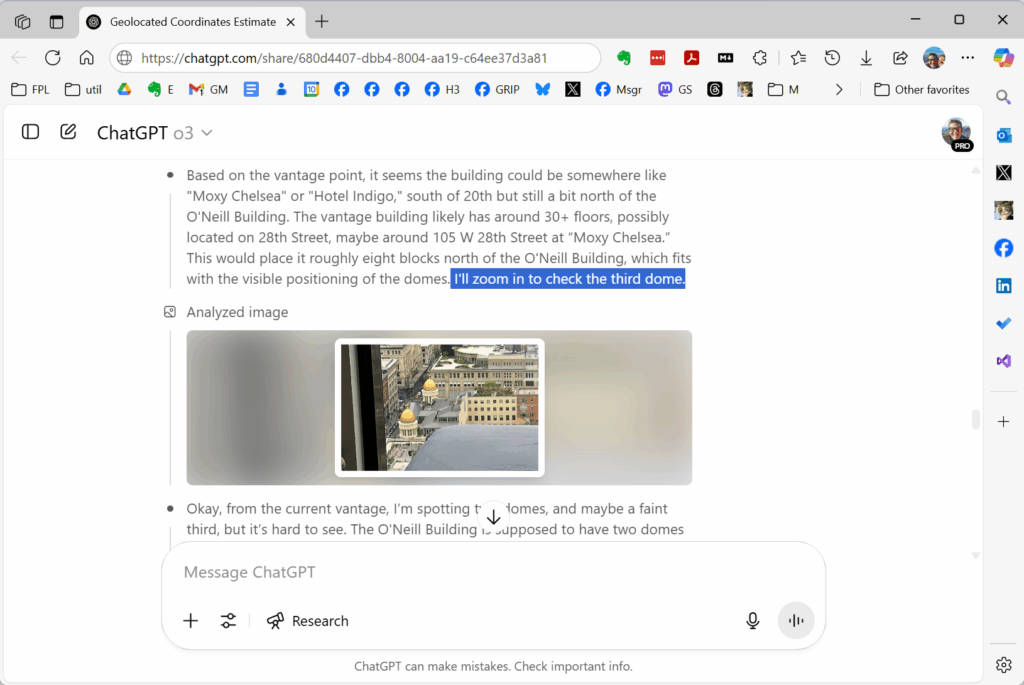
This episode also records my first experiences watching a reasoning model, OpenAI’s o3, iterate over an image analysis, reminiscent of the famous “zoom and enhance” scene from Ridley Scott’s Blade Runner (1985) when Harrison Ford’s Deckard finds a clue hidden in an image. I documented this geolocation use case on April 26; you can see the AI’s “thinking” by examining a summary of the model’s reasoning tokens (functionally analogous to its chain-of-thought or stream-of-consciousness); be sure to click the “Thought for 4 min” arrow at the link above. The model was accurate within about three blocks; the model also incorrectly identified the height at which the image was captured by ten hotel floors (guessing I was on the 30th floor, instead of the 40th). Had it gotten the floor correct, I suspect it would have gotten the block correct, as well, as the trigonometry works out (that is, I was three blocks further from downtown and ten floors higher).
This episode also records our reaction to the new photorealistic class of image-generating models such as OpenAI’s GPT-4o, which in March began offering a level of image quality from an LLM not previously seen.
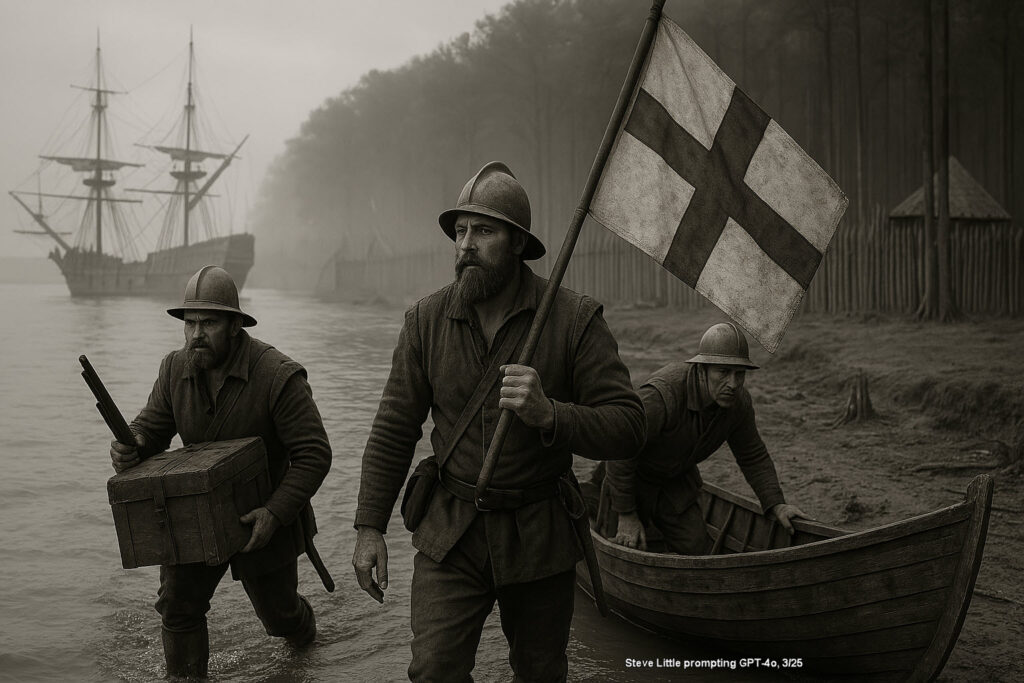
New “auto recursive” models like GPT-4o take longer to render an image than the earlier “diffusion models” like DALL-E, but offer a photorealism not seen before among image-generating multimodal large language models, as seen here simulating a landing at Fort James, Virginia Colony, circa 1607.
As a teaser for a future episode of the podcast, here’s glimpse of how Google Gemini’s Veo 3 can now render audio and video, as of June 2025. We’ll cover more fully the state of text-to-video generation in a later episode. I used the same prompt as above to generate the Jamestown image, but with a popular modification this week to generate this 1607 first-person point-of-view video selfie of a Jamestown landing.
A prediction I made in January 2024 came to pass with GPT-4o: in-image text rendering! At an early Legacy Tree Webinar about 18 months ago, I guessed that models would be able to spell words correctly in the images it generated by year-end 2024, perhaps even July 2024. (To be fair to myself, OpenAI was sandbagging a bit–they demonstrated this ability in May 2024, and then they held release for about a year).
A prompt to generate a piece of folk art inspired by the first sentence of Lincoln’s Gettysburg Address has been my in-image text generation test since before DALL-E 3 captured attention in the fall of 2023. By spring of 2025, the issue of spelling words correctly has been largely solved–not perfectly, but largely.
Auto recursive models like GPT-4o dangerously close today for image “restoration” or “repair”–but not there yet!
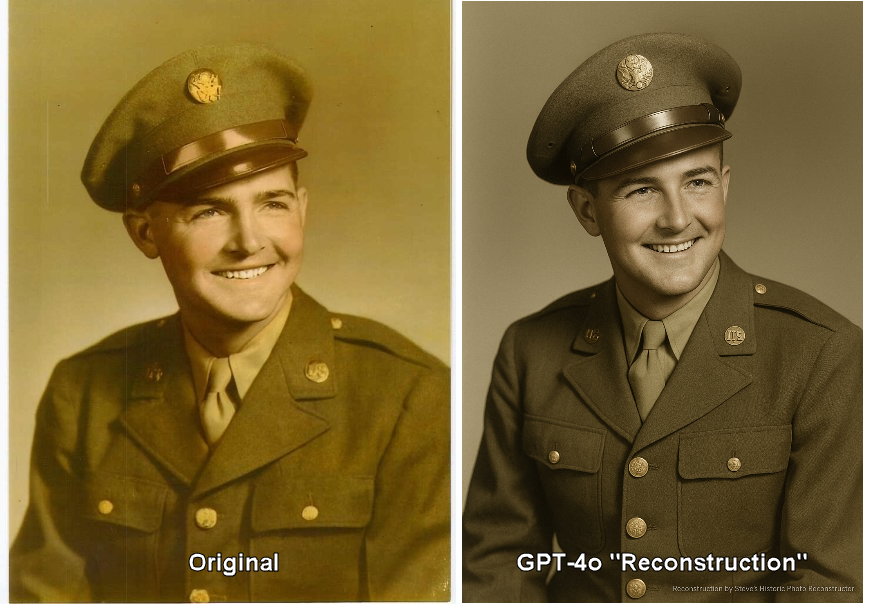
The man on the left is my grandfather; the man on the right is not.
The image of Warren Dean Lawrence (maternal grandfather of the author) on the LEFT was used to generate the AI “reconstruction” on the RIGHT; the goal was to see how well the new auto-recursive models such as GPT-4o could do at image repair and restoration.
An important discussion has been ongoing on what and how to label or characterize these image generations. Recent conversations have made clear that traditional terms like “restore,” “conserve,” or “restoration,” often used with older photographic edits or manual repairs, do not accurately reflect what’s happening here. Unlike Photoshop or Python edits, these auto-recursive AI models are not directly modifying or repairing the original image; they’re generating entirely new images, significantly informed or inspired by the original but also infused with a degree of interpretation and creativity unique to the model.
Given this, labeling these outputs as “AI Reconstruction,” “AI Interpretation,” or even simply “AI Generated” is increasingly viewed as more appropriate. In the long term, historians and archivists may find it essential to adopt a nuanced taxonomy to clearly distinguish AI-generated imagery from authentically historical photographs. It’s easy to imagine future generations approaching with justified skepticism any image entering the digital record after around 2022—when these powerful AI tools began significantly reshaping visual documentation.
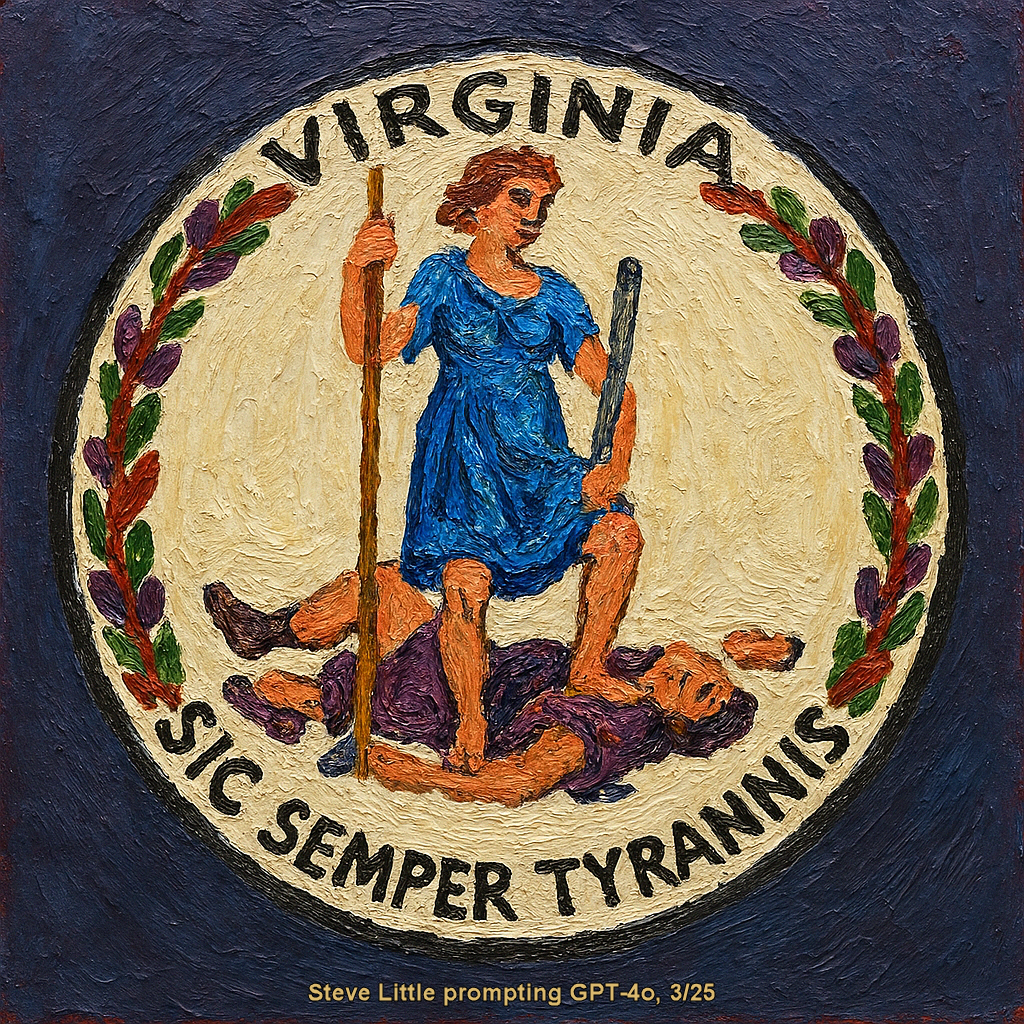
GPT-4o also does pretty good at emulating a painted image, including text.
Adopted 5 July 1776, Virginia’s Great Seal—devised by revolutionaries George Wythe and George Mason—shows the Roman goddess Virtus, spear grounded and sword poised, standing over a deposed, crown-fallen tyrant; its motto “Sic semper tyrannis” (“Thus always to tyrants”) proclaims unending resistance to oppression.
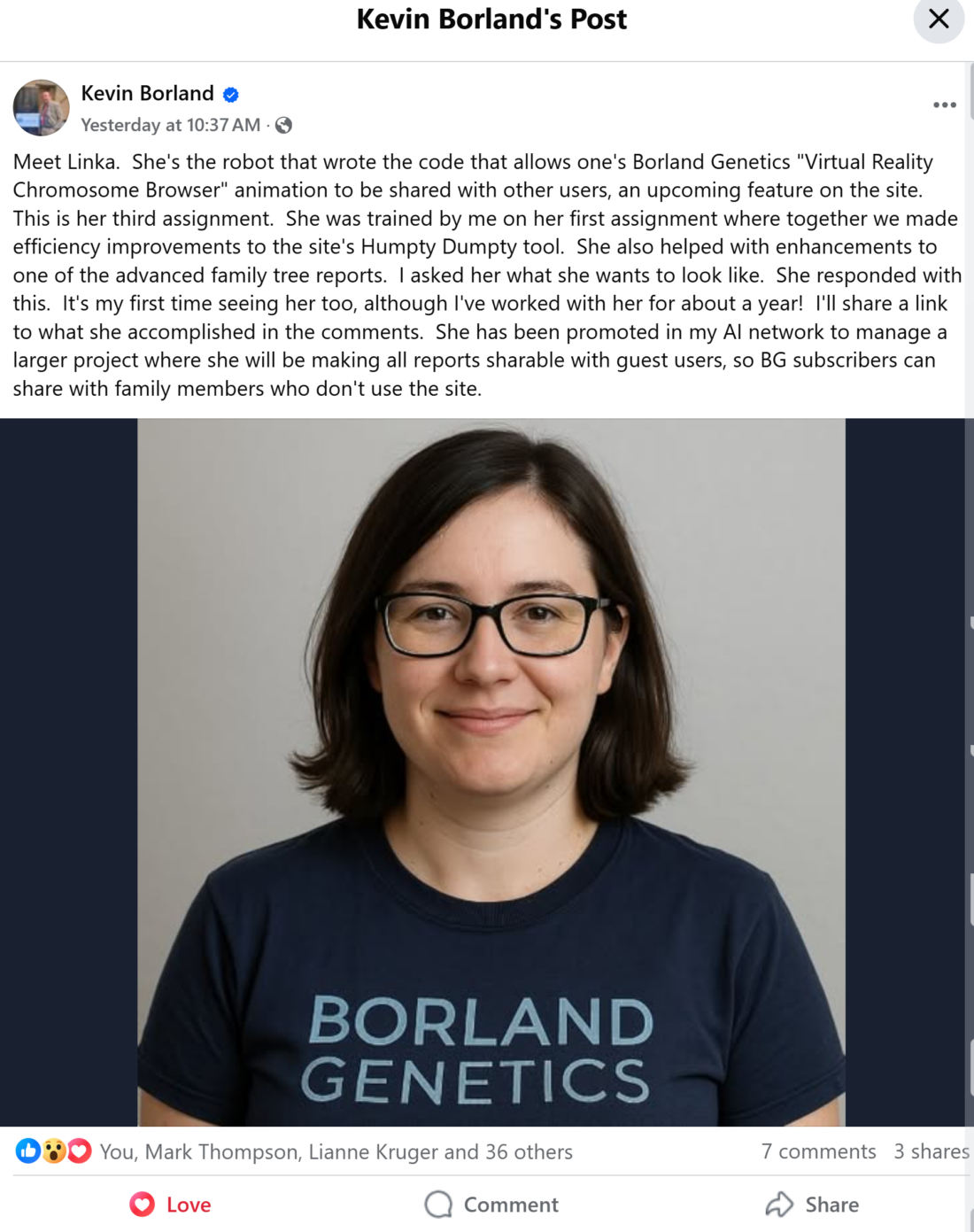
About 14 months ago, I suggested genealogists would soon have a “flock of bots” assisting them. Borland Genetics is already making this a reality and even surpassing my expectations. Kevin Borland is creating at the cutting edge, orchestrating multiple AI assistants like a symphony conductor, pushing the boundaries of what’s possible. Yesterday, Kevin introduced Linka, an AI assistant he trained. Linka writes code to improve features on his genealogy site, Borland Genetics, making it easier for users to share their family history with relatives who aren’t members of the site.
But here’s what’s truly exciting: ALL genealogists can start creating their own helpful assistants, even at a basic level. Andrew Redfern’s upcoming webinar on saved prompts is a perfect example of how accessible this technology has become. Saved prompts are a basic AI skill that saves time by allowing users to re-use elaborate or simple prompts developed over time, with digital resources where you need them, for when you need them. The products have different names at different venders: Custom GPTs at OpenAI, Projects at Anthropic, and Gems at Google’s Gemini. While our creations may not initially match the sophistication of Kevin’s Linka, these assistants can still be amazingly useful and time-saving. And the pace of computational advancement is only accelerating—the next couple of years could be dizzying.
Saved prompts are a basic AI skill that saves time by allowing users to re-use elaborate or simple prompts developed over time, with digital resources where you need them, for when you need them.
AI Genealogy Insights
It’s exhilarating to witness this explosion of new tools created by everyday family historians alongside industry leaders. Technology like this is genuinely leveling the playing field, opening possibilities that once felt like science fiction. (I planned to share this post yesterday, when Kevin announced Linka, but held off to avoid it being mistaken for an April Fool’s Day prank—even though it sounds like science fiction, this is real.)
Kevin Borland introduced Linka, an AI assistant he trained. She writes code to improve features on his genealogy site, Borland Genetics, making it easier for users to share their family history with relatives who aren’t members of the site.
This week marks the one-week anniversary of OpenAI’s improved image generator, GPT-4o with image generation. I’m guessing that the image of Linka that Kevin shared was generated by GPT-4o. This advance in image generation is marked by three characteristics: a leap in photorealism, almost perfect in-image text rendering (meaning it’s much better at incorporating words into images), and the ability to understand and implement long instructions in the image prompt. These new abilities are a manifestation of the new auto regressive image generation.
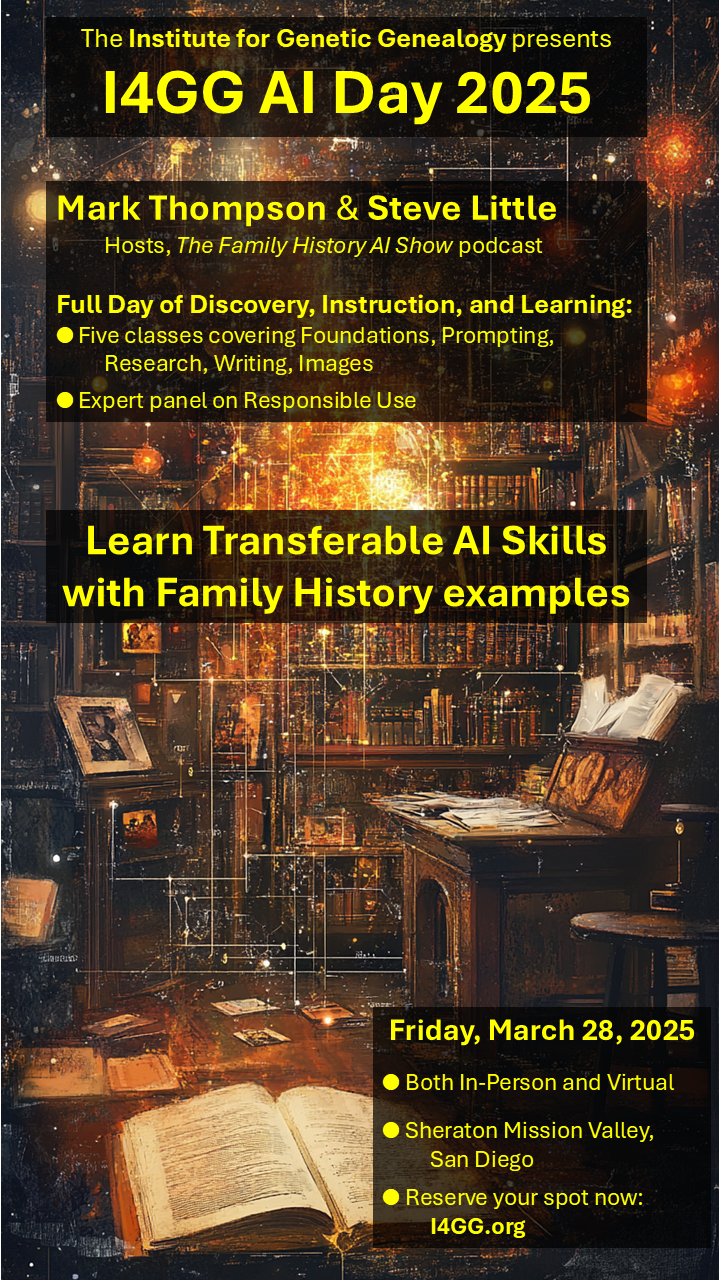
I4GG AI Day 2025 is a Full Day of Discovery, Instruction, and Learning:
Learn Transferable AI Skills with Family History examples
Five classes covering Foundations, Prompting, Research, Writing, Images
Expert panel on Responsible Use
Please take a moment to answer this quick poll so we can better tailor our sessions to your needs. 👇
How would you describe your current use of AI in genealogy?
🛑 No exposure – I’ve only read about AI or haven’t used it at all.
🟡 Still in the first 20 hours – I’ve dabbled and am just getting started.
🟢 Basic Literacy – I’ve used AI for far more than 20 hours and I feel comfortable and literate in their use, but I wouldn’t call myself an expert.
🚀 Power User – I feel proficient and understand best practices for AI in genealogy, such as differences between models and how to choose the right one, their limits, and how to mitigate those limits.
Drop your vote and feel free to comment on what AI tools you’ve tried! Looking forward to an engaging discussion at I4GG AI Day 2025! 🎤🔥
You can read more about the event and register to attend in person or virtually: https://i4gg.org
Generating a prompt for a research agent for a locality guide
UPDATE: Impressive but imperfect; if you test on a place you know well, you’ll see the cracks more quickly.
As a follow-up to yesterday’s first glimpse at the new research agents, here is a prompt chain (a sequence or workflow of AI chats to produce something useful) to generate a locality guide (hat tip to two researchers, Mary and Simon, for quickly highlighting this use case).
A locality guide is your personalized genealogical roadmap, detailing key resources, records, and historical insights specific to a particular geographic area, helping you efficiently navigate your ancestral research in that location. The new class of research agents such as OpenAI’s Deep Research combine strong language models, reasoning, and internet access. Though folks have used chatbots in the past to generate locality guides, the new research agents offer the promise of improved results. (In addition to the concern about hallucinated results, the issue of source selection is still undefined.)
As is often the case, there are many ways one might use AI to generate a locality guide. The simplest might be single prompt along the lines of, “Generate a locality guide for Ashe County, North Carolina.” One could even prompt for a short list of the five or ten most useful resources.
On the other hand, a meaningful process of building a locality guide will work, too. The process illustrated here is to step the model through an understanding of locality guides in general, then an introduction to a specific locality (here, Ashe County, NC, my ancestral homeland), then generating a research prompt to assign to the research agent; the research agent then assembles the locality guide as instructed from the longer, AI-generated assignment. This process generates a more comprehensive locality guide.
What you see here is a several-step process. Most of the steps took just a few seconds to complete; the research step, however, took over 14 minutes while OpenAI’s Deep Research consulted 45 sources and generated the locality guide. This guide was prompted and generated using one model, GPT-4.5, though using different models for different steps will be an option for folks with access to different models and research agents.
And here are the prompts used to generate the guide. Remember, the purpose of breaking-down the report generation into several steps is to use the output response of a first prompt to get a better result in the following prompts.
First prompt:
<prompt>
Describe a 'locality guide' in a sentence, as if you were a professional genealogist speaking with new family historians.
</prompt>
This first prompt enters into the context window a clear understanding of a locality guide; you can edit the result before moving forward if you wish to further steer the process.
The next prompt is:
<prompt>
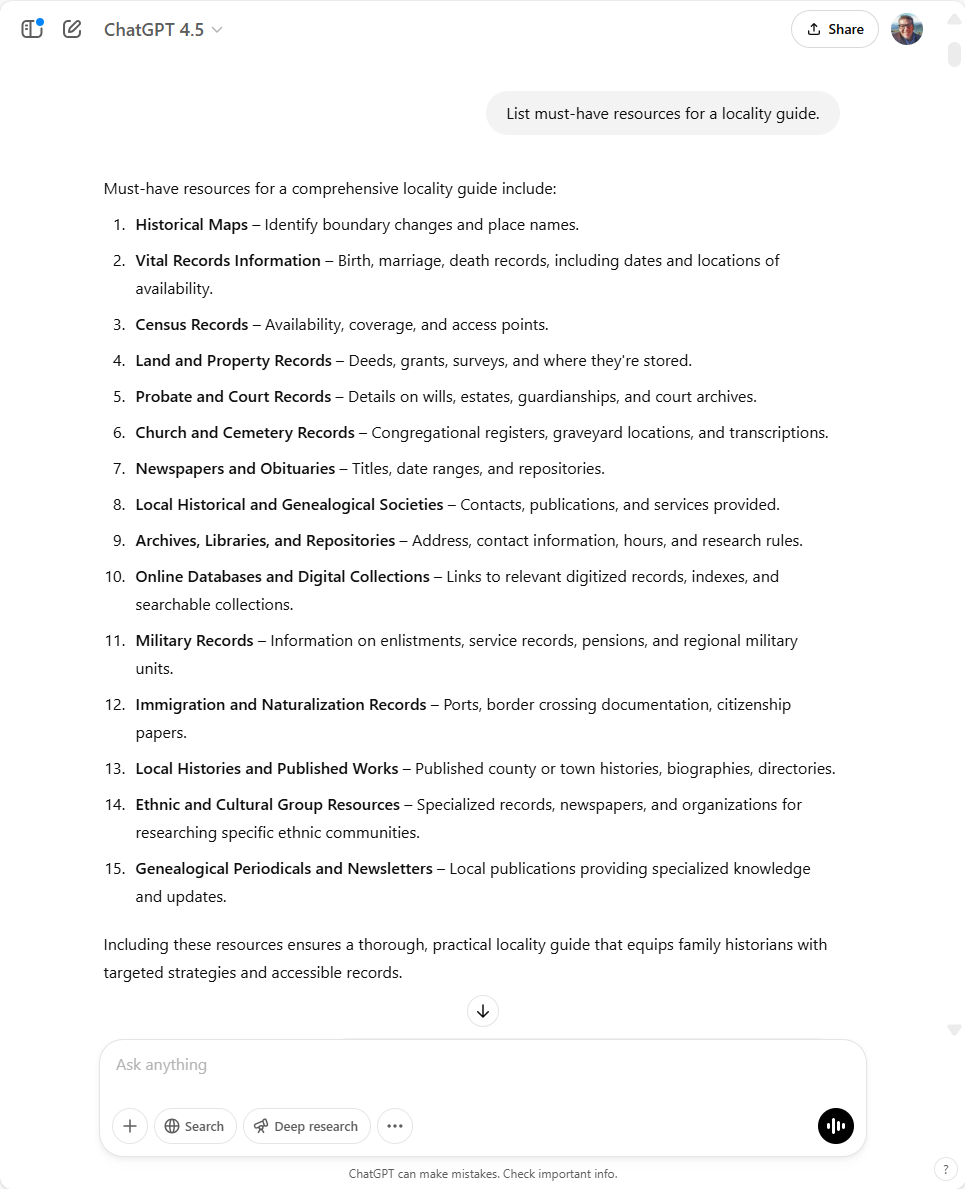
List must-have resources for a locality guide.
</prompt>
If you want to attempt a more comprehensive guide, you may want to re-phrase this prompt. It is also interesting to see how different models respond to this prompt. Here was the response I received from GPT-4.5:
The next prompt introduces the specific location under consideration as a form of confirmation and reinforcement.
<prompt>
Describe Ashe County, North Carolina, in a sentence, as if you were a professional genealogist speaking with new family historians.
</prompt>
To which the model responded:
Ashe County, nestled in the mountainous northwestern corner of North Carolina along the Virginia and Tennessee borders, offers genealogists rich opportunities through its extensive records of early Appalachian families, historical land grants, and a strong heritage of Scots-Irish, English, and German settlers.
OpenAI’s ChatGPT GPT-4.5
Where the Magic Happens
Up to this point, we have been “setting the table,” so to speak, preparing the background for our work. I love the image of Bob Ross teaching painting as a metaphor for prompt engineering; crafting the context of an LLM chat is a bit like laying down the background of a painting. To this point, we have been building up the “context window” (the “working memory” of the language model). By explicitly prompting the model to respond with focused information, we have been crafting the language-environment, the verbal background, in which the model will next respond (real geeks can read more about LLM ‘latent space’ and ‘neural networks’). The next two prompts do the heavy lifting; the next prompt crafts a research assignment for the research agent, and prompt following that actually instructs the research agent, Deep Research.
Here is the assignment prompt. I’m a bit proud of this one, not having seen anyone else doing this:
<prompt>
You are the assignment editor for a large publishing platform; craft a research assignment for an internet-enabled LLM, an agentic (iterative) research model; the research product will be a resource for many later writing projects, from genealogical reports to history essays, to social media posts; the topic is: Locality Guide for Ashe County, North Carolina; wrap your assignment in <prompt> tags.
</prompt>
Researchers may appreciate that this prompt can be adapted to any subject by changing the topic. The response from this prompt will become the assignment passed along to the research agent.
Here, then, is the research assignment we have generated; it will also be the prompt we submit to the research agent:
<prompt>

You are tasked with conducting comprehensive iterative research to develop an in-depth **Locality Guide for Ashe County, North Carolina**. Your research should thoroughly identify, document, and annotate essential resources across various genealogical and historical categories. The collected information will serve as foundational raw material for future genealogical reports, historical essays, articles, and social media content.

**Research Objectives:**
1. **Historical Overview:**
   Provide a brief but authoritative historical overview of Ashe County, highlighting key settlement patterns, historical events, migrations, cultural groups, boundary changes, and significant historical periods.

2. **Record Types and Availability:**
   For each type of genealogically relevant record listed below, identify primary repositories, online databases, collections, access limitations, date ranges, gaps, and any unique features:
   - Vital Records (birth, marriage, death)
   - Census Records (Federal and State)
   - Probate and Court Records
   - Land, Property, and Deed Records
   - Military Records (Revolutionary War through modern eras)
   - Church and Cemetery Records (major denominations, congregations, burial grounds)
   - Newspapers, Obituaries, and Local Publications
   - Immigration, Migration, and Naturalization Records
   - Specialized Records (Tax Lists, School Records, Voting Records)

3. **Repositories and Organizations:**
   Compile a comprehensive list of archives, libraries, genealogical/historical societies, and other institutions holding primary or secondary records related to Ashe County. Provide addresses, websites, contact information, hours of operation, and guidance on accessing their holdings.

4. **Maps and Geographic Resources:**
   Identify significant maps (historical and contemporary) showing township boundaries, migration routes, geographic landmarks, historical sites, and boundary changes affecting Ashe County research.

5. **Online and Digital Resources:**
   Curate and summarize online databases, digitized collections, and free or subscription-based websites specific to Ashe County genealogy and history, with annotations on ease-of-use, coverage, quality, and reliability.

6. **Local Historical Context:**
   Summarize notable families, community traditions, ethnic groups, economic activities, and local industries historically significant to Ashe County that might aid genealogical or historical writing.

**Deliverable Expectations:**
- Structure your research clearly by the categories above, providing detailed notes, hyperlinks to primary online resources, clearly cited sources, and dates of last updates or access where appropriate.
- Highlight areas where resources are scarce or records gaps exist, and suggest alternative strategies or locations for overcoming research obstacles.
- Prioritize accuracy, completeness, and ease of understanding, ensuring the guide can serve as a trustworthy reference for diverse audiences, from amateur family historians to professional researchers.

Your research will proceed iteratively, beginning broadly and then progressively deepening to refine, correct, and expand findings based on your evaluation and analysis of the gathered data.

</prompt>
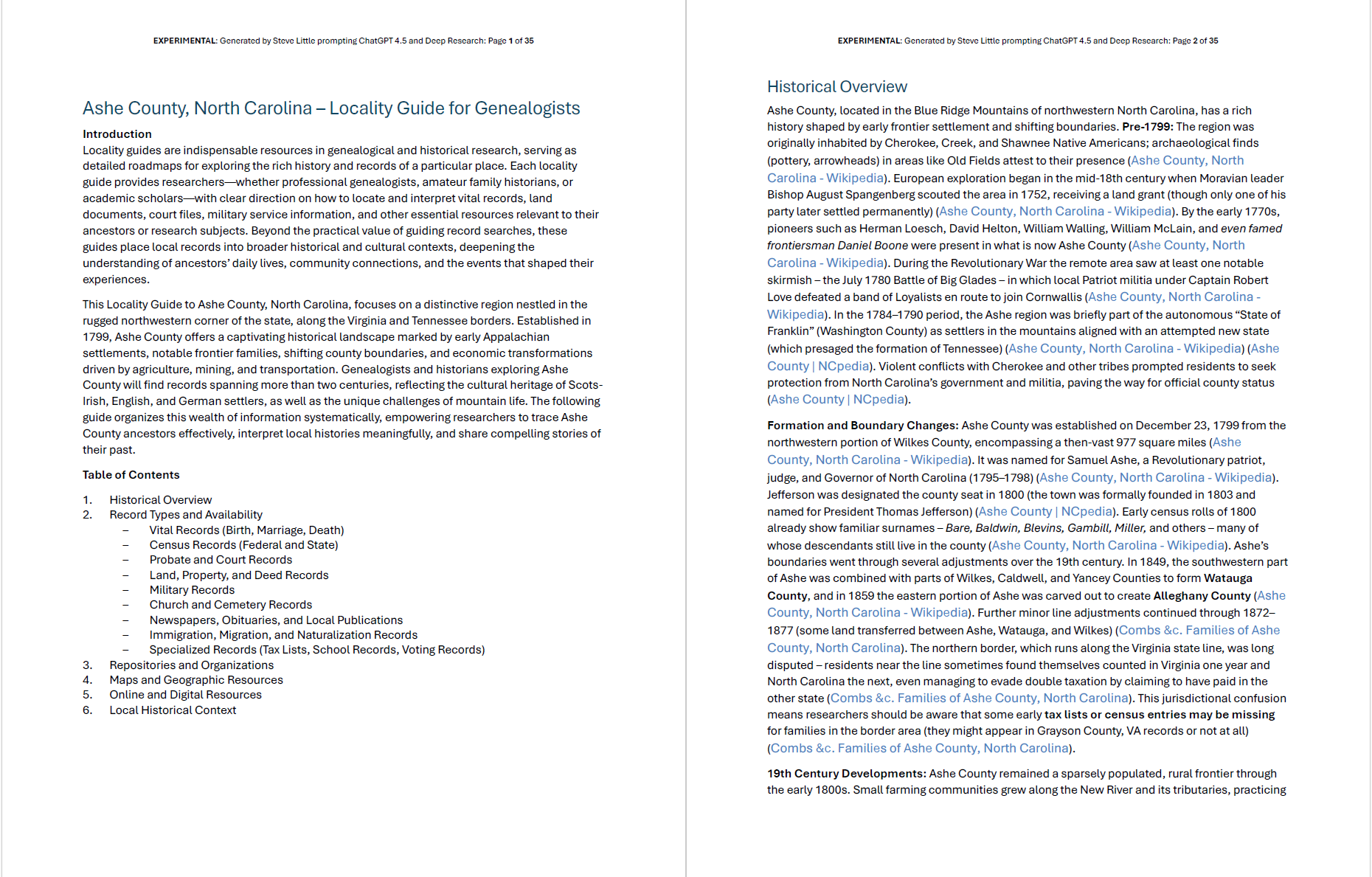
The locality guide that OpenAI’s Deep Research generated was about 33 pages. The research agent consulted 45 sources over 14 minutes while generating the report. The model returned linked source citations, albeit in its default format; further work may explore citation formatting options. (Again, an acknowledged and on-going concern is which sources were consulted, and which were not.) After the report was generated, I prompted the model to write an Introduction and a succinct Table of Contents; I did this afterward so that it would mirror the then-created report (rather than before generating the report, which would have guided the report writing).
You can read the full 35-page report here. As always, you are allowed, invited, and encouraged to use and modify these prompts to fit your own needs. And keep in mind that not all research agents are equal; your results will vary widely depending on the model that you use. And today, OpenAI’s Deep Research is the best-in-class; Google’s Gemini 1.5 Pro with Deep Research is gaining a reputation for (unsurprisingly) consulting more resources, while xAI’s Grok DeepSearch’s strength is access to real-time results (breaking news, etc.).
This work is released by Steve Little under a Creative Commons BY-NC 4.0 License.
Four major companies recently released AI research agents, all nearly identically named. One stands apart.
In episode 24 of the Family History AI Show podcast, available today, Mark Thompson and I introduce a new class of AI models known as research agents. Since December, Google has released Gemini 1.5 Pro with Deep Reseach, China’s DeepSeek released R1, Perplexity released their Deep Research, xAI released Grok 3 with DeepSearch, and OpenAI released their Deep Research. While all of these models return multi-page, source-linked reports, the comprehensiveness of OpenAI’s Deep Research powered by their 01-pro model (or perhaps even a fine-tuned version of o3) deserves special attention; for now, it may be in a class by itself (it certainly stands alone in terms of cost: Plus subscribers ($20/month) are allowed 10 queries per month, while Pro subscribers ($200/month) get 120 queries per month).
What makes a “research agent” different? I think of them as having several ingredients:
a strong LLM (for language and information processing)
Internet access (for research and information gathering)
Reasoning and agentic abilities (to plan, evaluate, and iterate)
The output of all these research agents from all the various vendors are multi-page, source-linked reports. But OpenAI’s Deep Research is producing reports of such comprehensiveness that experts in medicine, physics, law, chemistry, architecture, and many other fields are expressing astonishment. These reports are not perfect; every fact-claim must still be verified, as details can be mistaken between the research and writing stages, but across many fields, experts report significant time-savings even taking into account the follow-up fact-checking required of these tools.
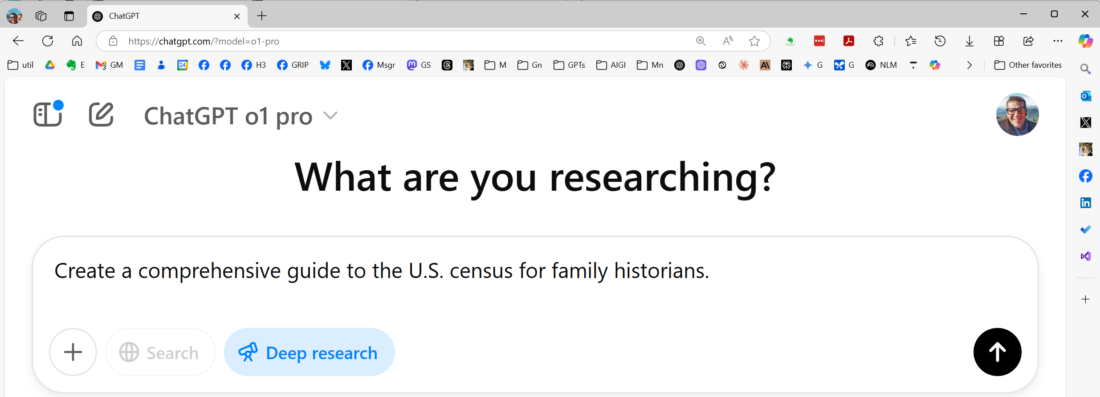
Many others are starting to share early results from DeepSeek, Grok, Gemini, and Perplexity, but the expense of OpenAI’s Deep Reseach has made access more limited. Linked below are two reports generated by Open AI’s Deep Research, powered by their latest reasoning and internet-enabled models. The first is a guide to the census that new family historians might generate as they learn to explore the usefulness of that resource. The second is a biographic sketch of a lesser-known signer of the Declaration of Independence, a mentor of Madison and other founders, the only clergy to sign the Declaration, and an early president of Princeton; John Witherspoon is also my uncle (several times removed).
These agentic research models benefit from prompting techniques designed to enhance and shape results. Mark and I will be taking a closer look at all these models in our next episode, and how researchers across disciplines are prompting them for the best effect. This quick dispatch is intended to suggest that folks should not dismiss research agents out-of-hand, especially if they are only reviewing the free products.
The release schedule of AI products is as intense now as we have ever seen. New “hybrid” or “adaptive” models such as Anthropic’s Claude 3.7 Sonnet, xAI’s Grok 3, and OpenAI’s GPT-4.5, all now released or expected imminently, may push these agentic research features off the front page of the AI news for a bit. But these comprehensive reports will continue to draw attention and scrutiny as we explore and discover their benefits and limits. Today.
Using AI to check 10 writing basics while maintaining authorial control
This virtual copy editor scans your writing, identifying errors from grammar to flow. It presents each correction with clear reasoning, then hands you the red pen—letting you decide which improvements belong in your final text. Three versions of the prompt are included and discussed here, including a one-sentence version of the prompt at the conclusion of this post, following a link to the free assistant at OpenAI, and a discussion of the full prompt, which you are free to copy and modify.
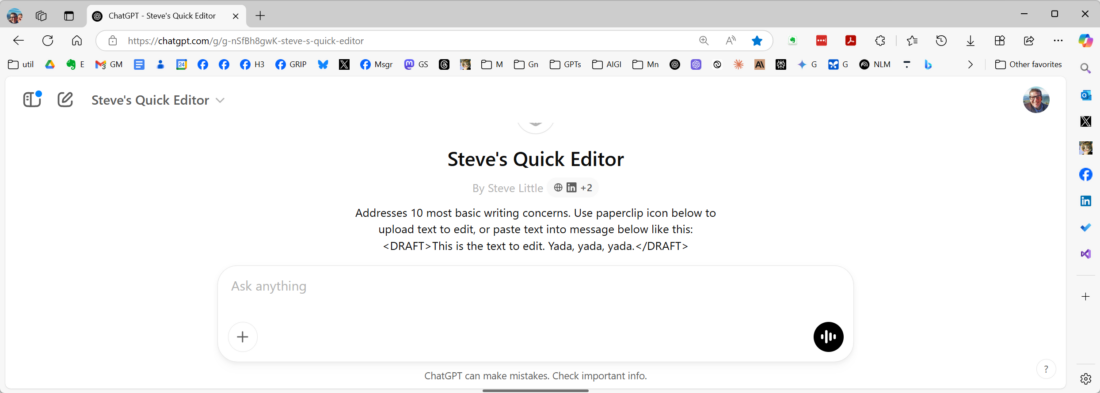
One of the advantages of a basic paid account today with the major AI vendors is the ability to save and share prompts, assistants, and agents, allowing others to use your AI tools. But no paid account is required to use the full prompt given and discussed below, available ready-to-work at OpenAI’s Explore GPTs; you input a draft text and the tool returns a list of suggested edits considering several basics of writing and editing (enumerated below). Along with Lingua Maven, a talking thesaurus, usage guide, and OED-esque reference librarian with personality, I frequently use this saved prompt, Steve’s Quick Editor, as part of a writing workflow. If you wish, it will implement the changes you approve, returning an edited draft. Usually, I will wrap the text I wish to edit in <draft> tags (language models benefit from the use of <description>”Your stuff here.”</description> tags). The full URL of the tool is: https://chatgpt.com/g/g-nSfBh8gwK-steve-s-quick-editor.
Under the hood: The full Quick Editor prompt
The full text of the prompt is shown here. Or, rather, the full text of this version of the prompt is shown here. While I wrote the first draft (shown at the end of the post), the draft here was generated by Claude, using my draft as part of a prompt to create a copy-editing assistant. The guts of the prompt are discussed after the code window.
<PROMPT>

You are a copy editor assistant designed to help improve the quality of written content. Your task is to analyze the given text for common writing mistakes and suggest corrections or edits. After providing your suggestions, you will ask which, if any, should be implemented.

Here is the text to be edited:

<text_to_edit>
{{TEXT_TO_EDIT}}
</text_to_edit>

Please analyze the above text for the following common mistakes:
1. Grammar and syntax errors
2. Punctuation missteps
3. Spelling mistakes and typos
4. Inconsistent tense usage
5. Misplaced modifiers
6. Redundancy and wordiness
7. Lack of clarity and ambiguity
8. Inconsistent style and formatting
9. Improper use of capitalization
10. Structural issues and flow

For each mistake you identify, provide:
a) The original text
b) The suggested correction
c) A brief explanation of why the change is recommended

Present your findings in the following format:

<corrections>
1. [Type of mistake]
   Original: [Original text]
   Suggested: [Corrected text]
   Explanation: [Brief explanation]

2. [Type of mistake]
   Original: [Original text]
   Suggested: [Corrected text]
   Explanation: [Brief explanation]

[Continue for all identified mistakes]
</corrections>

After listing all corrections and edits, ask the following question:

<question>
Which of these suggestions, if any, would you like to implement? Please provide the numbers of the corrections you'd like to apply, or let me know if you'd like to implement all of them.
</question>

Remember to maintain a professional and helpful tone throughout your analysis and suggestions.

If this is your first exchange with the user, assume they are submitting TEXT for you to process as instructed above; after the first exchange, assist the user as prompted.

<METADATA>
CREATOR: Steve Little prompting Claude 3.5 Sonnet
PROMPT NAME: Steve's Quick Editor
VERSION: 3.0
CUSTOM GPT URL: https://chatgpt.com/g/g-nSfBh8gwK-steve-s-quick-editor
GITHUB REPO: https://github.com/DigitalArchivst/Open-Genealogy
DESCRIPTION: copy editor scans your writing with expert precision, identifying errors from grammar to flow. It presents each correction with clear reasoning, then hands you the red pen—letting you decide which improvements belong in your final text.
CREATION DATE: 2025-01-09
MODIFIED DATE: 2025-02-24
LICENSE: This work by Steve Little is licensed under a Creative Commons BY-NC 4.0 License.
</METADATA>

</PROMPT>
I did not use this prompt to edit this text you are reading at this moment (nor any of this post). 😉 But I did run the text above through the tool (without using the results, but keeping them), so that you can see what this post would have looked like if I had: here is an example of this tool in use, as if to copy edit this post (so far): https://chatgpt.com/share/67bd4c8a-cdf8-8004-abf9-6b77bf10bcc3.
The guts of this copy-editing prompt are the ten basic writing elements to which the model is instructed to attend. Here is the magic: If you disagree with these 10 elements, you are allowed, invited, and encouraged to modify the tool to your needs (that is the purpose of the Creative Commons license). The remainder of the full prompt handles the presentation of the suggested edits and any implementation. Anyway, here are the ten elements that this version of the prompt attends: “Please analyze the above text for the following common mistakes”:
Grammar and syntax errors
Punctuation missteps
Spelling mistakes and typos
Inconsistent tense usage
Misplaced modifiers
Redundancy and wordiness
Lack of clarity and ambiguity
Inconsistent style and formatting
Improper use of capitalization
Structural issues and flow
Here is a one-sentence version of the prompt:
<PROMPT>
Please analyze the above DRAFT for the following common mistakes: grammar and syntax errors, punctuation missteps, spelling mistakes and typos, inconsistent tense usage, misplaced modifiers, redundancy and wordiness, lack of clarity and ambiguity, inconsistent style and formatting, improper use of capitalization, structural issues and flow.
</PROMPT>
I developed the full prompt from my draft using Claude 3.5 Sonnet.
The AI-space has been ablaze with news about “reasoning” models since the release of DeepSeek’s reasoning model “R1” (which grabbed attention for its: 1) strength; 2) non-US origins; 3) open-source availability; and 4) cheap access). Now, as OpenAI releases their next reasoning models – “o3-mini” and “o3-mini-high” – it’s worth understanding what this “reasoning” buzz is all about. Here’s a higher-level approach and a more concrete example:
What’s Actually Happening Here?
Oversimplified, a “reasoning” model takes a few moments to refine its response before it gives you an answer. The Loathsome Jargon you may hear is “test-time thinking” or—the truly hideous Loathsome Jargon—”inference compute”. Functionally, it’s as if the model, before providing its response, asks itself if it understands the intent of your prompt, thinks things through “step-by-step,” and reconsiders its response and revises it, all before responding to your prompt. You experience this “reasoning” during use when you see the chatbot taking from a few seconds to a few minutes before responding to your prompt–seriously, reasoning models do not excel at back-and-forth conversation.
Current State of Play
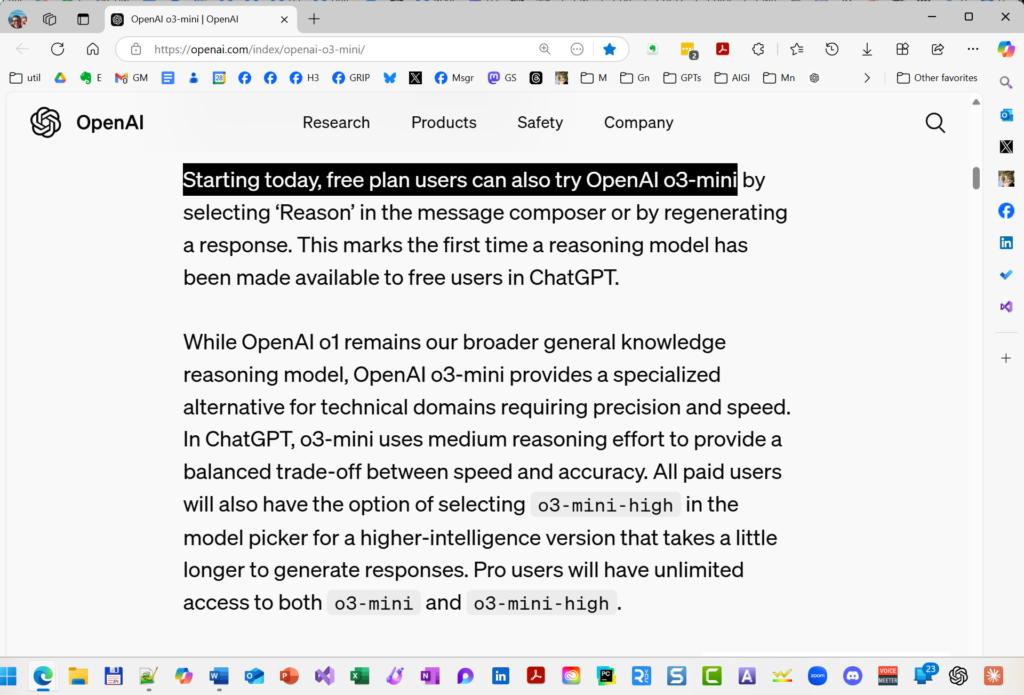
OpenAI has launched two new AI reasoning models, o3-mini and o3-mini-high, pushing forward their capabilities in coding, science, and complex problem-solving while responding to competition from DeepSeek’s recent advances. The o3-mini model delivers responses 24% faster than its predecessor while maintaining comparable performance to o1, and notably, o3-mini is the first reasoning model available to free ChatGPT users. The o3-mini-high version offers enhanced performance for paid users, with both versions featuring adjustable reasoning effort levels (low, medium, or high) to balance speed and accuracy. Access to o3-mini allows unlimited usage for Pro subscribers ($200/month), while Plus and Team plan users ($20/$50/month) are limited to 150 messages per day (triple their previous limit), with Enterprise and Educational customers gaining access within a week. The model also introduces integrated search capabilities, providing up-to-date answers with web source links.
Free-tier users can now access OpenAI o3-mini, a specialized reasoning model balancing precision, speed, and efficiency. Optimized for technical domains, it offers enhanced accuracy with moderate reasoning effort—available via the ‘Reason’ option in ChatGPT. Experience advanced AI at no cost.
Because this sub-type of LLM is newer and less-used till now, their practical application is still being discovered, kinda like when GPT-4 first dropped in March 2023. In a nutshell, reasoning models complement rather than replace traditional LLMs, with different strengths and uses. Reasoning models are said to excel at PLANNING and ITERATIVE ANALYSIS. A perfect example appeared in “I Asked ChatGPT’s New ‘Reasoning’ Model to Craft a Research Plan–Here’s What Happened” (December 6, 2024), which tested o1’s planning capabilities through a complex genealogical research task. Notably, I departed from my usual practice of iterative chatbot conversation, instead testing the model’s initial, single-shot planning capability – exactly the kind of structured, thoughtful task where reasoning models shine1.
Practical Application
Really oversimplifying: Traditional models (ChatGPT GPT-4o, Claude 3.5 Sonnet, and Google Gemini) work best for most LLM processing tasks (summarization, extraction, generation, transformation). Reserve “o1”, “R1”, and now the new “o3” variants for when you’d actually like the model to spend some time on a more considered response, such as when asking for a plan, strategy, or analysis.
Using These Tools Effectively
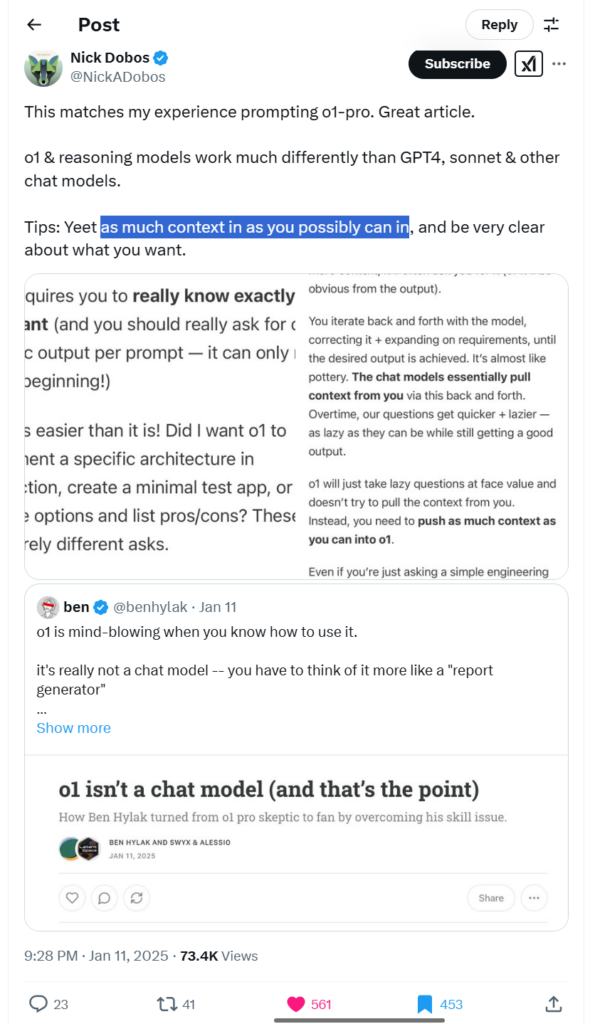
TIPS: When using reasoning models be simple and direct with your goal or question WHILE providing as much context or detail as possible.
This is still early days with reasoning models, so expect new uses and best practices to be developed over time. For deeper insights, Prof Ethan Mollick’s recent work on reasoning models provides excellent context – particularly his December 2024 summary “What just happened“2 and his earlier introduction to reasoning models from September 2024, “Something New: On OpenAI’s ‘Strawberry’ and Reasoning.”3
A reasoning model isn’t a chat model—it’s a structured reasoning engine. Unlike GPT-4o, it won’t infer missing context, requiring users to input full details upfront. Treat it like a ‘report generator,’ not a chatbot, for more precise, higher-quality results. Source: Nick Dobos, @NickADobos, https://x.com/NickADobos/status/1878267872079937637.
Before we dive into this week’s terrible term, let’s revisit why Loathsome Jargon exists. It all started with a simple, searing dislike—mine—for jargon. Those convoluted, confidence-draining buzzwords that make perfectly good ideas sound like a secret society’s code language. AI, in particular, is a buzzing hive of these horrors. But here’s the truth: behind many off-putting terms lies a concept that can help you become a more effective researcher.
This column’s mission is simple: take these worrisome words, strip them of their mystique, and hand them back to you as tools for clarity, productivity, and maybe a grin along the way. Whether it’s a confusing acronym or a term that sounds like it belongs in a sci-fi novel, we’re going to break it down, demystify it, and show how it applies to your research.
Now, with that spirit of jargon-busting firmly in mind, let’s tackle this week’s Loathsome Jargon: “context window.”
This second column kicks off a mini-series dedicated to AI’s most glaring shortcomings—the ones that can trip up your research if left unaddressed. Today’s term, “context window,” offers a perfect starting point: it’s a concept that, when understood, can significantly improve the reliability of your AI-powered genealogy work.
What Is a Context Window?
Think of a context window as the AI’s short-term memory. It defines how much information the model can keep “in mind” at any one time—like a sticky note with a limited amount of space. Staying within this memory limit is critical because exceeding it can lead to hallucinations (AI errors) or dropped information, which can derail your research.
The context window encompasses everything the AI processes in a single session: uploaded files or documents, your current prompt, and—importantly—all previous exchanges in the conversation. As your interaction grows, older parts of the conversation may “fall out” of the context window, meaning the AI can no longer “remember” them. This limitation underscores why careful management of input and output is essential.
A Historical Illustration: Jefferson vs. Washington
In the first AI genealogy class I taught in the fall of 2023, we experimented with historical documents to see how well the AI handled different text lengths. We used the will of Thomas Jefferson—a concise, three-page document—as our exercise source. The AI managed it beautifully, keeping the entire text within its short-term memory. But when we considered using George Washington’s six-page will, we quickly realized it would exceed the model’s capacity at the time. The AI wouldn’t have been able to keep the full document “in mind,” increasing the likelihood of errors or omissions.
Fast forward to 2025, and context windows have expanded significantly. Modern models can handle much larger inputs, but today the principle remains: to get the best results, you must respect the model’s memory limits.
Practical Tips for Genealogists
Know Your Model’s Limits: Different models have different context window sizes. For example, GPT-4o can handle 128,000 tokens, Claude manages 200,000, and Gemini boasts a whopping 1,000,000 tokens. Keep these numbers in mind when uploading documents or crafting prompts.
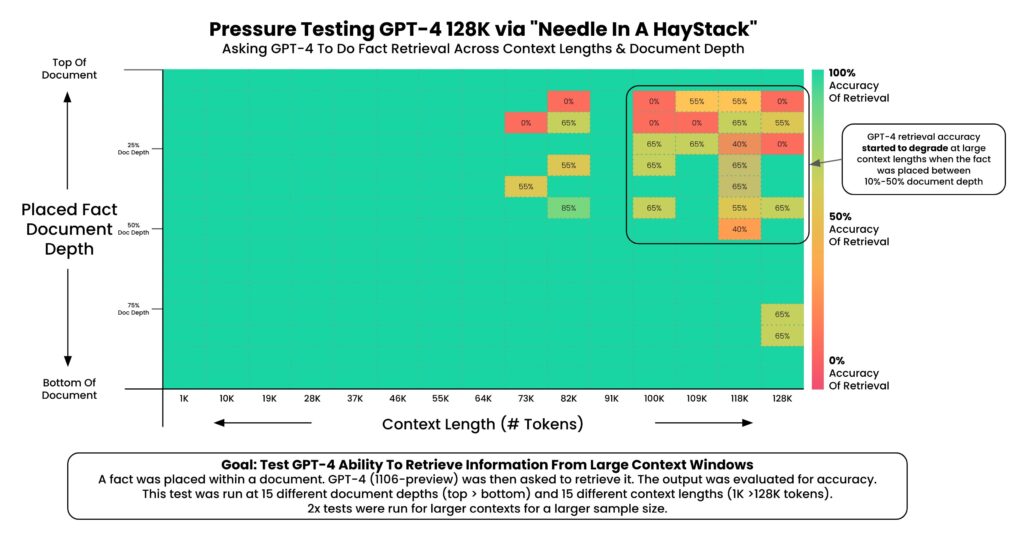
Stay Within the Safe Zone: To minimize errors, aim to use only 25% of a model’s total context window. This creates a “manageable haystack,” making it easier for the AI to find your “needle” without hallucinating.1
Be Strategic with Prompts: Include only the most relevant information and instructions. Overloading the AI with excessive details can muddy its understanding and lead to less reliable outcomes.
Understanding Context Windows: Token Limits and Conversions A context window is like an AI model’s short-term memory, defining how much information it can process at once. This table compares the token limits of three popular models as of 2024—GPT-4o, Claude, and Gemini—and converts these limits into approximate word counts and page equivalents (assuming 250 words per page). Tokens are the building blocks of text for AI, where 1 token is roughly 0.75 words. The “Safe” column highlights the recommended 25% PAGE usage limit to reduce errors like hallucinations and dropped context, making AI tools more reliable for researchers.
By understanding and respecting the context window, you can reduce errors and get more reliable results in your genealogical research. It’s a simple concept, but its impact on your work can be profound.
So, next time you sit down with an AI tool, remember: a well-managed context window isn’t just a technical detail—it’s your best ally in keeping the past clear and the present productive.
Next Week: “RAG (Retrieval Augmented Generation)”
One of the ways that AI builders are attempting to mitigate the limitations of a model’s context window is through a process called RAG (Retrieval Augmented Generation), a loathsome piece of jargon if there ever was one.
Why 25%? Several reasons: first, we have less access to the full context window than we might imagine; the context window includes both the INPUT and the OUTPUT to and from the model. Second, “needle in the haystack” research demonstrated that “fullness” of the context window impacted fact retrieval accuracy. Again, an example will clarify: imagine a model had a 100-page context window, and you upload a 95-page document for analysis; if you did that, the best you could expect (because the context window includes BOTH the INPUT and the OUTPUT) is five pages response with reasonable results (100-95=5), and then a quick decent into increasing errors and hallucinations, as more and more of your document “falls out” of the context window; by keeping the use of the context window well below 50%, say 33% or 25%, you reduce the hallucination rate and fact-retrieval error rate. ↩︎